
- TutorialsFrom WPBakery to tagDiv Composer
 Mustafa_Semerci
My web page, “http://www.paradelatdela.ru/” and there is a problem first part. This photo is a broken. How can I fix
Thank You…
 helios87
 Hey Catalin,
Thanks for a fast response.
I would rather go without dropdown in this case.
Homepage – http://prntscr.com/extgbt (Only 4 options to click, no dropdown)
Category level 1 – http://prntscr.com/extgq7 (opens secondary menu)
Category level 2 – http://prntscr.com/extgyw (opens 3rd menu with even more pages)
It’s the perfect structure for larger websites.
Hope it makes sense 🙂
Thanks
 Dmitry_Lupich
Hello!
We have last version Newsmag (3.4), but on mobile layout pagination (load more button) doesn’t work(
This issue is on homepage and category pages too! How to fix? Thank You (Site – galagram.com)
fix: Infinite pagination on categories did not work with speed booster – not helped(
 simchris
 Normally you’d develop a copy of your site with new theme in a sub-domain or alt dev setup like MAMP on your hard drive and import database from server (lots of articles on web for this).
Install theme via FTP if your hosting setup has funky permissions.
Some people “switch” to new site layout by setting aside a weekend and doing changes when things are less likely to freak people out. Note all your posts won’t break choosing new theme, indexes work, etc.; so often you can switch on new theme, then work on your homepage first, then sort out the rest.
I think there is also a theme switch plugin where you can work on new layout, test, then switch back to old theme. Have not tried that.
 krysteleal
 I used Visual Composer for my homepage and made a widgetised sidebar, however I was wondering how I can make this sidebar fixed?
I have this problem. How can I fixe my widgetised sidebar? Thanks!
 kenny17995
How can we put page numbers on the homepage content instead of infinite load or load more?
 fenomeno0chris
 1) CHECK
2) CHECK
3) Too bad you can’t help me with that. It is just one line to edit -.-
4) CHECK
5) Since my team has written a lot of news before I changed the theme, can I somehow edit the default Quote-Style to “Quote box left”?
6,7,8) I have edit my functions.php file with the code from your pagespeed tutorial. Those are the css and js files, which appeared on the top of the page:
registered scripts

common | /wp-admin/js/common.min.js

farbtastic | /wp-admin/js/farbtastic.js

admin-bar | /wp-includes/js/admin-bar.min.js

jquery-ui-sortable | /wp-includes/js/jquery/ui/sortable.min.js

utils | /wp-includes/js/utils.min.js

svg-painter | /wp-admin/js/svg-painter.js

wp-auth-check | /wp-includes/js/wp-auth-check.min.js

td_social_counter | http://www.ps4source.de/wp-content/plugins/td-social-counter/js/td_social_counter.js

yoast-seo-admin-global-script | http://www.ps4source.de/wp-content/plugins/wordpress-seo/js/dist/wp-seo-admin-global-460.min.js

media-editor | /wp-includes/js/media-editor.min.js

media-audiovideo | /wp-includes/js/media-audiovideo.min.js

mce-view | /wp-includes/js/mce-view.min.js

image-edit | /wp-admin/js/image-edit.min.js

td_wp_admin | http://www.ps4source.de/wp-content/themes/Newspaper/includes/wp_booster/wp-admin/js/td_wp_admin.js

td_wp_admin_color_picker | http://www.ps4source.de/wp-content/themes/Newspaper/includes/wp_booster/wp-admin/js/td_wp_admin_color_picker.js

td_wp_admin_panel | http://www.ps4source.de/wp-content/themes/Newspaper/includes/wp_booster/wp-admin/js/td_wp_admin_panel.js

td_edit_page | http://www.ps4source.de/wp-content/themes/Newspaper/includes/wp_booster/wp-admin/js/td_edit_page.js

td_page_options | http://www.ps4source.de/wp-content/themes/Newspaper/includes/wp_booster/wp-admin/js/td_page_options.js

td_tooltip | http://www.ps4source.de/wp-content/themes/Newspaper/includes/wp_booster/wp-admin/js/tooltip.js

td_confirm | http://www.ps4source.de/wp-content/themes/Newspaper/includes/wp_booster/wp-admin/js/tdConfirm.js

thickbox | /wp-includes/js/thickbox/thickbox.js

gadwp-backend-ui | http://www.ps4source.de/wp-content/plugins/google-analytics-dashboard-for-wp/admin/js/ui.js
registered styles
farbtastic | /wp-admin/css/farbtastic.min.css
admin-bar | /wp-includes/css/admin-bar.min.css
zilla-popup | http://www.ps4source.de/wp-content/plugins/zilla-shortcodes-2.0/assets/css/admin.css
colors | 1
ie | /wp-admin/css/ie.min.css
wp-auth-check | /wp-includes/css/wp-auth-check.min.css
seedprod_plugin | http://www.ps4source.de/wp-content/plugins/ultimate-maintenance-mode/inc/css/admin-style.css
wysija-admin-css-widget | http://www.ps4source.de/wp-content/plugins/wysija-newsletters/css/admin-widget.css
yoast-seo-adminbar | http://www.ps4source.de/wp-content/plugins/wordpress-seo/css/adminbar-460.min.css
yoast-seo-admin-global | http://www.ps4source.de/wp-content/plugins/wordpress-seo/css/admin-global-460.min.css
yoast-seo-dismissible | http://www.ps4source.de/wp-content/plugins/wordpress-seo/css/wpseo-dismissible-460.min.css
google-font-ubuntu | http://fonts.googleapis.com/css?family=Ubuntu:300,400,500,700,300italic,400italic,500italic,700italic&subset=latin,cyrillic-ext,greek-ext,greek,latin-ext,cyrillic
td-wp-admin-td-panel-2 | http://www.ps4source.de/wp-content/themes/Newspaper/includes/wp_booster/wp-admin/css/wp-admin.css
wp-color-picker | /wp-admin/css/color-picker.min.css
media-views | /wp-includes/css/media-views.min.css
imgareaselect | /wp-includes/js/imgareaselect/imgareaselect.css
thickbox | /wp-includes/js/thickbox/thickbox.css
gadwp | http://www.ps4source.de/wp-content/plugins/google-analytics-dashboard-for-wp/admin/css/gadwp.css
woocommerce_admin_menu_styles | http://www.ps4source.de/wp-content/plugins/woocommerce/assets/css/menu.css
I tried every single jss and css ID in the td-speed-booster.php file, but none of them could fix the missing errors which google pagespeed displays. So how can I put those 9 JS and 5 CSS to the footer?
JSS Error:
http://ajax.googleapis.com/ajax/libs/jquery/1.11.1/jquery.min.js?ver=1.11.1

http://www.ps4source.de/wp-includes/js/jquery/ui/core.min.js?ver=1.11.4

http://www.ps4source.de/wp-includes/js/jquery/ui/widget.min.js?ver=1.11.4

http://www.ps4source.de/wp-includes/js/jquery/ui/accordion.min.js?ver=1.11.4

http://www.ps4source.de/wp-includes/js/jquery/ui/tabs.min.js?ver=1.11.4

http://www.ps4source.de/wp-content/plugins/zilla-shortcodes-2.0/assets/js/zilla-shortcodes-lib.js?ver=4.7.3

http://www.ps4source.de/wp-content/plugins/background-manager/resources/js/functions.js?ver=1.2.5.2

http://www.ps4source.de/wp-content/plugins/background-manager/resources/js/flux.js?ver=1.2.5.2

http://www.ps4source.de/wp-content/plugins/background-manager/resources/js/pub.js?ver=1.2.5.2
CSS Error:
http://www.ps4source.de/wp-content/plugins/wysija-newsletters/css/validationEngine.jquery.css?ver=2.7.8

http://www.ps4source.de/wp-content/plugins/zilla-shortcodes-2.0/assets/css/shortcodes.css?ver=4.7.3

http://www.ps4source.de/wp-content/tablepress-combined.min.css?ver=6

http://www.ps4source.de/wp-content/plugins/wp-jquery-lightbox/styles/lightbox.min.css?ver=1.4.6

http://www.ps4source.de/wp-content/plugins/background-manager/resources/css/pub.css?ver=1.2.5.2
9) Im patiently waiting for the fix!
10) CHECK
11) I have changed my PHP version to 7.0. Everything seems to work faster.
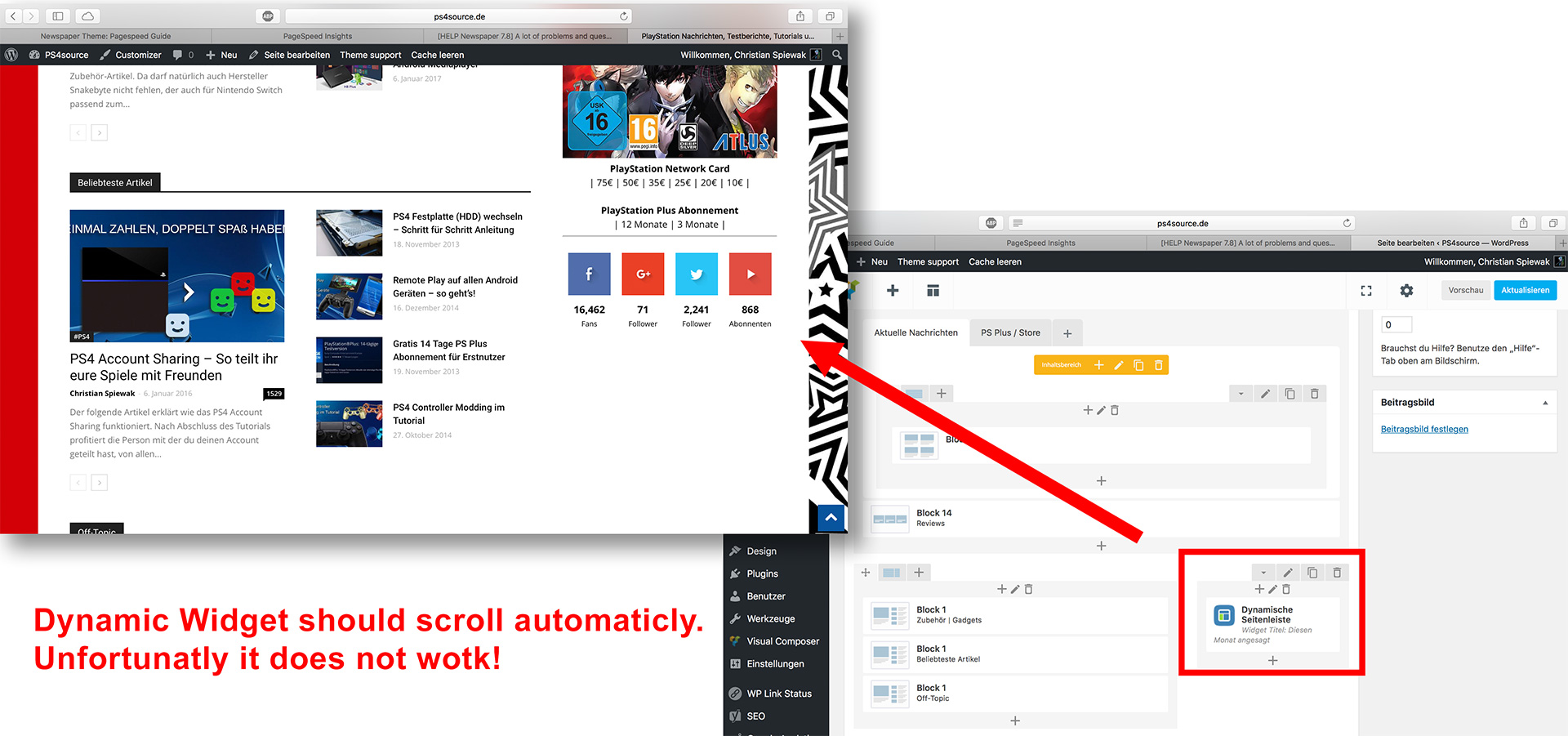
12) As you can see my dynamic widget on the homepage does not work:
 mario118
 To add to this, I am also having this same exact issue. I contacted Hostgator and they assured me they have no server side caching. The issue for me is not isolated simply to the homepage but rather across the whole site. When I make a change, I have to manually ctrl+f5 to see the changes on each page. Clicking on a new menu item and then back will not load the changes.
This seems to be a template issue as I tested this by installing a new instance of WP and used default themes and did not encounter this issue. I am also running multiple sub-domains with no issues.
Please help.
 Nano
NanoHi, Kindly see this screenshot : https://s17.postimg.org/af0c8n01b/2017-04-16_17-01-25.jpg
You can see that the ‘Load More’ is not very visible. Also the bottom border of first two ‘Load more’ tag is not visible.
1. Kindly provide a custom code to fill it with some color other than that of theme accent color or change the color of the border from faint gray to dark blue or something.
2. The bottom border of first two ‘load more’ is invisible. How can I make it fully visible.
3. Apart from this, here is an another screenshot- https://s28.postimg.org/fpjv9h83x/2017-04-16_17-04-24.jpg , this is ‘Related Article’ at the end of every post. Here ‘Next page and previous page’ icon is also not visible. So it also needs – 1. change of border color 2. fill it with some color.
Thank you.
 AfricanQuarters
I created a subfolder that I named ‘2’ in my public html where I installed and my new wordpress website. I went to Setting/General and changed the web address removing the ‘/2’ and saved. Then I went to the Cpanel to move the WordPress website to the root directory then I can’t get into the admin anymore and the homepage display with errors. Please find the errors included below:
Warning: include(/home/africanq/public_html/2/wp-content/plugins/wp-super-cache/wp-cache-base.php): failed to open stream: No such file or directory in /home/africanq/public_html/wp-content/plugins/wp-super-cache/wp-cache.php on line 65
Warning: include(): Failed opening ‘/home/africanq/public_html/2/wp-content/plugins/wp-super-cache/wp-cache-base.php’ for inclusion (include_path=’.:/usr/lib/php:/usr/local/lib/php’) in /home/africanq/public_html/wp-content/plugins/wp-super-cache/wp-cache.php on line 65
Warning: include_once(/home/africanq/public_html/2/wp-content/plugins/wp-super-cache/ossdl-cdn.php): failed to open stream: No such file or directory in /home/africanq/public_html/wp-content/plugins/wp-super-cache/wp-cache.php on line 82
Warning: include_once(): Failed opening ‘/home/africanq/public_html/2/wp-content/plugins/wp-super-cache/ossdl-cdn.php’ for inclusion (include_path=’.:/usr/lib/php:/usr/local/lib/php’) in /home/africanq/public_html/wp-content/plugins/wp-super-cache/wp-cache.php on line 82
 ekraja
Hello Sir,
If I am checking view source of any post or page or homepage of my website. It shows user ID and password/login detail.
But if I see website it shows nothing.
I want to remove it from all posts and pages. Because it is giving me error in webmaster tool that required ssL certificate..
So please tell how it will be removed??
Thanks
 Catalin
 Hello Victor,
Unfortunately, I do no know why you bring this message. Notice that script was been tested and it seems to work as expected. My advice is to recreate your homepage from scratch, clear all your caches and check the results.
Sorry for the inconvenient!
NanoWhile conversating here – https://forum.tagdiv.com/topic/how-to-get-next-page-design-like-this/#post-167908 , amit noticed that the mentioned link is broken. On further checking,
I noticed that not just that page but many other such pages are broken due to mixed content ( loading over insecure elements) issues in the bulk. This issue appears on few pages but not all posts of my website.
Please check the screenshot to see the broken page on the left and mixed content error on the right side. -https://s17.postimg.org/truo9cttb/broken_page_and_mixed_content.jpg
Here are few such pages with errors:
https://tomatoheart.com/webjockey/facts-about-bb-ki-vines-bhuvan-bam/
https://tomatoheart.com/shubham/kenny-sebastian-things-to-know/
https://tomatoheart.com/amardeep-singh/roadies-fame-raghu-and-rajiv-startup-show/
while other pages like:
https://tomatoheart.com/amardeep-singh/arunabh-kumar-tvf-founder-facts/
https://tomatoheart.com/niti-jha/michelle-obama-natural-hair-style/
doesn’t have any such issues. The homepage is also working well.
The issue rises only for normal users, not the logged in admins. I am using SSL for almost a year. Most of the mixed content errors are loading insecure theme files. I have recently updated the theme and since then I have noticed this issue. I have already sent login credentials to you for one another thread.
Please look into this issue.
Thank you
 rehanahmadjamal
Hi guys,
Can I use a different title in homepage and a different on in the post for the same article?
NanoHere is the issue,
I have tried 3-4 different method to insert inline ads after several paragraphs under post content ( both using plugins and without plugins) . It works perfectly.
But I noticed that when we use it with speed booster plugin, it has one weird issue.
First of all, based on info available here- https://forum.tagdiv.com/how-to-make-the-site-faster/ , I delete this code from speed booster file to make it work with other plugins:
        // disable the plugins if there are incompatible plugins
        $active_plugins = get_option('active_plugins');
        //print_r($active_plugins);
        //die;
        foreach ($active_plugins as $active_plugin) {
            if (!in_array($active_plugin, $this->allowed_plugins)) {
                define('TD_SPEED_BOOSTER_INCOMPATIBLE' , $active_plugin);
                return;
            }
        }
and then move the JS and css file to footer using file ID. It works very well with all other plugins installed on my website. But for this example- let’s consider that I don’t move any other files.
before activating speed booster. Here is how ad looks on my site: https://s30.postimg.org/6gjkrz7cx/ads-1.jpg
you can see that the ad after pragraph-1 is properly aligned to center within post content.
After activating speed booster, here is how it looks- https://s12.postimg.org/8lqlmqmp9/ads-2.jpg
You can notice that the ad leaves the post content and probably get aligned to the center of whole website, not just post content.
On further checking, I noticed that the issue is caused by the following line:
$this->move_style_to_footer_queue('td-theme');
When I delete this line from speed booster, the ads start displaying correctly. But then a new issue arises, the homepage gets broken like this: https://s11.postimg.org/6tk42duer/2017-04-13_14-14-13.jpg
So, either I can run these ads properly but then homepage gets broken or display homepage correctly, then ads gets misaligned.
I do want to use speed booster for optimisation purpose. So, please look into the issue and see if anything can be done.
Thank you.
 sumitmalhotra
The homepage at http://lowcosthousing.online/ has a couple of two column blocks (block 16) at the bottom, however, they are both rendering information in single column. Kindly check and help to resolve.
 Bogdan B.
 Hello,
If the sorting is the same, then the same results should be visible on both the homepage and the category page.
This could be a plugin conflict so please disable all plugins except visual composer, clear cache and reset cdn files if you use it. Please also check any custom code you might have added to the theme panel or the theme files. If you use a child theme, please switch to the main theme to make sure it does not affect the proper functionality of the theme.
Thank you!
Nano I checked it again and noticed that I have already asked the same question 5months and you have already solved it there 🙂
Here is the link: https://forum.tagdiv.com/topic/how-to-disable-header-ads-on-mobile-for-homepage/
It worked like charm. Sorry and thank you 🙂
 Imacyray
I just purchased this them and i have a fatal error message displayed on the homepage of my site. I tried deactivating and reinstalling the theme but the error message persist. What can i do to resolve this as soon as possible.
Fatal error: Call to undefined function vc_map_get_attributes() in /home/menfashi/public_html/wp-content/themes/Newspaper/vc_templates/vc_row.php on line 30
Bogdan B. Hello,
In order to get the slider to show up on your homepage, you will need to install revolution slider and then import the demo slider as this guide suggests: https://forum.tagdiv.com/import-revolution-sliders-on-demos/
Thank you!
 f_l_adisu
Hi,
when adding facebook to social counter element in my homepage, I got this js error when clicking to “Get Access Token”
Uncaught TypeError: data.replace is not a function
at Object.eval (eval at <anonymous> (load-scripts.php:2), <anonymous>:86:57)
at i (load-scripts.php:2)
at Object.fireWith [as resolveWith] (load-scripts.php:2)
at y (load-scripts.php:4)
at XMLHttpRequest.c (load-scripts.php:4)
And “Please wait…” message always there
My website is news_DOT_adisupuglia_DOT_it (replace _DOT_ with .)
My FB page is https://www.facebook.com/ADISU-Puglia-279297038747259
Facebook Id inserted in social counter: ADISU-Puglia-279297038747259
Then inserted AppId and secretkey as per your tutorial.
But unable to Get Access Token
Can you please help ?
Thanks
Catalin Hello seikology,
Please do not forget the support hours which are here -> https://www.screencast.com/t/4iymAHSqxM If you want to add a Big Grid to your homepage, you simply choose your homepage from your backend and add this Visual Composer element. For more information about how you can customize your homepage, please consult here -> https://forum.tagdiv.com/newsmag-homepage-how-to-build-and-set-it/
Thanks for your understanding!
 JonnyHudson
I recently installed the Newspaper theme with the Travel Demo but for some reason, the slider will not display on the homepage. I can’t figure out why this is the only part to not work. The website is currently under construction mode but once this is fixed I can put it live. Has this happened to anyone else recently and have any work arounds?
 awoodhams
 Hello! My current site is here: http://e50.4da.myftpupload.com/. I am using Homepage Post and would like for the image to not be so tall, so that the title of the post can be seen without scrolling down so far. Is this possible?
simchris PHP 5.6 will help quite a bit, and may even be “required” for current version of WordPress.
Make sure 64M allocated to WordPress in your wp-config.php file.
Use fewer widgets on posts/pages and homepage; don’t use the “more from author” stuff bottom of posts, don’t use widgets in footer, etc. to ‘streamline’ your pages/posts.
Check with GTmetrix.com for other stuff perhaps not optimized.



