
No search results were found in Documentation!
 rahuldas
I’ve created categories on the homepage, and I’ve noticed that some categories display a mega menu, while others do not. How can I fix this issue?
Website:- https://trendofox.com/
1. categories display a mega menu- Famous faces and blog
– Others don’t
 info@simonebarbone.net
 Hi please, I clarify my question:
please see screenshot here https://prnt.sc/sE_jcPA1H2dW
When I choose posts page in WordPress > Appearence > Customize > Homepage Settings > Posts Page and I set a specific page (e.g. Blog Page) how can I modify its template in Cloud Templates? Is it the search page template? The category page template?
Isn’t there any Latest Posts Page template in Cloud Templates?
 bulqizaime
http://www.bulqizaime.al
For some time now, the icons of social networks have not appeared on the main page, but only the text
 blackforest
 checked it with Safari on MAC, same problem.
– URL is changing (showing #anchor after click on menu-link)
– but mobile menu still open and when i close it manually on “X” still showing the top of the homepage – not the position with row-ID…)
blackforest yes, thats the way i did it
custom link like this
https://www.domain.com/#anchor-row
row ID is row on homepage…
blackforestHey guys,
mobile menu dont work with anchor link. have homepage with 4 sections or row ID’s but its not jumping there in the mobile menu (only from another site to the anchor on homepage).
Thanks
 daddywarrior
I’ve been able to filter for unique articles on several pages and other templates (single post, homepage, etc), but cannot figure out how to do it on the Category template. There is no box to check at the bottom of the editor and no unique filter option using the visual composer. Any ideas? (thank you)
 Otaku
Otaku Hey can you Check my mobile amp home page for my website Website This is so simple & Outdated. I want to add customization like grids but in amp customization there is very less customization available article on homepage are showing in list format. How can is change it.
 Bettina
 Hello!
You can edit the homepage with the TagDiv Composer and add the correct link: https://prnt.sc/U03xCDgp_2aa
By default, it should lead you to the homepage.
Please check out this guide: https://forum.tagdiv.com/mega-menu/
Check this limit: https://prnt.sc/n-UrEMEevPKN
You can add any custom link to your menu (Dashboard -> Appearance -> Menus). Or you can also use a modal popup: https://forum.tagdiv.com/modal-popup/ to display anything you like and place the modal popup element near your menu.
Thank you!
 insight
 Hi Bettina
I don’t want to change the homepage, just bypass it temporarily and redirect it to a category page instead. I understand you do this with the “redirect 301” command which needs to be added to the .htaccess page.
Bettina Hello @Batchy !
We’ve built the homepage and set it in every demo as in this guide: https://forum.tagdiv.com/homepage-how-to-build-and-set-it/
I hope that helps you!
Thank you!
Bettina Hello @ffkronstorf !
Please edit the homepage with the TagDiv Composer, click on that background, and check the CSS tab. There, you can find the option for background color.
Here you can find the color for the block: https://prnt.sc/Oldwsp-fFAdK
Thank you!
 payoneer
 Yes sure,
1st problem is the featured images are not showing on the homepage and articles on everywhere.
2nd Hostinger shows that this plugin td-composer has malware.
Please check the screenshot below
 Anamaria
 Hi,
Do you use the element Homepage post? If yes, then there is an issue with the element and in the next update, it will be fixed.
Thank you!
 vikiendu
Trust me, I have researched and read all the threads about this error on this forum and tried to fix it.
The problem is, that when I go to Cloud Templates > Homepage Templates > Import from Cloud Library, it displays this error:
Invalid reply from server endpoint.
Note that I can still import Header, Footer,…without issue, this error appears only when importing Homepage Templates or Page Templates.
 fuelmao
Hi there,
I have a problem trying to put a banner display ad on my site via Google Ad Manager (GAM) by using the Newspaper > Theme Panel > Ads function.
I want to put two different banners in my homepage, one in the header (leaderboard 728×90) and the other in the sidebar (medium square 300×250). When I put the code (tag) that GAM brings me for my site; with the leaderboard there’s no problem, it works perfectly when selecting the “passback” option in GAM for the code. But when I try to do the same with the sidebar one it does not work.
I tried selecting and de-selecting the “passback” option in GAM to see which lines of code work and nothing. Tried to put the codes on the custom ads box, nothing.
Is there something I’m missing? Is there any other way to put GAM ads on my site without plugins?
By the way, I always use the Ads panel with the AdSense code and it always works. But the GAM ones, besides for the header, the others just don’t work.
Can you help me with this one please?
for the record, my site is https://www.fuelcarmagazine.com
payoneerMy websites do not show featured images Or thumbs on the homepage and blog posts without a login dashboard.
What are the problems with it? Please check and fix the issues https://www.mianmudassar.com/
Waiting for the quick reply
 radiolombardia
On the homepage of our site immediately after the menu, we could see the latest featured post with the image of the post becoming the background of the site.
After updating to the latest version this no longer works and I noticed that when I go into editing the page I can see the futured post as it should be in live. Can you help me understand where I can check and resolve this problem?
Edit visualization
Live visualization
At the moment it seems that in edit you can see it while in live it doesn’t
 byothe
Hello,
I just updated Newspaper from 12.5.1 to 12.6.1 and I noticed that it was breaking part of my homepage…
The FLEX BLOCK 1 at the bottom of my page just disappears and the footer is completely messed up…
I had to go back to 12.5.1 to fix it…
This is the working version with 12.5.1 :
https://ibb.co/fCwSrwz
And this is the broken version with 12.6.1 (sorry images didn’t load but problem is on the bottom part) :
https://ibb.co/gjvYM8C
Any idea how I can fix this ?
Anamaria Hello,
This option works only on the posts, not on the homepage. https://i.imgur.com/kYnc03x.png
Thank you!
 cidona
I’m having an issue with the “more article” box not showing up on posts. It works fine on the homepage, but not on post pages. The homepage is set up tag-div composer, but the post pages are set up using style 8 of the default post templates.
I’ve tried all of the different options for the display articles options (from post tags, etc), but am still having the issue. It’s not an issue of whether there are enough posts to display, as there are plenty in each option.
The site is rvhive.com
I deactivated all plugins, and I still had the same problem.
Can you please help figure out what is going on? Thank you
Bettina Hello @IdentidadyFuturo !
Please edit the homepage with the TagDiv Composer. Click on that row and change the background color from the CSS tab.
Thank you!
 0xid0
0xid0Hello,
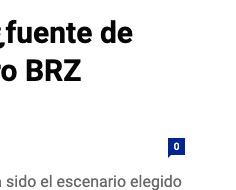
I want to remove the comment counter in a block that i have on my homepage, like this:
I don’t see the option here, where is it located?
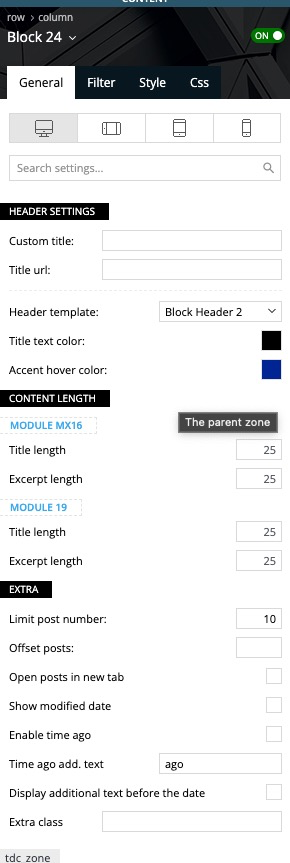
Thank you!
 kayainco
 thumbtack homepage search location live
-
This reply was modified 2 years by
kayainco.
 Quaren
 Just to clarify, I understand that I can filter the posts on this block when editing my main site page in TagDiv composer, but I want to filter them for each category page specifically and I see no option to do this or anywhere that I can edit individual category pages using tagdiv.
The only editable “Page”, per se, is my homepage.
There is no setting in my Newspaper theme to customise which posts show here either, and no setting in Posts > Categories

