- NewsmagHomepage – How to build and set it
- NewsmagtagDiv Composer Tutorial
- NewsmagNewsmag documentation
- NewsmagMain menu
- NewsmagLogo & Favicon
- NewsmagPage templates
 opinandosinanestesia
 Thank you again. But I suppose to avoid problems I configured it on a separate page to prevent the homepage from being damaged by an error, right?
 Calin
Calin Hi,
If you want to redesign only the homepage, what you could do is to look in our cloud library and see if you find something you like it, after that just import it and edit it with tagDiv Composer according to your needs – https://prnt.sc/0yBQY0w_385m
Thank you!
 Azerty514
Here’s an example:
On the demo homepage of newspaper_cali_sight_pro
https://demo.tagdiv.com/newspaper_cali_sight_pro/
If you look at the HTML source code, you’ll see some strange CSS code on the ACF fields. The front-end display is correct, but the problem is that this CSS code affects SEO.
Featured attractions

.tdi_172{margin-bottom:10px!important} .tdb_module_title{display:block;position:relative;margin:0;font-family:var(--td_default_google_font_2,'Roboto',sans-serif);font-size:21px;font-weight:400;line-height:1.2}.tdb_module_title a{transform:translateZ(0);transition:box-shadow 0.2s ease;-webkit-transition:box-shadow 0.2s ease}.tdb_module_title .tdb-module-title-excl{font-family:var(--td_default_google_font_2,'Roboto',sans-serif);color:#fff;background-color:#ff0000;padding:4px 8px 2px;margin-right:8px;font-size:14px;font-weight:500;line-height:1;vertical-align:middle}.tdb_module_title .td-element-style{z-index:-1}.tdb_module_template_637 .tdc-row .tdb_module_title_0{text-align:left;font-family:var(--sans-serif)!important;font-size:16px!important;line-height:1.2!important;font-weight:500!important}.tdb_module_template_637 .tdc-row .tdb_module_title_0:hover a{box-shadow:inset 0 -1px 0 0 var(--cs-black);color:var(--cs-black)}.tdb_module_template_637 .tdc-row .tdb_module_title_0 a{color:var(--cs-black)}.tdb_module_template_637 .tdc-row .tdb_module_title_0 .tdb-module-title-excl{display:inline-block}River City Queen

.tdi_196{margin-bottom:10px!important}Cielo Balloons Temecula

.tdi_220{margin-bottom:10px!important}Trail Park Beach
Calin Hi,
You can check using tagDiv Composer on the homepage, select an element and then the mobile viewport https://prnt.sc/uFRAa4XzS4BY then what you should do is even set a margin bottom on the breaking news element – https://prnt.sc/h93JLyVw9wPA or set a margin top on the element under the breaking news element – https://prnt.sc/0p6Yo-0echh7
I hope this will help you!
Thank you!
 chad.everson@ymail.com
My homepage isn’t letting me edit/delete a row. I am able to edit the sections in the top half. The two-column row in the second half doesn’t give me any edit options (when I hover or click, nothing appears – I don’t get the row/column/element menu)
Calin Hi,
When you make the edits, please edit the homepage using tagDiv Composer and follow my screenshots – https://prnt.sc/auUIF4PfYWlH do the same for the mobile logo – https://prnt.sc/pSP6HPUu8vDW
Calin Hi,
Please do not share private information like the license key on the forum, only in private.
Please check if you have created any mobile page for your homepage. If you want to use a mobile page, then you also need to create a mobile header and footer for it, otherwise it will use the default one https://prnt.sc/HaTqg6LP9XsR – https://prnt.sc/JOqzo6H4XAoR or if you do not want a mobile page for your homepge just set it to no mobile page – https://prnt.sc/lfklQSaWiWvD
Thank you!
 mithun
Hello, I am using newspaper theme. the purchase code is . But i have a issue. in mobile version other pages logo and menu is ok. but only in homepage it shows the text logo and other menu. i have changed several times by the tagdive editor. but in homepage it is not changing. I am very confused. need helo in this. The other menu pages logo and menu is ok in mobile.
 Metro Barcelone
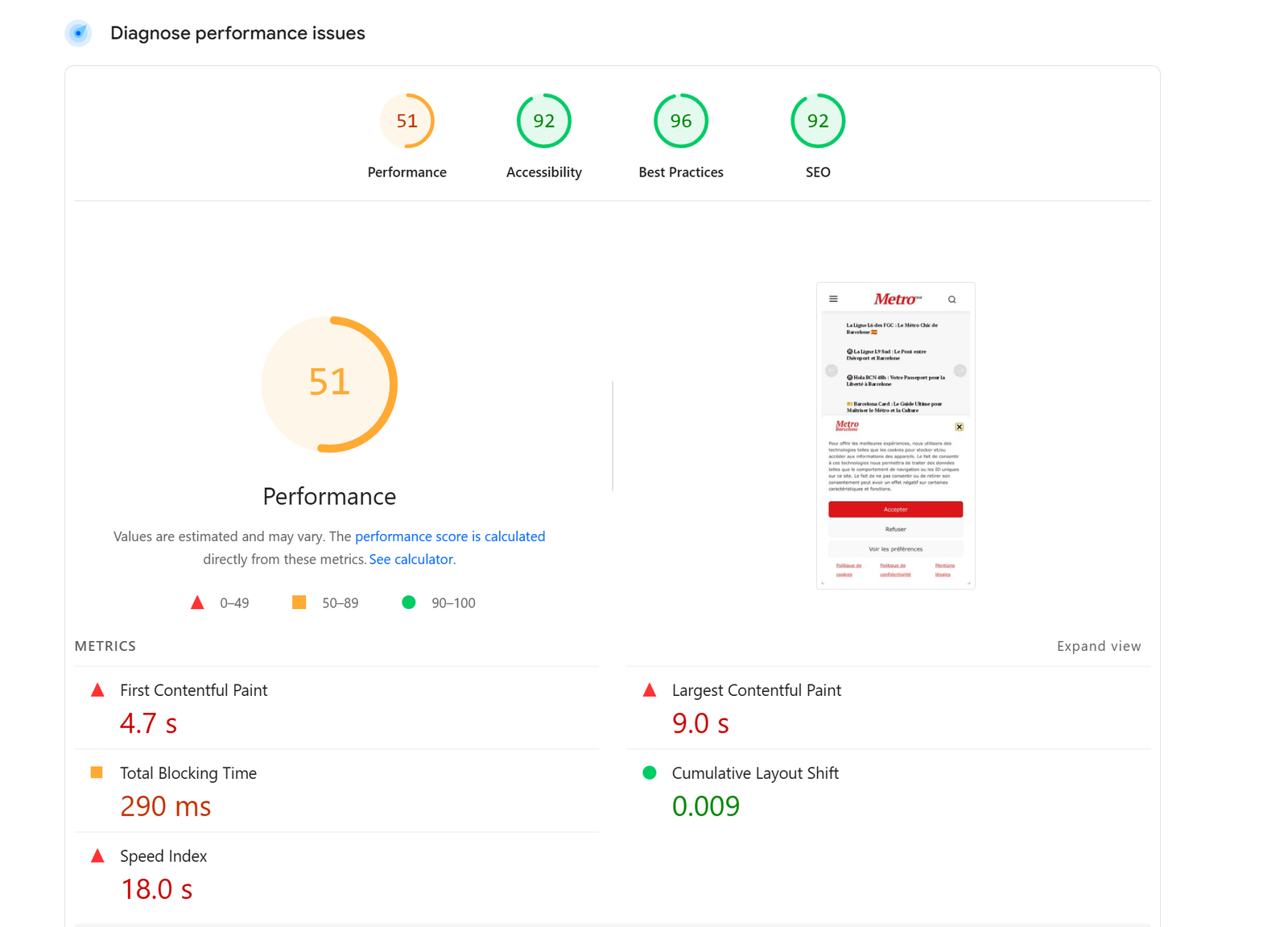
Hi, I took the newspaper demo Newsweek!
Very slow loading page speed. Homepage sometimes not even loading!
It is the first time it happens to me after purchasing around 20 licenses (from newspaper) for different websites.
Is it the theme or the demo?
I am using w3 total cache. I have cleared the cache several times.
Nothing changes even if using airlift plugin.
I also cleared the cache on server side.
Here a screenshot: http://metrobarcelone.fr/wp-content/uploads/2026/02/Screenshot-2026-02-26-044549.png
Can you please let me know where the problem is?
How can I improve page speed – this is very slow
Thanks
Marc
Calin Hi,
For the logo prolem use tagDiv Composer edit the homepage and scroll down and when the sticky is displayed, click on the logo and look for logo text tagline – https://prnt.sc/auUIF4PfYWlH do the same for the mobile logo – https://prnt.sc/pSP6HPUu8vDW
Second situation I think you are referring to the mega menu – https://prnt.sc/yp6EBFt1c_JJ. This can be set in wordpress menu were you can set a category as mega menu – https://forum.tagdiv.com/mega-menu/
Calin Hi,
Checking the provided link to the website, it looks like you have more than one header, and the one applied on the homepage is different from the one applied on articles and the one from the latest jobs- https://prnt.sc/8iv_NNaow26I – https://prnt.sc/TRpmEiE4MkYc – https://prnt.sc/pRYah3R_7Kru
What you can do is to set the same cloud header that you have on articles to be used on the homepage too.
 zaildaar
 even the header is showing different than other pages/homepages
zaildaar no custom css applied. also its only happening on homepage not on the post pages. here is the website link – https://dailyjobalert.in/
 macworks
Hello,
After a recent update, I’ve noticed inconsistent behavior when loading my primary blog page at:
https://www.macworks.com/blog/
At times, the page loads as expected, showing the correct homepage layout and content. However, intermittently, the same URL displays a different or incorrect version of the page.
This is occurring using the same browser and URL, without any changes on my end between page loads.
I’ve included two examples below:
• Example 1: Expected homepage appearance
• Example 2: Alternate/incorrect page rendering that sometimes appears
Could you please review this behavior and advise what might be causing the inconsistency? I’m trying to determine whether this is related to caching, theme behavior, or a recent update.
Thank you in advance for your help.
Calin Hi,
I checked the provided screenshots, and it appears that the Bookmark icon from Sticky Mobile is not removed. For this use, tagDiv Composer on your homepage to edit it, select an element, then select teh mobile viewport and scroll down till the middle of the sticky sidebar is not displayed, scroll up and it will be displayed, then you can select the element you want to remove. https://forum.tagdiv.com/header-manager/
Thank you!
Calin Hi,
You need to use tagDiv Composer, edit the homepage, then select the block you want to edit. In the filter tab, you’ll have the options to set a category or the IDs of the categories you want to display. Also, you have the option to sort the results. In the general tab, you’ll have the option to set the number of results – https://forum.tagdiv.com/flex-block-settings-guide/
Now checking your site, it appears that you have the flex block 2, and this is using next prev ajax pagination, so this is not quite a slide, so the next prev pagination can not be set. How many times can it be used /load articles, it will be used as normal pagination until all articles that are set in the filter will be loaded.
 zgdk2273
Hello, my website is https://1xbet.study/. I want to change the slideshow at the top of the homepage. Currently, the related articles in this slideshow are all newly published articles. How can I change it to only display articles of the pillar type, and where can I adjust the number of articles displayed?
 Kevin@hookedmagazine.ca
Hi which template for the homepage has blocks of posts plus a sidebar for small ads running down the right hand side?
 wimothy
Hello I really like the mega menu of the blockchain theme. However I cannot download the page the where the mega menu is on without installing the whole theme and lossing my site . I just want this page to. How can I get this ? Can you help me please ?
 rabbrong
Thank you so much. There seems a lot of errors. Perhaps because I uninstalled and installed again twice due to my Issue with Google who restricted my site URL (Perhaps the errors caused by the installing of too many plugins and Ad codes place incorrectly…) hours before I sent you a message for help, I had disabled your Theme and some plugins via SFTP FileZilla (During restriction, not allowed to access normally that’s why… After that, I cleared files, Caches… And reinstall Your Newspaper Theme and plugins… I didn’t check widget before the disabling of the Theme… But after reinstalling, I checked the widget and it was locked, grey out and when I tried to edit Theme with the TD editor, I couldn’t scroll down the whole theme (stick at half of the theme)… Is this error? Also I watched all the video tutorials on your web page and Youtube still cannot find a way to show Header Ad on Mobile and 2 more ads placement on homepage do not show up or I can’t find where to place them in Theme panel… If you scroll down on my home page realspill.news you will see no ads pop up ( I can’t find how to place ads on those placement)…. Sorry for this long complicated response.
I haven’t installed tagDiv Mobile Theme plugin yet… I wanted a Header Ad showing on Mobile devices. So do I need to install this tagDiv Mobile Theme plugin or not?
I was getting stuck the whole night.
Thank you for guiding me
 NiklasFischier
Hi i’m running ewpaper theme on litespeed server. And i have 6 flex blocks on the home page with ajax pagination activated. Clicking the “next” arrows results in the same in this case articles being shown, and not loading new ones. And the bottom three flex blocks, if i click the arrows it takes me directly to the top of the homepage. Devtools shows no errors in console or network. (afaik)
There are 6 categories like Österskär, Norrtälje, haninge etc.
You can try it on https://skargarden.se
Thanks
Niklas
Calin Hi,
Please use tagDiv Composer, edit the homepage and click on the first row containing the big grid, then uncheck the option “Hide on pagination” – https://i.imgur.com/G4OqH1Z.png. Do this for each row you do not want to be hidden when the pagination is used.
Thank you!
Calin Hi,
If you want the H1 on your homepage and you want it on a text, then you can use tagDiv Composer and use the element title, this hase the option for SEO title – https://i.imgur.com/CpxlvQx.png. Also, all blocks have this option https://i.imgur.com/mGwvJcE.png
Another element that can be used is Column title – https://i.imgur.com/1iOeJfr.png
Thank you!
 Santy
Santy“How can I add an H1 tag to the homepage of a News Paper theme? I’ve noticed that the homepage doesn’t currently include an H1, and I’m not sure how to include one properly.” thanks
zaildaar