
 Catalin
 Hello darel,
It seems to be a transitions issue which happens due to your untested plugins which you are using on your website, like this -> https://www.screencast.com/t/XiysNqh6 Most likely, some of them interact with the theme core files and cause this type of problem. Try to disable all of them, leave just Visual Composer to active, clear all your caches and install only the plugins that come bundled with the theme packet and rule out any conflicting plugins.
Hope this helps and let us know how it goes!
Thanks for your understanding!
 horacebritton
I’m trying to install your theme i’ve just purchased and i’m getting an error. Its a wordpress failure notice saying ‘are you sure you want to do this?’
I have deactivated all current plugins to see if that was the problem but it still didnt upload.
Need help asap
 Roboman
 Thanks for reply Simion C.,
Big Grid 8 is the highest number I can add in Visual Composer. There is no Big Grid 10.
I have Newspaper 7.6 installed and Visual Composer 5.0.
Thanks
 rgomez
 Hi,
I installed the speed booster, and a Check and Enable GZIP compression, I’m not advance in how to install the rest of the plugin to make the site faster. Can you help me set it up. I can pay for the freelance work. my email is in this topic
 tqmc
tqmcI can’t upadate topics and install plugins
Catalin Hello JJ0000,
Most likely, this error happens due to your untested plugins used by you. Try to disable all the active plugins, leave just Visual Composer to active, clear all your caches and install only the plugins that come bundled with the theme packet and rule out any conflicting plugins. Also, if the problem and the error is still there, try to make a new clean install from scratch via FTP way because this is the surest method in this regard, according to our documentation here -> https://forum.tagdiv.com/install-via-ftp/
Thanks for your understanding!
 Bogdan B.
 Hello,
Please try it a few more times as the server can get hung up at times. If you still cannot install a demo, please contact us on our email address at contact@tagdiv.com and provide a link to your site and wp-admin (login information and admin rights) so we can login and investigate. Please also include a link to this conversation.
Thank you!
Catalin Hello midronepro,
Please ensure that you have disabled all the untested plugins and install only the plugins that come bundled with the theme packet and rule out any conflicting plugins. Clear all your caches and check the results. If the problem is still there and if you need more assistance in this regard, please send us an email at contact@tagdiv.com with your log-in information (wp-admin) so we can further inspect it closer your setup page. Provide there the link to this topic so we can easily identify you.
Thanks for your understanding!
Catalin Hello invernessgigs,
In this case, you should make a full backup to your database to be safe, clear the actual theme and install the latest version of it from scratch via FTP because this is the surest method in this regard. For more information about FTP way, please consult the documentation here -> https://forum.tagdiv.com/install-via-ftp/ Also, check your system status parameters to be higher increased according to our documentation here -> https://forum.tagdiv.com/system-status-parameters-guide/
Hope this helps and let us know how it goes!
Thanks for the message!
Bogdan B. Hello,
Please only use the visual composer version that comes with the theme. Please disable the plugin and delete it from the plugins section and then install it again from here: http://screencast.com/t/PtNqOuhl
If the error is still there, then access your files via ftp and delete visual composer (js composer) from your plugins folder and then try to install again.
Let us know how it goes.
Thanks.
Catalin Hello golive,
My advice in this regard is to make a new fresh install from scratch via FTP way because this is the surest method in this regard. Also, install the latest version of the theme with only the required plugins which come bundled with the theme packet. Clear all your caches and check the results. In this case, the theme should work as properly. For more information about theme installing, please consult here -> https://forum.tagdiv.com/install-via-ftp/
Hope this helps and let us know how it goes!
If the problem is still there after my advice, please provide your website URL so I can take a closer look on it.
Thanks for the message!
Catalin Hello tamam,
Normally the Envato policy allows using a theme only on one install. You can, however, use the theme on a sub-domain if you plan on creating a testing site, but if we are talking about totally different sites with different content, then only one theme per install is legally allowed: http://screencast.com/t/NqzloVgyUJB. Notice that the theme can be activated only one for a single domain. So, if you want to change the domain, you should simply delete the theme for this domain and install it to other.
Thanks for the message!
 songhy
Dear TagDiv,
After I review your Newspaper Fashion demo ( http://demo.tagdiv.com/newspaper_fashion/ ), I really Love the ways you put the playlist video youtube in your website.
But when I install full demo, it is not include this playlist.
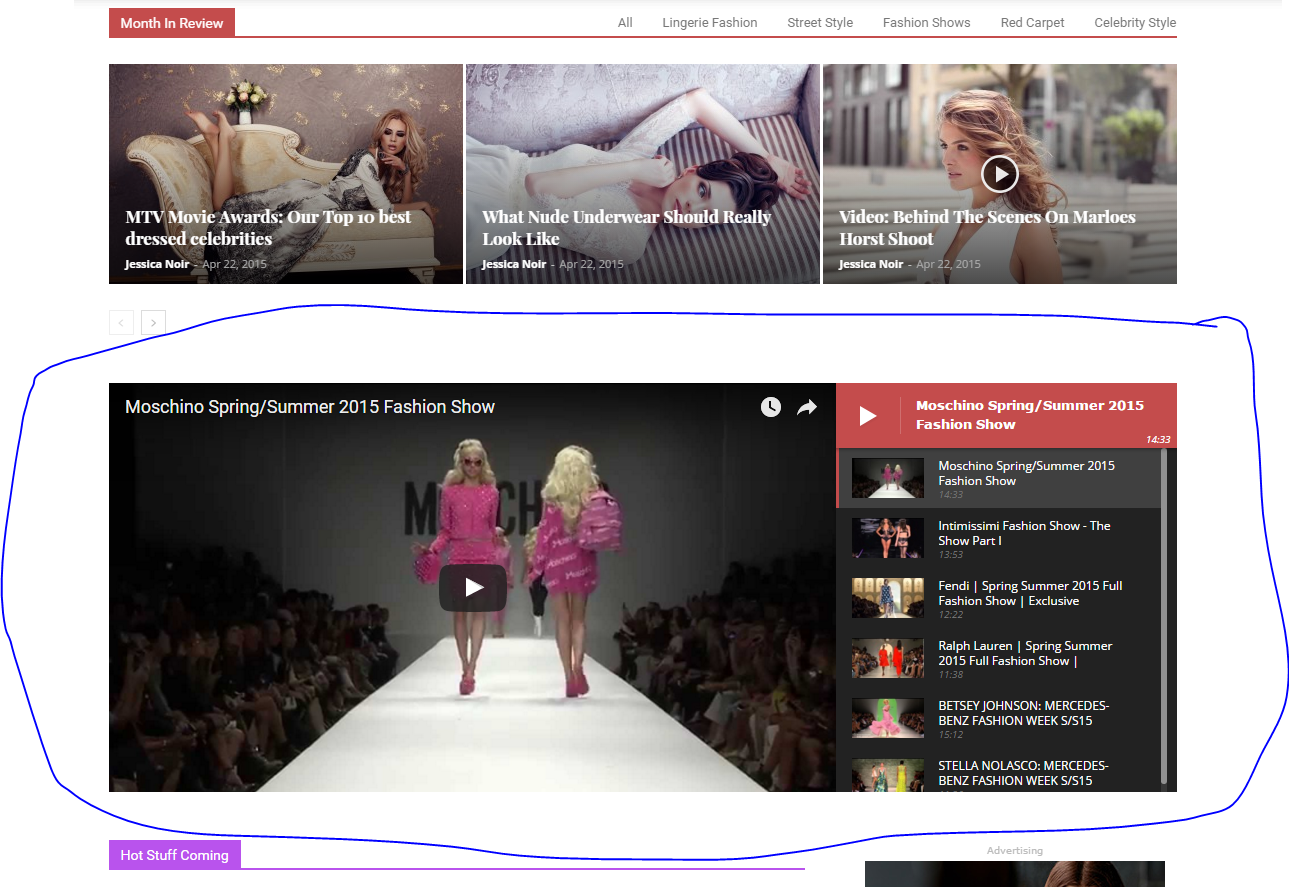
Could you please guide me to add playlist to my website like your playlist in Newspaper Fashion demo?
Thank you in advance
Bogdan B. Hello,
Maybe you installed the demo without dummy content. Please use this guide: https://forum.tagdiv.com/installing-demos/
Thank you!
 bilal-altaf
My Facebook Counter does show 0 followers but actually they are 23 and same problem with YouTube Social media counter as well. I have installed the social media counter properly..how can i solve the problem?
 Simion C.
 Hi,
You can find the footer templates in your theme install folder, it should be Newspaper->Parts->Footer – https://www.screencast.com/t/kRN2eBsRET then you need an editor (I used PhpStorm) like notepad++ or even notepad ,to open and edit the footer template you want (td_footer_template_1.php in your case) – https://www.screencast.com/t/GqSteyrna80 – https://www.screencast.com/t/N7ntQRpPj
Result – https://www.screencast.com/t/g8a5Kvi2
Thanks
 Warwick Jones
Hi,
I have an annoying “0” above Latest Articles tab on the home page: http://www.dogtrainingcourseforpuppies.com/ that I cannot locate anywhere in order to remove it. It appeared after I installed the latest version of the theme.
Would you be kind enough to point me in the right direction as to where I might locate and delete it?
I have tried the theme without the sharing plugin, which shows immediately above the Latest Articles tab and it made no difference – in case you were to suggest that.
Thank you and regards,
Warwick Jones
 JJ0000
I deactivated mobile plugin to see what it’d do and then tried to reactive it and got this error –
Fatal error: Cannot redeclare class Mobile_Detect in /wp-content/plugins/td-mobile-plugin/Mobile_Detect.php on line 29
I already tried reinstalling it but it keeps same error. Any fix?
Also, what does mobile theme do specifically? Responsive site looks nice on mobile, so is it mainly just a site performance thing?
 john low
Hello sir,
i want make an article with navigation button how can i do that with smart list what should i do to have an exelent post with navigation button without any issue
like this http://demo.tagdiv.com/newspaper/smart-list-style-1/
i haven’t features menu on my install demos to see css code
thank you
 Nana
NanaI would like to have the share options that are on the posts on my Woocommerce products without installing any plugins. Is there a reason why this is not available?
 peppefark
When I install the demo content gives me this error message:
tagDiv importer detected an error. The importer will try to recover and continue to install the demo after you click ok on this dialog.
Steps to troubleshoot:
– Check the permissions on your upload folder
– Please make sure that WP_DEBUG is set to false in wp-config.php
– Contact our support via email contact@tagdiv.com (please provide your product license key)
I checked and WP_DEBUG is configured to false and permits the upload folder to 755
 halcyonhub
NEVERMIND, I figured it out. Sucks your install doesn’t work via default Upload Theme option, and the requirement to use FTP wasn’t described in the Envato purchase email, etc.
But I’m good now! Feel free to delete this.
 Mattkmarsden1992
Installed the Newspaper theme 7.6 and when prompted to install Visual Composer, it comes up with this error message:
Installing Plugin: Visual Composer
The plugin does not have a valid header.
Downloading install package from http://www……..
Download failed. cURL error 56: Failure when receiving data from the peer””
Could you please provide me with some help? Thanks in advance!
 tevfikgulep
 The same problem here. I installed the theme again but still not working
 keeltyc
Hi guys, I’ve looked in the forums and can’t find a solution. Hope you can take a look.
I have two slide elements and a news ticker on my front page. The news ticker is not showing up at all, and the two slide elements don’t actually slide, they overlap headlines so you end up with something that looks like this:

Everything worked well for a while, then something broke. I suspect it may have had something to do with Jetpack, but I have tried disabling all my plugins, reinstalling wp-admin and wp-elements, and even doing a full clean install and restore of my WP site, and nothing has fixed the problem.
Would you mind taking a look and seeing if you can solve the problem? Thanks!
Chris
