
 Calin
Calin Hello,
There are a few situations when the cloud templates can not be imported, so it is essential to make sure that the theme requirements are set as we mentioned in this guide – https://forum.tagdiv.com/requirements-for-newspaper/
If the settings are set and the situation persists, please let me know the pre-built website you want to install and you are facing this situation.
Also, an alternative is to import the template for that demo, which can be done from the Cloud template – https://i.imgur.com/rXvPvP9.png
Thank you!
Calin Hi,
What you can try is to disable and delete the tgaDiv Composer and tagDiv Social Counter, and disable/delete the plugins. After that, go to Newspaper > plugins and reinstall the plugins from there, clear all cache, and check the results.
I hope this will help you!
 Ashutosh2001@
Hello TagDiv Support Team,
I am facing an issue with the TagDiv Composer in my Newspaper 12 theme. The problem is that I am unable to add a new Row in the composer. There is no visible error message, but the Row simply does not get added.
Here are the details of my environment and the troubleshooting steps I already tried:
• Hosting Provider: Hostinger
• WordPress Version: 6.8.2
• PHP Version: 8.2.28
• WP Memory Limit: 256M
• PHP Execution Time: 300
• PHP Max Input Vars: 5000
Steps I have taken:
1. Deactivated all plugins except TagDiv Composer.
2. Deleted and reinstalled the TagDiv Composer plugin.
3. Tried again, but the issue persists.
4. Checked the browser console and noticed AJAX requests returning 0.
I am also attaching a screenshot of the browser console output where AJAX returns 0, in case it helps your investigation.
Despite these efforts, the problem remains unresolved, and I am still unable to add rows.
Could you please check and let me know how to fix this issue?
Thank you in advance for your support.
Best regards,
[Ashutosh tiwari]
 Huylx
HuylxHello tagDiv Support Team,
I have recently reset my hosting and need to reinstall my website. My license key is currently active on old domains (suckhoepro.com and tamlyhoc.vn), and I need to unassign one of them (suckhoepro.com) to activate my new site. (tamlyhoc.vn)
The system prevents me from unassigning it myself until October 7, 2025. Could you please manually unassign the license from one of my domains so I can use it on my new website?
My Purchase Code (License Key) is: [479ffd32-….-5993738a962f]
Thank you for your help!
 Nextepisode
 I have purchased two licenses, One few years back and one recently, three days back. The website which i was working on had old staging license, so after purchase i have reset the key and installed new key, it worked nicely and today this is the issue.
 rahlplx
I recently installed a new prebuilt website/template. The homepage is showing the new layout correctly, but the category pages are still using the old template. How can I fix this so the category pages also use the new template?
 juanantonio
Hello,
I’m using the TagDiv Social Counter plugin on my website with the latest version installed. After connecting my social profiles (Instagram, Twitter, and YouTube), the numbers it displays are different from the real ones.
For example, on Instagram it shows only 189 followers, while the account actually has over 1,000 followers.
I have double-checked that the plugin is updated to the latest version, but the issue persists.
Could you please advise if there’s a fix or a setting I need to adjust so the plugin shows the correct follower counts?
Thank you in advance!
Calin Hello,
Yes, you can use MySQL version 8. On my installation, I’m currently running MySQL 8.0.30 and PHP 8.3.12.
Thank you!
 tonnynet
 Thanks for your reply.
I’d like to change it to the layout shown below.
With the method you suggested (using ACF), is it possible to make it look like this?

I have completed the ACF plugin installation.
On the page below, it says to set up a CPT (Custom Post Type). Do I need to install/set that up as well?
[https://forum.tagdiv.com/introduction-cpt-acf-newspaper-theme/](https://forum.tagdiv.com/introduction-cpt-acf-newspaper-theme/)
Rather than collecting new information from members, I want users to be able to edit their existing member information on the “Account details” page.
When you have a moment, could you please provide a more detailed explanation?
https://headline.hifive.pro/author/tonnynet/
https://headline.hifive.pro/my-account-towntalk_pro/?account_details
* Admin account
: contact@tagdiv.com
-
This reply was modified 1 year by
tonnynet.
 srendell
 Thanks for responding.
If i do this will there any problem ? because I have created many templates in cloud templates.
there are many custom templates created by me in cloud templates.
will this process of td cloud library plugin removal and reinstall affect my current pages?
 dailynewsng
 Okay. Let me go and uninstalled the plugin and see the result. Thanks
 nrvimal
Hi,
I was using the license in rvkgarage.com and i have closed this website. Now i have installed Newspaper theme on ets2.in , however i am unable to assing the leicnese to ets2.in.. the assing and unassing options are greyed out and the notifcitaion says i can do the assigment after 18.9.2025 and this is too late. Its unnecary to wait 20 days. please help
srendell So here I need to remove cloud library plugin and install new cloud library plugin given by you.
Am I right? Please confirm.
If i do this will there any problem ? because I have created many templates in cloud templates.
there are many custom templates created by me in cloud templates.
will this process of td cloud library plugin removal and reinstall affect my current pages?
Calin Hi,
For the problem _load_textdomain_just_in_time from td-cloud-library, please download and reinstall the plugin from here -> https://cdn.tagdiv.com/wp-content/uploads/2025/07/td-cloud-library.zip
The warning seems to be related to the Youtube ids that no longer exits, so you can check on your pages for the youtube ids: 9YPsSaYlkyc and 4h2FqahPC2M and remove them.
 varunnaagar
I have bought the newspaper theme on 2024 and I tried to installed the TagDiv composer. I tried multiple times to forums and the support team even the email to the support but receive the exact reply from them. When I was click on the “edit with TagDiv” its always showing 404 error. What is that mean and how it works I want the solution. Please help me out. Money wastage on Newspaper theme. I will share the negative review.
 thebackbenchers
hi this is my installed theme – https://bookreviews.forum/
I am aunable to chage orange colour all over the theme, i want to keep it something else.
Also on mobile screen there is a critical issue, the main header (where the logo is) on left hand side there is an empty white bar, please help me to make it sync with black header, it looks really cheap see screeshot – https://prnt.sc/XNiaBkl1mlPI
 GreeceMoments
Dear tagDiv Support Team,
I am experiencing a persistent PHP warning in my WordPress installation related to the tagDiv Cloud Library plugin. The exact error message is:
text
PHP Warning: Undefined array key “tdb_templates” in /wp-content/plugins/td-cloud-library/includes/tdb_functions.php on line 661
This warning appears repeatedly in my server error logs, particularly when customers have products in their WooCommerce cart and proceed to the checkout page. It seems the plugin is trying to access the “tdb_templates” array key which is either not defined or not properly loaded under these conditions.
I have already tried the following troubleshooting steps without success:
Reinstalling the tagDiv Cloud Library plugin
Clearing all caches (server, plugin, browser)
Ensuring that the tagDiv Shop plugin is installed and active
Testing multiple tagDiv Cloud Library templates for WooCommerce products
The warning persists and may indicate a problem with how the plugin handles template data when rendering the cart or checkout pages.
Could you please advise on how to resolve this warning? Is there a recommended way to repair, re-import, or reset the “tdb_templates” to ensure they are correctly registered?
Any guidance or a fix for this issue would be greatly appreciated, as it clutters our error logs and may impact site stability.
Thank you very much for your support.
Best regards,
Thomas – http://www.greece-moments.com
GreeceMoments I have the same warning. Please tagDiv Support Team can you help me?
I am experiencing a persistent PHP warning in my WordPress installation related to the tagDiv Cloud Library plugin. The exact error message is:
PHP Warning: Undefined array key “tdb_templates” in /wp-content/plugins/td-cloud-library/includes/tdb_functions.php on line 661
This warning appears repeatedly in my server error logs, particularly when customers have products in their WooCommerce cart and proceed to the checkout page. It seems the plugin is trying to access the “tdb_templates” array key which is either not defined or not properly loaded under these conditions.
I have already tried the following troubleshooting steps without success:
Reinstalling the tagDiv Cloud Library plugin
Clearing all caches (server, plugin, browser)
Ensuring that the tagDiv Shop plugin is installed and active
Testing multiple tagDiv Cloud Library templates for WooCommerce products
The warning persists and may indicate a problem with how the plugin handles template data when rendering the cart or checkout pages.
Could you please advise on how to resolve this warning? Is there a recommended way to repair, re-import, or reset the “tdb_templates” to ensure they are correctly registered?
Any guidance or a fix for this issue would be greatly appreciated, as it clutters our error logs and may impact site stability.
Thank you very much for your support.
Best regards,
Thomas
 Aldis
Aldis Hi,
Thank you! I checked debug mode and settings was good.
For info, this error happened yesterday after Rank Math Pro plugin update. Right now they send another update and after installation site again is good.
Thank you!
BR, Aldis
 willskz
 Guys, you need to hurry to look into this issue since we’re running live sites, mine got 1.7 million views on month… and the layout is broken! Suddunly all broke without any changes or installing news pluggins… site just broke suddenly!
 simchris
 Generally you can only purchase via Themeforest (part of Envato); so just login to your account there and your past purchases are shown, and option to download installer files and license file.
-
This reply was modified 1 year by
simchris.
 Anzer Ayoob
Hello,
I purchased the Newspaper theme today and installed it successfully. However, whenever I try to edit a page with the tagDiv Composer (by clicking the “Edit with tagDiv” button), I get the following error message:
ERROR
Error at zones: 6(models): 0(dom). The model does not match the content.
Current state has involved an issue. You could try an UNDO operation (CTRL+Z / CTRL+SHIFT+Z).
screenshot of error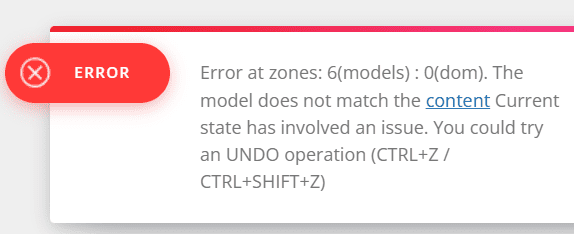
Because of this, I’m unable to edit any page.
Could you please help me fix this issue?
Thank you in advance.
Anzer AyoobHello,
I purchased the Newspaper theme today and installed it successfully. However, whenever I try to edit a page with the tagDiv Composer (by clicking the “Edit with tagDiv” button), I get the following error message:
ERROR
Error at zones: 6(models): 0(dom). The model does not match the content.
Current state has involved an issue. You could try an UNDO operation (CTRL+Z / CTRL+SHIFT+Z).
Because of this, I’m unable to edit any page.
Could you please help me fix this issue?
Thank you in advance.
 vimal.roy
Hello, Community!
I’m facing an issue with theme licensing. I currently have the license code activated on my staging site, but it’s also assigned to one of my local installations and my live website. However, none of these sites are using the theme anymore, and I’d like to reassign the license to my staging site.
When I try to activate it on staging, I get an error saying the license is already in use elsewhere.
Can anyone guide me on how to remove the license from the other two sites and assign it to my staging site?
Thanks in advance for your help!
Calin Hi,
Usually, when this is happening, it is because one of the theme plugins that has been used is no longer enabled, or the template used was unassigned (when using cloud templates).
If you used a standard header, then please go to Newspaper > plugins and install from there the tagDiv Standard Pack plugin.
Thank you!

