
 rrtoday
 Install the plugin Enable Jquery Migrate Helper. WordPress 5.5 turned this feature off and outdated and deprecated code no longer works.
Great articles on this today
https://ithemes.com/wordpress-5-5-breaking-websites-how-to-fix/
 Pinnacle client services
please support
tagDiv importer detected an error. The importer will try to recover and continue to install the demo after you click ok on this dialog.
Steps to troubleshoot:
– Check the permissions on your upload folder
– Please make sure that WP_DEBUG is set to false in wp-config.php
 itechguides
I installed Newspaper theme mobile plugin. I noticed that sometimes, when I visit the site from my laptop, it displays the AMP/Mobile version. I configured the Mobile theme to Mobile + AMP.
 ManCandy5
 Since the last message, i did another fresh install and cleaned out WP. I choose a different demo theme and uninstalled any non-div plugins. What’s funny is that the logo from the last install could not upload, but now it does.
Anyways, does this help?
Uncaught Error: Syntax error, unrecognized expression: [caption id="attachment_106" align="aligncenter" width="1125"] 1[/caption]
VM1682 load-scripts.php:2
 Vlad S
 Hello !
We have replied here: https://forum.tagdiv.com/topic/tag-div-newspaper-installation/
Thank you !
Vlad S Hello !
You can undo your changes from here: https://www.screencast.com/t/y5gc7C3F Also please make sure that your Mobile theme plugin has been installed and works properly.
Thank you !
 loslunes
Not the same site when using a pc and using a mobile. We don´t know what is happening. We want the same view in both.
http://www.loslunesseriefilos.com
Any idea? some times works, somw time it doesn´t. Maybe problems with cache plugin (autooptimize)? We have just installed it after using litespeed with the same problem (but sometimes worked, some post and home showed as in pc but other ones not working….).
We´re really desperate. Any way to see the same page. Maybe not using mobile template plugin?
Pinnacle client servicesTag div newspaper instalattions getting failed. please support
 cursor1208
My site keeps serving up one of two possibilities.
1. I see AMP versions of my website on mobile and desktop
2. I see the mobile version of the site and the desktop version of the site correctly.
Why is this happening? I can’t tell if it’s a caching issue or not. I followed the wp super cache installation instructions exactly as stated in the documentation.
My site is nhsjs.com
ManCandy5Just did a fresh install.
After uploading an image and clicking on “Insert into Post”, the image does not show up. This occurs for certain images but not all. This affects any Page and the Theme panel. Funny enough, I can insert the image in a post.
I have uninstalled all other plugins and when inserting, I choose “Full Size”.
Is there some sort of requirement I’m missing?
 alexandria
 Hello there,
I have installed ShortPixel Image Optimizer but I got a message that it says its not compatible with “Regenerate Thumbnails”. it is suggested that i should intall reGenerate Thumbnails Advanced.
I just want to know if you think its a good idea to install reGenerate Thumbnails Advanced instead of Regenerate Thumbnails?
Thank you.
 ShubhamManoharSasane
I am getting the following error (got this error as soon as I installed the plugin and clocked on edit with tagdiv):
Error at zones: 6(models) : 5(dom). The model does not match the content Current state has involved an issue. You could try an UNDO operation (CTRL+Z / CTRL+SHIFT+Z)
I have gone through article : https://forum.tagdiv.com/tagdiv-composer-not-working/
But it’s not working.
Thank you.
 kibiribi
 I’ve installed another one Template – Mage Menu again shows my only 1 subcategory –
screen- https://prnt.sc/u1qiu2
my menu – https://prnt.sc/u1qjkw
And one more thing – where can I modify CSS for each new one Template?
I was able to change colors only partially – screen – https://prnt.sc/u1qlmo
for example – active menu element was not controlled in this menu or I couldn’t find it 🙁
Access to admin was sent to support tagdiv
Please help. 🙁
 fleur
fleurI JUST installed the theme and am already getting this error message: There has been a critical error on your website.
Learn more about debugging in WordPress.
Please advice
thank you
 Calin
Calin Hi prophecywatchman and kentwissinger, please understand that our theme do not have the capability to make the theme update automatically (please check our article from here ) most probably on you host you have some options that when is detected a new update to be make automatic.
Also kentwissinger if you had a demo and you edit it and you do not made your own content, then yes, this will be lost when you change it or uninstall it -> https://i.imgur.com/9Im10z9.png -> https://tagdiv.com/newspaper-theme-installing-demos/
indeed with inline ads from single post templates are some problems, but these can be solved using a fix with -> https://i.imgur.com/421qX6d.png
<div style="width:720px">

</div>
If there is still a problem and you want, you we can take a look to them, make a full backup and send us an email at contact@tagdiv.com and provide admin login, as well as cPanel. We will take a look. Include a link to this topic in the email.
Thank you for your understanding!
 SportsNewsIRLAND
 Hi there I followed all the steps outlined and without any resolve, we started to use JS_composer as a quick workaround the tagDiv composer as the site was working, however, this morning the site crashed with database connection error. We removed all plugins except the tag_div plugins but still no connection until we removed the tagDiv composer plugin and we instantly got website connection.
we have reinstalled the tagDiv composer and the site is working by still the tagDiv composer is not working
 Niketa
 Hi,
I have installed this plugin and I followed all the steps.
But in mobile phone, I am getting this view
Website URL: mynigo.com
please check the image

-
This reply was modified 6 years by
Niketa.
Calin Hi ls0@libero.it,
TagDiv Composer must be enable because this is the one that old the normal layout for the website, also what version of WordPress do you have? because if it is v5.5 then you must to update the them to Newspaper v10.3.6.1 only this version can work with the last version of WordPress.
If you are using this version and deleting and reinstalling the tagDiv Composer (as in the link that you set above) is not fixing the problem for you, please send us an email at contact@tagdiv.com and provide admin login, as well as cPanel or FTP if possible. We will take a look. Include a link to this topic in the email.
Thank you!
Vlad S Hello !
This happens due to cache. Please follow our guide and make sure that WP Super Cache has been installed properly: https://forum.tagdiv.com/cache-plugin-install-and-configure/
Let us know the result.
Thank you !
Calin Hi JoAnn,
For me installing the PRO demo added the Shadow on website, but if you want you can add this shadow with custom css like this -> https://i.imgur.com/8dArdA7.jpg
.td-header-desktop-wrap .tdc_zone {

    box-shadow: 0 -13px 10px 3px rgba(0, 0, 0, 0.12);

}

.td-main-content-wrap{

    box-shadow: 0 0 10px 3px rgba(0, 0, 0, 0.12);

}

.td-footer-wrap .tdc_zone {

    box-shadow: 0 13px 10px 3px rgba(0, 0, 0, 0.12);

}
This code need to be set in theme panel> custom code> custom css.
Usually this css is set custom in header like this -> https://i.imgur.com/czDx1pI.jpg
Thank you!
 Christoph
 Hallo Calin
Thank you for your informations. I was already working with the Newspaper theme and wanted to install also the Newsmag. When I installed the theme Newsmag the error happend with the tagDiv Composer “Fatal error”. With the reinstall Link from WordPress I came again to the site. Seems that is something wrong with the tagDiv Composer when I install Newsmag with already installed Plugins from the Newspaper.
But in the past weekend I canceled the Newspaper and after that I installed the Newsmag. That worked an it confirmed, that everything was right installed. But I still couldnt put my purchase code. What I have to looking for, when I want to have installed both themes? Thank you.
Calin Hi,
Please understand that our support forum is not instant. We start to answer from oldest to newest topics/emails (also if you replay the topic/email will be move to newest and you’ll late answer).
If you do not do not have some security module or a firewall to block the theme plugins to be installed and activate, send us an email at contact@tagdiv.com and provide admin login, as well as cPanel. We will take a look. Include a link to this topic in the email.
Thank you for your understanding!
 Eficiencia-Laboral
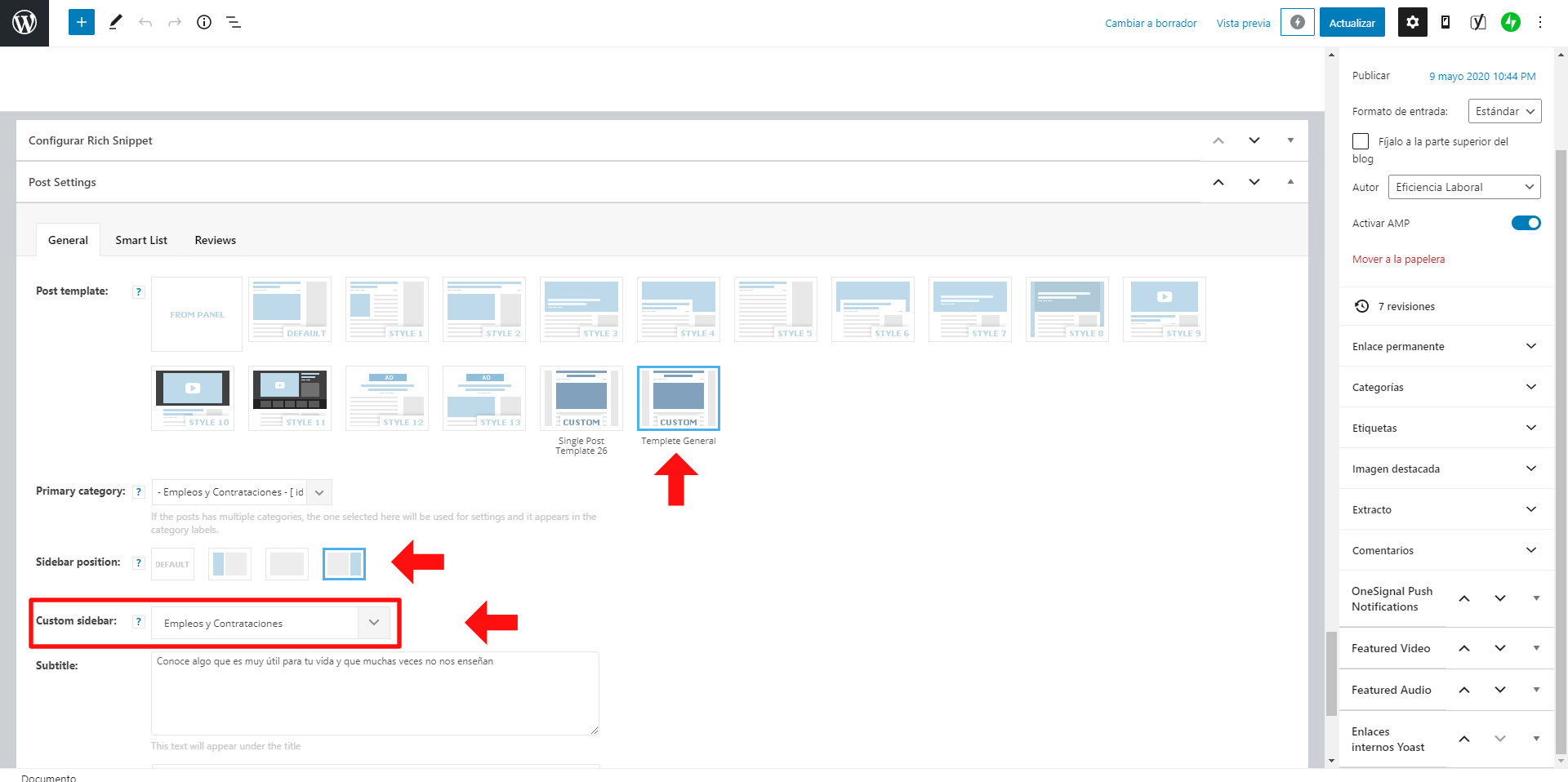
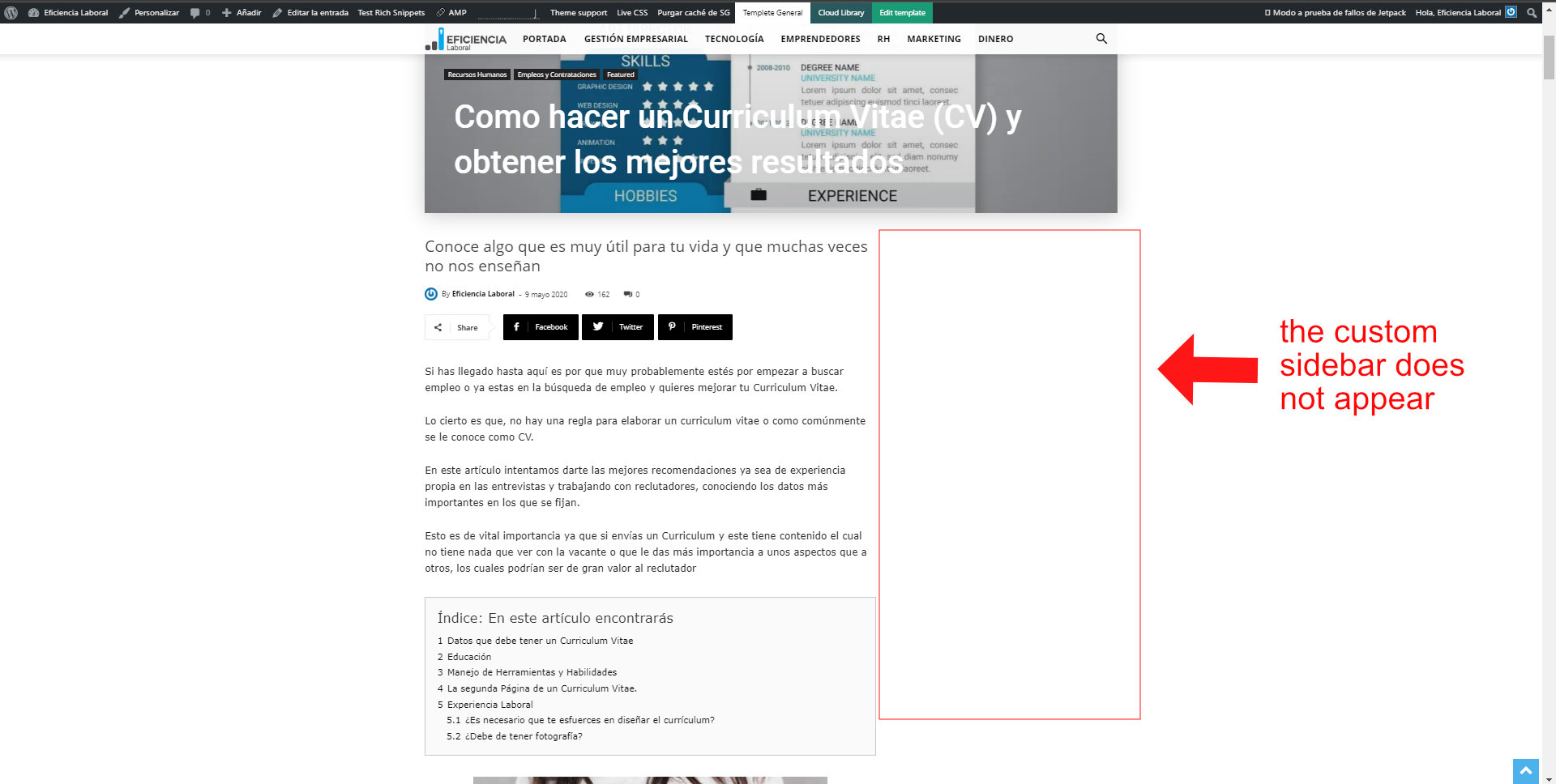
Hello, I have installed a “Cloud Templetes” to use the infinity load in the posts.
The infinity load effect works perfectly, but I’ve noticed that it doesn’t load the custom sidebar I assign to the post.
It only loads the sidebar that is added to the Cloud Templete, if one is added.
I have 28 custom sidebars that I assign to the posts according to the theme of the post.
How can I upload the custom sidebar to a post?
Attached are the images
 kentwissinger
 I didn’t choose to do the upgrade. It happened while I was logged out. No one else has access to my site. Even if I reinstalled the old Black Version, all my design work would still be wiped out.
I have both Composer and Standard Pack enabled. Although I had to reinstall these and the other tagDiv apps after my site was wiped out.
So it’s worth looking into on your end what happened to a site like mine since I didn’t choose the update. It auto installed. It looks like you have some other issues to work out with the new PRO versions like why the inline article ads are not working.
rrtoday Problems started for me after WordPress 5.5 install on a variety of themes.
Plugin enable jQuery Migrate Helper solved all issues.



