Kirti
Kirtihttp://www.kinzine.com
I am not able to regenerate thumbnail. I have already downloaded and installed plugin “regenerate thumbnail” and done the needful as mentioned on your website but still I cant see the thumbnail.
Please help!
 dpwilliford
I installed the theme and imported a site, which kept my previous posts but added a bunch more posts. However my previous posts don’t show up anywhere. They resolve, but the category and tag archive pages just say nothing found.
 nieveslgil
 Hi Calin
I created a playlist in the sandbox using text element as you suggested, but it shows only the first video in the list. I need to preserve the format of the playlist we’ve already installed on our home page – ie, the video displaying on the left, with the next cued videos displaying on the right (https://costatropical.tv/)
Is there a way to do this?
 jivan.rayamajhi11
Hi, I have installed theme and activate purchase code. But it is still showing “An issue has been encountered while trying to validate your license key” under Prebuilt Websites Menu Tab. In multiple theme installation option only showing preview option. But there is no any install and import content option.
And under My License menu thete is showing “No domains associated with your license key”
 gphilipp11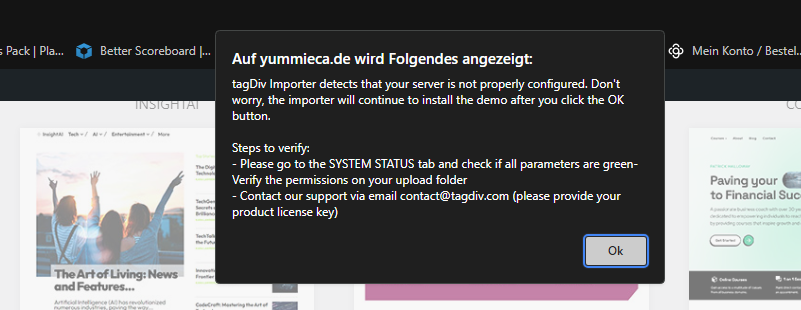
I got thie Error when i try to install the Demo Momentum Pro, on System Health is all Green.
 Bettina
 Hello Gaurav!
We have 3 options for mobile versions that you can use:
1. Responsive version: A responsive version of your website looks similar to the desktop version. TagDiv Composer is used to edit the page.Click on the mobile viewport: https://www.screencast.com/t/XDQJedlggSB. There, you can see your mobile version and edit or adjust the elements to look better.
2. Mobile pages: https://tagdiv.com/newspaper-10-3-7-update-brings-customizable-and-fast-mobile-pages
3. Mobile theme plugin: The Mobile Theme is a performance-optimized theme included in the main Newspaper theme that only loads on mobile devices. It comes with its own templates and designs for pages, posts, categories, etc., so your current templates from the desktop theme will get converted to the mobile theme layout. Please see https://forum.tagdiv.com/the-mobile-theme/ and https://forum.tagdiv.com/mobile-theme-introduction/ for more information.
A full explanation is here: https://www.youtube.com/watch?v=SpGkOnJeNZY
If you need to use mobile version 1 or 2, then you need to uninstall the Mobile Theme plugin and AMP.
Thank you!
 star.dgtl
 I’ve just deleted the SG Optimizer plugin, installed the WP Super Cache and used it for clearing everything. No effect 🙁
Do you happen to know what’s the OMGF Plugin is? May it cause the issue?
Thanks!
UPD: Great news! I decided to remove the OMGF Plugin, and now everything seems to be running smoothly.
-
This reply was modified 2 years by
star.dgtl.
Bettina Hello @heathcliff!
In order to do that, we should check what you use on your installation.
Contact us via email at contact@tagdiv.com and provide the following:
– admin url and credentials
– a link to this topic in order to identify you
We will take a look and try to help you asap.
Thank you!
 mouadeddouch
Hi, I don’t know what is happening today to the NEWSpaper Theme, it doesn’t show pictures and a menu as well as reviews. everything was working fine. but today everything is destroyed. Please help. I did not install any new plugins or something.
Here is my website: https://www.chinesesmartwatches.com/
mouadeddouchHi, I don’t know what is happening today to the NEWSpaper Theme, it doesn’t show pictures and a menu as well as reviews. everything was working fine. but today everything is destroyed. Please help. I did not install any new plugins or something.
Here is my website: https://www.chinesesmartwatches.com/
 Calin
Calin Hi,
Yes, that is the cloud header and indeed most of the time provides better results.
Also you can check the rest of templates, footer, category… and set them from cloud and after that check if you have the tagDiv Standard Pack plugin installed, if you do, then please disable it and check the website if displays shortcodes, if does, then activate the plugin and change those elements (usually are blocks that needs to be replace with flex blocks). If you have the tagDiv Standard pack enabled and you’ll disable the plugin there should be some more improve for the performances.
Thank you!
 robbyyy
 I have now installed the latest version of both Newspaper and Optin Builder on a staging site (as it was knocking the live site over).
Could I send you the URL and password to access the staging site? I don’t want to post the details on a public forum.
As you will be able to see the Woocommerce product pages have slowed to a crawl. I cannot tell what is causing it. I don’t see any conflicts. Neither does my hosting company (Cloudways).
I may have a custom project (a new sign-up process) for TagDiv once I know I can update the theme. I have already been quoted for the work, but am reluctant to undertake this if I have to move theme.
 great1212
 No, I don’t want the latest. It has some issues, therefore I need to install 12.6.3.
Please provide me the link of the zip file, including all its plugin.
Thanks
 peerblue
Hi, I installed the prebuilt theme called Newspro
Now upon publishing articles:
1. If i add featured image it is duplicated twice in the post but the image is visible on home page card as well
Home page screenshot : https://drive.google.com/file/d/1fFEEWO1WSTRYJkZoX39LBl3Rqyb96Qpg/view?usp=sharing
Look at the post with images displayed in the lower end of the screenshot
now example of the post : https://chainnewsnetwork.com/education/proof-of-liquidity-defi/341/
https://chainnewsnetwork.com/news/shiba-inu-meme-coin-mania-grips-market/387/
In both of the example image is coming in the box and is is replicated again.
2. If i do not add the featured image, on the home page there is no image and it looks quite ugly and broken
example of home page (https://drive.google.com/file/d/1fFEEWO1WSTRYJkZoX39LBl3Rqyb96Qpg/view?usp=sharing)
Example of post page
https://chainnewsnetwork.com/news/dogwif-outpaced-shib-bonk/402/
3. Also look at this demo content which you prebuilt and it looks beautiful, but my posts look ugly, While i choose default temple from panel for posting, kindly let me know what can i do to make my posts beautiful
Sample content link
(https://demo.tagdiv.com/newspaper_news_hub_pro/2022/03/04/td-post-a-newfound-quasicrystal-formed-in-the-first-atomic-bomb-testesd-in-us/)
Actual Content link :
https://chainnewsnetwork.com/news/dogwif-outpaced-shib-bonk/402/
May be i am configuring something wrong
 Anamaria
 Hi,
You should download the latest version it from the Theme Forest account https://elements.envato.com/learn/install-themeforest-wordpress-theme
Thank you!
 gerruld
Hello, I’ve set up a new website, purchased a new Newspaper license, and wanted to use the prebuilt website to edit it. Unfortunately, in every selected template, various pages look strange, and their appearance is completely different from the demo on preview. The biggest issues are with the cart and checkout. I’ve tried different things, performed a clean WordPress installation, removed all additional plugins, even reset all files on the server. I also attempted to downgrade Newspaper, but nothing helps, and these pages still look this way. How can I fix this?
 metron6
 what do you mean by “get in touch with your host” ?
i told you, as far as i know these are paid plugins which came with newspaper theme, and from time to time, i see my site is a mess, i login and i see that these plugins are not installed.
i’ve re-installed them 10 times, before come in and ask for help.
great1212 Need to install 12.6.3 version on another staging website.
So need installable zip file of 12.6.3 version of theme
 newspatron
 Also please let me know if there is way to remove clutter by reinstalling the entire theme?
I would like to preserve the photos, posts, pages, categories and stuff as it is. Delete the theme, switch over to another theme, check the loading times and everything if ok, and then again install the theme from scratch [as suggested by site host].
Still waiting on a resolution on loading time due to ajax filter.
great1212Need installable archive of 12.6.3
 masc
mascWe had an old newspaper theme, got malware
we upgrade wordpress to 6.4.3
and tried to upgrade newspaper them, but we start getting these errors
Uncaught Error: Class ‘td_util’ not found in /var/www/html1/wp-content/themes/Newspaper/includes/wp-booster/wp-admin/tagdiv-view-header.php:19
Stack trace:
#0 /var/www/html1/wp-content/themes/Newspaper/includes/wp-booster/wp-admin/tagdiv-view-theme-plugins.php(59): require_once()
#1 /var/www/html1/wp-content/themes/Newspaper/includes/wp-booster/tagdiv-wp-booster-functions.php(499): require_once(‘/var/www/html1/…’)
#2 /var/www/html1/wp-includes/class-wp-hook.php(324): {closure}(”)
#3 /var/www/html1/wp-includes/class-wp-hook.php(348): WP_Hook->apply_filters(”, Array)
#4 /var/www/html1/wp-includes/plugin.php(517): WP_Hook->do_action(Array)
#5 /var/www/html1/wp-admin/admin.php(259): do_action(‘newspaper_page_…’)
#6 {main}
thrown in /var/www/html1/wp-content/themes/Newspaper/includes/wp-booster/wp-admin/tagdiv-view-header.php on line 19
[05-Mar-2024 20:03:34 UTC] PHP Parse error: syntax error, unexpected ‘)’ in /var/www/html1/wp-content/plugins/td-composer/legacy/Newspaper/includes/td_config.php on line 9062
Anamaria Hello,
This is not a mobile page; it is tagdiv mobile theme plugin, so please disable it.
Using our theme, you can choose from 3 mobile versions
-> mobile responsive => https://www.screencast.com/t/oJ2ShOp47
-> mobile theme plugin => https://forum.tagdiv.com/the-mobile-theme/
-> mobile page => https://tagdiv.com/newspaper-10-3-7-update-brings-customizable-and-fast-mobile-pages/ The option that you need to use.
Suppose you created the mobile pages with tagDiv Composer. In that case, when you install the Mobile Theme plugin, your pages will be overwritten by the plugin (the mobile theme comes with its templates for page, post, category, etc, so your current templates from the desktop theme will get converted to the mobile theme layout, the page content is made without builders in mobile editor => https://www.screencast.com/t/xbgZG8kH also, the options that are provided to edit the mobile theme version are limited (this keeps the things simple)).
This is a video about Responsive Newspaper Theme, AMP & Mobile Theme, Mobile Pages & Templates -> https://www.youtube.com/watch?v=SpGkOnJeNZY.
So, the mobile responsive is what you see when that you select the viewport on phone => https://www.screencast.com/t/matV17hH, so some settings may apply for each viewport(where is the border blue), and others are not(where the border is black).
The mobile page has the mobile templates from Cloud Library => https://www.screencast.com/t/YCcZ8rL8
The Mobile responsive version of the theme and the mobile page editor can be edit with tagDiv Composer, the mobile theme plugin cannot.
For example, you can have the mobile theme plugin activated and use the mobile page/mobile responsive version for the homepage/pages, but for the categories pages/404 page, you can’t use the mobile page/mobile responsive version if you have the mobile theme plugin activated.
So, if you want to design the pages with tagDiv Composer, you can use the mobile page or mobile responsive version.
Also, please check this topic https://forum.tagdiv.com/topic/amp-pages-not-working-well-with-this-theme/
Thank you!
 Sikandar
So installed the child theme and I only have Styles.css and functions.php. The theme seems to be installed and running on the site but its functions and style.css are pretty much empty apart from some custom code I am using.
Did I do this right? Do I need to copy php files from the parent theme into the child?
 peters1964
Thanks for the last reply, however my problem is as follows:
I want to create a text post in a new page using the WordPress Gutenberg editor. I have previously installed a pre-designed template for the page.
However, my created “TestText” is not displayed correctly in the pre-designed template and is located under the pre-design template?
Where can I find the settings so that my texts for the new page are also displayed correctly in the pre-designed template?
Here is the link to the screenshot:
https://2024.mawi-westfalen.de/wp-content/uploads/2024/03/Screenshot-2024-03-04.png
Many thanks for your efforts
Bettina Hello!
We have 3 options for mobile versions that you can use:
1. Responsive version: A responsive version of your website looks similar to the desktop version. TagDiv Composer is used to edit the page.Click on the mobile viewport: https://www.screencast.com/t/XDQJedlggSB. There, you can see your mobile version and edit or adjust the elements to look better.
2. Mobile pages: https://tagdiv.com/newspaper-10-3-7-update-brings-customizable-and-fast-mobile-pages
3. Mobile theme plugin: The Mobile Theme is a performance-optimized theme included in the main Newspaper theme that only loads on mobile devices. It comes with its own templates and designs for pages, posts, categories, etc., so your current templates from the desktop theme will get converted to the mobile theme layout. Please see https://forum.tagdiv.com/the-mobile-theme/ and https://forum.tagdiv.com/mobile-theme-introduction/ for more information.
A full explanation is here: https://www.youtube.com/watch?v=SpGkOnJeNZY
If you need to use mobile version 1 or 2, then you need to uninstall the Mobile Theme plugin and AMP.
Thank you!