Simion C.
 Hi,
In Newspaper 8 the new tagDiv composer was introduced as the main page builder
– https://forum.tagdiv.com/tagdiv-composer-tutorial/
It will be activated by default when the theme is installed or updated. In some cases there can be problems when both Visual composer and the tagDiv composer are active at the same time.
If you decide to use the tagDiv composer you will have to recreate all the pages with this new front-end editor
– https://forum.tagdiv.com/visual-composer-tagdiv-composer-transition/
You can keep using Visual composer after updating the theme and disable the tagDiv composer, then make the switch when you think the time is right.
The option to display pages in blocks is available for Visual composer as well
– https://www.screencast.com/t/4HR4wu8gxPj
Page Id’s can be entered in the filter in order to display specific pages if necessary
– https://www.screencast.com/t/PtWrlmq7
Here in the live demo you can see most of the features of the theme (latest theme version)
– https://demo.tagdiv.com/newspaper/
Check the Features menu.
Thanks
Simion C. Hi,
Try deactivating all your plugins and then install the theme by FTP again
– https://forum.tagdiv.com/install-via-ftp/
These are some possible causes and solutions for the white screen
– http://www.wpbeginner.com/wp-tutorials/how-to-fix-the-wordpress-white-screen-of-death/
Increase the WordPress and server parameters mentioned in this guide, if needed
– https://forum.tagdiv.com/system-status-parameters-guide/
It should work properly, it is like simply installing a different theme.
Thanks
Simion C. Hi,
Maybe your install got infected somehow. You could try a theme reinstall by FTP
– https://forum.tagdiv.com/install-via-ftp/
And activate only the plugins that are provided with the theme. Then scan with the tool again and see if it still detects malware.
This is an extensive security tutorial that may be useful as well
– https://forum.tagdiv.com/topic/tutorial-good-basic-security-practices/
However you should consider updating the theme and plugins to the latest version, if possible
– https://forum.tagdiv.com/how-to-update-the-theme-2/
Thanks
 bokitchan
 hi Catalin
thanks for your reply.
I do this:
1)I setup setp follow
https://forum.tagdiv.com/cache-plugin-install-and-configure/
no plugin Seo by Yoast.
2) dell plugin ‘Disable Google Fonts’ and Upload ‘Newspaper 8.1’
Clear all the caches,but erro still.
what i can do? new upload wordpress4.8.1?!
thx.
 steve83
Apologies for starting a new thread on this. I’m not getting anywhere with my previous thread and need to summarise everything in hope of a solution.
5 days ago I upgraded Newspaper theme to 8.1. All my pages were created with visual composer.
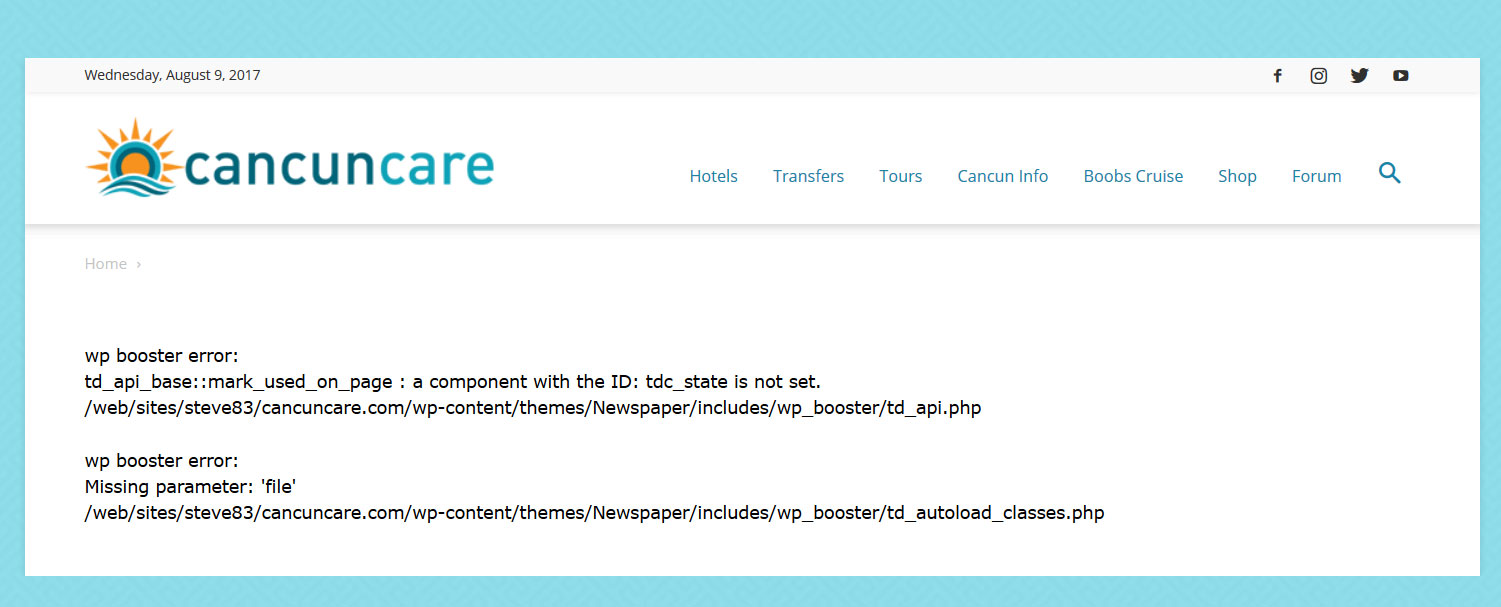
With tagdiv composer deactivated and visual composer activated my pages give the following error.
wp booster error:
td_api_base::mark_used_on_page : a component with the ID: tdc_state is not set.
/web/sites/steve83/cancuncare.com/wp-content/themes/Newspaper/includes/wp_booster/td_api.php

wp booster error:
Missing parameter: 'file'
/web/sites/steve83/cancuncare.com/wp-content/themes/Newspaper/includes/wp_booster/td_autoload_classes.php
(screenshot http://www.cancuncare.com/screenshot/homepage-with-vc.jpg)
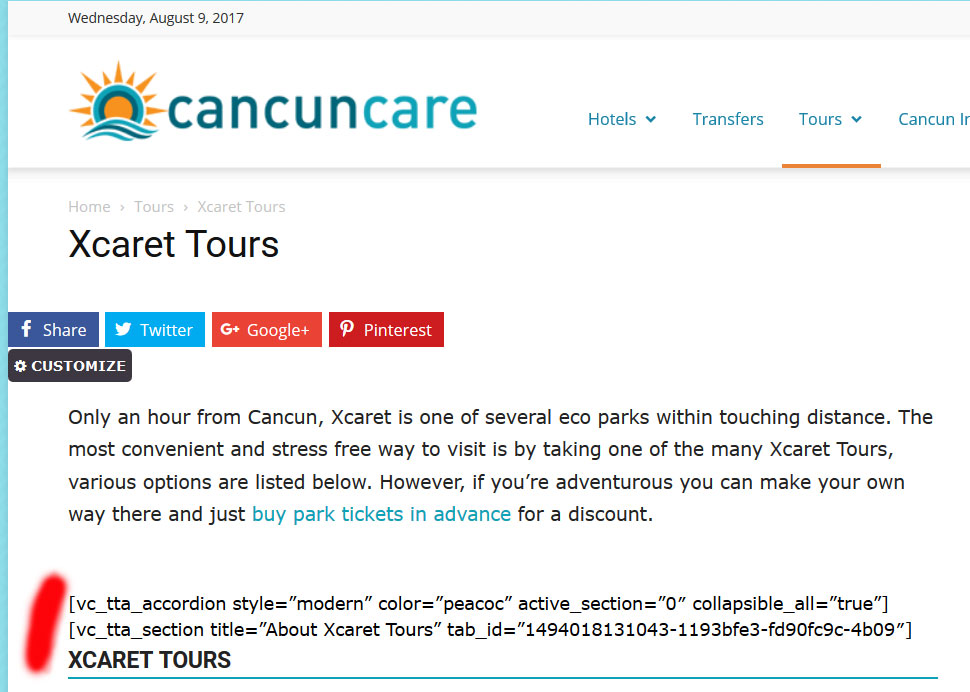
With tagdiv composer activated and visual composer deactivated many elements do not show at all, instead displaying the visual composer code.
(screenshot http://www.cancuncare.com/screenshot/page-with-tc.jpg)
The only way I have found to get the pages to show somewhat correctly is to install and activate both tagdiv composer and visual composer, which when I do so results in some page elements rendering incorrectly (images showing at an incorrect size and sidebars appearing below content). Re-making these pages from scratch results in the exact same problems. I understand having both tagdiv and visual composer enabled is not good. But disabling tagdiv results in the wp-booster error, and disabling visual composer results in elements not displaying.
I have been going round in circles for the last 5 days and am no further on than when I started. I really need a proper solution to this, the latest Newspaper update (8.1) broke my site and I need to get it fixed.
I am happy to provide wordpress login and ftp details if you could advise me on a secure way to do this.
 epicmag
 Thank you Catalin. I just sent the email with admin login credentials.
FYI, At this point, I have completely removed most old plugins and deactivated those that are specifically not included with the theme. I have overwritten all of the core WordPress files with a fresh install of 4.8.1, deleted and then re-installed the theme on 2 separate occasions, double-checked for any caching resources, and still the issues persist. I am at a loss as to why this isn’t working.
Thanks for your continued assistance!
 simchris
 See the theme docs on how to install the theme. Good place to start:
https://forum.tagdiv.com/newsmag-documentation/
steve83 All was working fine before the latest update. It was the update that broke things.
As mentioned, following the update the pages showed a wp booster error and did not render at all. Activating tagdiv composer allowed the page to show but the strange rendering of pages explained above occurred. At no time were any pages created with tagdiv composer, it was only installed for the first time with the latest update.
I then reinstalled Visual composer via ftp, deactivated tagdiv composer and the pages rendered again but still had the weird display errors. I then removed tagdiv composer and wp supercache. I reinstalled the whole theme via ftp (minus tagdiv composer) but the problem continues.
I guess the only way to fix these issues are to build all affected pages from scratch, at least 20 pages around 20 hrs of work I didn’t anticipate 🙁
-
This reply was modified 9 years by
steve83.
 micheal221
Hi I’m new, how you can image. I would customize the template that i’ve install to the follow address http://www.magnificatoscana.it. with that structure. I need to pay you for unlock the template or i just can replace your sample with my data?
If you don’t understand, tell me where i can send you a screenshot.
Regards Simone
 emceenetwork
I just installed the theme.
I tried to edit the homepage with the TagDiv Composer and immediately got this error:
Errors happened during tdcIframeData.init() -> bindViewsModelsWrappers()!
 Matthew
Hello,
On mobile with the mobile plugin installed the menu button is not clickable and the arrow button to get to the top no longer appears.
Site:http://www.monkeysfightingrobots.com/
Thank you for your help.
 mitsus
Hi,
I installed Travel Demo, but I’ve a problem on homepage…please see image attached.
Can you help me to solve please?
Thanks in advance
 javier_sanhueza
 ok, thanks.
BTW, I get this error when trying to install “WP Super Cache- caching plugin”.
Incompatible plugin: This plugin is not supported on WordPress.com.
Do you know why it says it is incompatible?
Javier
 Optival
 Sorry, I am confused here. If I have a category that made up of private and public posts. The default wordpress would allow me to view those private and public posts if I were to sign in as administrator.
But when I use Newspaper theme, despite sign in as administrator, I can only view the public posts?
Further, I noted if I install user access manager plugins or other similar plugins, to assign category or page in the menu bar as private, it has absolutely no effect on the frontend, ie. a visitor would able to view the category/page displayed at the menu bar!
Please advise.
 Catalin
 Hello bokitchan,
1)Errors happened during tdcIframeData.init() -> bindViewsModelsWrappers()!
Please do not use this setting in Seo by Yoast:
https://www.screencast.com/t/n8Cc35EofLh Also, if you are using the WP Super Cache plugin, please ensure that has been right setup according to our documentation here -> https://forum.tagdiv.com/cache-plugin-install-and-configure/
2)Also, the third important rule is to do not edit a page which was created with Visual Composer with TD Composer.
Also, I have inspected your website and I saw that you are using some untested plugins which can interact with the theme core files and causes a lot of unknown issues like this.
Clear all the caches and check the results.
Thanks for your understanding!
 redshoepaul
Hey everyone, just after installing the theme, no images have been showing up other than the advertisement header. Updated to the newest version and it’s still not working. The theme worked flawlessly on my test server.. Examples below:
https://postimg.org/image/87v2dg46j/
https://postimg.org/image/4qt0ah54b/
https://postimg.org/image/400a4p2qz/
Is this in result to some poor CSS error by default? After trying to upload featured images myself, those still don’t show up either. Could this be a server side issue?
Thanks!
Catalin Hello nasadino,
Unfortunately, I do not exactly understand why do you have changed the N in n? Please leave the name of these files to be exactly when it comes from Theme Forest, like this -> https://www.screencast.com/t/Zfig6kYRQi22 Try to make a new clean install from scratch via FTP and please do not change anything and follow our useful guide here -> https://forum.tagdiv.com/install-via-ftp/
Thanks for your understanding!
Simion C. Hi,
Please try and reinstall the theme by FTP
– https://forum.tagdiv.com/install-via-ftp/
Also deactivate and delete the tagDiv composer, and install it again from the theme package.
Then deactivate all other plugins except theme plugins and clear all caching. Check the results and let us know.
Thanks
Simion C. Hi,
This is an unusual issue, I have not seen it before. Please update the theme by FTP
– https://forum.tagdiv.com/install-via-ftp/
Then deactivate all other plugins excpet theme plugins and clear any caching installed. If you use a child theme, switch to the main theme. Then check if the problem is still occurring. Please let us know the results.
Thanks
Simion C. Hi,
Something is not functioning properly on your website. A theme reinstall and testing with only Visual composer enabled should fix the problem. Clear any caching installed as well.
The single images you mention seem to be created with the tagDiv composer, maybe you used both editors on the same page. That is strongly not recommended and can create these problems.
Try recreating the page in Visual composer, or create a similar page with single image elements and check if they display like that. Keep the tagDiv composer deactivated.
Layout issues like sidebar being displayed below main content are also caused by plugins or custom code, or modifications to the theme files directly or through a child theme maybe.
Thanks
Catalin Hello riealeksandra,
Please keep in mind that the very simplest way in this regard would be to delete the old theme, download the latest version of it from Theme Forest and then install it via FTP way because this is the surest method in this case, according to our documentation here -> https://forum.tagdiv.com/install-via-ftp/
Hope this helps and let us know how it goes!
Thanks for the message!
 dldr24
 i did it. install and all configure. But same still. İ see old page again.
Simion C. Hi,
In some cases reinstalling the theme, or the composer also works
– https://forum.tagdiv.com/install-via-ftp/
Or try lowering the PHP version of your server if possible and test. Use the latest version of the theme, as it is compatible and tested with version of PHP up to 7.1.
Thanks
 Edward
 Don’t use other cashe plugin. Only WP Super Cache.
Cache plugin – install and configure: https://forum.tagdiv.com/cache-plugin-install-and-configure/
Simion C. Hi,
The recommended way of updating or installing Word press themes is by FTP. Please see this guide for more information about this, and also other steps to ensure a smooth update process
– https://forum.tagdiv.com/how-to-update-the-theme-2/
Auto update is also available through the Envato plugin, as mentioned in the guide.
Consider making backups, in case something goes wrong you can simply revert to a previous working website. Hopefully that will not be the case.
Any modifications made to the theme files directly will be lost, but nothing else will be affected (theme panel settings, custom code, posts, pages etc).
Plugins included with the theme can simply be deactivated and removed and then install the new ones from the theme package.
Other plugins that are working with the current version of the theme, may or may not work anymore after an update of the theme or of the plugin. That is the case with all themes and plugins.
If you want to make the switch to the tagDiv composer you will have to recreate the pages with the new editor
– https://forum.tagdiv.com/tagdiv-composer-tutorial/
– https://forum.tagdiv.com/visual-composer-tagdiv-composer-transition/
Some elements that were specific to Visual composer are not available in tagDiv composer. More options and features will be added to this front-end page editor exclusively, in future updates however.
Thanks