
No search results were found in Documentation!
 toimata
Hi,
How can i replace the logo on mobil header please ?
See attached capture: https://ibb.co/Pjnb21B
Regards,
Nicolas
 robbykasch
 how does it seem okay… :/ no logo, no favicon,no footer, random code on homepage, design just dissapearing on anything but homepage, everything is broken just dissapears and shows only article with wrong width n stuff
robbykaschDid update from 12.3 to 12.5 newspaper theme and homepage is broken after update.
Can somebody pls help. Shows random code on front page, no footer, no logo, and so on. (althalla.com)
 PKramik
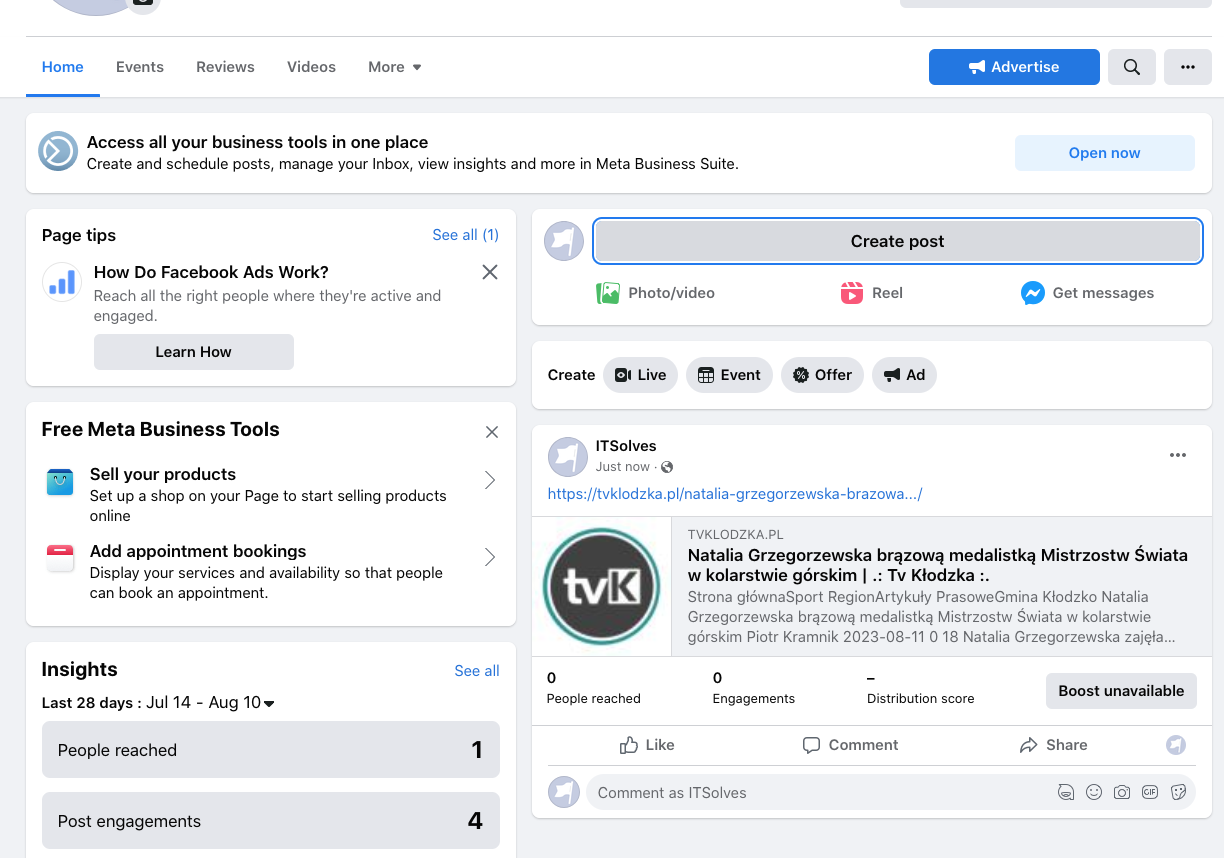
 I don’t think it’s a question of the size of the photos or illustrations. I noticed after adding a post on FB, only the logo of the page is loaded. There is definitely something wrong with the template. Because if I download the address from the demo site, it is displayed incorrectly, the logo is downloaded from our site. I am now adding two images, one shows adding a post and here is the image with news and the second one after adding to the FB page is just the logo of the page.
Create a post:

Added post:
 Bettina
 Hello!
First of all, you should upload a smaller logo picture. You can set a smaller font size for the menu items as well.
Thank you!
Bettina Hello!
Your logo can be placed twice, for example, in the mobile viewport. Disable the H1 from the mobile, for example, in order to have only one H1.
Thank you!
 newpaperwptheme
How can I make the sticky header shrink when scrolling? I mean less height and smaller logo. My site is math.gr and I use the “header template 19 – city news”
 GreatestGamers
 Thank you for your reply. The only thing that is creating the H1 tags is my header logo. If I disable the H1 on my header logo both H1 tags are removed, which means that my header logo for some reason creates two separate H1 tags. On my homepage, I want it to be a H1 but when I enable it for H1 it creates two separate H1 tags instead of one. Could you let me know how to fix this, thank you.
Bettina Hello!
Check in the TagDiv Composer and disable the H1. For example, H1 from logo(header, footer, mobile): https://forum.tagdiv.com/topic/6-h1-tags-on-front-page-bing-have-deindexed-my-site/
Thank you!
GreatestGamersHi my website url is https://greatestgamers.com/ and this question is about my homepage (which is found at this url)
My homepage has an issue where it is showing double H1 tags. This is not an issue on my other webpages as I enabled the option to disable H1 tags on all pages except the home page in the theme settings. However, for my homepage I want to keep the H1 tags so I kept the option enabled on the tag div composer. However, when I keep the H1 tags for my logo on my homepage it creates an SEO issue where I know have H1 Tags x2. For some reason it gives my logo H1 tags on two seperate occasions, does anyone know a fix to this?
 Anamaria
 Hi,
You need to edit with tagdiv Composer in order to change the logo. Please delete the logo from the theme panel and check this guide https://i.imgur.com/cR7F0v4.png https://www.youtube.com/watch?v=HXQQygkCCJo -> https://forum.tagdiv.com/add-logo-newspaper/
Thank you!
 marlonbrand
Hi, thanks for whoever can help.
I go to the dashboard>newspaper>themepanel>header>Logo & Favicon
I have changed the necessary logos with the correct dimensions but it is NOT updating when I preview the site. I am using the GOSSIP pro theme. Please help, I have watched videos, cleared cache broswer, even tried editign with the TagDiv editor/composer, and nothing has worked. I am such under a strict deadline too. I need to have this website launched by Friday. PLEASE HELP!
Thank you
Bettina Hello @thegg !
Yes, you can do that. You need to duplicate the category template, change the name, make the changes, and assign them individually to your categories. If a category template is global, then every modification will appear the same in all your categories. You can assign/duplicate multiple templates. See https://forum.tagdiv.com/topic/different-logo-in-categorypage/ for more information.
Thank you!
Anamaria Hello,
You need to edit with tagdiv Composer, select the logo and in the tab style change the font size https://i.imgur.com/hK2nrNl.png
Thank you!
 willysawa
Please how do i reduce or increase the font size City PRO logo and also to adjust the align left of right
 contacthealthymug
 when i share a post in facebook then preview image is not showing only showing logo image, this issue occured last 3 days, how to fix that?
here is screenshot attached:
before- https://prnt.sc/x2uWHgLi8eOa
after- https://prnt.sc/6qj2tFJii9lo
Bettina Hello @dbaker !
You should add the logo in the tagdiv Composer and delete this text: https://prnt.sc/cR3KbwOxdroq
Thank you!
 dbaker
Hi. I have uploaded my logos in the header section of the theme panel but it is still showing the template logo “City” (I’m using the City Pro header template). Can you help me to get it to display my logo?
https://waystomakemoney.io/
Bettina Hello @nagi!
All these changes can be made very easily in the TagDiv Composer: https://forum.tagdiv.com/tagdiv-composer-tutorial/
More documentation about the cloud templates is here:
– https://forum.tagdiv.com/cloud-library-templates/
– https://forum.tagdiv.com/design-post-pages-using-cloud-library-templates/
– https://forum.tagdiv.com/cloud-library-category-templates/
You can assign/duplicate multiple templates. See https://forum.tagdiv.com/topic/different-logo-in-categorypage/ for more information.
You can add any element to the sidebar in the TagDiv Composer. If you add it to a template and make it global, then it will appear on every page that has been assigned that template. You can build a sidebar with the TagDiv Composer. Steps:
1. Insert one new row (or delete an existing one).
2. Divide into two columns (2/3 + 1/3).
3. You can add whatever element you want to the second column and consider it a sidebar.
Access Newspaper -> Prebuilt Websites, select “All” -> https://prnt.sc/Vga5V7yzrAkJ and you can find the demo and press install.
Some styles can be added with CSS code: https://forum.tagdiv.com/create-custom-code-using-the-browsers-inspector
You can use a flex block for the post’s list:https://forum.tagdiv.com/big-grid-flex-settings/ and https://forum.tagdiv.com/flex-block-settings-guide/ limit it at 10, and you can create another block, set another limit, and have an offset of 10: https://forum.tagdiv.com/offset-feature/ and the list will continue posting post after post without displaying the same post. For the desktop view, we have another feature that won’t let this happen: https://forum.tagdiv.com/unique-articles/
Also, we have a new block that you can use and customize more: https://forum.tagdiv.com/flex-block-builder-flex-loop-builder/
I hope that helps you!
Thank you!
Bettina Hello @willysawa !
Edit the page with the TagDiv Composer, click on the row, and delete it from here: https://prnt.sc/RM0BKeWELyPl, or change it because you won’t be able to see the text because it has a white color.
If you mean the logo, then you can delete or hide the text: https://prnt.sc/lab7psoo89oc
The color can be found in the Style tab: https://prnt.sc/v8fzHQtntXFT
Every page is fully editable with the TagDiv Composer: https://prnt.sc/auUzjEzB_X3Z
If you set this color for your article title and the template is global, then all your articles will have the same color for their titles. You can have different color titles if you duplicate the template, give it another name, and assign it to the special article.
More documentation about the cloud templates is here:
– https://forum.tagdiv.com/cloud-library-templates/
– https://forum.tagdiv.com/design-post-pages-using-cloud-library-templates/
– https://forum.tagdiv.com/cloud-library-category-templates/
Thank you!
 Tribun74
Hi, last question for today 😉
I have load a Header from the Cloud Libary ( Header Template 36 ).
I have change my Image Logo.
But I cant find the place where I can change this Background Image. Can ou help me here?

Thank you!
KR
Bettina Hello @fryant !
You can create and customize multiple header templates. One could be global, and one could be manually assigned to the page you need. You can change every setting in the elements we have already in the tagdiv Composer. Also, you can duplicate a template to have the same style but different settings for the elements in that template. See https://forum.tagdiv.com/topic/different-logo-in-categorypage/ for more information.
Unfortunately, you cannot have two search templates and put them into some links. It won’t work.
I’m not sure why you need this, but we have an exception for the CPTs. A CPT can have its own search template, which will show the results only from that CPT’s information.
Thank you!
Bettina Hello!
Make sure it is not hidden from the CSS tab and make sure the SVG logo from this tab https://prnt.sc/X4N8WJdeRT0M is set as hide and not show.
Thank you!
 amrit.atc.in
 Hi,
As you suggested, I deleted the cache and also tried to remove and re-add the mobile logo and retina logo. But it still not showing. https://prnt.sc/Ms9oBJ1ycW-a
Can you please try to do this from your end?
Waiting for your response.
Thanks.
Bettina Hello @Royce111 !
It’s a SVG logo, and you need to set it as hide here: https://prnt.sc/95y-KZ6ZNvIi
Thank you!


