- NewspaperWhen tagDiv Composer is Not Working
- TutorialsSystem status parameters guide
- NewspaperCache plugin – install and configure
- NewsmagRequirements for Newsmag
- NewspaperRequirements for Newspaper
 prem
premAfter I update the new version of the theme my server was down most of the time and the hosting provider is saying due to some plugin problems. he is saying “So I suspect an issue with memory maxing out, leading to CPU process being stuck (maybe MySQL queries”
“Logs show that the main processes consuming the resources are from [index.php] which is mainly due to activity of plugins/themes. Unfortunately, it does not cite which particular plugin/theme is causing the problem.
If this only happened recently, maybe you can review if any plugin or theme was installed or updated recently?
”
Could you suggest to me if any plugin I can disable to minimize the use of memory and enable only when I am required to use and disable it again?
Thanks,
Prem
 Rafael
 Good day to you. Was this issue ever resolved for you? I’m asking because I’m experiencing the same issue and I’ve been waiting for some time for a resolution and I haven’t received one as yet. You can read my thread here: https://forum.tagdiv.com/topic/cpu-and-memory-100-usage-admin-ajax-php/.
Removing my post views and comment counts is not a suitable work around for me as these are theme functions that should work properly and should be fixed if they are causing issues.
Regards,
Raf

 Calin
Calin Hi Stanford Nix,
If the WP_MEMORY_LIMIT is already set on 256mb then yes, you can let it like that.
Thank you!
 Stanford Nix
 I just got my own dedicated server. The capacity I have is 16G. Do i need to change the WP_MEMORY_LIMIT? Or can I just leave that alone? It is currently showing green
 rabinmahmud
Hello,
I have installed the newspaper theme on my website. It’s telling me that my WP Memory Limit: 40 MB, however, I can see it is 512MB.
Also when I edit a post it’s not working smoothly. The screen just freezing!
Can anyone help with this?
Calin Hi,
1. The color for the mod_substitue is still yellow because the theme do not check the code from the .htaccess, but if you set the code there, then that configurations is ok.
2. Yes, the WP_MEMORY_LIMIT was set correctly (the theme can check the php settings). But, please notice that is more for the backend. If you have a large traffic, you need to use for your website a dedicate server
-> https://i.imgur.com/zi1RqDi.png -> https://forum.tagdiv.com/requirements-for-newspaper/
Thank you!
 mkioutsiouki2
Hello, i check my installation of newspaper and every time i am enabling tagdiv composer i have a 200% cpu process on my dedicated server.
My specs are.
1. Dedicated core i9 16 cpu
2. 64gb MEMORY
3. NVMe HDD
Cloudlinux
Litespeed
For my installation only: 6CPU, 6gb MEMORY.
wp rocket, rocketcdn, cloudflare.
Help me please.
 Ibalex
 I do not think it is the case of alignment. Practically speaking, if you visit the website, go to the pop-up menu and click the categories Lagos legends (has 3 posts), In loving Memory (has 2 posts), Abuja: Builders & Reformers/Updates & Trends (has 1 post). All these categories I have listed are not displaying their corresponding post. The question is why these categories are not displayed. I need to resolve this issue for my client.
Secondly, the category Peculiar People has 5 posts, but only 2 are displayed when clicked. I do not understand this kind of anomaly.
The Change makers and the Portraits of Patriots categories are displaying just fine. They have over 15 posts each. I wonder if there is a minimum number a category should have before posts under it can be displayed. I hope I am clearer this time. Thank you
Stanford Nix I think I got it. Here are some questions:
1) I have added the mod_substitue code on the file. I did it both before the “# end WordPress” and I also added it after the ‘# end wordpress’. Both of these still show yellow in the system status
2) have set the WP memory. It now shows green in the system status here. Is this correct? And also, how much traffic can I hold? On Tuesday, I will probably have over 100,000 people visiting my site and I need to make sure it wont crash.
-
This reply was modified 4 years by
Stanford Nix.
 honlim
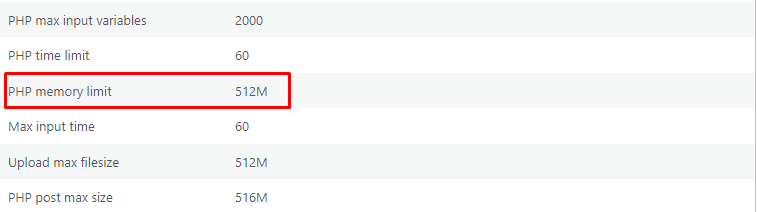
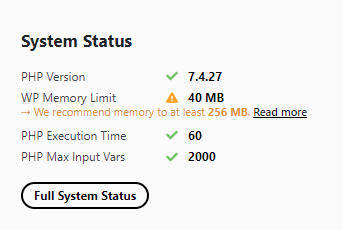
The following images are issue i consulted with my hosting company.
These are the maximum allowable value permitted for my shared host WordPress.
Are there know known issues if I disregard the system status and continue using Newspaper theme?
system status
maximum allowable value
 trademodo
 I had the same issue as you before, and I contacted my hosting provider (SiteGround), and they were able to update the WP memory limit for me.
Stanford NixI have no idea how to change these system status settings
I need to update my memory and the system. On Tuesday I will have around 100,000 people visiting my site and I CANT let it crash.
The help documents are pretty useless. I have no idea what they mean or how to make the changes.
1) Do i need to update my PHP version? if so, how?
2) I don’t know how to change my memory
3) what is PHP max time and input vars?
Please someone help, I HAVE to update these so I can launch my website on Tuesday
 lopetoms
 The new version of the screen is broken, it blocks me even the IP of my server with my local internet. if i install another template it works great just with you guys
System Status
PHP Version
8.0.15
WP Memory Limit
256 MB
PHP Execution Time
1000
PHP Max Input Vars
2000
lopetomsInternal Server Error
The server encountered an internal error or misconfiguration and was unable to complete your request.
Please contact the server administrator at root@localhost to inform them of the time this error occurred, and the actions you performed just before this error.
More information about this error may be available in the server error log.
System Status
PHP Version
8.0.15
WP Memory Limit
256 MB
PHP Execution Time
1000
PHP Max Input Vars
2000
 theleaderdotinfo
 Have you increased the memory limit in the php.ini?
 bcee
bceeHi,
I cannot increase the memory to 256MB.
I have performed the expected procedure by inserting define( ‘WP_MAX_MEMORY_LIMIT’, ‘256M’ ); in the wp-config.php file, but it doesn’t work.
Where do I go wrong?
Best regards
 Bettina
 Hello @RichBrun!
Please follow the steps from this topic: https://forum.tagdiv.com/topic/php-memory-limit-not-detected-correctly/
Thank you!
 RichBrun
My PHP Memory Limit was increased to 2GB, which is much higher than the recommended 256MB. However, the System Status for WP Memory Limit is still displaying as a yellow status.
 andreaskas
Hi,
I noticed that if i provide an invalid parameter on p, for example https://www.agrinio-sports.gr/?p=invalid
i get internal server error. The reason is that the memory is being exhausted because it tries to load ALL the posts since day one and show them. No matter how i increase the memory, the issue persists. I even tried with 1GB limit just out of curiosity.
One of the files that is involved in the process is /plugins/td-composer/legacy/Newspaper/loop.php which loop through the files.
Is it possible to either limit the posts with paging, or just return a 404 in case the post provided in the parameter is not valid?
Thanks
 theulsterfry
 Hi guys,
Thanks for your input. Just reporting back as I tried all of the above to no avail (sorry Bettinna) and so I escalated it to my hosting provider again (who had already ensured all php memory limits were met) as I suspected something else was underlying.
It turns out reason this wasn’t working was because it was triggering ‘mod_security’ rules within my hosting environment that were preventing the ajax calls from working. In short, these systems were blocking the calls to save_post, as it was being flagged as ‘XSS Attack Detected via libinjection’. They were thus able to whitelist the activity and now everything works as expected. There were two rules whitelisted I believe, one for page load and the other for save, which would correlate to the two 406 errors in my console log.
My hosting is a pretty standard linux setup, with widely available security features, and so others may have similar setup running on their host. Just sharing in case it helps others and/or tagdiv guys wanna include some caveats in your documentation.
The system is now working 100% fine and is really fast and powerful btw. I jumped from V8 of newspaper to this, and it’s quite the leap. Excellent work.
Calin Hi greenleads_bg,
Please set the wp_memory limit in the wp-config.php file, you can add it there the line of code like in our guide https://forum.tagdiv.com/requirements-for-newspaper/ then the problem will be solved.
Thank you!
 greenleads_bg
Hello,
We recently purchased both your themes, but I noticed that on both we get the same warning on the PHP Memory Limit even though the limit is increased accordingly.
We have noticed this on both themes, tested on two different hosting providers, same warning always appears, no matter how we set up the PHP config, tested via the hosting tools, php.ini, wp-config, .htaccess nothing makes the warning go away.
https://i.postimg.cc/gk11k191/Server-stats.png
https://i.postimg.cc/ZKW1m4Qr/theme-warning.png
Please advise how to resolve this and if it could impact theme performance in the end or is it simply a false warning?
Thank you in advance for the time and help on the matter.
Calin Hi sruhtbackend, can you please provide some more details abut the cloud templates. Is this not opening?
If you get the “Invalid reply from server endpoint error” is caused by insufficient WP_Memory_limit, if you’ll set it to 256M, and is still not working, please check the rest of settings from our guide -> https://forum.tagdiv.com/requirements-for-newspaper/
An working alternative for that situation is to open the cloud library from the frontend. For example you need a cloud category, go on a category and click on cloud -> https://i.imgur.com/rtOlQ9K.png also the cloud can be opened from tagDiv Composer -> https://i.imgur.com/tSMIb9e.png
Thank you!
 MovieMaG
 Hi Bettina,
I did what you asked, but it makes no difference. What I find weird is that it’s not the Div composer itself that’s crashing, but simply the page that lists all the cloud templates. Why would an overview page require so much memory?
I truly hope you can help.
Martin
MovieMaGHi!
I’ve been using your Newspaper template for some weeks and I’m loving it. However, I’m running into some issues all of a sudden.
For some reason I can’t access the cloud templates anymore. When I click cloud templates, I get this error:
HTTP ERROR 500
I looked in the server logs and this is the error:
2022/02/04 00:08:17 [error] 22385#22385: *4651968 FastCGI sent in stderr: “PHP message: PHP Fatal error: Allowed memory size of 268435456 bytes exhausted (tried to allocate 20480 bytes) in /www/martingijzemijter_121/public/wp-includes/meta.php on line 1190PHP message: PHP Fatal error: Allowed memory size of 268435456 bytes exhausted (tried to allocate 102400 bytes) in /www/martingijzemijter_121/public/wp-includes/functions.php on line 5212” while reading response header from upstream, client: 213.10.70.207, server: martingijzemijter.nl, request: “GET /wp-admin/edit.php?post_type=tdb_templates HTTP/1.1”, upstream: “fastcgi://unix:/var/run/php7.4-fpm-martingijzemijter.sock:”, host: “martingijzemijter.nl:26715”, referrer: “https://martingijzemijter.nl/wp-admin/”
I tried disabling all plug-ins, what I’ve found is: when both WooCommerce and tagDiv Composer are enabled, I get this error (so with ALL other plug-ins disabled). If I disable Woocommerce and enable tagDiv Composer it works, and if I disable tagDiv Composer and enable Woocommerce it works.
The weird thing is, its just the overview page that’s not working. I can actually edit the templates, just not access the page linking to them.Would you have any idea how to fix this?
Thanks in advance!
Martin