
- NewspaperWhen tagDiv Composer is Not Working
- TutorialsSystem status parameters guide
- NewspaperCache plugin – install and configure
- NewsmagRequirements for Newsmag
- NewspaperRequirements for Newspaper
 Rafael
 Hey,
So I reached out to my host about admin-ajax.php and object cache possibilities and they checked them out. Apparently I needed to increase the memory limit and the pool buffer size on my server.
That just fixed the issue. Thanks.
 mnew
mnewMy preliminary research, debugging and testing discovered this theme causes a myriad of memory problems using PHP versions 7.2, 7.3 and 7.4. I dropped the PHP version down to 7.0 and now 2 different installations are working properly. Not sure what the problem is, but hopefully this helps someone.
 Calin
Calin Hi PaulAvery, the WP_MEMORY_LIMIT need to be set like in our guide, in config.php file.
The spinning wheel appears after you click on save settings from theme panel, then most probably you have an admin-ajax.php error, check the console to see if you get some errors.
Normally, admin-ajax.php is blocked by modSecurity from host, it can be from firewall or other security modules/plugins.
If you can not manage the situation, we can do it for you, for this, make a full backup and contact us at contact@tagdiv.com provide wp-admin and cPanel, also provide as many details as you can about the problem.
Thank you!
 PaulAvery
I have spent hours on trying to get this theme working. I have been on with tech with my host and now know that it is not on their end. I verified that all the requirements are met. I increased the WP_MEMORY_LIMIT, but I still have a 40M warning (I even checked in WP tools and it’s set to 512MB) and get a spinning wheel when I try to do anything. Does this theme just not work?
 Takara
 Hello,
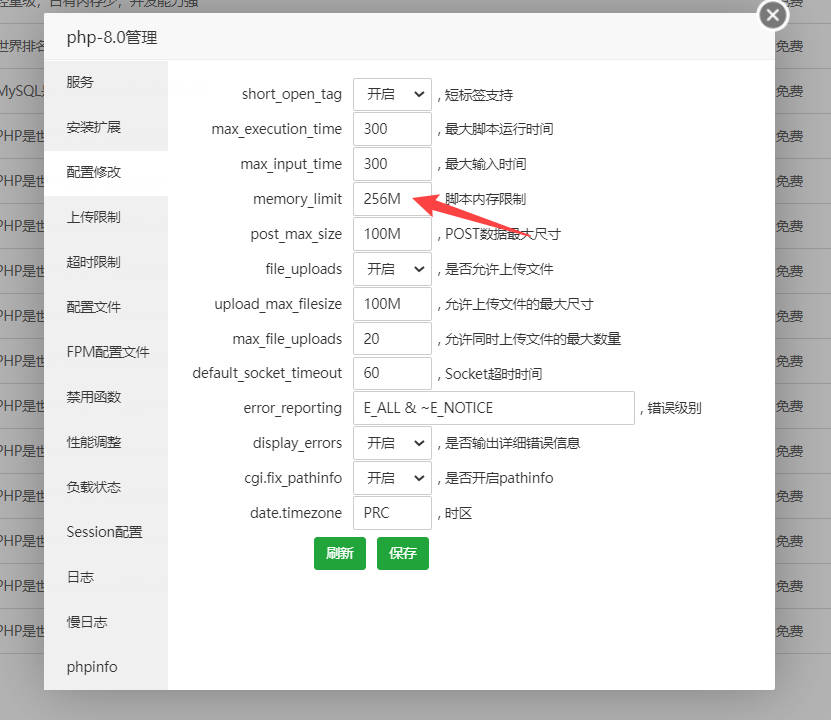
i have the same problem, i have set memory_limit and
post_max_size / upload_max_filesize to 600 and it tells us the same problem in tagDiv Cloud Library (
Invalid reply from server endpoint.)
The tag div composer plugin doesn’t work either, and I can’t even install the tagDiv Multi-Purpose, it gives me an error.
 ar15usr
 **UPDATE**
I have defined in the wp-config.php file the:
define( ‘WP_MEMORY_LIMIT’, ‘256M’ );
define( ‘WP_MAX_MEMORY_LIMIT’, ‘512M’ );
and now the Theme Status shows:
WP Memory Limit 256 MB/request
…but the problem still persists.
ar15usrHello,
I just installed the latest Newspaper theme and cannot set/save any of the Theme Panel settings. Whenever I hit “save” I get the spinner and it never goes away. I have the Default PRO prebuilt installed.
Please advise…
Details:
Theme version: 11.4
WP Version: 5.8.3
MYSQL Version: 5.6.41-84.1
php.ini configuration
Server software Apache
PHP Version 7.4.27
allow_url_fopen = On
allow_url_include = Off
display_errors = Off
enable_dl = Off
file_uploads = On
max_execution_time = 5000
max_input_time = 5000
max_input_vars = 5000
memory_limit = 5000M
post_max_size = 4800M
session.gc_maxlifetime = 1440
session.save_path = “/var/cpanel/php/sessions/ea-php73”
upload_max_filesize = 4800M
zlib.output_compression = Off
I have the php “memory_limit” set to 5000M but your theme shows “40 MB/request”
 Anamaria
 Hello,
1. Please let me know how you translate the elements, I made a test and for me works well -> I load the translation from Theme panel -> Translations -> Translations -> https://i.imgur.com/z5z6Fp4.png > https://i.imgur.com/p6VffKT.png. The translation should apply to all pages/posts.
2. For me works well to hide the footer, also for you -> https://i.imgur.com/88H9PSK.png -> https://i.imgur.com/A8tEwiB.png, maybe was a problem related to the cache memory.
Thank you!
Calin Hi,
You can set the memory limit by editing the config.php file and adding this code
define( 'WP_MEMORY_LIMIT', '256M' );
also the steps are provided in our guide -> https://forum.tagdiv.com/requirements-for-newspaper/
For the problem with widgets, I think that some of theme will still be there even with the theme disabled, so the best solution will be to install the classic widgets plugin -> https://i.imgur.com/Sy5eqiD.png
Thank you!
 GusV
GusVHello Support team,
I am having trouble accessing my widgets I keep getting many error messages please refer to the images. https://ancientcoinnews.com/wp-content/uploads/2022/01/7.jpg
https://ancientcoinnews.com/wp-content/uploads/2022/01/8.jpg
https://ancientcoinnews.com/wp-content/uploads/2022/01/6.jpg Also I was wondering if this has to do with not having enough memory please see this image: https://ancientcoinnews.com/wp-content/uploads/2022/01/9.jpg
Thanks.
Gus
Anamaria Hello,
Usually the “Invalid reply from server endpoint error” is caused by insufficient WP_Memory_limit, if you’ll set it to 256M, and is still not working, please double it and check the rest of the settings from our guide -> https://forum.tagdiv.com/requirements-for-newspaper/ also make sure that you are using SSL and you have a good bandwidth, the one from our server is 1GB/s and the one that I use at home is 500MB/s, if you have low bandwidth, then you can access parts of the cloud, this can be done from the frontend, for example, if you are on a post -> https://i.imgur.com/4G74M7F.jpg or from tagDiv Composer -> https://i.imgur.com/2F6MhfI.png
If the problem is persisting and you have a good bandwidth, then we can take a look and see if there is not something different that interferes.
Thank you!
 nwnuyhs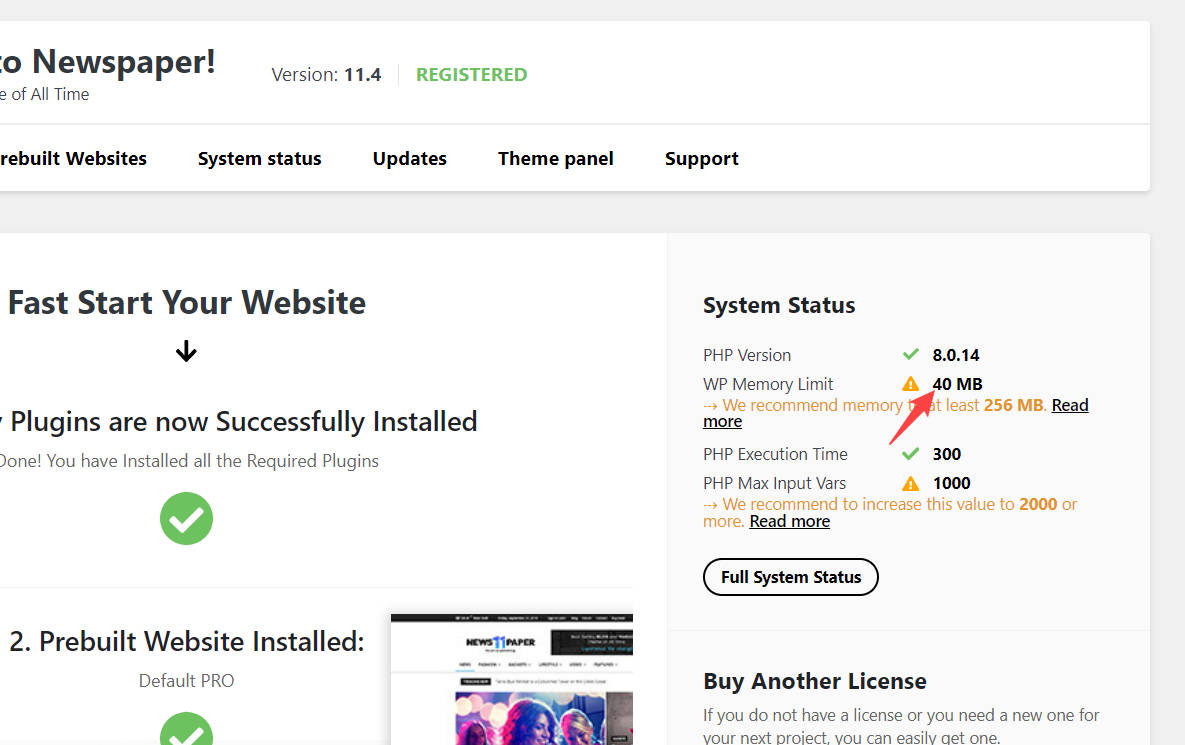
 Anamaria
 Hello,
Usually the “Invalid reply from server endpoint error” is caused by insufficient WP_Memory_limit, if you’ll set it to 256M, and is still not working, please double it and check the rest of the settings from our guide -> https://forum.tagdiv.com/requirements-for-newspaper/ also make sure that you are using SSL and you have a good bandwidth, the one from our server is 1GB/s and the one that I use at home is 500MB/s, if you have low bandwidth, then you can access parts of the cloud, this can be done from frontend, for example, if you are on a post -> https://i.imgur.com/4G74M7F.jpg or from tagDiv Composer -> https://i.imgur.com/2F6MhfI.png
If the problem is persisting and you have a good bandwidth, then we can take a look and see if there is not something different that interferes.
Thank you!
Anamaria Hello,
Please make sure that all theme requirements were set as in our guide https://forum.tagdiv.com/requirements-for-newspaper/ you can try to double the wp memory limit, and please make sure you do not have a plugin conflict.
Here is an article about how to fix this problem:
There has been a critical error on your website.
Also, please check the permalinks and re-save them -> https://i.imgur.com/MQPtVzl.png
Also, please let me know if you use WordPress.org or WordPress.com -> https://wordpress.com/support/com-vs-org/
Hope it will help you!
Thank you!
 Tdoc31
4 articles out of 17 do have the wp_booster error
https://lemagdici.com/2021/07/pour-une-meuse-potable-des-villes-se-mouillent/
https://lemagdici.com/2021/07/une-maison-de-sante-cest-plus-que-quatre-murs/
https://lemagdici.com/2021/07/axoncable-de-retour-sur-mars/
https://lemagdici.com/2021/07/a-lecole-dingenieurs-la-securite-se-pense-globale/
I read a lot, and can get my head around why they have this error
Version: 11.3.2
Active plugins
tagDiv Cloud Library
tagDiv Social Counter
tagDiv Mobile Theme
Official AMP for WP
system status is ok ( cache addon is not being detected)
PHP Version 7.4.26
WP Memory Limit 265 Mo
PHP Execution Time 120
PHP Max Input Vars 5000
I really dont know what to do !! any help out there ?
 Bruno Riggs
 I solved this by adding the line
define( ‘WP_MEMORY_LIMIT’, ‘256m’ );
In wp_config.php under the <?php
Try it.
 bodhi.blog
 Dear team,
So sorry, I just fixed this problem.
Thanks 😀
PHP Version
7.4.26
WP Memory Limit
256 MB
PHP Execution Time
120
PHP Max Input Vars
5000
 bob@mrrogersweborhood.com
When creating a new footer cloud template, selecting ‘retro’ footer, when editing it, the following errors occur:
https://www.dropbox.com/s/cd4zkxkuo0r1g9r/Screenshot%202021-12-15%2012.56.22.png?dl=0
https://www.dropbox.com/s/47srwfk27s1a2s3/Screenshot%202021-12-13%2013.02.51.png?dl=0
Our web hosting provider, iPage indicates there’s plenty of disk space and memory available.
Please let me know what additional information you might need for troubleshooting.
Thanks.
Bob
 Bill Fleak
We have created a new site in our dev environment and all works perfectly in the dev environment. When we deploy the dev site to the new production (live) environment and point our domain to it, we are receiving many PHP Out of memory errors.
This is only happening when the site is live to the public and starts receiving a lot of visitors (traffic).
The sites PHP.ini memory limit was 256MB on the dev and prod and we bumped this up to PHP.ini memory limit to 756MB to see if this resolve the issue. No LUCK..Same errors.
Do you have any insight into what may be causing this? I can send over site credentials if needed. Your assistance is greatly appreciated.
Below are a few lines of error code from our Apache error log:
[Thu Dec 09 15:25:28.953395 2021] [proxy_fcgi:error] [pid 2809:tid 140591727834880] [client 175.176.54.3:16106] AH01071: Got error ‘PHP message: PHP Fatal error: Out of memory (allocated 4194304) (tried to allocate 24576 bytes) in /bitnami/wordpress/wp-content/plugins/td-composer/legacy/common/wp_booster/td_css_buffer.php on line 33’, referer: https://www.google.com/
[Thu Dec 09 15:26:00.081537 2021] [proxy_fcgi:error] [pid 3333:tid 140592038266624] [client 198.245.41.130:55658] AH01071: Got error ‘PHP message: PHP Fatal error: Out of memory (allocated 27262976) (tried to allocate 20480 bytes) in /bitnami/wordpress/wp-content/plugins/td-composer/legacy/common/wp_booster/td_util.php on line 2934’
[Thu Dec 09 15:26:00.585914 2021] [proxy_fcgi:error] [pid 3465:tid 140592969332480] [client 198.245.41.130:46019] AH01071: Got error ‘PHP message: PHP Fatal error: Out of memory (allocated 14680064) (tried to allocate 40960 bytes) in /bitnami/wordpress/wp-content/plugins/td-composer/legacy/common/wp_booster/td_util.php on line 2937
[Thu Dec 09 15:26:06.486111 2021] [proxy_fcgi:error] [pid 2825:tid 140592558319360] [client 198.245.41.130:16087] AH01071: Got error ‘PHP message: PHP Fatal error: Out of memory (allocated 6291456) (tried to allocate 61440 bytes) in /bitnami/wordpress/wp-content/plugins/td-composer/legacy/common/wp_booster/td_css_res_compiler.php on line 18’
[Thu Dec 09 15:26:09.981622 2021] [proxy_fcgi:error] [pid 3333:tid 140591744521984] [client 66.249.66.158:40280] AH01071: Got error ‘PHP message: PHP Fatal error: Out of memory (allocated 6291456) (tried to allocate 57344 bytes) in /bitnami/wordpress/wp-content/plugins/td-composer/legacy/common/wp_booster/td_css_compiler.php on line 74
 sellim81
Hello,
I started to use Newspaper theme again on my tech-news platform. I installed pre-build template and I can not change it. I am trying to edit the theme through TagDiv Composer. When I am adding somethings, there is only loading screen. Nothing is coming no matter how long I wait.
Also, if I check something from the cloud, there is Invalid reply from server endpoint error. I searched in the forum and increased the WP Memory Limit to 256M, nothing changes.
Thank you.
Anamaria Hello,
Please make sure that all theme requirements were set as in our guide https://forum.tagdiv.com/requirements-for-newspaper/ you can try to double the wp memory limit, and please make sure you do not have a plugin conflict.
Here is an article about how to fix this problem:
There has been a critical error on your website.
Also, please check the permalinks and re-save them -> https://i.imgur.com/MQPtVzl.png
Also, please let me know if you use WordPress.org or WordPress.com -> https://wordpress.com/support/com-vs-org/
Hope it will help you!
Thank you!
Anamaria Hello,
You need to set the wp-memory in the wp-config.php file is located in the WordPress root directory, not in the file .htaccess
Please make sure that all the settings are like in our requirements, please follow the guide carefully
– https://forum.tagdiv.com/requirements-for-newspaper/
and please increase all lower requirements, and follow all steps.
Thank you!
bodhi.blogI got problem about WP Memory Limit as below.
Could you please me to solve to this problem.
https://upanh.org/image/2LcPwV

 verona2020
Instalo el tema Newspaper en worpress y se instala correctamente pero no me deja instalar los plugins.
Fast Start Your Website
1. Install or Update the required Newspaper plugins
Easily Install and Activate the following tagDiv plugins
tagDiv Composer
Not installed
tagDiv Cloud Library
Not installed
tagDiv Social Counter
Not installed
System Status
PHP Version
7.4.26
WP Memory Limit
256 MB
PHP Execution Time
300
PHP Max Input Vars
10000
Buy Another License
If you do not have a license or you need a new one for your next project, you can easily get one.
Purchase License Now
No puedo enviar url porque el tema no se deja instalar
He copiado los textos…se podrá adjuntar una imagen? Cómo?
Anamaria Hello,
Please make sure that all theme requirements were set as in our guide https://forum.tagdiv.com/requirements-for-newspaper/ you can try to double the wp memory limit, and please make sure you do not have a plugin conflict.
Here is an article about how to fix this problem:
There has been a critical error on your website.
Also, please check the permalinks and re-save them -> https://i.imgur.com/MQPtVzl.png
Also, please let me know if you use WordPress.org or WordPress.com -> https://wordpress.com/support/com-vs-org/
Hope it will help you!
Thank you!



