- TutorialsFrom WPBakery to tagDiv Composer
- TutorialsWhat is Ajax preloading?
 Lamb
Lamb I had the tagdive mobile theme .. I should remove it ?
 Calin
Calin Hi,
This is because you are using the mobile theme plugin, if you disable it then the responsive version will be displayed or you can create for each page a mobile page editor -> https://tagdiv.com/mobile-theme-get-mobile-ready-with-newsmag-theme/
Thank you!
 Bettina
 Hello!
The tagdiv Composer is the main plugin for this theme and it has a lot of customizations. For example, if you have a lot of elements on a page, then it could load a little bit slower. Our developers are working a lot to improve the page speed in every update.
Some factors which you need to take into account are:
External factors: server speed, if you are using CDN or not, the external resources loaded by your website like ads, fonts, tracking scripts like Facebook Pixel, Google Analytics, Twitter analytics, Hotjar and so on.
Internal factors: the number of elements on the page, image size, image formats, if you are using mobile optimized layouts, console errors, if you are using the Standard Pack plugin on not, if you are using PRO demo or a standard one.
Please check the tutorials from those platforms gt metrix and Google Pagespeed Insights and I’m sure you can increase the page speed.
Please note that the page speed is not covered by the support team: https://forum.tagdiv.com/newspaper-theme-support/
Also, check this useful guide: https://www.xtechkr.com/optimize-newspaper-theme/
Other useful tips here: https://forum.tagdiv.com/topic/%e2%9a%a0-very-slow-image-load-help-needed/
Hope that helps you!
Thank you!
Bettina Hello!
Please try to reinstall the Mobile Theme plugin, clear all cache.
Make a test and deactivate ALL plugins except tagDiv ones, also if you are using a cache plugin, deactivate it, clear all cache and try again.
If this problem is not solved after that, then we need to take a look and see what happened there.
Please contact us via email at contact@tagdiv.com and provide the following:
– admin url and credentials
– cpanel url and credentials
– a link to this topic in order to identify you
Our team will take a look!
Thank you!
Bettina Hello!
The Mobile Theme is a performance optimized theme included in the Newspaper main theme and it loads only for mobile devices. It comes with its own templates/design for page, post, category, etc so your current templates from the desktop theme will get converted to the mobile theme layout.
Documentation here:
– https://forum.tagdiv.com/the-mobile-theme/
– https://forum.tagdiv.com/mobile-theme-introduction/
Also, you can not customize AMP so much, because it comes with its own design: https://forum.tagdiv.com/tagdiv-amp-plugin-tutorial/
There are some settings in the Theme panel -> Mobile Theme and Dashboard -> AMP.
Thank you!
Bettina Hello!
I’m sorry to hear about that, but our developers are working a lot to improve the page speed in every update. Make sure you use the latest update of the theme and plugins.
Some factors which you need to take into account are:
External factors: server speed, if you are using CDN or not, the external resources loaded by your website like ads, fonts, tracking scripts like Facebook Pixel, Google Analytics, Twitter analytics, Hotjar and so on.
Internal factors: the number of elements on the page, image size, image formats, if you are using mobile optimized layouts, console errors, if you are using the Standard Pack plugin on not, if you are using PRO demo or a standard one.
Please check the tutorials from those platforms gt metrix and Google Pagespeed Insights and I’m sure you can increase the page speed.
Please note that the page speed is not covered by the support team: https://forum.tagdiv.com/newspaper-theme-support/
Also, check this useful guide: https://www.xtechkr.com/optimize-newspaper-theme/
Other useful tips here: https://forum.tagdiv.com/topic/%e2%9a%a0-very-slow-image-load-help-needed/
Hope that helps you!
Thank you!
Bettina Hello @leandrocastro!
Please try to reinstall the Mobile Theme plugin, clear the cache and let me know the results!
Thank you!
Calin Hi,
It depends on what you mean by a fully compatible cache plugin. If you are referring to the settings that need to be used to work correctly with the theme, then both of the above plugins can be used, for WP Super cache we have a guide, and for WP Rocket we can give you a guide that works.
Now the problem is that depending on how each website is created, what elements it contains and what resources it still has, some webmasters need help to get a better speed for the mobile version. So our theme besides the responsive version offers me 2 more options.
Mobile page templates, these are mobile templates that can be made for pages and cloud templates with tagDiv Composer -> https://i.imgur.com/Uz85flw.png -> https://i.imgur.com/LR03SYa.png
Mobile theme plugin, is a plugin that uses a simple layout and elements without builders, as a consequence the pages must be rebuilt using mobile editor or you can use the responsive version.
Here is a video for how to use those 2 mobile versions -> https://www.youtube.com/watch?v=SpGkOnJeNZY
Thank you!
Calin Hi,
Can you please try this custom css for mobile:
#tdm-popup-modal-td_m_5d6f.tdm-popup-modal-over-screen .tdm-popup-modal {
 display: none;
}
#tdm-popup-modal-td_m_5d6f.tdm-popup-modal-over-screen.tdm-popup-modal-open .tdm-popup-modal {
 display: block;
}
The code was set in the the theme panel > custom code> advance css> in mobile section.
Please check the website and let us know the results!
I hope this will help you!
Bettina Hello!
I’m sorry to hear about that, but our developers are working a lot to improve the page speed in every update.
Some factors which you need to take into account are:
External factors: server speed, if you are using CDN or not, the external resources loaded by your website like ads, fonts, tracking scripts like Facebook Pixel, Google Analytics, Twitter analytics, Hotjar and so on.
Internal factors: the number of elements on the page, image size, image formats, if you are using mobile optimized layouts, console errors, if you are using the Standard Pack plugin on not, if you are using PRO demo or a standard one.
Please check the tutorials from those platforms gt metrix and Google Pagespeed Insights and I’m sure you can increase the page speed.
Also, check this useful guide: https://www.xtechkr.com/optimize-newspaper-theme/
Hope that helps you!
Thank you!
 tgarmon032071
 No errors at all in console. Also, running debug mode. This is so frustrating and time consuming. Two things in composer do not work. Everything else works. Cannot save inline text content edits and reordering columns in composer mobile view. Look, I have a business to run. Im happy to pay you whatever you think is fair to look at this. Otherwise, I have to eat FIVE licenses for your theme and the cost of this tech support. Are you prepared to refund all of that?
Also, your email notifications for follow-up replies doesn’t seem to be working either. I haven’t gotten a single notification of a reply and have had to sift through all of these post to find mine. You should be able to view the site now. We have set Romania to bypass firewall continent block.
-
This reply was modified 4 years by
tgarmon032071.
-
This reply was modified 4 years by
-
This reply was modified 4 years by
tgarmon032071 Bettina,
I have been working in WordPress for 10 years. I know my stuff. I have debug running and there are no php or any errors. I have checked all of the items you suggested. No issues. We have dedicated hosting. Plenty of memory resources allocated to the installs. We have FIVE LICENSES. Right now, I’d be really happy with a refund of all licenses and this tech support if you cannot offer more than this. If I don’t get this glitch in your tag div composer solved, which many others seem to have, we will have to abandon this theme for one that isn’t full of glitches. At this point, I’ll pay PREMIUM to not continue to waste valuable time here.
Reordering mobile columns doesn’t work AT ALL and inline text WILL NOT SAVE EDITED CONTENT! This is getting really tiresome and frustrating.
-
This reply was modified 4 years by
-
This reply was modified 4 years by
-
This reply was modified 4 years by
 partharoy.heal
Hi,
Team Tag Div,
I installed the “Default Pro” prebuild website of the ‘Newspaper 11 theme’ in my website named viraljagat.com. But after customization, the header and footer are not showing properly on the mobile and desktop. Header logo also missing! Please help me to solve this problem as early as possible.
Below are the URLs of some of the photos:
1)https://sarkarijagat.in/wp-content/uploads/2022/04/Screenshot-25.png
2)https://sarkarijagat.in/wp-content/uploads/2022/04/Screenshot-27.png
3)https://sarkarijagat.in/wp-content/uploads/2022/04/Screenshot-26.png
4)https://sarkarijagat.in/wp-content/uploads/2022/04/Screenshot-24.png
5)https://sarkarijagat.in/wp-content/uploads/2022/04/Screenshot-23.png
6)https://sarkarijagat.in/wp-content/uploads/2022/04/Screenshot-22.png
My website is:https://viraljagat.com/
Gmail: info.papaisaha@gmail.com
Please help…
partharoy.healHi,
Team Tag Div,
I installed the “Default Pro” prebuild website of the ‘Newspaper 11 theme’ in my website named viraljagat.com. But after customization, the header and footer are not showing properly on the mobile and desktop. Header logo also missing! Please help me to solve this problem as early as possible.
Below are the URLs of some of the photos:
1)https://sarkarijagat.in/wp-content/uploads/2022/04/Screenshot-25.png
2)https://sarkarijagat.in/wp-content/uploads/2022/04/Screenshot-27.png
3)https://sarkarijagat.in/wp-content/uploads/2022/04/Screenshot-26.png
4)https://sarkarijagat.in/wp-content/uploads/2022/04/Screenshot-24.png
5)https://sarkarijagat.in/wp-content/uploads/2022/04/Screenshot-23.png
6)https://sarkarijagat.in/wp-content/uploads/2022/04/Screenshot-22.png
My website is:https://viraljagat.com/
Gmail: info.papaisaha@gmail.com
Please help…
 mastaliyev
hi
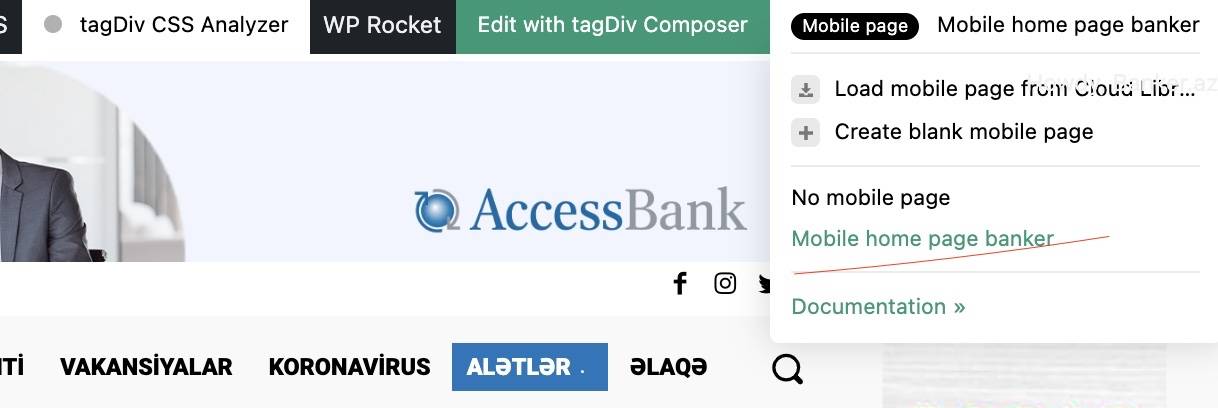
in my website (banker.az) everything worked fine, but i’ve changed something, don’t remember , no mobile theme is not loading. in composer i see that i’ve mobile them ,but it’s loading desktop verion in mobile. how to settle this? all detail page in mobile works fine. problem with only home page in mobile.
https://banker.az/wp-content/uploads/2022/04/Screen-Shot-2022-04-24-at-19.07.33.jpg
 Mclongx
Dear TagDiv,
I have two questions to seek your help:
1) Can I edit the links of the “menu login”( https://www.gowiselife.com/wp-content/uploads/2022/04/Screen-Shot-2022-04-24-at-5.06.59-PM.png ) , the icon and login settings on the upright corner?
The reason for editing the links is that I found the “menu login” direct all clicks to the pages belong to Metropolitan PRO’s Login/Register – metropolitan_pro pages, etc. What I need is to direct all member related pages to Ultimate Member’s user pages. But I can’t find a way to edit those links.
I could remove this “menu login”, but I do like the design of this login setting, it is one the reason I choose Metropolitan PRO theme. I really do not want to replace it by another menu there.
2)Can we edit the mobile menu in Metropolitan PRO?
The mobile menu page is the page appears when users touch the menu icon on the homepage in a mobile phone, the page in my site looks like this: https://www.gowiselife.com/wp-content/uploads/2022/04/IMG_7047.jpg
So far, I can only change the background image and turn on/off the “Sign in / Join”. I hope I can edit the links for those two words(for user logins) , and to redirect them to UM users pages.
Could you help me out?
Thanks!
 Nickolas Combatente
 i dont know what you mean by that: “The mobile page template can be also used on cloud templates”. Im a begginer in doing sites and with newspaper theme.
right, dont have a way to me use only one plugin than can make all the necessary stuff, like show mobile page only on mobile devices and the others cache things. What wanna say is dont have a complete cache plugin compatible with newspaper theme?
 Funjaan
 Hi Calin,
Thanks for your time and for your quick response. I have tried to disable the mobile theme.
Once disabled I see the responsive RTL magazine theme loaded for home page, but it is taking larger size than the display, for the normal posts again the old theme and again larger size than the display.
I tried to enable it again, still same themes load but this time with correct display size.
Anyway I will look into the documentation shared and follow the steps.
Thanks for your time and support.
Calin Hi Funjaan,
Do you want to use the mobile theme plugin? If not, just disable it and use the responsive version. Then the same layout from desktop will also be displayed on mobile.
Using the mobile theme plugin you need to make some settings form it in the theme panel, here is our guides for it.
-> https://forum.tagdiv.com/mobile-theme-introduction/
-> https://forum.tagdiv.com/the-mobile-theme/
Thank you!
 mikej
mikej I figured my issue out mate. I amended my mobile menu styles under Theme Panel > Theme Colours > Mobile Menu / Mobile Search.
Even if you have settings applied try hitting save again to force them through.
-
This reply was modified 4 years by
mikej.
Nickolas Combatente yes, the mobile page is set only to homepage, have problem in doing that?
i allready removed the images it was assigned in theme panel and im gonna do all the tests.
doing this small changes improve the speed, but is not greater yet.
one question i can use WP Rocket with WP Super Cache together?
 jtoney
Looking at my website which doesn’t have separate mobile themes, when I select the menu I see a color that I don’t have selected anywhere in the platform. Where do I adjust this? Its the same red color under search when I click the search icon. Any ideas?
Funjaan Thanks Bettina, I checked and all is set to RTL Newsmagazine.
All Post on desktop is showing correct theme, but on mobile its showing the old theme.
I went to one of the posts on desktop, clicked on edit then I find as per below edit mobile theme, once I click on it, i find the old theme. How to set the RTL newsmagazine for posts for mobile
Bettina Hello!
Please check if you have the Mobile Theme plugin active and uninstall it.
Thank you!
Funjaan Hi Bettina,
Thanks for your time checking my post and providing your feedback.
Well now the homepage is working perfect on mobile, it seems it took some time for clearing the cache and getting the new homepage. And frankly I don’t know which change i made that did the trick 🙂
However now the posts is still using the old theme, how I can set the posts to show the new theme.
Thanks again for your time and support, it is appreciated.