
- ApiUsing the Theme API in plugins
- ApiPractical example – How to add a new Block and Module
- ApiAPI – Smart Lists – Introduction
- ApiAPI – Category top section style – Introduction
- ApiAPI – Category top section template – Introduction
- Apitd_api_module::update
- Apitd_api_module::add
- ApiAPI – Modules – Introduction
 danna
dannaHello,
as CLS get’s more important i just wanted to know how i can fix he following issue:
I’ve activated the mobile theme and it seems like scrolling causes a CLS as you can see on the screenshot:
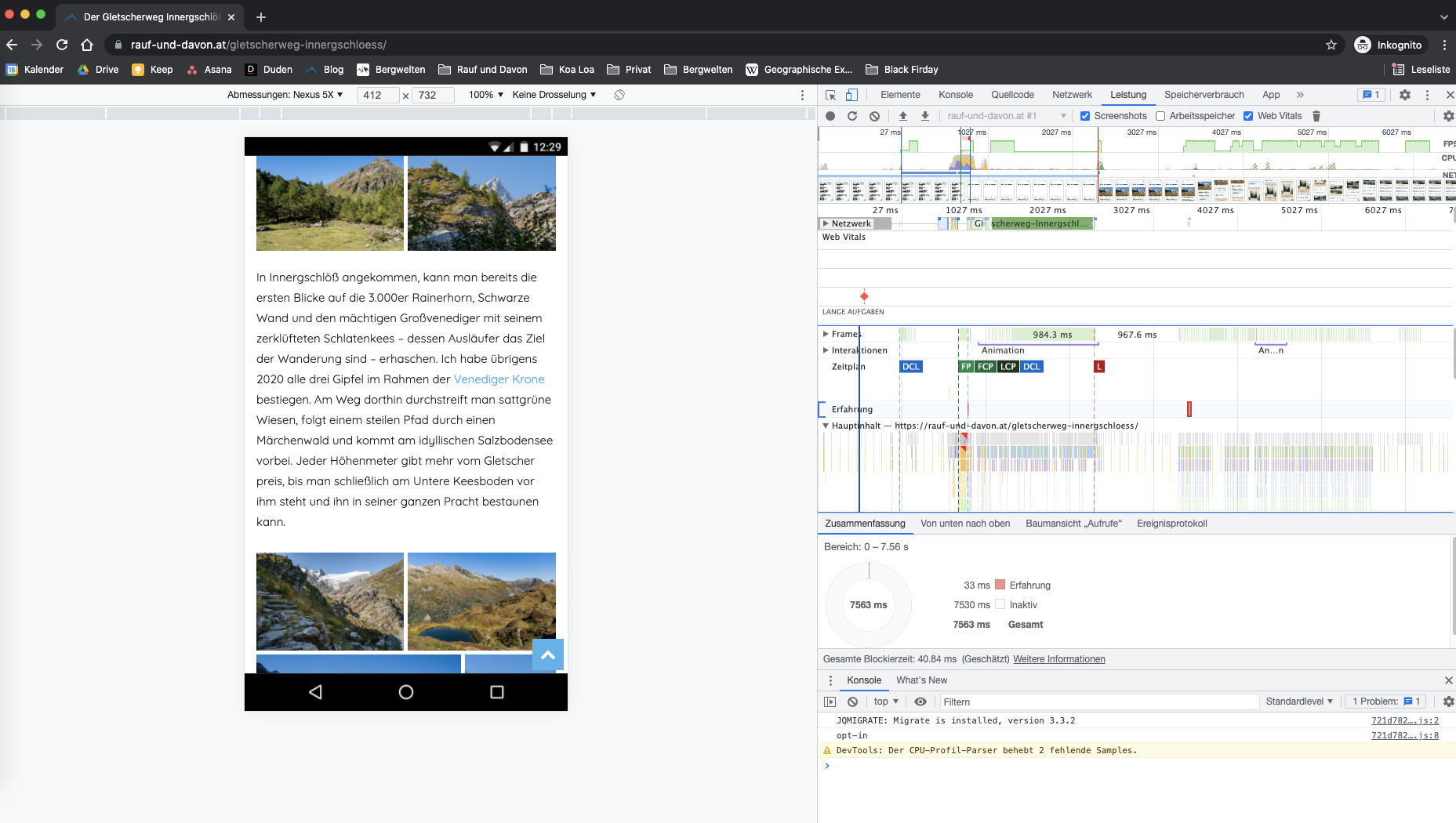
This always happens on every page but only when you start scrolling. Can you please take a look at it and tell me how to fix that 🙂
For example here: https://rauf-und-davon.at/reedsee-wanderung/
All the best and thanks,
Daniel
 Bettina
 Hello!
Unfortunately, child theme support for mobile theme is not available at the moment in our theme.
Thank you for understanding!
 Anamaria
 Hello,
Please disable the mobile theme plugin.
Thank you!
 Satheeshraj
 Can we do the same for tagdiv-composer plugin?. Because mobile theme related header and footer are in that plugin only.
Bettina Hello!
If you uninstall the Mobile Theme plugin, then it will appear how you’ve set up the mobile version from Composer.
This situation appears when you are using the mobile theme plugin and the cache plugin that you have does not feature options for a separate mobile theme plugin therefore do not know when to deliver the mobile version and when to deliver the desktop version.
We tested with our theme the WP Super Cache and with the settings from our guide this is working correctly: https://forum.tagdiv.com/cache-plugin-install-and-configure/
Hope that helps you!
Thank you!
Anamaria Hello,
So, if you want to have the mobile responsive version, you can simply disable the mobile theme plugin.
Also, please check this topic where I explained each mobile version -> https://forum.tagdiv.com/topic/mobile-version-not-working-properly-2/ and choose what mobile version you want.
Thank you!
Anamaria Hello,
From your screenshot seems you have the mobile theme plugin activated, please deactivate it, clear all cache and check after the mobile version.
Also, please check this topic where I explained each mobile version -> https://forum.tagdiv.com/topic/mobile-version-not-working-properly-2/ and choose what mobile version you want.
Thank you!
 Kalamir
Hi,
I would like to remove the custom mobile theme and revert to the default one.
How is it possible?
Thx
 Sebastian
 Hi Bettina,
That worked nicely on the desktop version of the theme, thank you, but on the mobile version, in the popup with the mobile menu, the link of the user name shown above is not changed. How I could change the link also in the mobile menu popup?
Cheers!
Sebastian
 dimitrisv
Please see this video
https://1drv.ms/v/s!Akul2ygARwfdh5U9aNewFazgZXqf0w?e=HLVAlu
on the 9th second you will see the layer appearing…
Possibly I made a mess with some options in theme panel. What can I do to make it disappear completely?
 giriraj
 Hello Anamaria,
Thank you for your suggestions.
I deactivated the plugin and it has changed my customizations like title font and color for h2,h3,h4 etc.
I added custom script to adjust, but I couldn’t get the related articles option.
As you instructed It worked once made changes in the mobile theme and activate the standard pack plugin, but I want to continue the standard pack as deactivation.
Pls let me know If there is anyway to bring ‘related article’ back to desktop view.
Thanks
Giri
 Testventure
 I have totally the same issue, this only happens when the mobile theme is activated. On AMP it is working.
-
This reply was modified 4 years by
Testventure.
 AWAY FROM LIFE
 Yes, we’re talking about the same.
So you have done following steps, right?
1. Deactive all TD-Plugins on the site
2. Activate all TD-Plugins on the network
3. Setting on the theme panel on the site: Mobile Theme -> USE MOBILE THEME FOR: -> AMP
 Amit
Amit1. Add child theme support for mobile theme.
Many sites alter the layout or add some extra ad codes, widgets to a single post page. So, every time the theme gets an update, the developer needs to redo those customizations. (Single template, header, footer) [/wp-content/plugins/td-composer/mobile/]
2. td Plugin updates
Every time we update the theme it’s doesn’t auto-update all the plugins. Consider fixing this or provide plugin updates in the plugin section directly. Most of the time you just change the updated date of the plugin and not its version which confuses most of the users. Also, make sure it should not install or update the td plugin which is not in use. In our case, we don’t use td social counter plugin but on every update, it is being auto-installed from the welcome screen.
3. Changelogs and Patch files
Provide clear changelogs (you used to provide it earlier before you introduced td standard plugin and td composer) Now even on the minor updates like (Newspaper 11.3.2), we have been asked to update td composer plugin and we lose all the customizations made in the plugin files (especially for mobile). So releasing even minor updates takes a lot of time for each site. Earlier it was really super easy to release minor updates just by overwriting theme files with patch (https://www.screencast.com/t/BXNL8iaX). Now every update has a few changes to the plugin files as well. I will suggest you provide clear changelogs for plugin files as well.
4. AdSense Responsive ad units for AMP (AMP Compatible ad unit)
Google recommends using responsive ad units on the site as they have started auto optimizing ads on the page. The mobile theme supports responsive ad units, but it uses fixed-size for AMP.
AMP should support Responsive AMP-compatible ad units. I am using Responsive AMP-compatible ads and I have seen improvements in earning. The last time I shared a solution for this via mail was on April 2, 2019, with you, but you have not implemented it yet.
 /*

		         * if its a google adsense ad on amp..

		         * we use the 'g_data_ad_client' && 'g_data_ad_slot' to generate a adsense ad type > amp ad component

		         *

		         * <amp-ad width=300 height=250

				 *    type="adsense"

				 *    data-ad-client="ca-pub-2005682797531342"

				 *    data-ad-slot="7046626912">

				 * </amp-ad>

		         *

		         * */
/*
* Modified by Amit Refer: https://support.google.com/adsense/answer/7183212?hl=en
**/
$buffy .= '<amp-ad width="100vw" height="320" ';
$buffy .= 'type="adsense" ';
$buffy .= 'data-ad-client="' . $ad_array['g_data_ad_client'] . '" ';
$buffy .= 'data-ad-slot="' . $ad_array['g_data_ad_slot'] . '" ';
$buffy .= 'data-auto-format="rspv" ';
$buffy .= 'data-full-width> ';
$buffy .= '<div overflow></div> ';
$buffy .= '</amp-ad>';
5. Newsletter
The theme comes with Newsletter plugin, but it does not work with mobile theme and AMP. Now Google has started mobile indexing first. From the sites I am handling, I can see 80-85% of overall traffic is from mobile devices.
Try to make a Newsletter plugin compatible/usable with a mobile theme/AMP version. Having a Newsletter popup will be the cherry on the cake. Currently, we have added Newsletter on Mobile and AMP by modifying the code.
That’s it for now.
Anamaria Hello,
I’m glad you solved the issue.
I saw you use the mobile theme, so to change the header color you need to go in Theme Panel -> Mobile Theme -> Theme Colors -> Menu bar =>https://i.imgur.com/Aes2jN8.png
Thank you!
 zarpe77
For some reason the desktop theme frequently switches to mobile view on a desktop. I use WP Rocket and every time this happens I have to clear the cache from the plugin to get it to view the desktop view correctly.
I have check with both WP rocket theme and cloudflare about this issue and both state that this is not caused by them and that I should check with the developers of the theme.
For context… I used both of these services with the old theme (before making the change to newspaper theme) and did not have this issue. This leads me to think that it may be theme related
Can you assist in letting me know why this may be happening with this theme? I have snippets if that would help in resolving the issue.
 rahulroushan
 Simon, frankly I’m yet to take the changes I made live, but on a staging server, it appears to be working for me i.e. the mobile site is responsive desktop site only, while the mobile theme is used only for AMP. The settings get saved for me so far as staging server is concerned. The setting I’m talking about is Theme Panel –> Mobile Settings –> AMP settings. Are you talking about the same? If so, as I said, at least in the staging environment, the changes are saved for me.
AWAY FROM LIFE Hi rahulroushan, thank you for your help! Sadly it don’t work by me, cause everytime I want to change the mobile Theme from “mobile” to “AMP” it don’t save the settings (I use the mobile theme just for AMP). Have you any idea why does the setting always reset?
Bettina Hello!
If you use Mobile theme plugin, then you can not edit the pages with TagDiv Composer.
You have only some settings for this layout, which you can find in Theme panel -> Mobile Theme. Please note that if a page is made by Composer, than the content won’t be displayed on Mobile theme version. You should create the content with the Mobile Editor.
For more details, please take a look here:
– https://forum.tagdiv.com/mobile-theme-introduction/
– https://forum.tagdiv.com/the-mobile-theme/
You can edit the mobile pages like this and create your own design: https://www.screencast.com/t/mCDwGFln
Hope that helps you!
Thank you!
 avertizor.ro
Warning: Invalid argument supplied for foreach() in /home/avertizo/public_html/wp-content/plugins/td-composer/includes/tdc_mapper.php on line 42
Warning: Cannot modify header information – headers already sent by (output started at /home/avertizo/public_html/wp-content/plugins/td-composer/includes/tdc_mapper.php:42) in /home/avertizo/public_html/wp-includes/functions.php on line 6712
Warning: Cannot modify header information – headers already sent by (output started at /home/avertizo/public_html/wp-content/plugins/td-composer/includes/tdc_mapper.php:42) in /home/avertizo/public_html/wp-admin/includes/misc.php on line 1310
Warning: Cannot modify header information – headers already sent by (output started at /home/avertizo/public_html/wp-content/plugins/td-composer/includes/tdc_mapper.php:42) in /home/avertizo/public_html/wp-admin/admin-header.php on line 9
What can i do? This error comes from tagDiv.mobile.themes and AMP plugins.
Bettina Hello!
The CSS code you need to add in Newspaper -> Theme panel -> Mobile Theme -> Custom code:
#td_amp_menu .td-menu-background, #td_amp_search .td-search-background {

    background-color: transparent!important;

}
Hope that helps you!
Thank you!
 Calin
Calin Hi chunsamPARK, the tagDiv Cloud Library is a plugin that is coming only with Newspaper theme, the Newsmag theme do not have it.
Also the mobile menu I see in your screens that you are using the mobile theme plugin, then the mobile elements can be edited from Newsmag > Mobile theme -> https://i.imgur.com/r1qoWQh.png
I hope this will help you!
 vanisticz
 Hello,
I’ve just tried to disable all plugins except AMP and tagDiv ones. The result is the same. As soon as both plugins (AMP and tagDiv Mobile Theme) are active, AMP configuration is not visible (and thus not accessible) in the wordpress admin menu. As soon as the tagDiv Mobile Theme plugin is deactivated, AMP plugin configuration suddenly appears in the WordPress admin menu.
Only tagDiv plugins are enabled, no caching plugin active, tried in anonymous mode.
Thanks for any advice,
Jan
Bettina Hello!
Let me explain you which options of mobile versions are:
1. Responsive version: A responsive version of your website is looking similar like on desktop, edit the page with TagDiv Composer, click on the mobile viewport: https://www.screencast.com/t/XDQJedlggSB ; there you can see your mobile version and you can edit the elements there.
2. Mobile pages: https://tagdiv.com/newspaper-10-3-7-update-brings-customizable-and-fast-mobile-pages/
3. Mobile theme plugin: The Mobile Theme is a performance optimized theme included in the Newspaper main theme and it loads only for mobile devices. It comes with its own templates for page, post, category, etc so your current templates from the desktop theme will get converted to the mobile theme layout. For more details, please take a look here: https://forum.tagdiv.com/the-mobile-theme/ ; https://forum.tagdiv.com/mobile-theme-introduction/
A full explanation you can find here: https://www.youtube.com/watch?v=SpGkOnJeNZY
It seems that you use Mobile Theme plugin, so if you do not need that, please uninstall it.
Let me know the results!
Thank you!
 Gorobets
How can I disable totop button on mobile theme? I don’t see this information in docs (https://forum.tagdiv.com/the-mobile-theme/).

