
- TutorialsFrom WPBakery to tagDiv Composer
- TutorialsWhat is Ajax preloading?
 thecitylane
Hi
I’ve updated my website (https://thecitylane.com) to work with AMP on mobile, but I can’t see any options to change what appears in the footer beyond what’s in the Theme Panel -> Mobile Theme -> Footer section. I want to get rid of the the text “About Us” and “Follow Us” in the AMP footer.
 Oldmagio
 Hello,
I updated the theme and now I can see those options in theme panel but when I try to hide the featured image nothing changes in the responsive mode.
Here the screenshot from the tablet with the post doubled:
https://prnt.sc/14s0jlt
https://prnt.sc/14s03lb
Here the post from desktop: https://incognita.online/2021/06/02/la-via-dellacqua-che-scorre/
This error appear for every post. But if I active those plug-in that overwrite every mobile template the problem could disappear? In this case, after the plug-ins activation could I set again the page that I created for every page also if the plug-ins are active?
Oldmagio Another question about this:
“If you created the mobile pages with TagDiv Composer, then when you install Mobile Theme plugin, your pages will be overwritten by the plugin.”
but if I only active AMP and don’t the Mobile Theme plugin? It is the same or could change something without overwriting?
Oldmagio Hello, thanks for your reply.
For standard pack you mean also AMP and TagDiv Mobile plug-ins? I want to fix just the responsive version that appear only with the tablet, so can I keep those two plug-in uninstalled or I must to install and to activate them to can see the option “Theme Panel> Post settings> Featured Image>”?
Best regards
 Bettina
 Hello!
If you created the mobile pages with TagDiv Composer, then when you install Mobile Theme plugin, your pages will be overwritten by the plugin.
The Mobile Theme is a performance optimized theme included in the Newspaper main theme and it loads only for mobile devices. It comes with its own templates for page, post, category, etc so your current templates from the desktop theme will get converted to the mobile theme layout. For more details, please take a look here: https://forum.tagdiv.com/the-mobile-theme/
Only if you will deactivate the plugin, then you will see your responsive version on your mobile version. If you want to use a mobile page, then you need to assign it. For more information about this mobile version please take a look in this article: https://tagdiv.com/newspaper-10-3-7-update-brings-customizable-and-fast-mobile-pages/
If your settings are missing from theme panel, then make sure you have Standard Pack installed and active.
Hope that helps you!
Thank you!
 Scholars
 I just deactivated and deleted the mobile theme plugin and amp. However my main home page mobile version didn’t change back. Some of the post returned to normal, but some hasn’t.
https://ibb.co/J7Qn7Sq – post not using the right header (and footer)
https://ibb.co/qyQZFFF – post with the right header (and footer)
https://ibb.co/RDSh04m – home page (still different from desktop version)
https://ibb.co/yng1Fs6 – tagdiv composer (mobile front page)
 Anamaria
 Hello,
If you want to add a custom code CSS for mobile then you can add it in Theme Panel -> Custom Code -> Advanced CSS => https://www.screencast.com/t/CRaBgpxghCw
Thank you!
Anamaria Hi,
Using our theme you can choose from 3 mobile versions
-> mobile responsive => https://www.screencast.com/t/oJ2ShOp47
-> mobile theme plugin => https://forum.tagdiv.com/the-mobile-theme/
-> mobile page => https://tagdiv.com/newspaper-10-3-7-update-brings-customizable-and-fast-mobile-pages/
If you created the mobile pages with tagDiv Composer, then when you install the Mobile Theme plugin, your pages will be overwritten by the plugin (the mobile theme comes with its templates for page, post, category, etc so your current templates from the desktop theme will get converted to the mobile theme layout, the page content is made without builders in mobile editor => https://www.screencast.com/t/xbgZG8kH also, the options that are provided to edit the mobile theme version are limited (this keeps the things simple)).
This is a video about Responsive Newspaper Theme, AMP & Mobile Theme, Mobile Pages & Templates -> https://www.youtube.com/watch?v=SpGkOnJeNZY
So, the mobile responsive is what you see then that you select the viewport on phone => https://www.screencast.com/t/matV17hH, so some settings may apply for each viewport(where is the border blue), and others are not(where the border is black).
The mobile page has the mobile templates from Cloud Library => https://www.screencast.com/t/YCcZ8rL8
Mobile responsive version of the theme and the mobile page editor can be edit with tagDiv Composer, the mobile theme plugin not.
For example, you can have the mobile theme plugin activate and use the mobile page/mobile responsive version for the homepage/pages, but for the categories pages/404 page you can’t use the mobile page/mobile responsive version if you have the mobile theme plugin activate.
So, if you want to design the pages with tagDiv Composer, you can use the mobile page or mobile responsive version.
I hope this information helps you!
Thank you!
 cdpragazzi
Hello, i have insert ads code (ADSENSE) in a Theme Setting but not it works in a desktop mode.
Code insert in this section:
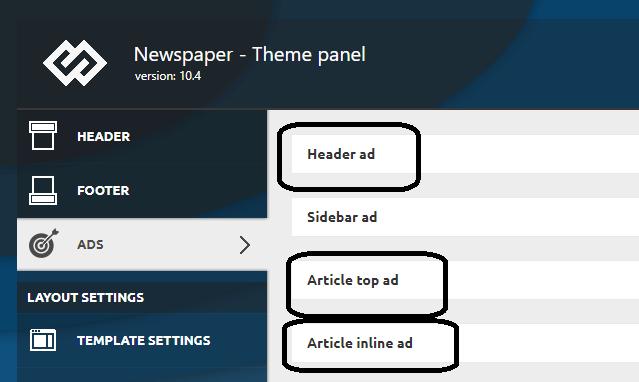
In a mobile i use a Theme Mobile (and has other settings) and it works.
Scholars Oh and one more screenshot of my mobile theme.
Oldmagio Hello,
I’ve the same problem if Renu just when I see the website through the tablet. Then appears in the menu the “search” field that I removed from every template. I created mobile pages for every page and mobile themplates for categories and tags but is like if appears a 3rd kind of template for the resolution of the tablet that I don’t find.
Moreover: I don’t find the Theme Panel> Post settings> Featured Image> Disable SHOW FEATURED IMAGE and FEATURED IMAGE too.
It could be caused by the deactivation of AMP and TagDiv Mobile theme?
If yes I’ve a doubt:
I deactivated those plug-ins and I created in the past mobile pages for every page and mobile themplates for categories and tags. If I’ll activate those plug-ins will change the assignment of every mobile page that I just attributed?
Best regards
 Tinystepsbabyclub
 Hi Bettina
It appears that the fix hasn’t worked and the non-mobile theme desktop version is once again appearing on the homepage only.
I sent a reply email to the team to see if they can again take a look into this for me but I have heard nothing back from them.
I’m contemplating removing the theme, which I don’t want to do, because the homepage of my site is looking pretty awful.
I just can’t understand why the rest of the site is displaying the mobile theme fine but the homepage won’t?
Regards
Sarah
Bettina Hello!
From what you describe it seems you have installed Mobile theme plugin. If you created the mobile pages with TagDiv Composer, then when you install Mobile Theme plugin, your pages will be overwritten by the plugin.
The Mobile Theme is a performance optimized theme included in the Newspaper main theme and it loads only for mobile devices. It comes with its own templates for page, post, category, etc so your current templates from the desktop theme will get converted to the mobile theme layout. For more details, please take a look here: https://forum.tagdiv.com/the-mobile-theme/
Better deactivate the plugin and see the results.
Thank you!
 kkovacheva
A few days ago i activate the AMP plugin by tagdiv and my current mobile disappeared, nothing can be done at all, the site is very unsupported to AMP, in the theme settings there is a mobile + amp option to implement my theme, but so far, neither the home menu is same as on the desktop I tried to create a new mobile page, I try everything. Please give advice.
 rudhihadhi92
Hello,
I am using the newsmag theme from tagdiv for my website. I’ve also installed the AMP plugin and Mobile Theme, but I have a question about “how to install ad code in AMP”.
When I tried to create a new ad unit specifically for AMP in my Adsense account, there I found 2 codes, namely 1 code that was told to paste between <head>code</head>, and the other in the <body></body> body tag.
For the ad code I already know where I should paste it, namely in the “Ad Auto AMP” bar in the Mobile Theme settings panel. Meanwhile, if the other code, which is asked to paste in the <head></head> section, where should I paste it?
Because I see the section in the AMP plugin settings or Mobile Theme there is no column or bar for code (meta tags)?
—
Here’s an example of my website post page that has successfully become an AMP page: https://dutaserviceac.com/freezer-tidak-dingin/?amp
Because I enable AMP pages only specifically for post pages.
Please help from the Tagdiv team? thank you
Regards
Rudi Hadi
Jakarta, Indonesia
 jansarokar
After Disabling the Mobile theme. there is a white screen on all my post pages on mobile.
Anamaria Hello,
You can change the color from Theme Panel -> Theme Colors -> Mobile menu/mobile search =>https://www.screencast.com/t/EAe9ac8Krmg
also, if you use the mobile theme plugin, then you need to go in Theme Panel -> Mobile Theme -> Theme Colors => https://www.screencast.com/t/RVvArMqPFlTA
Hope this helps you!
Thank you!
Bettina Hello!
It seems you have Mobile Theme plugin installed and active, then you should add the ads in Newspaper -> Theme panel -> Mobile Theme -> Mobile ads -> Article ads.
Thank you!
 yy
yyHi, I love TagDiv Newspaper.
Is there any way to replace all theme accent colors at once?
I understand there’s some way to edit component colors;
A Change them from Theme panel > THEME COLORS
B Change them from TagDiv composer on each elements
C Change them by adding own CSS codes
For example, beautifully prebuilt template ‘GOURMET PRO’,
I’ve expected all of pale green has been replaced if I change setting THEME COLORS > THEME ACCENT COLOR. But just only some of elements has changed its color, such as right bottom jump-to-top button. Not for active/hover text colors. The THEME COLORS menu has an item for ACTIVE/HOVER TEXT COLOR but it’s for just Mobile menu / Mobile search.
I can deal with the way B but editing all pages and all elements is too hard.
Is there any good way to replace all pale green at once?
Thank you.
Bettina Hello!
Edit the page normally and there you will find a setting in the right side:https://www.screencast.com/t/nKr3cv2eAdbE Please disable it.
From what you describe it seems you have installed Mobile theme plugin, so please uninstall it. If you created the mobile pages with TagDiv Composer, then when you install Mobile Theme plugin, your pages will be overwritten by the plugin.
The Mobile Theme is a performance optimized theme included in the Newspaper main theme and it loads only for mobile devices. It comes with its own templates for page, post, category, etc so your current templates from the desktop theme will get converted to the mobile theme layout. For more details, please take a look here: https://forum.tagdiv.com/the-mobile-theme/
Thank you!
 Vlad S
 Hello!
If you are using AdSense auto ads, you have to insert the code in only 1 place. For example, insert it in Theme Panel – Ads – Header Ads. And that is the only place where this code should be.
If you insert it in more than 1 place, the code will be broken or will not work. Based on your most intense areas where users put their finger (on mobile) and cursor on desktop, Google will autoplace ads so that you will get maximum out of them.
Please make sure that after you are making any changes, clear your cache and test your changes on an incognito page.
You can if you want to switch to standard templates but that would be a shame when there is so much more potential on cloud library templates.
Please let me know the result of the instructions above! If this doesn’t work please contact us via email at contact@tagdiv.com and provide the following:
– admin url and credentials
– A link to this topic in order to identify you
Our team will take a look ! Please note that at the moment the support is a bit crowded. Replying may take up to 24 hours.
Thank you !
Anamaria Hello,
Now I understand what you want to get, unfortunately, there is no option in the theme, but if you want you to have to do the implementation in the theme files for mobile wp-content/plugins/td-composer/legacy/Newspaper/parts/search.php and add the code https://i.imgur.com/IdSDtwj.png
Also, the cursor blinked in the search https://we.tl/t-smcJXZ4y9p
Thank you!
 subhashgottumukkala
My site URL is https://netsuggest.net
I have installed Mobile theme on my site but still after a day only normal theme is showing up.
 devjaind123
I have already Amp for Wp plugin (Accelerated Mobile Page). Is it necessary to install Official Amp For Wp plugin for newspaper theme.
 mcmben
Hi team
I have experienced an issue with displaying the header logo in the header menu properly on mobile responsive.
Preview mode (what i expect): https://finkab.com/img/screen2.png
Live mode (what i actually see on mobile): https://finkab.com/img/screen1.jpeg
My site: https://www.visualfinance.co
This problem only exists on the frontpage of my site, and it works perfectly fine on other pages.
Note that I have disabled AMP or tagdiv mobile themes. Thanks a lot.



