
- ApiUsing the Theme API in plugins
- ApiPractical example – How to add a new Block and Module
- ApiAPI – Smart Lists – Introduction
- ApiAPI – Category top section style – Introduction
- ApiAPI – Category top section template – Introduction
- Apitd_api_module::update
- Apitd_api_module::add
- ApiAPI – Modules – Introduction
 jayanthvignesh
Does the theme support Media.net ads ? I tried adding the div block for other ads, still no luck. It breaks my page load. The mobile smart menu is broken.
 kibiribi
According to your manual – https://tagdiv.com/amp-newspaper-theme/
Google Analytics code for AMP should be like this
{

            "vars":{

                "account":"UA-123456789-1"

            },

            "triggers":{

                "trackPageview":{

                    "on":"visible",

                    "request":"pageview"

                }

            }

        }
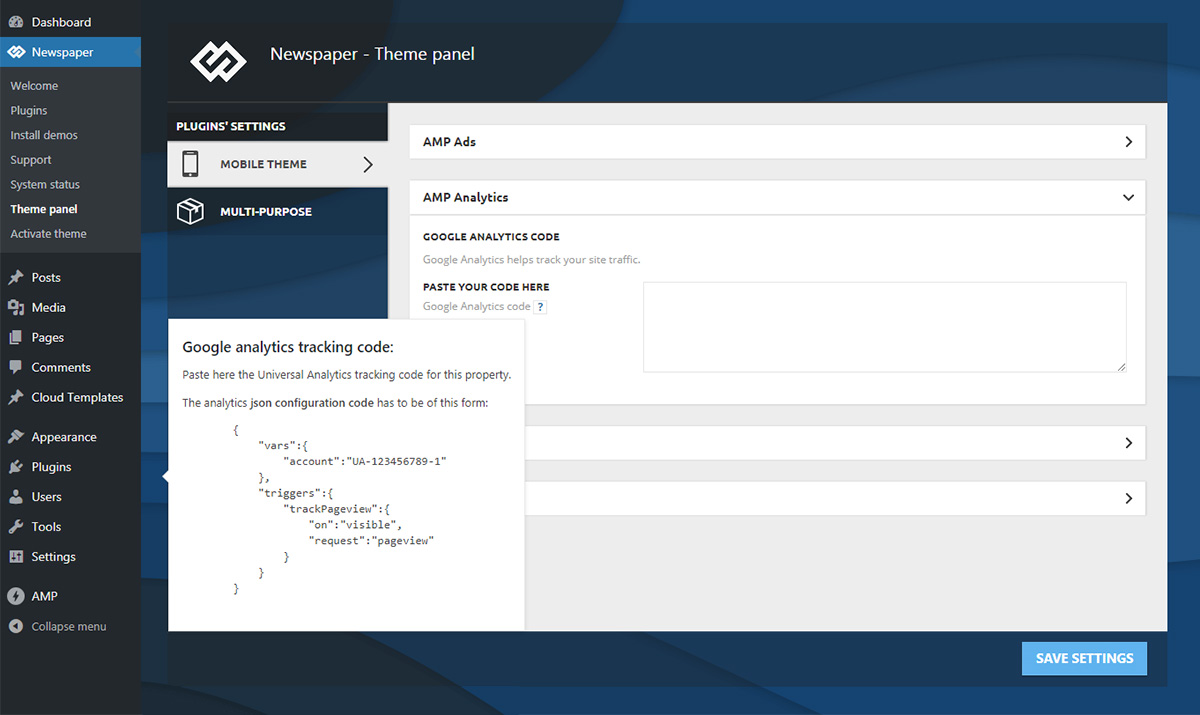
But there is no such format in Google Analytics
screen – https://www.screencast.com/t/416joI5Uo0O
Does it mean that Manual is old OR I use wrong code?
 Calin
Calin Hi,
The mobile theme can be edited using the settings from them panel -> https://i.imgur.com/GT81urF.png also you can use the settings from here -> https://i.imgur.com/PqjwO7X.png to add/remove elements from posts.
The infinite loading is available only on main theme and responsive version, yo use it only on few posts, you can disable the mobile theme on these posts/pages -> https://i.imgur.com/VDX5Xcc.png or if you want to use it only on amp -> https://i.imgur.com/OqQlSR0.png if not disable it.
Thank you!
Calin Hi,
That is because you are using the mobile theme plugin, you’ll gain a better speed then responsive version of theme, but in order to achieve that speed you’ll need to create a new content for pages because in the most of cases those were made with builders ( tagDiv Composer, WPBakery ) and you need to use only the mobile editor ( you need to set the content for pages in mobile editor and this content will be display on mobile theme)
-> https://i.imgur.com/9d0UWLT.png
Also you can show the responsive version on mobile theme -> https://i.imgur.com/m0bVB5T.png you can check more details about mobile theme in our documentation -> https://forum.tagdiv.com/the-mobile-theme/ or if you want to have the responsive version only, you can use the amp option from mobile theme -> https://i.imgur.com/oofST3D.png (to use the mobile theme template on amp) or you can disable the plugin.
When the mobile version or amp is displaying on desktop is a cache problem, we recommend to use WP Super Cache with the settings from our guide -> https://forum.tagdiv.com/cache-plugin-install-and-configure/ also if you are using other cache plugins please deactivate theme and make a test, also this will solve the problem with latest post on mobile device.
Have a nice day!
Calin Hi,
Using the mobile theme plugin you have after the post the related articles -> https://i.imgur.com/dWnXQOS.png
The number of the related articles can be set from the Theme panel -> https://www.screencast.com/t/5lhNNIjP
Also you can edit it from theme panel> mobile theme -> https://i.imgur.com/M9C8EAG.png
If you choose to use the responsive version of theme, you’ll have the same content and layout of posts, but adjusted for mobile devices.
Thank you!
 Nagarig
 I want to keep mobile theme for speed. But i just want to remove the Author box from post.
 bcafaggi
Dear all,
Good Morning.
I have done my webpage in TD Composer (that is really amazing) but I cannot see the pages below when I visit my website in my mobile. What can I do to fix it? The page that appears is in black, just the head menu and the footer.
My Newspaper Theme is totally updated with the Mobile Theme activated + AMP.
Page that I cannot see through my mobile:
https://cafaggiincucina.com/conheca-o-bruno/
https://cafaggiincucina.com/contato/
Looking foward your reply.
Many thanks
Bruno Cafaggi
 rnbjunk
Hello Guys
I’m still running your mobile theme on my site, activated and customized. We just update to new version.
I am using cloudflare CDN, if i activate this page rule setting to speed up the site, the mobile theme doesn’t charge, instead of it it loads the desktop site in mobile


 Vlad S
 Hello !
The whole theme is dynamic and everyhting adjusts depending on what you work on it. If this is a page speed matter you can follow our tutorial here: https://forum.tagdiv.com/how-to-make-the-site-faster/
The CSS of the mobile theme can be found in here: wp-content/plugins/td-composer/mobile/style.css
We are able to offer you a refund if you make a request here: https://themeforest.net/refund_requests/new
We are sorry for the inconvenience !
Thank you !
Calin Hi,
The background image can be remove from here ->https://i.imgur.com/UMQ7RzI.png if you are using the responsive version, if you are using the mobile theme plugin -> https://i.imgur.com/njxT4Rj.png also for the close suggestion, this can be done only with custom work, sorry!
Thank you!
Vlad S Hello !
Unfortunately this layout cannot be achieved using Newspaper Theme. Also from what I can see your template will become not mobile friendly for google since all the elements are so close together and small.
Thank you !
 TurbineThree
 As for the thumbnail sizes for mobile, I have found that I needed to activate both those two thumbnail sizes in my theme panel, and have fixed it. Sorry about that.
But I still need help with the sharing options.
Thanks.
Calin Hi,
The code is the same -> https://i.imgur.com/Ogtpf4B.png
.td-scroll-up {

background-color: black;

}
But you need to set it in theme panel> mobile theme > custom code> css.
Hope this will help you!
Thank you!
Calin Hi,
Usually the h1 is set on logo, if you are using a cloud header from tagDiv Cloud Library, you can have a different H1 per page/posts, another way is to using the Page Builder + Page Title on page template, this should set your page title as h1 and remove the h1 from logo.
If you want that your title to have the h1 set instead of logo, then please check if you are using a cloud header, if yes, then you can edit it with tagDiv Composer and disable the h1 -> http://prntscr.com/q1ohji from desktop and make sure that you do the same for mobile logo -> https://www.screencast.com/t/xVUjIMUelXA2 -> https://www.screencast.com/t/ABTw6DUnbMjH and the problem will be solved!.
If you are using a standard header template, then you need to remove the h1 from theme files (this is not indicate, after theme update, these settings will be overwrite) -> wp-content/plugins/td-standard-pack/Newspaper/parts/header/logo-h1.php -> https://i.imgur.com/i6pmZt7.png
Hope this will help you!
Thank you!
Vlad S Hello !
The Mobile theme was specially designed for optimization on mobile devices. Unfortunately on mobile theme you cannot do much changes of design. If you want to have the same design as on desktop mode you can achieve that by simply disabling the mobile theme.
You will have to recreate your pages into the Mobile editor or completely disable the mobile theme. The mobile editor will not render shortcodes !
Also you can disable mobile theme on certain pages or posts by following this setting: 
Please take a look here: https://forum.tagdiv.com/the-mobile-theme/
Mobile theme plugin can be disabled from Newspaper Plugins as you can see here: https://www.screencast.com/t/LnkZCEVC
Thank you !
Calin Hi,
I think that you are referring to infinite loading option-> https://tagdiv.com/infinite-loading-for-single-posts/ this is set on single post template from tagDiv Cloud Library and can be edited with tagDiv Composer.
If this option is not working on mobile, is very possible to use the mobile theme plugin, this is using a different template/layout for mobile (a simple template to make the mobile version faster). If is so, then you can activate the responsive version -> https://i.imgur.com/YPZjo9r.png on some posts, or use the amp version only for amp -> https://i.imgur.com/WMGulIt.png
Let me know the results!
Thank you!
 BenSchneider
Hello , the mobile version of the demo looks different compared to my website
https://prnt.sc/scwwe9
https://demo.tagdiv.com/newspaper_pulses_pro/#
The mobile version of my website looks like AMPified which I don’t prefer. I need to use the theme’s original mobile version like in the demo.
https://prnt.sc/scwx13
http://www.jobmofy-magazine.com/
BenSchneiderHello , the mobile version of the demo looks different compared to my website
https://prnt.sc/scwwe9
https://demo.tagdiv.com/newspaper_pulses_pro/#
The mobile version of my website looks like AMPified which I don’t prefer. I need to use the theme’s original mobile version like in the demo.
https://prnt.sc/scwx13
http://www.jobmofy-magazine.com/
 tmamedov
Hi,
My question is whether the separate mobile theme is customizable via options to include related articles, more articles or latest articles. If not, how can i make these blocks enabled? Currently i use cloud templates to design page blocks visually. Would i be able to do it via template code?
 joonta321
My site does not show theme normally on mobile browser.
Only when i logged in as administrator, it shows normal desktop theme. But i logged out and access again then it shows me mobile theme even though on desktop browser.
it’s really hard to find solution.
Vendor should check this and update theme version.
please let me know how to solve it
site url: http://www.penstoo.com
theme: newpaper x – old fashioned
 Oswald
Hello,
On the mobile version I get the following error:
Warning: require_once(/website-path/name of wp-content folder/Newspaper/tagdiv-deploy-mode.php): failed to open stream: No such file or directory in /website-path/name of wp-content folder/plugins/td-composer/mobile/functions.php on line 11
Fatal error: require_once(): Failed opening required ‘/website-path/name of wp-content folder/Newspaper/tagdiv-deploy-mode.php’ (include_path=’.:/usr/local/lib/php’) in /website-path/name of wp-content folder/plugins/td-composer/mobile/functions.php on line 11
As you can see it’s trying to find the Newspaper Theme directly in the wp-content folder (which I renamed) instead of looking in wp-content/THEMES
What can I do?
Thank you
 ludyma
 Hello, I still have the problem of adapting the pages without the mobile theme, could you tell me how is it? .. I already updated and I see that you perceived and in which I have also mounted tests
TurbineThreeHello, my site’s mobile version thumbnails aren’t showing: https://www.screencast.com/t/SccjzZpm4p
I have read the blog post for the Newspaper mobile theme that stated “The mobile theme requires the “265×198” and the “741×486” thumbnail sizes in order to show the featured images properly.” I’m not exactly sure what this means. Am I supposed to create two separate thumbnails, or choose one of the dimensions, if not, how do I get the dimensions for my site’s mobile version to be working/showing?
Another separate question I have regarding the Newspaper theme is in regards to the sharing options.
Under Theme Panel>Post Settings>Sharing, there is only 1 option for sharing, and that is Naver (https://www.screencast.com/t/4vqwONyb2NzZ), from what I’ve seen, there are supposed to be more options for sharing posts.
Please advise me on how to fix these two issues, thanks.
 edivaldobrito
 Unfortunately, you can’t understand this difficulty in providing this css.
A friend of mine who uses the bimber theme needed this and the developer patched it.
Just for you to understand better, when activating this option, the site loading is better and increases the mobile audience, resulting in more engagement on this platform, and consequently in the increase in earnings.
He did it and it’s working really well.
I want to do this because google has changed its algorithm in the last few weeks and now considers the speed question even more.
I don’t want to change the topic, but if I can’t do what is necessary to improve the speed of the site with these optimizations, unfortunately, I will have to do that.
 ttz
ttz Hello,
Sorry, I mean the mobile theme with AMP.
https://www.screencast.com/t/QjLqsPDw
Thank you!



