
- ApiUsing the Theme API in plugins
- ApiPractical example – How to add a new Block and Module
- ApiAPI – Smart Lists – Introduction
- ApiAPI – Category top section style – Introduction
- ApiAPI – Category top section template – Introduction
- Apitd_api_module::update
- Apitd_api_module::add
- ApiAPI – Modules – Introduction
 ludyma
 Thanks for the information, but I carry out tests and I do not see where it comes out in the mobile theme, could you show me where?
It is only for pages, that option does not appear in the post, right?
-
This reply was modified 6 years by
ludyma.
 Gmcarlson
Hello,
I re-activated my mobile theme and when I did, the logo left justified blocking the mobile menu search bar. Is there anyway to center it again?
The site is Dudefluencer.com
 KC
KC Hi,
Alright. Other than that, I don’t see thumbnail placeholder in mobile theme as well, it is also a missing feature for mobile theme?
 Calin
Calin Hi,
You can use the mobile them only for amp version -> https://i.imgur.com/mmQWJC9.png also you can use the mobile editor -> https://forum.tagdiv.com/the-mobile-theme/ to add content for mobile pages and you can display more blocks/grids using these options -> https://i.imgur.com/DPw3npx.png
Or you can use this option with out mobile theme -> https://i.imgur.com/Qaly90z.png
Thank you!
 Vlad S
 Hello !
You are facing cache issues on your website. As you can see from the homepage your website is displaying the mobile theme: https://www.screencast.com/t/WrzUc7xBm
Please clear your cache and try again.
Thank you !
Calin Hi,
I just checked the problem you mentioned but instead of that problem I see that you have the mobile theme on desktop -> https://i.imgur.com/zMdaoSw.jpg this is usually a cache problem.
Also is look that now the logo image is not find -> https://i.imgur.com/rFwrSy0.jpg
Make sure that you set an logo that is working, after that if there is still a problem, you can send us an email at contact@tagdiv.com and provide admin login, as well as cPanel or FTP if possible. We will take a look
Thank you!
Calin Hi,
What you ask is a custom work. Please note that mobile theme plugin do not display the sidebar, only the post content, if you want to display the sidebar you can use the responsive version.
Also if you want to implement the sidebar in mobile theme plugin, you can check our custom services from here : -> https://tagdiv.com/web-development-services/
Thank you for your understanding!
 sfnewsdaily
Hi,
I want to remove pagination number from my post and instead display “Back” and “Next Page” blocks. For this following custom css code was suggested in one of the Tagdiv forum thread. So I tried below code which works well on desktop but not on mobile devices. I am using mobile theme.
On desktop, I can see it properly https://www.screencast.com/t/dXJtxJ3WWEu
But on mobile, it is showing 1st and last page numbers. https://www.screencast.com/t/otiUL1wkW0
This is the custom CSS cosw I have used. Please suggest how can I get the same display on mobile as on desktop.
.page-nav-post .post-page-numbers {
display: none;
}
.page-nav-post .post-page-numbers:first-child, .page-nav-post .post-page-numbers:last-child {
display: block;
}
.page-nav i{
font-size: 20px;
padding: 25px 150px;
justify-content: center;
}
.page-nav-post a {
color: #fff;
background: gray;
}
.page-nav-post .post-page-numbers:last-child{
background: orange;
}
.page-nav-post .post-page-numbers .td-icon-menu-left:before {
content: ‘\e80c BACK’;
}
.page-nav-post .post-page-numbers .td-icon-menu-right:before {
content: ‘NEXT PAGE \e80d’;
}
 jigneshgohel
Hello,
I have just install tagdiv newspaper(V10.3.2) theme to my site.everything working good but for google page speed i am not getting expected result.
I am follow these article but still not getting expected google page speed.
Google PageSpeed score
-Mobile: 9
-Desktop: 35
Thank you.
Vlad S Hello !
The Mobile theme was specially designed for optimization on mobile devices. Unfortunately on mobile theme you cannot do much changes of design. If you want to have the same design as on desktop mode you can achieve that by simply disabling the mobile theme.
You will have to recreate your pages into the Mobile editor or completely disable the mobile theme. The mobile editor will not render shortcodes !
Also you can disable mobile theme on certain pages or posts by following this setting: 
Please take a look here: https://forum.tagdiv.com/the-mobile-theme/
Mobile theme plugin can be disabled from Newspaper Plugins as you can see here: https://www.screencast.com/t/LnkZCEVC
Also please make sure that you clear your cache!
Thank you !
Calin Hi,
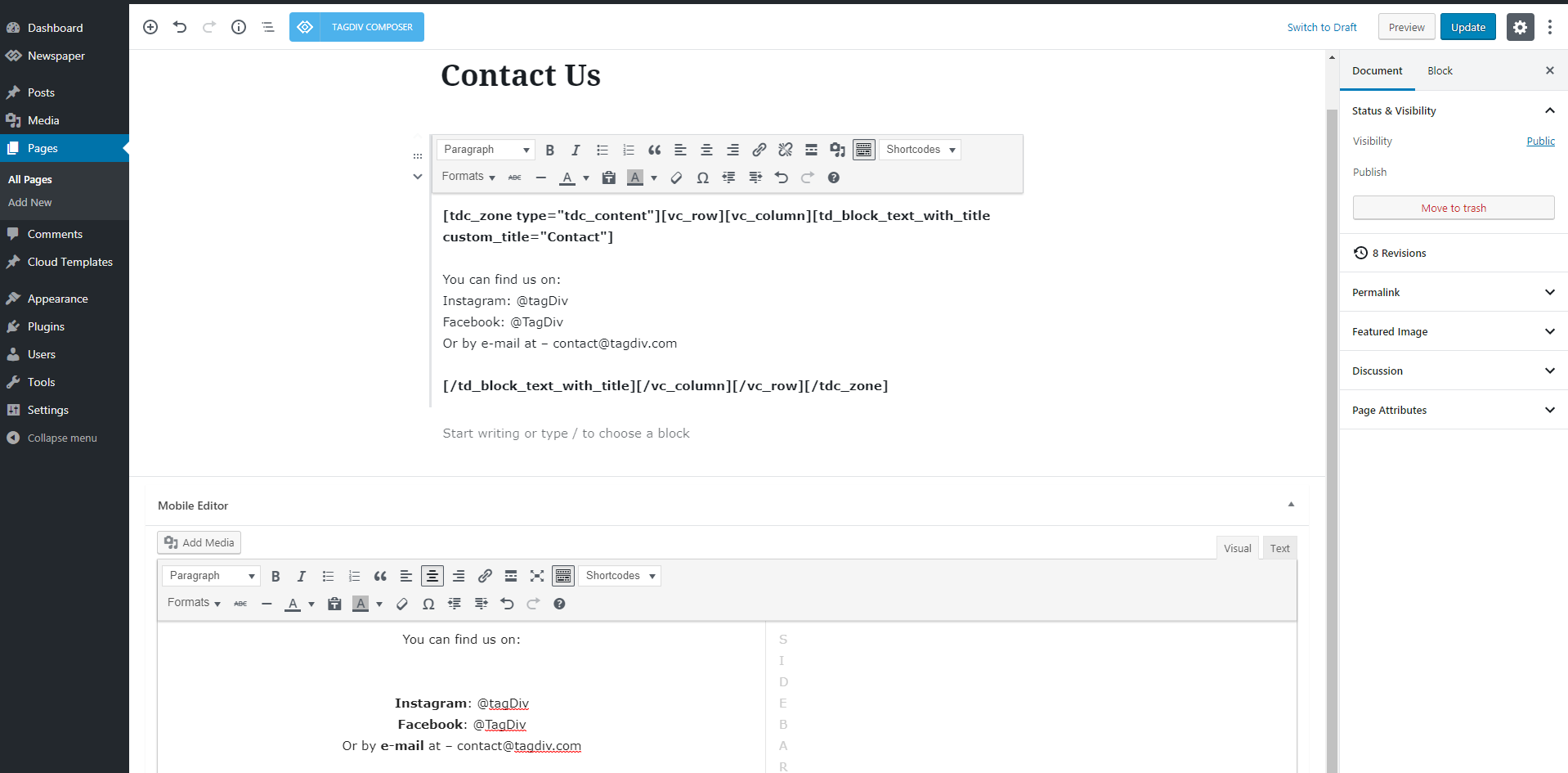
The mobile editor appear only if you are using the mobile theme plugin, also this will be add only for pages, at the bottom of page -> https://i.imgur.com/xa76dqJ.png if the section do not appear, check in screen options -> https://i.imgur.com/P2C6q1b.png
Thank you!
 whatswithjeff
 And now, mobile theme doesn’t work any more even on mobile.
I didn’t change anything. Not sure why
 ttz
ttzHi,
On the mobile theme with AMP in the author box How can I reduce the space between the top frame line and the author name?
https://www.screencast.com/t/cVekQeABMx0
It’s possible that this space is for the avatars, but I do not use them. I tried to set to not show avatars at the settings/discussion/Avatar Display/Show Avatars, but the system dose not save it.
Is there any other settings that can reduce this space?
Thank you!
Calin Hi,
Please try this custom css: https://i.imgur.com/w2v1qP3.png
.td-menu-mob-open-menu #td-outer-wrap{

-webkit-transform: none;

    transition: none;

}

.td-menu-background, #td-mobile-nav {

 width: 70%;

}
The code need to be set in theme panel> mobile theme> custom code> css
Hope this will help you!
Thank you!
Calin Hi,
If you want to use a custom page for register you can do it, you need to assign this page url to a button or if you want to set it on the login pop=up you need to set the url on these files:
For cloud header -> wp-content/plugins/td-cloud-library/parts/tdb-login-modal.php -> https://i.imgur.com/b7aMNDu.png
For standard header -> wp-content/plugins/td-composer/legacy/Newspaper/parts/header/td-login-modal.php -> https://i.imgur.com/MQ6Sh9I.png
For mobile theme plugin -> wp-content/plugins/td-composer/mobile/parts/register.php
But please note that the only td-login-modal.php can be set in child theme, the rest of files can not be set in a child theme, therefore will be lost when you’ll make a theme update.
Thank you!
Vlad S Hello !
Unfortunately the mobile theme cannot be modified.
Thank you !
Calin Hi,
That is because you are using the mobile theme plugin, you’ll gain a better speed then responsive version of theme, but in order to achieve that speed you’ll need to create a new content for pages because in the most of cases those were made with builders ( tagDiv Composer, WPBakery ) and you need to use only the mobile editor ( you need to set the content for pages in mobile editor and this content will be display on mobile theme)
-> https://i.imgur.com/9d0UWLT.png
Also you can show the responsive version on mobile theme -> https://i.imgur.com/m0bVB5T.png you can check more details about mobile theme in our documentation -> https://forum.tagdiv.com/the-mobile-theme/ or if you want to have the responsive version only, you can use the amp option from mobile theme -> https://i.imgur.com/oofST3D.png (to use the mobile theme template on amp) or you can disable the plugin.
When the mobile version or amp is displaying on desktop is a cache problem, we recommend to use WP Super Cache with the settings from our guide -> https://forum.tagdiv.com/cache-plugin-install-and-configure/ also if you are using other cache plugins please deactivate theme and make a test, also this will solve the problem with latest post on mobile device.
Have a nice day!
Calin Hi,
Unfortunately for the moment our theme use the WhatsApp only on mobiles, but if you want to have it on desktop to, you can use this custom css:
.td-social-whatsapp{

display: inline-block;

}
The code need to be set in theme panel> custom code> custom css.
Please note that this will only display the WhatsApp share button on desktop, it will not work as WhatsApp Web app.
Thank you!
 mrsky28
 Reopening this thread since I have a similar problem but with featured images. I’m not using the mobile theme plugin but instead using the default responsive version of the site for mobile devices.
GTMetrix does show that some images are not scaled properly. My recommendation was: ****imagelink****.webp is resized in HTML or CSS from 1280x920 to 335x241. Serving a scaled image could save 29.2KiB (93% reduction).
Is there a setting or a way to serve smaller featured images when viewed via mobile?
All my images are optimized via imagify and this is the one problem I can’t figure out.
 Josan
JosanHello, I want to know if there is any way to integrate AMP with Main theme without the mobile theme plugin. I dont want to use classic reader mode of AMP and Mobile theme plugin.
I’ve tried using mobile theme plugin for few months on my site but on mobile devices my Average session duration is less than 30 sec and bounce rate is 90% – 95%.
I diactivated mobile theme plugin for a week and average session duration increased from 30 sec to 2 min and bounce rate to 40-50%
Mobile theme plugin doesn’t have any customization setting and show only 3 related posts at the end of post. Plugin need an update and allow us customize it to add more post recommendation for visitors and possible ENABLE AUTO LOADING like desktop version.
Thanks
KCHi,
I need the speed of mobile theme due to 95% of my site’s traffic come from mobile, but I don’t want to lose the dynamic sidebar feature.
I tried to achieve it by modifing the mobile theme single file \plugins\td-composer\mobile\single.php, but by loading /wp_booster/td_single_template_vars.php and adding <?php get_sidebar(); ?> –> https://prntscr.com/sdteqo, however it shows the default WordPress sidebar –> https://prntscr.com/sdtgx5.
What was I missing? Please advise, thanks.
Regards,
Terrence
whatswithjeffHi!
I have this issue where some of the pages, not all, of my site is being displayed with Mobile theme even though I am using a desktop PC. I tried opening several pages of my site and some of them are in normal desktop view, while others are displayed as mobile.
What’s the issue and how to fix this? I have already updated the newspaper theme to the latest version, but still the problem persist.
Thanks,
 hunmar
Is it possible to create a child theme for the mobile version of the site? Currently I edit the mobile files directly. but these are lost when there is an update.
 mcmoad
I have so many problems in my mobile theme, i can’t adjust the logo of the footer and no changes affect when i do upload it in the theme panel, a “about us” title is shown in the footer also but i can’t customize what is displayed in it neither delete it, and no theme panel option is available for this.
And when i visit my pages they are just empty.
Any help please!
ludymaHello, I have read the mobile theme section (Mobile theme) and I do not see the mobile editor option anywhere, in the panel theme / mobile theme / custon html section, I have tried to put a code and it does not appear in the position mentioned in your section (Mobile theme) comes out below the futer, it can help me understand why and if there is a way to get it elsewhere.
according to your tutorial
according to your tutorial

look where it comes out, embedding html code in mobile custon theme html




