
- TutorialsFrom WPBakery to tagDiv Composer
- TutorialsWhat is Ajax preloading?
 Anamaria
 Hello,
Please delete the menu from the theme files. You need to assign the menu with tagdiv Composer like in our guide -> https://forum.tagdiv.com/main-menu/
Also, if you add the menu for mobi,e in the theme files, please delete it because it is not working https://i.imgur.com/oizfjVC.png
Edit the homepage with the tagdiv Composer, go to the mobile viewport, click on that menu icon and change the menu from that dropdown: https://app.screencast.com/QU8PVGPjHw4b0
Thank you!
 croboy
 Hello,
This is not an issue of image optimization
Here is code from mobile theme:
Only image width=”696″ height=”392″ is preloaded.
I don’t know why multiple images sizes are used on mobile theme.
Can that be changed in theme panel? I mean can I define that only one image size is used for mobile theme for featured image.
Thank you
 Anamaria
 Hello,
We no longer recommend using AMP because it is deprecated https://developer.bigcommerce.com/docs/storefront/wordpress/platform-integration/enabling-amp
For mobile theme + Amp the content need to be added in Mobile Editor -> https://www.screencast.com/t/xbgZG8kH
Please check this topic where I explained each mobile version -> https://forum.tagdiv.com/topic/mobile-version-not-working-properly-2/ -> https://forum.tagdiv.com/topic/amp-pages-not-working-well-with-this-theme/ and choose what mobile version you want.
Also, please let me know what plugin for the cache you use now.
Thank you!
Anamaria Hello,
1. Usually, this happens with cache plugins. If the cache plugin does not have mobile support then the mobile theme version can be delivered instead.
Also, please let me know what plugin you use for the cache now.
2. Please progvide the linkt ot your website.
Thank you!
 Wriper
As mentoied in other topics with mobile menu i have the same issue.
After tap on it it just keep loading for a very long time, sometimes it loads sometimes it freeze.
Mobile menu is working fine only when no javascript is called in header .
I have tried deffering javascript but it didnt work.
Only thing that worked was delaying until interaction or after few seconds.
Also what worked was switching to mobile theme plugin BUT you are not compatibile with Cloudflare so this is not an option for us.
There is no issue with plugin conflicts this is happening also on clean website without plugins activated.
Website:https://www.zaujimavysvet.sk/
Other topics with this problem:
https://forum.tagdiv.com/topic/hamburger-menu-still-doesnt-work/
https://forum.tagdiv.com/topic/hamburger-menu-not-working-on-mobile/
 apbforum
Hi, I am using newspaper theme and have created a mobile page to display home page in mobile. Here are the issues I am seeing;
1) When I open the page on my mobile sometimes it shows the Mobile home page which I created and sometimes the actual home page (responsive) page will be displayed.
2) When I open homepage in my tablet it displays the horizontal version of my mobile page, where I am looking to display mobile page only on mobiles not on tablets.
Not sure how to limit the mobile page to be displayed only on mobile but not on tablets
Please let me know if you have any suggestions.Thanks a lot.
 frankiefop
Hello,
I have highlighted four issues I needed to fix below.
Site URL: https://converseer.com
1. After analysing my site, I realised fonts make up 57.8% of the total page size. This is a lot just for fonts. Please, how do I reduce this?
2. The DOM is very large and it’s causing high TBT time. How do I fix this – which HTML element do I need to fix or remove?
3. How do I preload the LCP image on the homepage? The theme is also using CSS background image, which I’ve realised can’t be preloaded. Is there an option to load these images inline instead?
4. The tagdiv JS file is very large and can’t be delayed. It should be more modular but everything seems to be in one big JS file. How do I optimise it? Is there any way you can load more of your CSS in an external file?
Please, I need help with this. I have been stuck, instead of creating content, I am stuck with optimisation. 👉 https://pagespeed.web.dev/analysis/https-converseer-com/ty7j496bq7?form_factor=mobile
See screenshots via the links:
i. https://paste.pics/dc62669811dc058f56da1886394f408e
ii. https://paste.pics/310b4a236e5dd1a960ad287335ce139e
iii. https://paste.pics/ed5381602eaea936e8b930e1c4deca66
iv. https://paste.pics/943b1b809d1c784b2d3b4b849b04c81b
v. https://paste.pics/ce6eb42f1377f5c2eff08c041d73f002
I know you’ll say speed optimisation is not covered by you, however, I am asking you to do it, just show me how, and I will but the one you can, please, I help by doing it.
Thank you.
 BLAY
BLAY Hello Betina,
Fyi Your link for Mobiles pages is broken I obtained Error 404
On my website I have Mobile pages but for a few days I don’t have these mobile pages on my mobile phone but the desktop version !!! why ?
I don’t use mobile theme plugin and don’t use AMP and no new plugin only the new newspaper version
-
This reply was modified 2 years by
BLAY.
Anamaria Hi,
Did you add the logo in theme panel -> header for mobile?
If yes, please delete it from there.
Thank you!
 Bettina
 Hello!
1. You should edit an article with the tagdiv composer and use the element Single Post Tags. Make sure you have tags assigned to your article as well. Also, check if you have a tag template in Cloud Template and set it global.
2. Please check the console if you have any errors when you click Save Settings.
A similar situation has already been discussed here; please check: https://forum.tagdiv.com/topic/theme-panel-settings-are-not-saving-2/
3. You can hide it on mobile, and you’ll have it on the other viewports. You can hide every element from the CSS tab: https://prnt.sc/1FJiMub9ke4s for each viewport: https://www.screencast.com/t/XDQJedlggSB
I recommend you turn this option on: https://app.screencast.com/R9qXYOO0g44lO before anything else.
4. You should place it in the content zone and not in the header or footer zones that are global, and it will display on all pages.
Thank you!
 waleed9
Hello my dears, I hope everyone is well
I have some unfinished business that I wanted to inquire about
Of course, I use a Video News PRO https://blog.horrortape.com
1- Tags do not appear at the bottom of the article on a single page. I do not know how to display them https://prnt.sc/I1OXpyQTNzUt
I haven’t done anything related to tags since uploading the thame except adding tags when publishing and The tags page appears like this https://prnt.sc/A0rWhSKgsPp9
2- The THEME ACCENT COLOR does not change. I tried to change it several times, but it does not change It does not change from this same panel after I save it. When I refresh the page, its default color returns, and therefore the color does not change at all.https://prnt.sc/1cLgHdxoN3ba
3- Now, if Newsletter is still not working on the mobile, is the way to remove it from the mobile phone by deleting it from the mobile version from here? https://prnt.sc/BA2wXUgwJvu5
Or do I need to intervene in the code or something else?
4- Also, is the contact form loaded on all pages? and therefore I can disable it from all pages except the Contact Us page? And how is that done?
Thank you very much
 dharma3d
I’m having some undesired spaces in the hearder of my mobile theme, and I’m tryin to resolve that through custom css and that works when I load the mobile theme on desktop but on mobile phone I don’t see those changes.
For example
:
.td-a-rec-id-header_mob {
margin: 0;
}
This is how it looks on mobile phone:
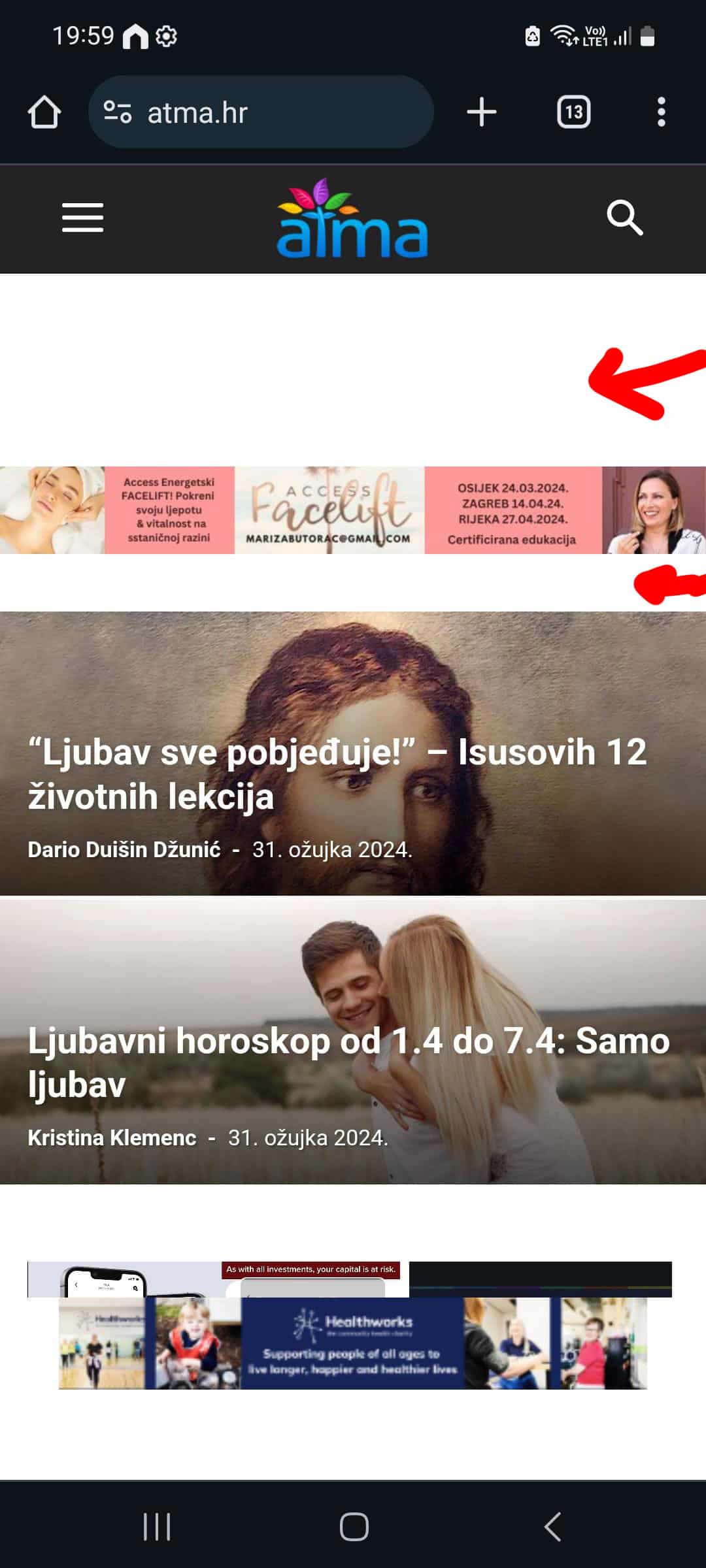
And this is the result is see in DevTools when I switch to mobile view:
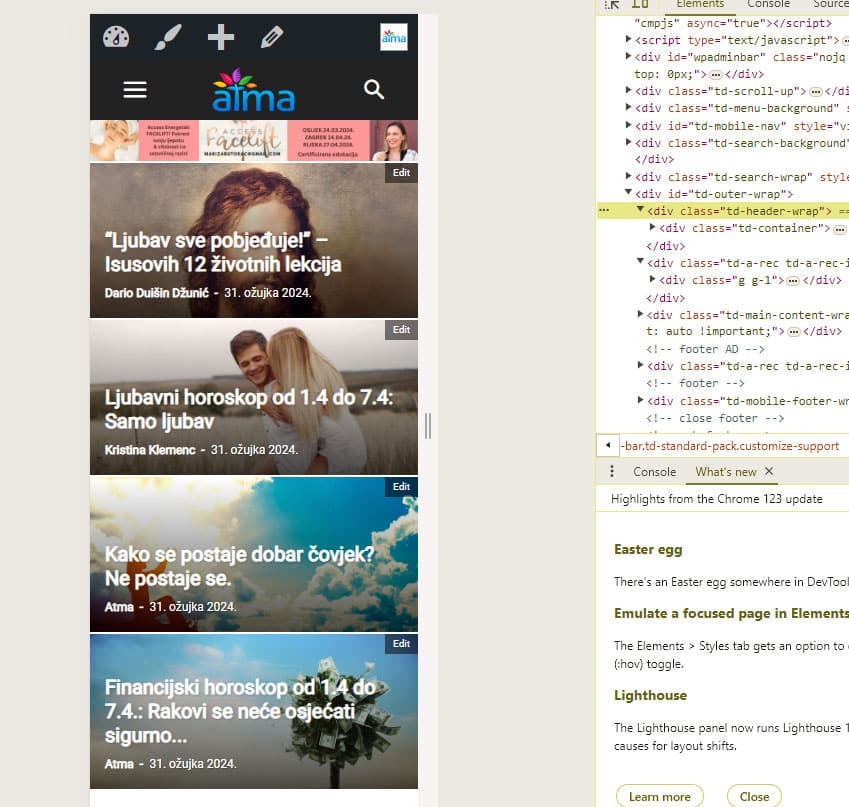
Or is there another way to get rid of those spaces?
Thanks!
My site is https://atma.hr/
Bettina Hello!
Please check the links I provided you above.
Few similar topics for more solutions:
– https://www.infophilic.com/get-almost-100-pagespeed-newspaper-theme/
– https://forum.tagdiv.com/topic/score-100100-pagespeed-with-newspaper-wordpress-theme/
– https://developers.google.com/speed/docs/insights/v5/about
– https://www.youtube.com/watch?v=tnkVapqhIHc
– https://www.xtechkr.com/optimize-newspaper-theme/
– Check those guides : https://web.dev/lcp/ – > https://www.sqlpac.com/en/documents/google-pagespeeds-lighthouse-6-new-features-lcp-cls.html -> > https://wp-rocket.me/google-core-web-vitals-wordpress/improve-cumulative-layout-shift
– https://forum.tagdiv.com/topic/to-high-cumulative-layout-shift-in-mobile-theme/
Thank you!
 todaysnifty
 Google Chrome.
My Site Performance is very low, after activating this theme can you gave a pdf tutorial to well optimized my website for mobile and laptops both.
Anamaria Hi,
Usually, this happens with cache plugins. If the cache plugin does not have mobile support then the mobile theme version can be delivered instead.
The solution would be to use the recommended WP Super Cache plugin instead and activate these settings (especially the mobile device support): https://forum.tagdiv.com/cache-plugin-install-and-configure/
Also, please let me know what plugin for the cache you use now.
Thank you!
Bettina Hello!
This situation appears when you are using the mobile theme plugin and the cache plugin that you have does not feature options for a separate mobile theme plugin therefore do not know when to deliver the mobile version and when to deliver the desktop version.
We have 3 options available for mobile versions that you can use:
1. Responsive version: A responsive version of your website looks similar to the desktop version. TagDiv Composer is used to edit the page.Click on the mobile viewport: https://www.screencast.com/t/XDQJedlggSB. There, you can see your mobile version and edit or adjust the elements to look better.
2. Mobile pages: https://tagdiv.com/newspaper-10-3-7-update-brings-customizable-and-fast-mobile-pages
3. Mobile theme plugin: The Mobile Theme is a performance-optimized theme included in the main Newspaper theme that only loads on mobile devices. It comes with its own templates and designs for pages, posts, categories, etc., so your current templates from the desktop theme will get converted to the mobile theme layout. Please see https://forum.tagdiv.com/the-mobile-theme/ and https://forum.tagdiv.com/mobile-theme-introduction/ for more information.
A full explanation is here: https://www.youtube.com/watch?v=SpGkOnJeNZY
If you need to use mobile version 1 or 2, then you need to uninstall the Mobile Theme plugin and AMP.
Thank you!
 joshimilestoner
This is my site on wordpress I have updated compatible version of wordpress installed and newspaper theme is also updated, I have updated the PHP 8.1 where it shows lot of errors and website doesn’t work on desktop but it works only on mobile… After changing it to 7.4 version it works absolutely fine please help…. If i doesn’t update the latest php it will slow down the site.
 TheNCBeatNow
I am so sick and damn tired of having the same issues with Newspaper theme every single time I change my theme. Why don’t the freaking MOBILE header logo stay what i save it as instead of keep going back to the fucking default theme header. I didn’t pay for this!
 Fontaine
Hello,
I have a problem with the Newspaper theme. I want to use the mobile version and not the Amp version and it displays the mobile version on the PC when I activate mobile.
Can you please help me to understand and solve the problem.
Thank you
FontaineHello,
I have a problem with the Newspaper theme. I want to use the mobile version and not the Amp version and it displays the mobile version on the PC when I activate mobile.
Can you please help me to understand and solve the problem.
Thank you
 jkakade
I use the InsightsAI Pro prebuilt theme. From the mobile version, the MORE button at the sticky mobile menu is not working. I don’t know what changes I made when installing the theme.
https://www.gamerstones.com/
Or if the process is complicated, how to remove the button?
jkakadeUnder Theme Panel > Custom Code > Custom CSS, I have inserted my desired coding for backlinks:
.tdi_57 a {
cursor: pointer;
border-bottom-width: 1px;
border-bottom-color: #9a58b5;
text-decoration: underline;
}
But it isn’t reflecting on the mobile version of my site. I even added it in Custom CSS > Advanced CSS and also in additional CSS from the Customization menu.
Anamaria Hi,
No, you don’t have the tagdiv mobile theme plugin activated. Also, please delete the object cache file https://forum.tagdiv.com/general-options-may-interfere-newspaper-theme/ -> https://imgur.com/XuPGnOo
Thank you!
 TribunaSNM
 Yes, I use the mobile theme plugin enabled. Here is the link: http://www.tribunasnm.ro.
Anamaria Hi,
Do you use the mobile theme plugin enabled? Please provide the link to your website.
Thank you!

