- TutorialsFrom WPBakery to tagDiv Composer
- TutorialsWhat is Ajax preloading?
 dscom
dscom We’ve reviewed the guide, but unfortunately, it didn’t offer a solution. We’re interested in using the ‘ARTICLE INLINE AD’ option from the mobile theme to achieve the same effect on the AMP page(showing inline ads between the articles paragraph). While we understand that this feature isn’t supported by default in the theme, could you please provide guidance on which theme files to edit in order to accomplish this?
https://app.screencast.com/op6RUX7p2Vibk
 Anamaria
 Hello,
Please delete the logo from theme panel, and assign it with tagdiv Composer https://i.imgur.com/bfPZEps.png https://i.imgur.com/EmzWCmI.jpg
For mobile please edit with tagDiv Composer, select the viewport on phone, select the header logo and change it => https://i.imgur.com/cR7F0v4.png https://www.youtube.com/watch?v=HXQQygkCCJo -> https://forum.tagdiv.com/add-logo-newspaper/
Thank you!
 ipro-wpadmin
Hello,
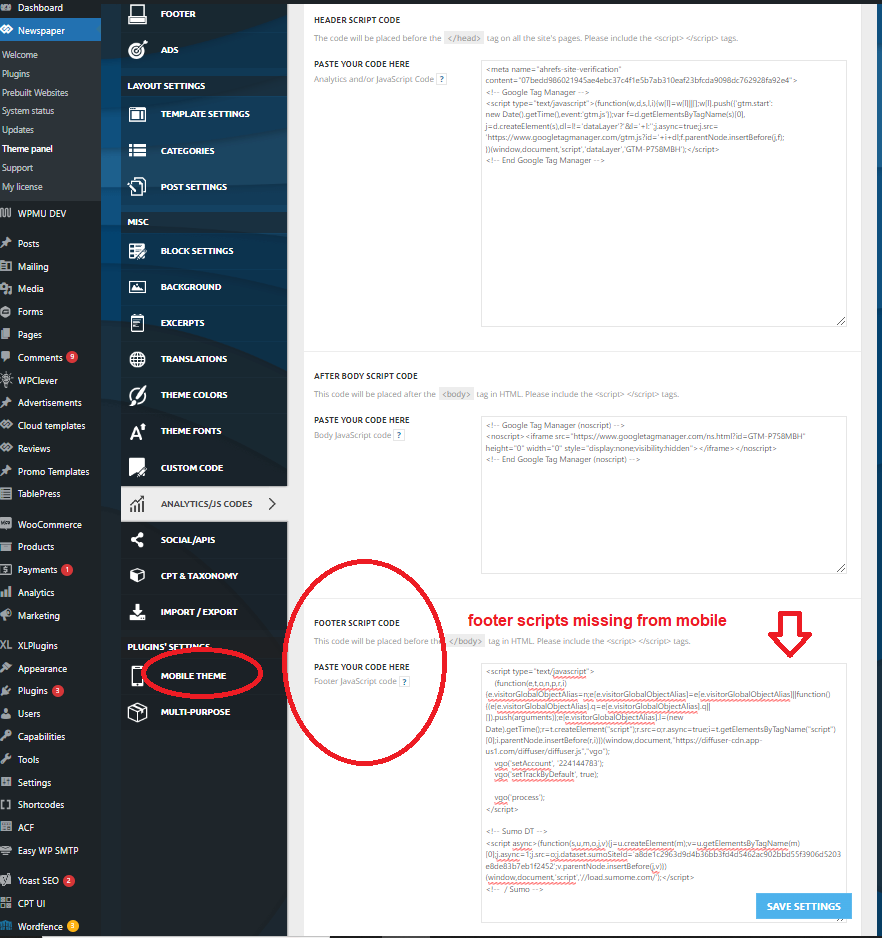
Scripts added into the Analytics Footer Script area in theme settings are not loaded on mobile when using the “mobile theme”. They load fine on desktop but are missing from mobile when the mobile theme is active. The header scripts do load on mobile.
Let me know if you have any questions or need any more information.
screenshot image – https://www.gun-tests.com/wp-content/uploads/2024/04/newspaper-footer-script-1.png
Thanks-
Stan
 smartjockz
 i change the header and footer in global newspaper themepanel and i will send screenshots showing the change and what pops up on mobile. I dont even have the newspaper image in my media library so not sure how it even displays in the absence of words or logo
 Bettina dscom
Hello,
We would like to load AMP ads inside the article ads in the mobile template. We are currently only using the mobile theme for AMP, and we would like to utilize the Article ADS section to load AMP ads. Could you tell us if something like that is supported by your theme? If not, can you guide us on how to achieve this?
Thank you.
Bettina Hello @mathclash!
We have 3 options available for mobile versions that you can use:
1. Responsive version: A responsive version of your website looks similar to the desktop version. TagDiv Composer is used to edit the page.Click on the mobile viewport: https://www.screencast.com/t/XDQJedlggSB. There, you can see your mobile version and edit or adjust the elements to look better.
2. Mobile pages: https://tagdiv.com/newspaper-10-3-7-update-brings-customizable-and-fast-mobile-pages
3. Mobile theme plugin: The Mobile Theme is a performance-optimized theme included in the main Newspaper theme that only loads on mobile devices. It comes with its own templates and designs for pages, posts, categories, etc., so your current templates from the desktop theme will get converted to the mobile theme layout. Please see https://forum.tagdiv.com/the-mobile-theme/ and https://forum.tagdiv.com/mobile-theme-introduction/ for more information.
A full explanation is here: https://www.youtube.com/watch?v=SpGkOnJeNZY
If you need to use mobile version 1 or 2, then you need to uninstall the Mobile Theme plugin and AMP.
Thank you!
Anamaria Hello,
Your website is not working. Please provide some screenshots. You can disable the mobile theme plugin from Newspaper -> plugins.
Thank you!
smartjockzIt hides all the images on the home page and basically turns the layout to just words on top of words. In the mobile preview it has images but when visiting the website on my mobile phone no images. I will attach images to your follow up email.
smartj.sh-host.com
Bettina Hello Joachim!
Do you mean these thumbs?: https://forum.tagdiv.com/thumbs-on-modules-and-blocks/
If you deactivate a dimension from there, next time when you will upload an image, it will not be resized to that dimension.
After changing the thumbnail sizes you need to regenerate your thumbnails using a plugin. Check this: https://forum.tagdiv.com/using-the-theme-with-existing-content/
NOTE: If the thumb specific for that block is not enabled, then the image won’t be displayed.
NOTE: The Mobile theme layout is not customizable as the responsive version or mobile pages. Please see https://forum.tagdiv.com/the-mobile-theme/ and https://forum.tagdiv.com/mobile-theme-introduction/ for more information.
Please provide an example of the issue you have now, and it wasn’t when you installed the theme, so we can check if there is a bug or not. You have the option to hide the featured images from Flex Block, for example.
Thank you!
 Fontaine
Hello
Problem with the menu on cell phones is a problem encountered by many people. The problem is not fixed and I’ve read over 300 messages and I’m not even halfway through the messages about problems with the mobile menu. No solution
isn’t there a problem with the theme?
 datingvergleich
Dear Support Team
I am having the same issue with the TownTalk Child theme. LCP check is failing for mobile view in Google Page Speed tests. LCP for the mobile view of posts is about 5 seconds.
I am using WP Rocket Premium with all optimizations turned on.
Obviously, this is mainly related to the thumb image on top of the posts. This image is loaded in full size and then resized to the mobile width.
For some reason, I did not have this issue when installing the theme first time. Could it have turned up with the latest version updates?
Example URL: https://www.dating-vergleich.com/alternativ/gleichklang/
There must be a better way to include this image. I assume, that all your child themes have this same issue.
If there is no way of optimizing this part from a developers point, would it be possible to do a custom workaround: removing this feature image from the mobile theme for posts and pages?
Looking forward to a feedback on this.
Best regards
Joachim
datingvergleich I am having the same issue with the TownTalk Child theme. LCP check is failing for mobile view in Google Page Speed tests. LCP for the mobile view of posts is about 5 seconds.
I am using WP Rocket Premium with all optimizations turned on.
Obviously, this is mainly related to the thumb image on top of the posts. This image is loaded in full size and then resized to the mobile width.
For some reason, I did not have this issue when installing the theme first time. Could it have turned up with the latest version updates?
My URL: https://www.dating-vergleich.com/alternativ/gleichklang/
There must be a better way to include this image. I assume, that all your child themes have this same issue.
Looking forward to a feedback on this.
Best regards
Joachim
datingvergleich I am having the same issue with the TownTalk Child theme. LCP check is failing for mobile view in Google Page Speed tests. LCP for the mobile view of posts is about 5 seconds.
Obviously, this is mainly related to the tumb image on top of the posts. This image is loaded in full size and then resized to the mobile width.
My URL: https://www.dating-vergleich.com/alternativ/gleichklang/
There must be a better way to include this image. I assume, that all your child themes have this same issue.
Looking forward to a feedback on this.
Best regards
Joachim
 shuddhatm9
Hi, I am using the Gossip Child theme where I have been facing LCP issues since last month we figured out that your cloud library and composer are taking time to load so it will be a great help if you can help in optimising the plugins and minifying CSS.
my site URL is https://www.tellymantra.com
Bettina Hello @Wriper!
Do you use an extra plugin for ads? Try to deactivate it, clear the cache and check if the ad is still there or not.
For the mobile theme plugin, we have only those options that could be found here: Newspaper -> Theme panel -> Mobile theme -> Mobile ads.
Thank you!
Bettina Hello @anshulrajora!
We have 3 options available for mobile versions that you can use:
1. Responsive version: A responsive version of your website looks similar to the desktop version. TagDiv Composer is used to edit the page.Click on the mobile viewport: https://www.screencast.com/t/XDQJedlggSB. There, you can see your mobile version and edit or adjust the elements to look better.
2. Mobile pages: https://tagdiv.com/newspaper-10-3-7-update-brings-customizable-and-fast-mobile-pages
3. Mobile theme plugin: The Mobile Theme is a performance-optimized theme included in the main Newspaper theme that only loads on mobile devices. It comes with its own templates and designs for pages, posts, categories, etc., so your current templates from the desktop theme will get converted to the mobile theme layout. Please see https://forum.tagdiv.com/the-mobile-theme/ and https://forum.tagdiv.com/mobile-theme-introduction/ for more information.
A full explanation is here: https://www.youtube.com/watch?v=SpGkOnJeNZY
If you need to use mobile version 1 or 2, then you need to uninstall the Mobile Theme plugin and AMP.
Thank you!
 Wriper
Hello,
We have tried activating the “post grid” on newspaper mobile theme.
Suddenly, there is 300×250 blank space called. When inspecting it tell us it is an AD.
I have checked all places for codes in theme, deactivated ad inserter (it is not called by ad inserter plugin). Deactivated our AD tag scripts. I dont know what this is or what i am missing
Do you know which part of theme is activating this place? I tought this is our homepage ad from desktop but it is not i have tried to deactivate that block and nothing happens.
Screenshot 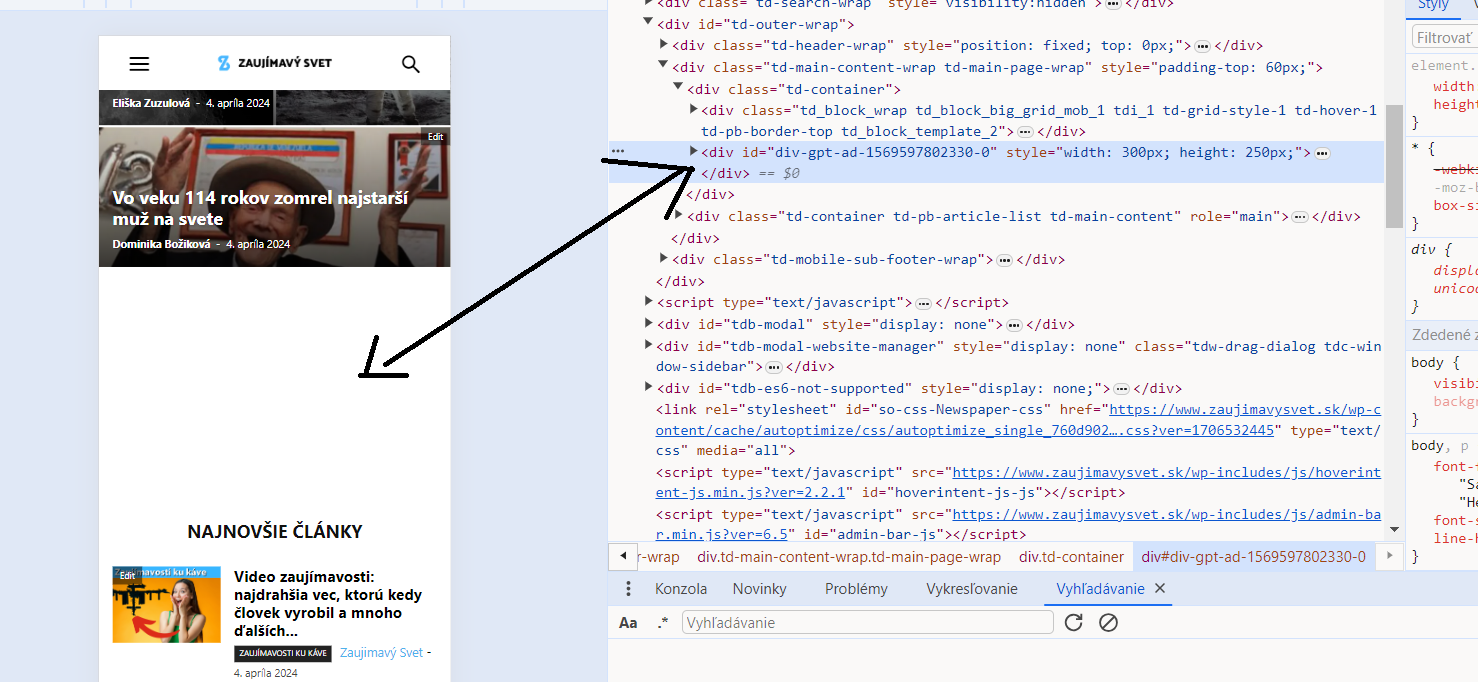
Thank you
 anshulrajora
Hi,
I have Installed “tagDiv Mobile Theme” and added the Mobile Template for Homepage, Category Page, Tag Page, Single Page & Author Page but when I am checking the settings on my mobile it’s not reflecting and showing a default structure. Also when I am trying to open the Menu in Mobile it’s responding too late.
Anamaria Hi,
There are a lot of factors which can make your site slow. Make sure you use only some templates and fewer functionalities and options.
Some factors which you need to take into account are:
External factors: server speed, if you are using CDN or not, the external resources loaded by your website like ads, fonts, tracking scripts like Facebook Pixel, Google Analytics, Twitter analytics, Hotjar and so on.
Internal factors: the number of elements on the page, image size, image formats, if you are using mobile optimized layouts, console errors, if you are using the Standard Pack plugin or not, if you are using the PRO demo or a standard one.
Also, installing a demo doesn’t guarantee that you’ll achieve the same page speed as tested on our demos. You’ll need to perform optimizations. You can use caching plugins like Super Cache or the premium WP Rocket.
There are many optimization guides provided by our users here in the forum, some made by us; you could check some of them
– https://forum.tagdiv.com/cache-plugin-install-and-configure/
– https://forum.tagdiv.com/how-to-make-the-site-faster/
– https://forum.tagdiv.com/topic/high-number-of-ajax-request/
– https://www.infophilic.com/get-almost-100-pagespeed-newspaper-theme/
– https://forum.tagdiv.com/topic/score-100100-pagespeed-with-newspaper-wordpress-theme/
– https://www.andraware.com/wp-rocket-for-newspaper-theme/
– https://spraythemes.com/newspaper-theme/how-to-speed-up-the-newspaper-wordpress-theme-using-wp-rocket/
– https://forum.tagdiv.com/topic/page-speed-guide-for-2023-beginners-and-advanced/
– https://forum.tagdiv.com/topic/newspaper-theme-speedify-your-website/
– https://forum.tagdiv.com/topic/tutorial-chriss-custom-optimizations-for-functions-php-etc/
– https://forum.tagdiv.com/cloudflare-cdn/
– https://forum.tagdiv.com/topic/theme-causing-high-cpu-usage-2/
– https://forum.tagdiv.com/topic/sql-querys-high-cpu/
– https://forum.tagdiv.com/topic/newspaper-theme-slow-to-respond/
– https://premium.wpmudev.org/blog/optimizing-your-wordpress-database-a-complete-guide/
– https://underconstructionpage.com/optimize-wordpress-database/
– https://crunchify.com/better-optimize-wordpress-database-all-in-one-guide/
Also, pagespeed is not covered by support -> https://forum.tagdiv.com/newspaper-theme-support/
Thank you!
Bettina Hello!
Check this guide: https://forum.tagdiv.com/thumbs-on-modules-and-blocks/
If you deactivate a dimension from there, next time when you will upload an image, it will not be resized to that dimension.
After changing the thumbnail sizes you need to regenerate your thumbnails using a plugin. Check this: https://forum.tagdiv.com/using-the-theme-with-existing-content/
NOTE: If the thumb specific for that block is not enabled, then the image won’t be displayed.
NOTE: The Mobile theme layout is not customizable as the responsive version or mobile pages. Please see https://forum.tagdiv.com/the-mobile-theme/ and https://forum.tagdiv.com/mobile-theme-introduction/ for more information.
Thank you!
Anamaria Hi,
To change the font and color for the mobile menu please go to Theme Panel -> Theme Colors -> Mobile menu/mobile search => https://www.screencast.com/t/0CvSgXp9H to set a background image go in Theme Panel -> Background -> Mobile menu/mobile search => https://www.screencast.com/t/uvDejzbX to change the font from Theme Fonts => https://www.screencast.com/t/ANBQe7hQhJd
To set the menu edit with tagdiv Composer, select the viewport for phone element and change the menu https://i.imgur.com/JJJ1WB7.png
Thank you!
Anamaria Hi,
To change the font and color for the mobile menu please go to Theme Panel -> Theme Colors -> Mobile menu/mobile search => https://www.screencast.com/t/0CvSgXp9H to set a background image go in Theme Panel -> Background -> Mobile menu/mobile search => https://www.screencast.com/t/uvDejzbX to change the font from Theme Fonts => https://www.screencast.com/t/ANBQe7hQhJd
To set the menu edit with tagdiv Composer, select the viewport for phone element and change the menu https://i.imgur.com/JJJ1WB7.png
Thank you!
 waleed9
Hello dears
It seems that with the last update to the theme, I did not notice some things that were different until now
Mobile templates do not appear as they did before, and there is no small pencil to modify or access them
I feel confused. I no longer know where my templates and pages that I allocated for mobile are
This is how it appears, it is something different and incomprehensible https://prnt.sc/RJFb_BfVgVGC
 OTAdmin1
I am trying to edit the appearance and contents of the menu that pops up when clicking the hamburger menu on the mobile site. Currently, it has a stock background image of a woman in a bathing suit, and the menu features categories that don’t exist on my site. How do I change the contents of the mobile menu, and how do I alter/remove the background image? When I click on that menu element in TagDiv Composer, it simply takes me to my live website instead of opening up a TC editing options window.