
- TutorialsFrom WPBakery to tagDiv Composer
- TutorialsWhat is Ajax preloading?
 kalacosolutions
 I am having issues removing the shadow on the header zone for mobile. The shadow does not show on desktop but shows on mobile. Shadow is set to 0. The shadow is not showing on the home page on mobile, but shows on mobile for all pages and posts.
Please advise how to get the shadow off the header zone on mobile..
Link to a post (please view on mobile) https://www.bylocalnews.com/news/salvation-army-launches-red-kettle-drive/
 HeatherKitching
Hi folks,
OK, getting a critical error on my mobile site. I deleted and reinstalled TagDiv mobile and cleared out the cache but nothing changed. When I disabled TagDiv mobile the home page displays perfectly. But the header and footer on the pages aren’t there. So for now I have mobile disabled so that I at least have that. But can you please help with the fix?
Thanks!
h
HeatherKitchingObvious question but kind of important! Thanks!
 Zeeshan Rasheed
 Update:
Here is mobile home page which i created https://imgur.com/a/D5pN6xz
And here you can see how its looks on mobile device https://imgur.com/a/D5pN6xz
Zeeshan RasheedHi,
I customized my theme pages with different blocks and section templates, and now my site https://www.bookwormworlds.com not showing on mobile even though I already created a mobile home page after this issue. Its just shows Newspaper demo data with newspaper header which totally different from my home page layout. Can you please help me out?
Thank You
 caminoel
Hello,
Is it possible to show & hide specific content on mobile devices by using tagDiv composer?
Thank you
 besthomegear
 Updates:
Clarification: We have not made any modifications to the Tagdiv Composer before or after this issue began.
1) My About page currently redirects to a random post, very slowly, but the URL is the “About page”?
2) We are unable to edit any pages or posts in WP editor. When we attempt to we get redirected to a page like this.
3) Essentially our site is shut down for any editing. We have confirmation from your tech support they were to look at my WP admin settings, in regards to AMP + Mobile theme plugins not functioning correctly, so this matter is more urgent. Please ask them to contact me by email Monday am, and i can give them temporary access to my Admin. My developer can find no determination for issues with the theme settings.
Thank You!
Kevin
 Socialpedia4u
Hello, team
Flexi block pagination not working in mobile it’s working only on desktop
tell me why it’s happing
 info@simonebarbone.net
 Hi Calin, I see now the grey top bar displays on mobile view, but there is still the menu missing in portrait viewport (see screenshot https://prnt.sc/nZJYuFGGU6A4) can you solve this as well?
 PatWire
 I don’t use the TagDiv mobile theme, have never used it – it isn’t installed and therefore doesn’t install when updated
 jaywhack
Hi,
There are Sign In/Join options in the mobile version of my site navigation menu. These shouldn’t be there as I don’t want visitors logging in to my site. I’m using Magazine v12.
Please advise on how to remove these options.
Thanks!
 TheNCBeatNow
 But I want to use the mobile theme because I like the plugin. Do I still need to edit desktop version first after disabling mobile theme and then re activate after the edit is complete?
 vallartamirror
 The menu is built.
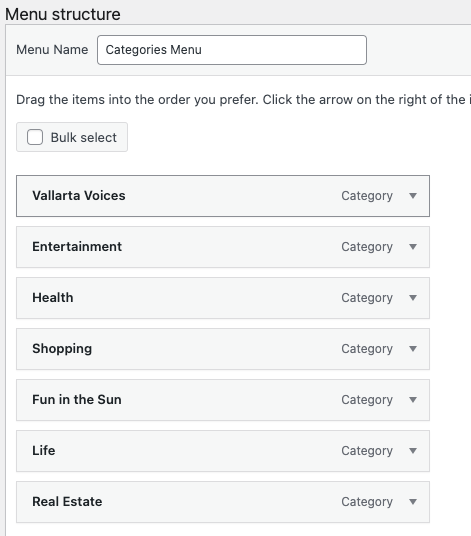
Selected in header.
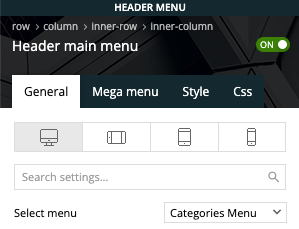
It displays fine on desktop but not mobile
The site is now live at vallartamirror.com if you would like to take a look on mobile and desktop.
vallartamirror I’m not quite sure how to do this. I cannot add a menu in the mobile home template.
I have the categories menu selected for the desktop design.
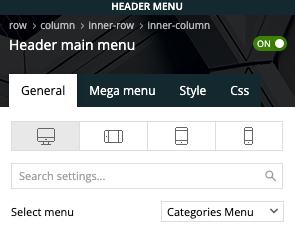
However, the mobile design does not have a selector and displays the categories from primary. Do I need to just edit these… and if so, where?
 Bettina
 Hello!
This issue has been discussed already here: https://forum.tagdiv.com/topic/after-updated-mobile-menu-issue/
Thank you!
 Anamaria
 Hi,
You didn’t change for mobile, you can change it for desktop -> https://i.imgur.com/ZRfxj0r.png
This is for mobile https://i.imgur.com/s0D9WQb.png
Thank you!
Bettina Hello!
Please update the theme to the latest update and deactivate, delete, and reinstall the tagDiv mobile theme from Newspaper plugins, clear all cache.
Thank you!
Anamaria Hello,
If you have created mobile templates, then you need to convert the header/footer -> https://www.screencast.com/t/HrjOBNayd please check this video https://www.youtube.com/watch?v=SpGkOnJeNZY to be able to edit them with tagDiv Composer.
Thank you!
Anamaria Hi,
Using our theme you can choose from 3 mobile versions
-> mobile responsive => https://www.screencast.com/t/oJ2ShOp47
-> mobile theme plugin => https://forum.tagdiv.com/the-mobile-theme/
-> mobile page => https://tagdiv.com/newspaper-10-3-7-update-brings-customizable-and-fast-mobile-pages/
If you created the mobile pages with tagDiv Composer, then when you install the Mobile Theme plugin, your pages will be overwritten by the plugin (the mobile theme comes with its templates for page, post, category, etc so your current templates from the desktop theme will get converted to the mobile theme layout, the page content is made without builders in mobile editor => https://www.screencast.com/t/xbgZG8kH also, the options that are provided to edit the mobile theme version are limited (this keeps the things simple)).
This is a video about Responsive Newspaper Theme, AMP & Mobile Theme, Mobile Pages & Templates -> https://www.youtube.com/watch?v=SpGkOnJeNZY
So, the mobile responsive is what you see when that you select the viewport on phone => https://www.screencast.com/t/matV17hH, so some settings may apply for each viewport(where is the border blue), and others are not(where the border is black).
The mobile page has the mobile templates from Cloud Library => https://www.screencast.com/t/YCcZ8rL8
The Mobile responsive version of the theme and the mobile page editor can be edit with tagDiv Composer, the mobile theme plugin cannot.
For example, you can have the mobile theme plugin activated and use the mobile page/mobile responsive version for the homepage/pages, but for the categories pages/404 page, you can’t use the mobile page/mobile responsive version if you have the mobile theme plugin activated.
So, if you want to design the pages with tagDiv Composer, you can use the mobile page or mobile responsive version.
Thank you!
 vqs
vqsIs there a cookies plugin that doesn’t cover the whole screen on mobile? The new european law about the GDPR made google force us to use that bad plugin. Is there a better one?
 terahlynn
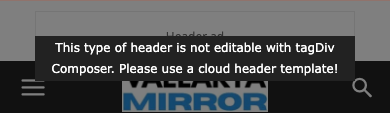
I created a mobile page and copied the content from desktop. It removed my header and when I go to edit it says that “this type header is not editable with tagdiv composer, please use a cloud template” however, no cloud templates are available in composer and it does not let me apply the one that I set as global. I have no ability to edit the header at all.
 Oldmagio
 Hello again,
Sorry but the problem is not totally solved, in the mobile home page (https://incognita.online/) reappeared the problem.
Inside the other pages and articles seems everything ok.
Have you any suggestion to help me?
Thanks for your attention.
Regards.
 thekiwigolfer
Have been having issues getting the mobile menu to work. All I’m getting is ‘Click here – to use the wp menu builder’. Can someone assist?
terahlynnI just now learned about being able to update the mobile version separately which I did but when we updated the website, it’s too much to individually update on mobile. is there a way to delete the mobile page then start over so it gives us the option to duplicate the desktop page like it did the first time? Or a way to update so it will pull over from desktop?
Thanks!
PatWire This issue persists with 12.6.2 – updating ( never had an update issue before )
The mobile plugin doesn’t auto install now but…
On mobile ( not plugin, responsive ) Big Grid Flex 1 corrupts to two massive images – the rest of the home page on mobile look fine – it’s Big Grid Flex 1 that is corrupting – no plugin deactivating or similar, fixes it – all site requirements are met all plugins tested. Only rolling back to 12.5 fixes the problem.
Desktop unaffected.


