- NewsmagUsing other ads
- NewsmagSidebar ads
- NewsmagImport / Export theme settings
- NewsmagRequirements for Newsmag
- NewsmagNewsmag documentation
- NewsmagHow to update the theme
- NewsmagBlock settings tutorial
- NewsmagIntroduction
- NewsmagPage Menu
- NewsmagMega menu
- NewsmagLogo & Favicon
- NewsmagFooter templates
- NewsmagTheme thumbs
- NewsmagBackground introduction
- NewsmagVideo playlist
 mexa
mexaHi guys,
My client’s website (https://www.milieucompleet.nl/) has a weird issue. The mobile header is different on a few pages. It look’s like the header has moved up to the left, which results in some black area on the right.
Most of the pages (including home) has a correct version:
https://www.imgdumper.nl/uploads9/63de438c528d0/63de438c502dc-Schermafbeelding_2023-02-04_om_12.35.58.png
Example on some other pages with the incorrect header (some simple text pages, WooCommerce pages etc.)
https://www.imgdumper.nl/uploads9/63de437588a20/63de437586052-Schermafbeelding_2023-02-04_om_12.36.05.png
I hope you guys has a solution for this issue.
 PuckWuck
Hello, have noticed this since last year.
When activating Newspaper I find that my adsense earnings drop considerably. I mean, A Lot!
Then when I go back to my other favored theme, it goes back up again.
I always check things out, at the end of every month. That is, to make sure these aren’t inflated numbers. Nope! I’ve consistently had tiny $$ amount of invalid traffic when using another theme.
It’s because of this, that I’ve repeatedly dropped Newspaper and gone back to my other fave theme.
Any thoughts? Anyone else have similar experiences?
Thanks
 hadharm
 Please kindly check the website now it has happened again. The homepage (hiideemedia.com) loads but other pages like hiideemedia.com/blog comes with the error.
The only fix have found is to delete the tagdiv composer and reinstall it from a fresh file.
 Ashby_P
Every time I save a post or page I get a Fatal related to the td-composer.
I do have Elementor installed (free version).
The error is only seen on mobile devices. It breaks the page (breaks mean that the page still loads on mobile, but it is all messed up).
The error goes away after 30 minutes or so. But will be present again when I save another post or page.
Here is what the error looks like:
Fatal error: Uncaught Error: Class ‘td_css_res_compiler’ not found in /home/rootname/public_html/wp-content/plugins/td-composer/includes/shortcodes/vc_row.php:171 Stack trace: #0 /home/rootname/public_html/wp-content/plugins/td-composer/includes/tdc_composer_block.php(133): vc_row->get_custom_css() #1 /home/rootname/public_html/wp-content/plugins/td-composer/includes/shortcodes/vc_row.php(324): tdc_composer_block->get_block_css(NULL, false) #2 /home/rootname/public_html/wp-content/themes/Newspaper/includes/wp_booster/td_global_blocks.php(28): vc_row->render(Array, ‘[vc_column][/vc…’) #3 /home/rootname/public_html/wp-includes/shortcodes.php(355): td_global_blocks::proxy_function(”, ‘[vc_column][/vc…’, ‘vc_row’) #4 [internal function]: do_shortcode_tag(Array) #5 /home/rootname/public_html/wp-includes/shortcodes.php(227): preg_replace_callback(‘/\\[(\\[?)(vc_row…’, ‘do_shortcode_ta…’, ‘[vc_row][vc_col…’) #6 /home/rootname/public_html/wp-content/plugins/elementor/includes/widgets/shortcode.php(130): do_shortcode(‘[ in /home/rootname/public_html/wp-content/plugins/td-composer/includes/shortcodes/vc_row.php on line 171
There has been a critical error on this website.
I´d appreciate to resolve this problemm
 Harutyun
 Hello,
1. for my first question i want to explain in more detail so that we understand each other correctly. look at the attachment I am attaching.

I have this button turned off but it exists in the codes, I can remove it via css by adding ‘display none’ but know and fix it too.
 Anamaria
 Hello,
Depends on how this plugin works; maybe some posts are shorter.
Did you use other codes for ads?
Thank you!
Anamaria Hello,
In the ad box, we can choose only those spots https://i.imgur.com/rsELvgm.png
The ad box has 3 sections for ads: using theme panel ads -> https://i.imgur.com/KFa9ibl.png, using images/banners -> https://i.imgur.com/MfAPTaE.png and custom code -> https://i.imgur.com/2rh8SuD.png save it and will appear on the post (you can set a shortcode like a shortcode from adrotate plugin or other plugins).
Thank you!
 neildahiya
Since yesterday, the cloud template library is not opening. I’m getting a “Proxy Error: Failed to contact the templates API server”. And looking at other threads in the support section, seems this problem is faced by all users.
 sebpre0805
 Hello Anamaria,
unfortunately that was also unsuccessful. Nothing is still displayed. When I search the site and look at all the results, everything is there, including all the meta information.
I had already deleted the style and from the beginning nothing is displayed. Have the header search already completely deleted and started again from the beginning. Nothing goes. Cache is cleared and the problem is not only with Firefox but also with Chrome.
Then another question, is it possible to customize the composer (left menu). As you can see, I don’t see everything (see red arrow) and there is no scroll bar.
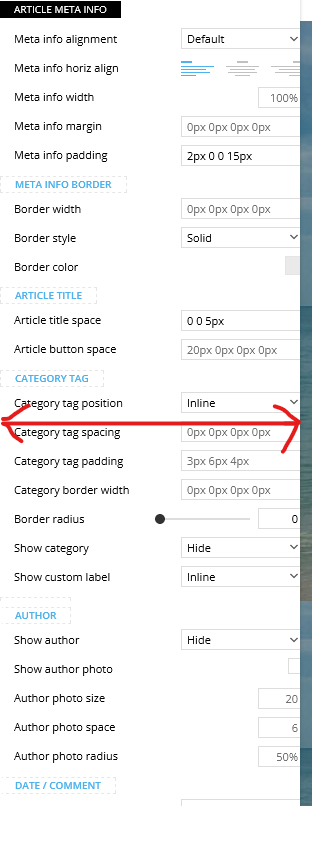
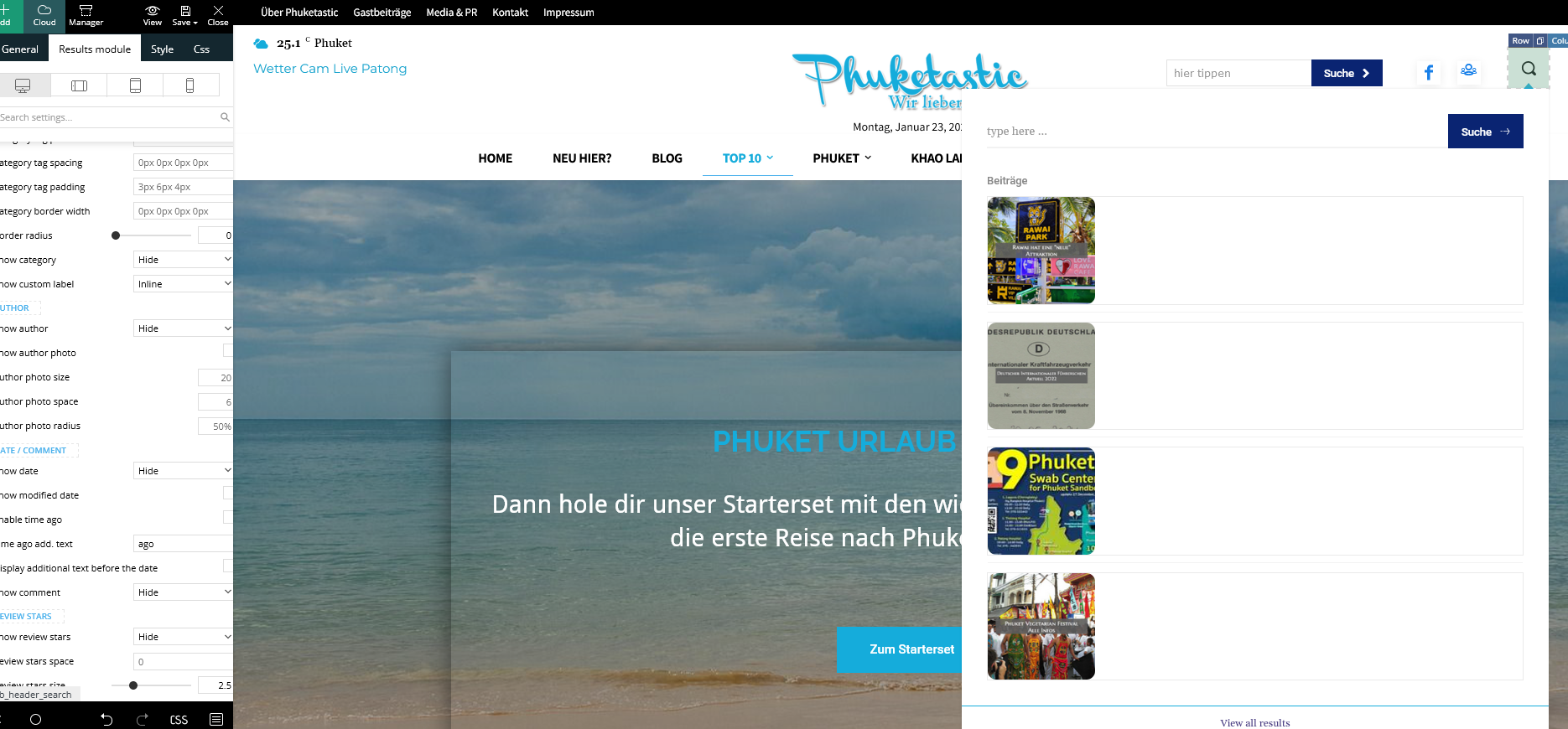
Best Regards
 AntonioT
When using Google Auto Ads I have to insert two code blocks:
– one in <head></head>
and the other after the pages <body> where I want to use Auto Ads.
The Newspaper – Theme Panel – Mobile Theme – AMP Ads – only have a field for “AdSense Auto Ads for AMP”
How can I do It?
Thanks
 discovermh
Hello Tagdiv,
From last 2 years there is no change in mobile theme. there are some features which is present in main theme but not in mobile theme.
1) 2 Column Option in Home, Category or archive page
2) Sticky social share option.(I already did it via css check https://www.discovermh.com/how-did-shivaji-maharaj-look-like/ )
3) Reading indicator
4) Carousel menu option under header like Jnews theme
5) Read Full Article Button on Post. which compact post and shows button after click on button it shows full article.
5) Remove other css from style.css for mobile view
6) Whenever you add bookmark/read later functionality make sure it is added in mobile theme also.
Almost all website have most users from mobile device. so this is very useful features need to implemented in mobile theme.

hadharm The homepage loads for visitors but other pages don’t
hadharm Now I findout it is the tagdiv composer plugin, I installed a previous version of the composer for the latest theme but it still returns an error. I think something is not right with the composer from my end though. Or is there a required PHP version for the latest theme??
And also is there a way to download older or previous version of newspaper released like version 12.1.1 that was working perfect b4 the update.
Only my homepage loads other pages on the website don’t.
 Anamaria
 Hello Martin,
Please edit with tagdiv Composer, not use the option Customize; select the banned in the tab image you can set your image or code.
The ad box has 3 sections for ads: using theme panel ads -> https://i.imgur.com/KFa9ibl.png, using images/banners -> https://i.imgur.com/MfAPTaE.png and custom code -> https://i.imgur.com/2rh8SuD.png save it and will appear on the post (you can set a shortcode like a shortcode from adrotate plugin or other plugins).
Thank you!
Anamaria Hi,
You can use the element Ad Box, and set the element where you want. The code does not need to be auto ads, so the theme will not have control.
The ad box has 3 sections for ads: using theme panel ads -> https://i.imgur.com/KFa9ibl.png, using images/banners -> https://i.imgur.com/MfAPTaE.png and custom code -> https://i.imgur.com/2rh8SuD.png save it and will appear on the post (you can set a shortcode like a shortcode from adrotate plugin or other plugins).
Thank you!
 Carvibz
Hello and Happy New Year!
We’ve been using the Newspaper theme for over 1 year and it’s proven a highly valuable resource. Nevertheless, while we’ve read your documentation on the topic, but it’s not totally clear to us how the theme works regarding images.
Context:
We are a news website and we usually upload photos from Instagram or screenshots from YouTube in FHD. We’re running your lightbox and the gallery is set this way. Link to: Media File. Image Size: medium.
Our Goal with the Newspaper theme for this action:
We’re trying to delete some of the thumbnails generated by the Newspaper theme because these take up serious space (we’re close to filling up our server capacity regarding sheer size and file count, and we’re not using the majority of them in the first place—more on this below).
Details:
Until recently, all the ticks were On in Theme panel>Block Settings>Thumbs on Modules/Blocks. But our website only really uses 696×0, so we’ve just switched all of them Off and left only that On.
The problem is with all the news stories written until the said recent change. Many unnecessary crops (for our implementation) were created for these and we’re trying to establish which ones to delete from the server and which to keep for properly displaying the stories.
Here’s Example One.
The issue is that the thumbnails generated are come in more sizes than required: (300×0, 696×0, 0x420). At least for us on Firefox (on Chrome they seem to work fine, display a single size, namely 696×0). One of these isn’t even meant for galleries.
And, on top of this, the editor and the thumbnails are like this (it’s a default wordpress size):
https://www.carvibz.com/wp-content/uploads/2022/12/320890937_1225580058312273_926418632237447405_n-240×300.jpg
Here’s Example Two, for the first image in the gallery (porsche-panamera-rear2.jpg)
If we look in the server, there are over 20 crops generated for the original image, as follows:
-100×70
-1024×576
-1068×580
-1068×601
-150×150
-150×84
-1536×864
-218×150
-265×198
-300×169
-324×160
-324×235
-324×400
-356×220
-356×364
-485×360
-533×261
-534×462
-696×385
-696×392
-741×486
-747×420
-768×432
-80×60
-original uploaded to wordpress media gallery (in this case it was 1600×900, but it can obviously vary)
This behavior is replicated with all other images (the number of crops per original image—as found on the server—usually varies between 22 and 24 and not 100% of the specific sizes are the same for the various images, even though many are common).
Conclusion (we need your assistance):
-What crops should we delete?
-Can you please explain how the NewsPaper theme works in terms of generating these crops and serving them to the users? This should help us establish the crops we can delete and the ones to keep.
Thank you,
Mihnea Radu
Carvibz co-founder
 drvarun5179
Hi, I released my Page speed guide for the Newspaper theme back in 2017. This is the 2023 version for the same.
My Website: https://medicforyou.in
Current Stats:
1. Pagespeed Mobile
2. Pagespeed Desktop
3. GTMetrix
4. Pingdom
Resources used:
Plugins
1. Ad Inserter
2. Akismet
3. Contact Form 7
4. Converter for Media
5. Formidable Forms
6. Formidable Forms Pro (Paid)
7. Inline Related Posts
8. Jetpack
9. LuckyWP Table of Contents
10. RankMath (free version)
11. Regenerate Thumbnails
12. tagDIV Cloud Library
13. tagDIV Composer
14. tagDIV Mobile Theme
15. tagDIV Social Counter
16. Wordfence Security
17. WP Rocket
18. wpDiscuz
CDN– Only Cloudfare Free with tweaks and rules
Hosting– GoDaddy (sucks but will switch later)
Plugin Based Tweaks Worth Mentioning
1. Ad Inserter
Newspaper mobile does not provide extended in-article ads. This is why I switched to Ad-inserter to apply rules to mobile and desktop versions. Works like a charm.
4. Converter for Media
Free webP conversion recommended by Google. Lightweight and also converts your previously uploaded files to webP as well.
6. Formidable Forms Pro- Paid
I bought this to have a quiz and calculator. To be honest, I spent more than 30 hours but still could not learn the conditional tags and essential formatting. Regardless, this is broken on the mobile theme plugin and has a drastic speed impact on the page. Definitely not recommended.
8. Jetpack
I am still to figure out what is the role of Jetpack in SEO and speed. Anyways, I have kept it to not destroy my existing SEO.
11. Regenerate thumbnails
I would recommend regenerating all thumbnails at a time when your visitors are not active on the website. It has some memory usage and should be done in a free environment.
MOST IMPORTANT
I browsed through forums to find that TD Standard Pack is not an essential plugin if you know how to develop your theme properly using TD Composer.
I was already using pre-installed templates. So, I simply deactivated the plugin to check if any pages were broken. Since there were none, I deleted the plugin.
It has huge speed impact and I definitely recommend creating your own templates rather than relying on the easy way out. Additionally, I would recommend you start with a pre-built website, and start editing the following Cloud Templates:
14. tagDIV Mobile Theme
If you have to choose performance over quality, I’d recommend quickly installing this plugin. It is tempting to give your users a wonderful experience, but at what cost? Reduced speed only drops your visitors from search engines. Most of us are bloggers, meaning we rely on Google and Bing for our visitors (in long term). I’d recommend using it without caring for those beautiful blocks or glittering images.
16. Wordfence Security
If you are on a shared hosting like me and using Wordfence, I would suggest you enable performance tweaks.
17. WP Rocket
I used AutoOptimize and various other plugins to speedily my website. I did achieve results, but the “remove unused CSS” is beyond my scope. It requires hours of finding the CSS and deleting them. Even if you understand what I am saying, you are still bound to make mistakes.
I switched to WP Rocket a few months back. It cost me 59 USD for a year. What did I get? Here are tweaks that I was not able to achieve previously (the rest all can be achieved with free plugins):
18. WpDiscuz
The CSS files are annoying and I believe minifying CSS and loading
wpDiscuz> Settings> General Settings> Enable Use WordPress native AJAX functions and Minify JS and CSS Files to Optimize Page Loading Speed.
If you have not installed it yet, I highly recommend you don’t get lured by it. Stick to traditional Comments from WordPress itself. They won’t cost you any speed damage.
Cloudfare Optimizations
I would not go much into detail about this. But I will summarize what I have done:
1. Optimization Tab- Tick marked all options except AMP URL and Rocket Loader (only if you are using WP Rocket because it will break your search button and menu on mobile with a Newspaper theme).
2. Caching- Tickmarked all except Always Online and Development mode.
3. Rules- I have set two rules which make Cloudfare cache all contents on my website except my admin panel. You can set them using the following image, make sure you replace your website name with www or without www (and no HTTP or HTTPS) and in THE ORDER THEY ARE (ByPass at 1st, Cache everything at 2nd).
Image:
4. Scrape Shield- Tick marked all of the available features (3 in total).
Currently, my concerns revolve around the following:
I hope this guide helps you all. Please leave any feedback or queries. Best of luck fellas.
 phubner
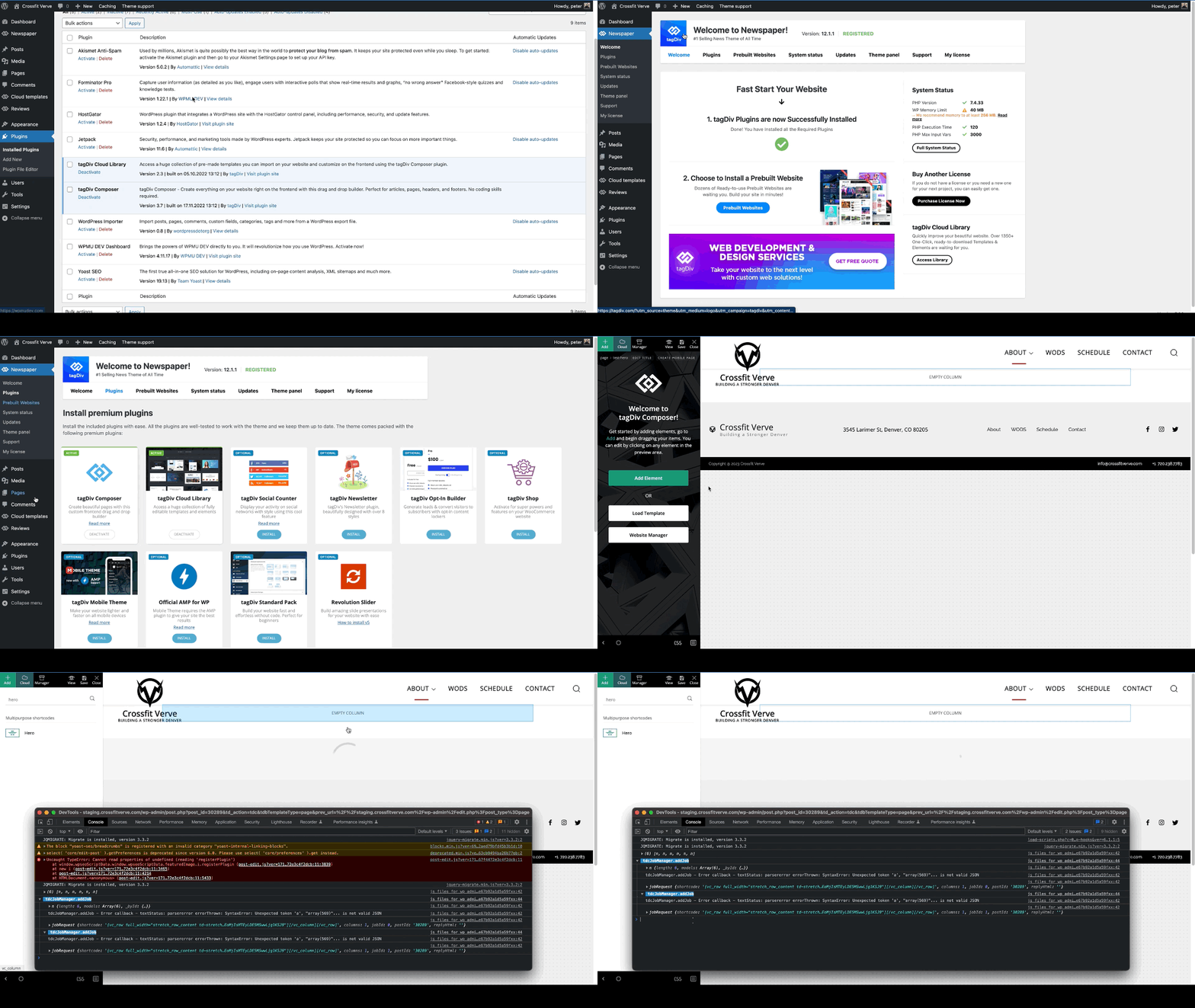
When trying to add a hero modules to pages I am getting the following error. This is happening on multiple sites of mine.
I created a simple test page that was blank and just tried to add the hero module. The page just has the spinner and never completes adding the hero module. In the console this is logged
tdcJobManager.addJob - Error callback - textStatus: parsererror errorThrown: SyntaxError: Unexpected token 'a', "array(569)"... is not valid JSON
jobRequest ...
shortcode
:
"[vc_row full_width=\"stretch_row_content td-stretch-content\"][vc_column][tdm_block_hero title_text=\"SGVybw==\" title_tag=\"h3\" title_size=\"tdm-title-bg\" description=\"V2VsY29tZSB0byB0aGUgZnV0dXJlIG9mIGJ1aWxkaW5nIHdpdGggV29yZFByZXNzLiBUaGUgZWxlZ2FudCBkZXNjcmlwdGlvbiBjb3VsZCBiZSB0aGUgc3VwcG9ydCBmb3IgeW91ciBjYWxsIHRvIGFjdGlvbiBvciBqdXN0IGFuIGF0dGVudGlvbi1jYXRjaGluZyBhbmNob3IuIFdoYXRldmVyIHlvdXIgcGxhbiBpcywgb3VyIHRoZW1lIG1ha2VzIGl0IHNpbXBsZSB0byBjb21iaW5lLCByZWFycmFuZ2UgYW5kIGN1c3RvbWl6ZSBlbGVtZW50cyBhcyB5b3UgZGVzaXJlLg
I did verify that I could add other modules, Author box, Flex grid, Client list, Image info box … etc.
site : staging.crossfitverve.com
Newspaper Version : 12.1.1
plugins : tagDiv Composer, tagDiv Cloud Library, YOAST SEO, Forminator Pro, Jetpack, WPMU DEV Dashboard
Anamaria Hi,
You can use the element Ad Box, and set the element where you want. The code does not need to be auto ads, so the theme will not have control.
The ad box has 3 sections for ads: using theme panel ads -> https://i.imgur.com/KFa9ibl.png, using images/banners -> https://i.imgur.com/MfAPTaE.png and custom code -> https://i.imgur.com/2rh8SuD.png save it and will appear on the post (you can set a shortcode like a shortcode from adrotate plugin or other plugins).
Thank you!
 Luca
LucaHi , I am looking for someone who even remotely is willing to fix some parts of my blog that runs on newspaper that I can’t fix myself .
In particular I would be interested in having the categories sorted with sub menus ( exactly as it is done in the demo ) that on mouseover ( for desktop ) show the categories and clicking opens the related submenus , at the moment I am using everything on one page . Among other things , despite having the Adsense active on youtube tells me that the site is not yet ready to work with adsense , because it lacks an order in the menus as written and then it is important to insert all the disclaimers that make the site 100% legal .
Unfortunately this is my first experience and despite help from the TagDiv team I have not made much progress .
Thanks for anyone who would like to help me .
Anamaria Hello,
Please provide the link to your website.
Also, did you add some code for ads in the head or other places?
Thank you!
 Chris Baird
Looking at posting coupons on the site – using CPT and ACF.
I would like to have it to be able to be separated via city and business category type . . .
I would like to have the “pages” with city or business category to show the business logo . . . and how many coupons are available for that business.
When clicked on the business logo – it goes into an information page about that business – with any available coupons shown there. . .
or any other better suggestions as to how to set it up – – i also want my banner ads to be seen on the “pages” . . (Layouts)
Any help and guidance appreciated – – if there is already a template to start from – that would be great.
 sco
scoHello,
The header live search does not return same results through live search and the press button or press enter. It leads to confusion for the visitor.
Location : tagdiv composer > add element > header live search > general tab > Post type
Only one type of post can be defined. Could you allow many post types separated by a coma ?
2 situations :
(1) when post_type is leave empty
a) when we press enter or click on the research button, we are redirected to : site.com/?s=word&post_type=post
So the results only include post_type = post
b) whereas live search return results that include of kind of posts
(2) when post_type is defined with : post, other_post_type
a) when we press enter or click on the research button, we are redirected to : site.com/?s=word
So here, full results appear
b) but live search return no results at all
Could you fix this by allowing multiple post-types separated by a coma ?
Thanks for your help,
Regards.
Chris BairdIn the Single Post Content > Ads > Bottom ad – there is no option to center it?
How would I otherwise center the ad?
Thanks
 LinkBaits7
I am creating a submission form which need to include a number of ACF created custom fields; however the form input field isn’t showing all created ACF custom fields. It seems to only be showing text, textarea, number, url & email but not other fields like select, date, WYSIWYG Editor, date picker etc.
But in documentation, demos & features it shows fields such as select: