- NewspaperWP Rocket and Newspaper Theme: Optimization Guide
- TutorialsDefault Block Settings Guide
- TutorialsOffset Feature
 Bogdan B.
 Hello,
If using a page builder you will first have to use the pagebuilder + page title template: https://forum.tagdiv.com/page-templates-2/
The you can add this css on the page in the top right of the screen (cog wheel)
.page-template-page-pagebuilder-title .td-crumb-container,

.page-template-page-pagebuilder-title .td-page-title{

display:table;

margin-left:auto;

margin-right:auto;

}
Thank you!
 simchris
 There are no such H3 rules like that in actuality. It’s normal practice to use H3 for section heads in posts, and on news indexes for the headline to identify it as more important than paragraph text, but not as important as page level h1 title and h2 supplemental (section) heads. If you look at actual information from Google, whomever told you that there are ‘too many h3’ tags on a page is bad, is incorrect. This is normal for an ‘index’ of content that leads to other content — in this context the h3 is used for presentation and not SEO, as on normal news sites the headlines change regularly and so are not used toward the overall weight of a page vs the actual page being linked to where the phrase would be the primary meta data, og data, and h1.
You could certainly edit the template and modules to turn that into h4, but even WP defaults sidebar widgets to h3 going back 12 years now. It’s normal practice to make all supplemental headlines or section heads h3 as h4/h5/h6 generally have no actual relevance other than presentational.
Speaking as an SEO company since March 1995 and WordPress dev since 2005.
Food for thought anyway (I don’t work here).
 news.zapoved.ru
Hi,
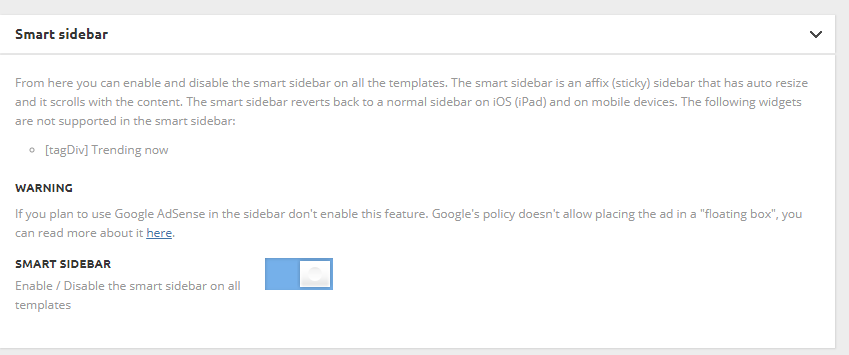
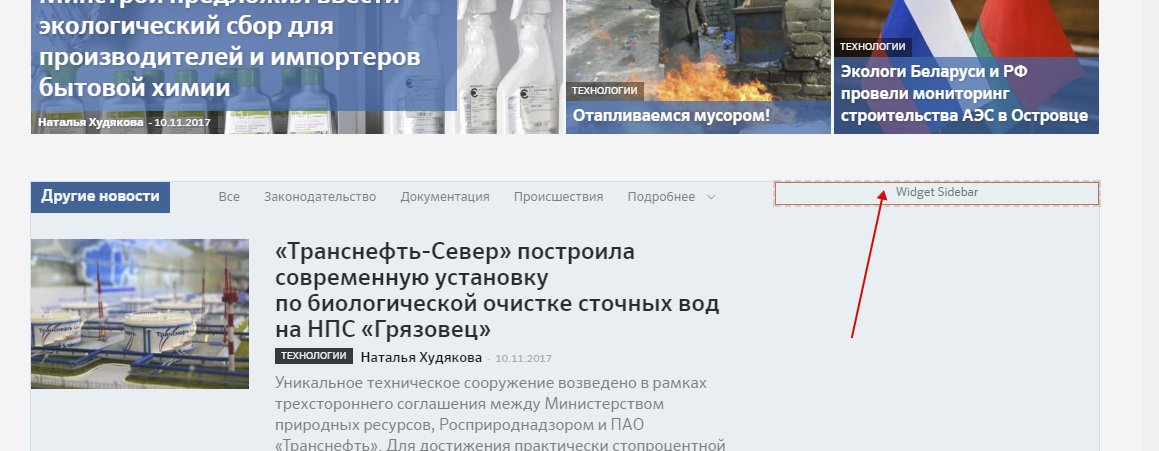
I turned on ‘Smart Sidebar’ option in template setting (screenshot: http://c2n.me/3Po2uhK.png), made sidebar and inserted it on the home page by the means of TD Composer (screenshot: http://c2n.me/3Po2BaR.png). But sidebar is not scrolling with content as intended. What I did wrong?
The page address is http://ecomag.zzkk.ru/
 Febrow
How can I change these 134 H3 headers on the home page? SEO rules say that there must not be so many H3 headlines on one page. I have to change it. Can you help?
By the way why such a well-structured template does not have such obvious feature, which is the ability to change these headers?
My website:
http://www.jazdaprawna.pl
simchris Two ways. Just place the image at top of your post by inserting the media normally. Or, you might have to edit page template to add the featured image hook. Often easier to just place the image manually. At least thats what i do.
 gos_ant
Good evening, team tagdiv.
I would very much like to get at least some support for the plug-in (Auto Load Next Post, https://wordpress.org/plugins/auto-load-next-post/) or the built-in function of the topic of loading the next post in the scrolling page.
Judging by the support forum, you have repeatedly been asked to make such a functional.
By our own forces, we could not build the plug-in correctly, because of the non-standard implementation of the templates 🙁
Loading the next post on the scroll, according to statistics, increases the visibility of the site to 100%. According to this, and there were thoughts about implementation.
There are many new themes that already out of the box support this function, but only because of it I do not want to move from your Newspaper theme to some other one 🙁
 Catalin
 Hello meri,
The template number used by you can find it if you will inspect you setup page or also, you can know what kind of template you are using if you will check your Theme panel. Also, notice that you should add some if statements to hide the author for specific categories, using the is_category function by category id or category slug, like as in the above example. Notice that is not a simple task and if you are not aware of the steps which are needed to take in this case, please consider hiring a freelancer/developer to help you because we cannot do this for you, sorry!
Thanks for the message!
Catalin Hello 3pixelkindr,
I have inspected your website and I saw that your pagination works as expected. I saw that you are using the Pagebuilder+Latest Articles+Pagination as page template. So, if you want to have another pagination style, like Load More, you should simply switch to another page template, like, page template default and then, use a Block setup with Load More pagination, like this -> https://www.screencast.com/t/Dwx7b151X4 and then you will have Load More pagination, as you want.
If is not what you mean, please provide more details so I will be able to provide a more accurate response.
Hope this helps!
Thanks for the message!
simchris Usually you can go to ‘edit page,’ for your static home page template, select the block, then choose which category to pull content from such as ‘featured’ or the ID for ‘featured’ category, depending on where that is being done.
That’s how I do it anyway.
 Arioth
 Which Newspaper template(demo) are you using for your page? I find it very interesting and would like to try it on my own website.
Thank You,
Milan
Catalin Hello Nachi,
This element comes from the page template. I saw that you are using the page builder + page title as you can see here -> https://www.screencast.com/t/rTFfRXfpRk8 If you want to remove this you should simple change the page template.
Thanks.
simchris One option would be to disable the views function from theme panel, and then use the WP-PostViews plugin but edit to use the same datafield/custom field used by the theme (or edit dbase to rewrite to ‘views’); then you’d turn ‘off’ the view on pages option in the plugin, but the views would still show for logged in users.
Simpler than hiring programmer.
OR:
With the theme only, you’d have to disable the code on all templates to keep it live in the admin post index view.
Food for thought anyway.
 mirko
mirkoHi,
1) i noticed that in your demo and in different categories you have different color titles:
for example:
in this page you have black title https://demo.tagdiv.com/newspaper/td-post-denton-corker-marshall-the-mysterious-black-box-is-biennale-pavilion/
in this one, instead, you have white title https://demo.tagdiv.com/newspaper/td-post-after-effects-guru-tracking-and-stabilizing-footage/
and it is perfect!
In the website im tryng to setting if i change post title color form theme-panel|theme colors|post title color it affects all posts, so if i insert white color it works for video template, but it doesnt work for the “post style 6” template (see https://d.pr/FREE/Sc9bW0) because the white title is on white background…
How to have different colours as in your demo?
2) how to have different colour background in the video template? (style 11 and 12?)
only via custom css?
thank you
 Simion C.
 Hi,
The top grid cannot be disabled, unless you remove all posts from the Featured category so it will not appear, but that is not a good solution.
You could achieve that a different way, it will require a modification to the mobile front page template. The slider can be then placed above the top grid, like this
– https://www.screencast.com/t/EdPqz4Ode
– https://www.screencast.com/t/F5pmyn1oY1
<?php echo do_shortcode ('enter shortcode here'); ?>
The result would be like this – https://www.screencast.com/t/iyizmSRu0a
Some margins could be added to top and bottom if needed
– https://www.screencast.com/t/TagJsncTRb
This would be the code for that, you can modify the pixel values as you wish, then enter the code in Theme panel->Mobile theme->Custom CSS code section
.rev_slider_wrapper {

margin-top:5px!important;

margin-bottom:5px!important;

}
If you want the slider to be full width (no margin left or right) that can be done in the slider settings
– https://www.screencast.com/t/KBRtdV3o7y7q
– https://www.screencast.com/t/IhIWzEvv
Result – https://www.screencast.com/t/sPIvQk6BdT
The top and bottom margin would be like this if you make the slider full width
– https://www.screencast.com/t/866eQxCEh
.forcefullwidth_wrapper_tp_banner {

margin-top:5px!important;

margin-bottom:5px!important;

}
Thanks
Catalin Hello Nabil Nachi,
You can change the page template from here -> https://www.screencast.com/t/8EyIMe5gR For more information about this, please check here -> https://forum.tagdiv.com/newsmag-page-templates/
Thanks for the message!
Simion C. Hi,
That will be the case. If the mobile theme plugin is disabled, then the same content from desktop will be displayed on all devices. The mobile theme plugins is optional, you can simply leave it deactivated.
If you choose to use it, please note that mobile page content will have to be entered through the mobile editor
– https://www.screencast.com/t/OuxeGzZD6pq
The plugin comes with predefined templates for the homepage, posts, category pages etc. You can find out more information here
– https://forum.tagdiv.com/the-mobile-theme/
If you would like to place a revolution slider on a mobile page, enter the slider shortcode in the mobile editor for that page
– https://www.screencast.com/t/OKRydevZWSd9
– https://www.screencast.com/t/YLe8R2WIAu
– https://www.screencast.com/t/c7iKYrjQddP
Thanks
 Wlk
WlkIs there any way? Because when I disable lazy load in template settings, its still enabled on article featured image. Disabling works on general images in article or pages, but not featured. Using Style7 for posts but its same on other styles too.
 brenbrinkman
I noticed that within the template on the right down corner on my website there is an arrow that will scroll me back up to the top on the page when I click on it. Is there a way that I can make this arrow disappear or change it?
Thanks!
 deltabh
 I placed the code there but i get a second reject from adsesne. I dont know why. Where did i get wrong?
Your AdSense application status
As mentioned in our welcome email, we conduct a second review of your AdSense application once AdSense code is placed on your site(s).
We did not approve your application for the reasons listed below
Insufficient content: To be approved for AdSense and show relevant ads on your site, your pages need to have enough text on them for our specialists to review and for our crawler to be able to determine what your pages are about.
To resolve this issue, please work through the following suggestions:
Make sure that your pages have sufficient text – websites that contain mostly images, videos or Flash animations will not be approved.
Your content should contain complete sentences and paragraphs, not only headlines.
Ensure that your website is fully built and launched before you apply for AdSense – do not apply while your site’s still in a beta or “under construction” phase or only consists of a website template.
Place the ad code on a live page of your website. It does not have to be the main page, but test pages that are empty except for the AdSense ad code will not be approved.
Provide a clear navigation system for your visitors so that they can easily find all of the sections and pages of your website.
If you’d like to monetize YouTube videos, please apply for the YouTube monetization program. Note that blogs and websites that contain only videos will not be approved.
 kompulsa
Hi,
I made the front page of the Newspaper theme (with the ‘Tech News’ demo) full-width using the tagDiv composer, but the ‘Front Page’ heading won’t align fully to the left, so it looks out of place. How can I fix that?
It can be seen here: https://imgur.com/a/5zeu5
 vincentbz
Hi,
I’ve read posts, pages and recommendations about thumbnails but I don’t think it answers, so here I am 🙂
I have the Newspaper theme, using for my articles the template n°7, with a full width featured image. The problem is that the bloc of this image is in 16/9 and I would like to change it to 4/3.
I’ve tried to modify the thumbnails but it doesn’t change the size of the displayed block, only the quality of the image. So, I don’t know how to change it now 🙂
To be more clear, this is what I have now

This is the image I would like to have in full width and correct height

Thanks for your help !
 wesdunn1977
Hi Support
Not sure if anyone here can assist, I guess this would come down as theme customization so I’m only posting on the off chance.
I would like to remove the link that appears in TD-Module-Thumb when using blocks, I would like to be left with only the title linking to whatever appears in these blocks so I don’t have 2 links to every article. I have highlighted in yellow first what I want to remove, the second item in yellow is what I want to keep.

I can see this code in TD_Module_4 which specifies the image dimensions but it is not clear to me how I go about removing the link, I have also looked in the block templates and I still don’t see what I could edit to achieve this small change.
<div class=”<?php echo $this->get_module_classes();?>”>
<div class=”td-module-image”>
<?php echo $this->get_image(‘td_324x235’); ?>
<?php if (td_util::get_option(‘tds_category_module_4’) == ‘yes’) { echo $this->get_category(); }?>
</div>
My site uses pages only if that makes a difference with pagebuilder and title as the template, I prefer Visual Composer also as opposed to the new Tag Div composer.
Appreciate any assistance.
regards
Wes Dunn
 konefsta
 First, thank you for your replies guys.
Second, i thought about this but it’s not a good solution….
I guess i will just take the long and old way of customising each page differently and set it as template and just use the template each time i want to add a new article.
That’s at least workable solution right? Or am i missing something?
Catalin Hello JorgeA,
You can increase from here -> https://forum.tagdiv.com/newsmag-page-templates/ https://www.screencast.com/t/iesSHmrtu the limit post number for your page template.
Hope this helps!
Thanks for the message!
Simion C. Hi,
There will have to be a header, to display the website logo and navigation menu. The header cannot be disabled.
The logo can be changed in the theme panel
– https://forum.tagdiv.com/logo-favicon/
The demo you have installed uses header style 11, this header style does not have a limit for the logo size. You can use any image size as logo.
You will have to create your own menu, based on your own categories for posts. Here is more information about creating the menu, and also the mega-menu option
– https://forum.tagdiv.com/main-menu/
– https://forum.tagdiv.com/mega-menu/
The revolution slider can be configured to display posts from the categories you want
– https://forum.tagdiv.com/import-revolution-sliders-on-demos/
So after setting the header and revolution slider as needed, you can go ahead and choose which block type, grid or full grid you want on the homepage. You can view them all as I mentioned in the live demo (Features menu).
First please check this tagDiv composer tutorial
– https://forum.tagdiv.com/tagdiv-composer-tutorial/
Blocks have many configuration settings, this is a guide where each is explained
– https://forum.tagdiv.com/block-settings-guide/
Modules that form blocks and grids will display the post title, additional post meta, and excerpt. The meta information can be disabled if you wish
– https://www.screencast.com/t/DF872Ac2sR
Excerpt length can be controlled as well – https://forum.tagdiv.com/excerpts-introduction/
When the module is clicked you will be directed to the post page, that is the intended functionality.
The baby blog demo consists of the revolution slider on top, then a latest articles section with a sidebar. The latest articles section is automatically added when the required page template is selected. More about it here
– https://forum.tagdiv.com/page-templates-2/
Posts will have to be created and published. Edit published posts and modify them if you wish. The tagDiv composer cannot be used to edit posts, it is a page editor.
Please correct me if I misunderstood something, and let us know if you need further help.
Thanks