
- Apitd_api_single_template::update_key
- Apitd_api_single_template::update
- Apitd_api_single_template::add
- ApiAPI – Single Template – Introduction
- ApiPractical example – How to add a new Block and Module
- ApiAPI – Category top section style – Introduction
- Apitd_api_module::update
- Apitd_api_module::add
- ApiAPI – Modules – Introduction
- Apitd_api_block::update
- Apitd_api_block::add
- ApiAPI – Blocks – Introduction
- ApiUsing the Theme API in plugins
 Simion C.
 Hi,
The picture you mention is a header ad. If you want to display the ad below the header, please select a header style that does that automatically. Like Header style 7 for example that looks like this
– https://www.screencast.com/t/1opezFNGf
If this has nothing to do with the ad and you want to insert a picture below the header, you could just simply use a single image element from Visual composer and add it on the top of your page
– https://www.screencast.com/t/8o5pfk7aFt7
Then select the image you want and the settings
– https://www.screencast.com/t/Qo4LRpNgafba
– https://www.screencast.com/t/XhN5TJOi4wgi
This works only for pages, if you want an image to appear everywhere on the website you must edit the header style template file that you are using. For example something as simple as this
– https://www.screencast.com/t/rjapLpBR
– https://www.screencast.com/t/VkruwjNptLTl
The image will appear on every page of your website.
Thanks
 TrevorDupp
Your smart lists are a helpful feature but I don’t understand why the introduction text found before the first h3 tag is shown on every single list page. This not an ideal user experience.
The UX we’re looking for is something like this
Intro
1st List Item
Nextbtn
2nd List Item
Next btn
Ect, etc.
To clarify, currently the result is this
Intro
1st List Item
Next Btn
Intro
2nd List Item
Next Btn
—–
Since your wordpress interface does not easily provide a page break button to use Pagination and since a lot of my writers are not super code inclined to go into the text version and type in <– nextpage –> over and over.
I’m hoping you guys might be able to provide a solution?
Big fan of the template and I hope this feedback proves useful from a UX experience perspective.
All the best
 Rousing The Kop
Hi,
I desperately need help on rectifying an error I seem to have made in my editor.
The following is the code for http://www.rousingthekop.com
<!doctype html >
<!–[if IE 8]> <html class=”ie8″ lang=”en”> <![endif]–>
<!–[if IE 9]> <html class=”ie9″ lang=”en”> <![endif]–>
<!–[if gt IE 8]><!–> <html <?php language_attributes(); ?>> <!–<![endif]–>
<head>
<meta name=”google-site-verification” content=”Sqc5Zv21aAPEJSdC00z8_XXjiIr1IXXOS2me030c7lM” />
<title><?php wp_title(‘|’, true, ‘right’); ?></title>
<meta charset=”<?php bloginfo( ‘charset’ );?>” />
<meta name=”viewport” content=”width=device-width, initial-scale=1.0″>
<link rel=”pingback” href=”<?php bloginfo( ‘pingback_url’ ); ?>” />
wp_head(); /** we hook up in wp_booster @see td_wp_booster_functions::hook_wp_head */
?>
</head>
<body <?php body_class() ?> itemscope=”itemscope” itemtype=”<?php echo td_global::$http_or_https?>://schema.org/WebPage”>
<?php /* scroll to top */?>
<div class=”td-scroll-up”><i class=”td-icon-menu-up”></i></div>
<?php locate_template(‘parts/menu-mobile.php’, true);?>
<?php locate_template(‘parts/search.php’, true);?>
<div id=”td-outer-wrap”>
<?php //this is closing in the footer.php file ?>
<?php
/*
* loads the header template set in Theme Panel -> Header area
* the template files are located in ../parts/header
*/
td_api_header_style::_helper_show_header();
do_action(‘td_wp_booster_after_header’); //used by unique articles
 simchris
 Probably need to hire developer, or try editing the style.css file for the main containers.
Find them via view source for the page layouts, and also use F12 in Chrome to inspect CSS elements.
If none of that makes sense, you would need to hire somebody to hack the CSS for you.
Theme doesn’t have a “full width” template, that I know of, and doesn’t advertise having one.
( I don’t work here. )
 sailingchance
I am having some trouble with the smart list 1 template. I am using vertical images and when they display the full width of the page you can only see a portion of the image. I want to set a max height for all images used in my smart list so that I can get both vertical and horizontal images to render well. What code should I be using for this?
I have not published the article with it not displaying properly. But, here is a fix that I did use to get the height right. Ideally I’d like to have one vertical image per slide with white space around it. http://www.sailingchance.com/blog/the-doors-of-barcelona
simchris Delete plugin ?
Turn off ability for core files to be edited by WordPress via functions.php.
Check your home page template.
Check your functions.php file for something added to it by plugin.
Delete any entry added to your MySQL dbase by the plugin.
Resave permalinks, clear cache; clear transients with WP-Optimize.
( I don’t work here. )
simchris Theme doesn’t control that at all to the permalinks. Best to ‘google’ that as it’s part of WordPress core.
e.g.,
http://stackoverflow.com/questions/17798815/remove-category-tag-base-from-wordpress-url-without-a-plugin
I think for second item, just edit the ‘tag’ loop in the page template(s).
( I don’t work here. )
sailingchance I am having some trouble with the smart list 1 template. I am using vertical images and when they display the full width of the page you can only see a portion of the image. I want to set a max height for all images used in my smart list so that I can get both vertical and horizontal images to render well. What code should I be using for this?
 Bogdan B.
 Hello,
You seem to use the latest articles feature of wordpress, not a static page on your homepage. In this case you can select the module used for the template from here: https://www.screencast.com/t/cY9mIhG9y6dr
If you want to build a custom page using visual composer and set it as a homepage, please follow this guide: https://forum.tagdiv.com/homepage-how-to-build-and-set-it/
Thank you!
PS. Your mega menu is broken as it was not created properly. Please check this forum topic: https://forum.tagdiv.com/topic/megan-menues/
 Catalin
 Hello Gabbukas,
Unfortunately, our theme does not have any such an option and no tested plugins in this regard, sorry! Our login template page is made in login.php https://www.screencast.com/t/N8ltcmv8UFsK. If you want to display more levels in our theme and if you are not aware of the steps which are needed to take in this regard, please consider hiring a freelancer/developer to help you because we cannot provide custom services at the moment, sorry! Also, we cannot provide support for untested plugins.
Thanks for the message!
 SW1988
 Hi,
Thank you for the extensive explanation.
I got it for the most part running now, exept the side bar is gone now.
I got the page template now up at : page builder + page title
How do i get the side bar back 🙂 ?
EDIT:
In this image i see you recreate a sidebar in visual composer. Is that the way to get the sidebar back ?
https://forum.tagdiv.com/wp-content/uploads/2016/06/Block-setting-pencil2.png
-
This reply was modified 9 years by
SW1988.
Simion C. Hi,
You could achieve that like this. I added these blocks to the page
– https://www.screencast.com/t/36ywCEy2u6
The first block (block 23) is set to display one post, and has the title Latest posts
– https://www.screencast.com/t/EZ8lo90R
The second block (block 12) has no title and you can set the limit of posts and pagination you want for it.
The result is like this
– https://www.screencast.com/t/59xVfwwejftA
– https://www.screencast.com/t/o4wtqyP1
– https://www.screencast.com/t/snEfyVPdiPs
Then you can disable the default Latest articles section, by selecting a different page template. Of course the blocks have the same options to filter and sort the content
– https://forum.tagdiv.com/block-settings-guide/
Hopefully this suggestion will be helpful to you.
Thanks
Bogdan B. Hello,
This depends on the page template you use. If you use the default page template the title and breadcrumbs will be removed when using visual composer. Please switch to the page builder + page title to show the title and breadcrumbs on your pages: https://forum.tagdiv.com/page-templates-2/
Thank you!
SW1988 That is correct. I use pagebuilder+latest articles+pagiation as a page template.
I did what you said and looked up that area from the first screenshot but unfortunately i couldn’t find it.
I did find it at other pages though..
Catalin Hello SW1988,
I have inspected your website and I saw that you are using the pagebuilder+latest articles+pagiation as a page template, right? So, if you want to change the modules from this area, you can modify them from here -> https://www.screencast.com/t/Whn7XdVjpr9H For more information about our page templates, please check here-> https://forum.tagdiv.com/page-templates-2/
Thanks for the message!
Bogdan B. Hello,
The latest articles area settings are found in the post loop settings here: https://www.screencast.com/t/bbl59J9qS
Please also read the documentation on page templates for more info: https://forum.tagdiv.com/page-templates-2/
Thank you!
Bogdan B. Hello,
Sorry but the mobile theme homepage cannot be edited. It is a predefined template that does not use visual composer so you cannot add block elements. sorry. If you need to have block elements on your mobile site, you will have to disable the mobile theme plugin as the theme is already responsive without the plugin. The mobile theme plugin adds more speed but limits the theme to standard templates without the use of visual composer.
Thank you!
Bogdan B. Hello,
As you can see on this category template, the container takes up the entire screen space above the sidebar: https://www.screencast.com/t/er0oB03xp
You will not be able to move the sidebar into the category header container unfortunately. A more elegant solution would be to use one of these 3 category templates: https://www.screencast.com/t/lRjm67fDD if no grid is used on category pages.
Thank you!
 nodi
nodiHello,
first … sorry for my bad english!
I can not activate “unique articles”, because the “page template settings” (like this:
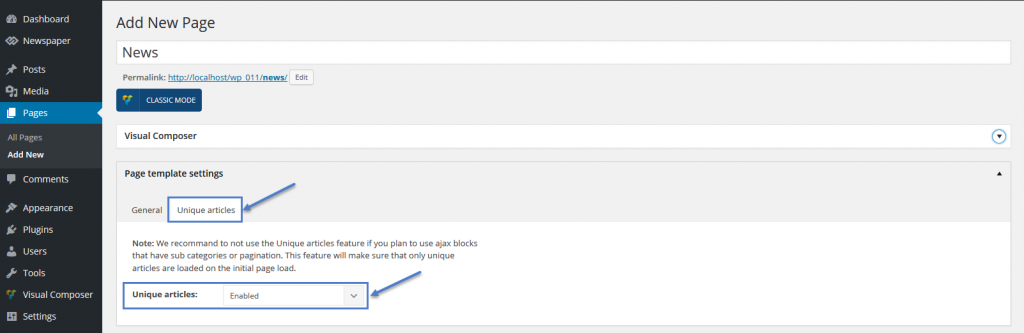 ) in my page-editor is missing. What´s wrong? Please help!
Greets,
Alex
Simion C. Hi,
There is no easy way of forcing the sidebar to display above the post, in the post page. It will appear below the post content. You can try to make modifications to the theme files if you want to achieve this. Each post template has a corresponding single file – https://www.screencast.com/t/b0unpyzDB
There you could change the order of the post structure, and place the sidebar above the main content. This may not work properly, and may require additional modifications but you could give it a shot.
Thanks
Simion C. Hi,
That would require quite a bit of work. The header has the option to stretch it’s content to full width
– https://www.screencast.com/t/cKbxMbctA7Y
So you could achieve something similar to that – https://www.screencast.com/t/9CGVdaGaXQW
Here you can see the available header templates
– https://forum.tagdiv.com/header-styles/
Further styling can be made using the theme options.
The footer can be disabled in the theme panel
– https://www.screencast.com/t/8bM7floiga6L
As well as the top bar above the header
– https://www.screencast.com/t/l5lbALT0
Then you can start creating your page in Visual composer using the available elements. The rows have the option to stretch to full – https://www.screencast.com/t/ikT7LZWT
And also to use a parallax image – https://www.screencast.com/t/Ho8FCuhoQm2v or even a video background.
Hopefully this will get you started in your project and you can manage to create the design you want.
Thanks
Catalin Hello rfortz,
Unfortunately, if you want to change the layout of your woo commerce page, notice that will can be done only through the code because the theme does not have any such an option that allows you to do this, sorry! Notice that is not a simple task and if you are not aware of the steps which are needed to take in this case, please consider hiring a freelancer/developer to help you because we cannot provide custom services at the moment, sorry! As a hint, if you want to affect the woo commerce template, you should edit the following core files, from here -> https://www.screencast.com/t/KoDf3xbvhkd
Thanks for your understanding!
 Alxtric
Hi,
I have followed the instructions and watched the video tutorial to build my custom homepage. Every time I select a template with the visual composer, the visual composer throbber spins indefinitely and I wait for ages with no progress. I cannot get past this stage. Am I doing something wrong?
Simion C. Hi,
There is no option to enable Visual composer on category pages. The category templates are predefined and there is no setting to edit it and add additional content in the page. Here you can find the category templates in the theme – https://www.screencast.com/t/o9us5uunwj if you would like to modify the code or make modifications to them. The category page consists of a Top post Big grid, and a section containing articles from the respective category. If you would like to implement more elements to these pages, it will have to be made custom or through a plugin if there are any with this capability.
Thanks
 Dirk Micheal
Hello TagDiv Team,
How is it possible to create new full width template without even header & footer and integrated with visual composer? reason i ask you is i need to create full width page using Visual Composer with One Page Navigator like this link http://beeteam368.com/wordpress/smart-one-page-parallax-selection/
I would like to get help about this Creating full width Template.

