
- NewsmagPage templates
- NewsmagCategory templates
- NewsmagFooter templates
- NewsmagDefault post templates
- NewsmagPost templates
- NewsmagHomepage – How to build and set it
- NewsmagtagDiv Composer Tutorial
- NewsmagCustom Post Type Support
- NewsmagNewsmag documentation
- NewsmagHow to use the Visual Composer plugin
- NewsmagHeader styles
- NewsmagSmart sidebar
- NewsmagCategory grid styles
- NewsmagCategory top post styles
- NewsmagHow category settings work
- NewsmagFeatured images
 Anamaria
 Using our theme, you can choose from 3 mobile versions
-> mobile responsive => https://www.screencast.com/t/oJ2ShOp47
-> mobile theme plugin => https://forum.tagdiv.com/the-mobile-theme/
-> mobile page => https://tagdiv.com/newspaper-10-3-7-update-brings-customizable-and-fast-mobile-pages/ The option that you need to use.
Suppose you created the mobile pages with tagDiv Composer. In that case, when you install the Mobile Theme plugin, your pages will be overwritten by the plugin (the mobile theme comes with its templates for page, post, category, etc, so your current templates from the desktop theme will get converted to the mobile theme layout, the page content is made without builders in mobile editor => https://www.screencast.com/t/xbgZG8kH also, the options that are provided to edit the mobile theme version are limited (this keeps the things simple)).
This is a video about Responsive Newspaper Theme, AMP & Mobile Theme, Mobile Pages & Templates -> https://www.youtube.com/watch?v=SpGkOnJeNZY.
So, the mobile responsive is what you see when that you select the viewport on phone => https://www.screencast.com/t/matV17hH, so some settings may apply for each viewport(where is the border blue), and others are not(where the border is black).
The mobile page has the mobile templates from Cloud Library => https://www.screencast.com/t/YCcZ8rL8
The Mobile responsive version of the theme and the mobile page editor can be edit with tagDiv Composer, the mobile theme plugin cannot.
For example, you can have the mobile theme plugin activated and use the mobile page/mobile responsive version for the homepage/pages, but for the categories pages/404 page, you can’t use the mobile page/mobile responsive version if you have the mobile theme plugin activated.
So, if you want to design the pages with tagDiv Composer, you can use the mobile page or mobile responsive version.
No, you do not need a plugin to redirect to the homepage; this will automatically change, but please make sure that you have a cache plugin with the support alos mobile versions.
Thank you!
 jtoney
I’m not sure what this is called but when looking at a page there used to be an option to change the template it was using whether it was the global template or one I created. That bar is gone now and I’m left with the Edit in TagDiv Composer or Mobile as my only options. What happened to this?
 PIF21
PIF21 Is the search page a page or a template? Other than the tagdiv composer, I do not see an edit option on the search page. Is there any way to recover after revisions of the search page?
 EntertainmentWorld
Throughout out the day my website is running the proper mobile I designed. Then come night it goes to CRAZY PAGE mobile template while i sleep. Any idea why this happens? I since have deleted all mobile pages.
entertainment world tv
 somoselectricos
Hello.
I contact you because I want to know if there are any way to add in the template Newsmag a keywords in the beginning of the website (Header) as appear in a lot of pages.
For example this: https://www.marca.com/ (in the beginning appear Es noticia: follow of keywords.
I don´t know if I can add this easyly in any option of the theme or if you know any plugin that help me.
Thank you very much.
 LauraBV
 No – it’s not displaying the error right now because I have cleared the website cache and therefore it displays correctly.
Am I being stupid here?
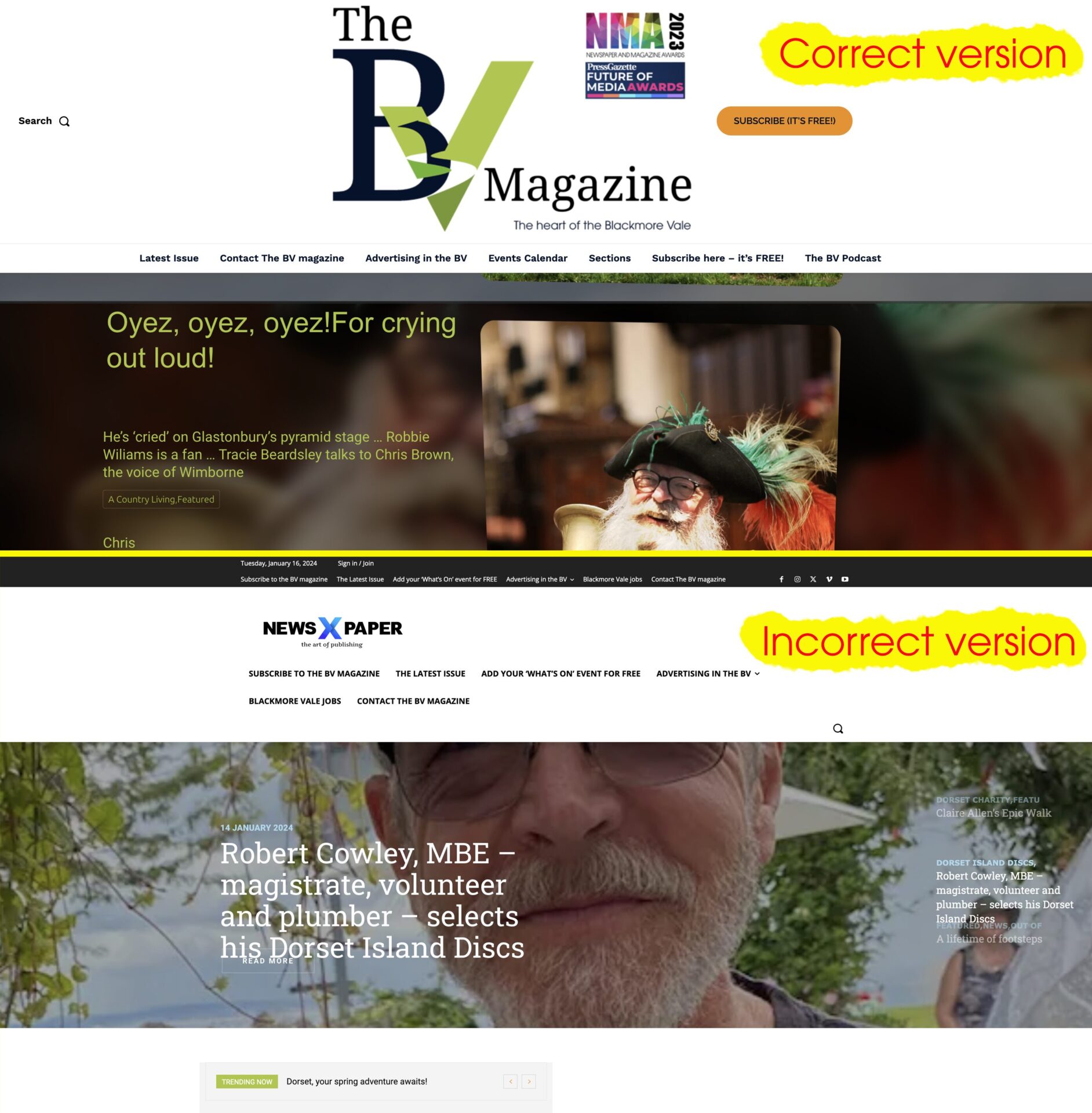
The website should not revert to a broken, incorrect version on the home page when I create a new blog post.
That is not an error in someone’s browser.
They are not simply viewing a leftover unrefreshed echo.
It is a bug in the website itself – the home page template has zero connection to a new blog post going live.
Below are the two side by side – please explain how this occurs when I publish a new blog post, and how the source of the issue is the users browser?
Anamaria Hi,
You can’t use the page template globally because there are different pages, that do not contain the same information. You can edit the page in the editor, set the editor in code editor -> https://i.imgur.com/FOe7EdU.png -> https://i.imgur.com/hwxxjQt.png copy the code, and paste in a new page in the code editor, to have the same style.
If you delete all the page templates, then it will be a default template.
The page template should be for all prebuilt websites. What version of the theme do you have? Please provide screenshots.
Thank you!
Anamaria Hi,
For mobile please edit with tagDiv Composer, select the viewport on phone, select the header logo and change it => https://i.imgur.com/cR7F0v4.png https://www.youtube.com/watch?v=HXQQygkCCJo -> https://forum.tagdiv.com/add-logo-newspaper/ Please delete the logo from theme panel.
This is a video about Responsive Newspaper Theme, AMP & Mobile Theme, Mobile Pages & Templates -> https://www.youtube.com/watch?v=SpGkOnJeNZY.
Thank you!
 lpecchiproper
I noticed a difference between Newspaper 11, which I used with other Newspaper accounts for several sites, and Newspaper 12, just purchased for a customer, regarding cloud templates.
I saw in version 12 the Page Template item has been added in templates, in which I can import different templates from the cloud library.
However, I can’t figure out
- how come it is not possible to assign a global page template, as it is for posts
- how I can change the page template of a specific page
- if I delete all the imported page templates, what is the default template for the page type
Also, I am using Dental Pro as prebuilt site, and it does not provide, as with other prebuilts, page templates, and I can’t even find a blank page template as for posts
Could you please help me?
Thanks in advance, Luca
 Calin
Calin Hello,
Unfortunately the theme do not have a black page template, but what you can do is to install the revolution slider plugin that we provide with the theme and this will add a black template – https://i.imgur.com/rkB2Jlj.png
Thank you!
Anamaria Hello,
1. Using our theme, you can choose from 3 mobile versions
-> mobile responsive => https://www.screencast.com/t/oJ2ShOp47
-> mobile theme plugin => https://forum.tagdiv.com/the-mobile-theme/
-> mobile page => https://tagdiv.com/newspaper-10-3-7-update-brings-customizable-and-fast-mobile-pages/
Suppose you created the mobile pages with tagDiv Composer. In that case, when you install the Mobile Theme plugin, your pages will be overwritten by the plugin (the mobile theme comes with its templates for page, post, category, etc, so your current templates from the desktop theme will get converted to the mobile theme layout, the page content is made without builders in mobile editor => https://www.screencast.com/t/xbgZG8kH also, the options that are provided to edit the mobile theme version are limited (this keeps the things simple)).
This is a video about Responsive Newspaper Theme, AMP & Mobile Theme, Mobile Pages & Templates -> https://www.youtube.com/watch?v=SpGkOnJeNZY.
So, the mobile responsive is what you see when that you select the viewport on phone => https://www.screencast.com/t/matV17hH, so some settings may apply for each viewport(where is the border blue), and others are not(where the border is black).
The mobile page has the mobile templates from Cloud Library => https://www.screencast.com/t/YCcZ8rL8
The Mobile responsive version of the theme and the mobile page editor can be edit with tagDiv Composer, the mobile theme plugin cannot.
For example, you can have the mobile theme plugin activated and use the mobile page/mobile responsive version for the homepage/pages, but for the categories pages/404 page, you can’t use the mobile page/mobile responsive version if you have the mobile theme plugin activated.
So, if you want to design the pages with tagDiv Composer, you can use the mobile page or mobile responsive version.
No, you do not need a plugin to redirect to the homepage; this will automatically change, but please make sure that you have a cache plugin with the support alos mobile versions.
2. You can use this plugin to reinstall wordpress https://wordpress.org/plugins/wp-downgrade/
3. No, this plugin contains malware. You need to remove it immediately.
4. You can use the Wordfence plugin to scan it.
All the plugins and themes can be infected -> https://www.wordfence.com/blog/2024/01/wordfence-intelligence-weekly-wordpress-vulnerability-report-january-1-2024-to-january-7-2024/
Thank you!
Calin Hi Central,
The tagDiv Composer should be used only on pages and cloud templates, not on posts (this should be used only for single cloud templates that can be used as templates for posts).
Also, if you made some pages and you want to copy them, then just use the duplicate option – https://i.imgur.com/GZmAX6J.png
Thank you!
 Vairao
 Hi Bettina,
Thanks for your reply, and sorry for late mine.
It look like the jump from v9.7 to latest version was a major update as my page template disapeared.
Would you accept to proceed the update of the theme for me if I share the website credentials with you ?
Thanks a lot,
Regards,
Nicolas
 mochfadhil66
Can i create new page with default template but with no the header and footer section? Just only blank page before i customize with tag div composer? Because when i use default template, the header and footer section appear
 slivertorp
Hi there,
I love your theme so much, thank you for your hard work!
I have a very simple question. I have created a new page, imported the following template: https://demo.tagdiv.com/newspaper_doctors_pro/tds-switching-plans-wizard/ unfortunately I don’t get the prices and the buttons https://australie.bucket-list.fr/pricing/
How is that supposed to work?
How can I get the same result?
How can I link those 2 plans to a woocommerce product?
tagdivShop and woocommerce plugins are installed.
Thank you in advance for any help.
EntertainmentWorldI had Post Views and Count disabled in Theme Panel. and they still showed up in template so I just turned back on. Views I can see in google stats but not updating proper on page.
https://entertainmentworldtv.com/2024/01/15/the-evolving-role-of-the-actor-coach-to-stars-like-daniel-craig-and-sam-rockwell/
FYI my favorite theme I own 5 or 6 copies.
Calin Hello,
The forum questions are available only for the members that have an account on it and this can be made on using a license key.
Unfortunately if you have a pro demo installed the theme panel options will not apply on it, it can be edited only using tagDiv Composer, and this is not so hard after you do it a few times.
I will show you how to do it, first edit the page or cloud template using tagDiv Composer – https://i.imgur.com/YzFXqaU.jpg then select the block you’ll like to add the pagination and in “filter” tab you’ll have extra options- https://i.imgur.com/n2DTTeg.jpg. This is what you need to do for all blocks where you’ll like to have a pagination, the only difference is that on posts loop element the option for pagination is in general tab not in filter – https://i.imgur.com/qLUMKtZ.jpg
I hope this will help you!
Calin Hello Southview92,
The theme panel option for inline image is referring for standard templates, and you have a single post template from cloud that needs to be edited using the tagDiv Composer, there you can select the post content and add you ads in inline ads section – https://forum.tagdiv.com/post-template-ads/ – https://i.imgur.com/7Vnpbg2.png
Also, if you have a mobile page make sure that you set on it the ads on inline ads section too.
Thank you!
Anamaria Hi,
You can add how many ads you want on the page/template using the ad box.
Thank you!
Anamaria Hello,
Please deactivate the tagdiv mobile theme plugin.
Using our theme, you can choose from 3 mobile versions
-> mobile responsive => https://www.screencast.com/t/oJ2ShOp47
-> mobile theme plugin => https://forum.tagdiv.com/the-mobile-theme/
-> mobile page => https://tagdiv.com/newspaper-10-3-7-update-brings-customizable-and-fast-mobile-pages/
Suppose you created the mobile pages with tagDiv Composer. In that case, when you install the Mobile Theme plugin, your pages will be overwritten by the plugin (the mobile theme comes with its templates for page, post, category, etc, so your current templates from the desktop theme will get converted to the mobile theme layout, the page content is made without builders in mobile editor => https://www.screencast.com/t/xbgZG8kH also, the options that are provided to edit the mobile theme version are limited (this keeps the things simple)).
This is a video about Responsive Newspaper Theme, AMP & Mobile Theme, Mobile Pages & Templates -> https://www.youtube.com/watch?v=SpGkOnJeNZY.
So, the mobile responsive is what you see when that you select the viewport on phone => https://www.screencast.com/t/matV17hH, so some settings may apply for each viewport(where is the border blue), and others are not(where the border is black).
The mobile page has the mobile templates from Cloud Library => https://www.screencast.com/t/YCcZ8rL8
The Mobile responsive version of the theme and the mobile page editor can be edit with tagDiv Composer, the mobile theme plugin cannot.
For example, you can have the mobile theme plugin activated and use the mobile page/mobile responsive version for the homepage/pages, but for the categories pages/404 page, you can’t use the mobile page/mobile responsive version if you have the mobile theme plugin activated.
So, if you want to design the pages with tagDiv Composer, you can use the mobile page or mobile responsive version.
No, you do not need a plugin to redirect to the homepage; this will automatically change, but please make sure that you have a cache plugin with the support alos mobile versions.
Thank you!
Anamaria Hello,
When you have shortcodes on the pages and template, you need to check if you have the tagdiv plugins activated, like Composer, Cloud Library, Standard Pack and so on. Now, you don’t have the tagdiv Standard Pack plugin activated.
Thank you!
 Sergey
Hello, will the “INTERIOR DESIGNER” template (home page) be added to the Pre-designed Templates – Cloud Library?
Thank you.
 ilouie
 O.K. I do need some help after all. How can I add a podcast like in the template and have it play like here, and not send you another page? https://cloud.tagdiv.com/featured-podcast-podcasts/ TY
ilouieHi, could someone please help me. I am trying to add a page to my website like this template: https://demo.tagdiv.com/newspaper_towntalk_pro/latest-videos-towntalk/ to be able to post videos, but my problem is that I can’t find a way to add the videos. I’ve uploaded several to the media library, but I can’t find within the template on how to add them. I am self hosting the videos. I also would like to do the same to podcasts using a temp like this one: https://cloud.tagdiv.com/featured-podcast-podcasts/ and also can’t find where to add the mp3/mp4 files. Thanks in advance.
 AnimeDunes
 Hi there. I have the same problem but it doesn’t get fixed with what you suggested because I have no custom CSS in Custom Code section. This problem also occurred to me before!
So I imported this theme called “Black Version Pro,” and customized it. But whenever I used a different header than provided in the template, my logo and page content got hidden behind the header bar (the page started from top and behind the header bar, not from below header).
I tackled it using custom CSS to position the page below the header (I don’t think this was an optimal solution btw). Now I imported a footer and my logo text (not the logo image), goes up into the screen top after scrolling below and back up.
Sample 1: Fresh Page (Not scrolled) = https://ibb.co/T26K3BR
Sample 2: Scrolled down and up = https://ibb.co/XxwpYSS
Sample 3: After unchecking “align-items: flex-start;” = https://ibb.co/DrLxXX0
Is this a problem with headers and footers? Because they aren’t the ones that the template provided?
How can I fix this?
Website Link: https://narutoexplained.com



