- NewsmagRequirements for Newsmag
 Nr32OnTheBack
Hi!
First of all I wanted to know, that if I update the theme, will all my settings and pages be deleteted? Just worried, that it will get lost.
2) For some reasons we get super bad rating for page speed. I’m not entirely sure cause I’m super bad with IT, HTML, etc. but I think it’s some technical stuff. Is there maybe a setting that I mistakenly clicked?
That’s the site: http://www.cavanisfriseur.de
Thanks a lot,
Marco
 Calin
Calin Hi,
If you want to preload some posts you can use the tagDiv Composer and make this settings on the flex blocks -> https://i.imgur.com/hrA0ZKm.png
Also the theme support is not covering the Google PageSpeed -> https://forum.tagdiv.com/support-policy-2/ if you want help with Google PageSpeed you can cehck our services from here -> https://tagdiv.com/premium-customization-services/
Thank you for your understanding!
 jfmombiela
Hi,
I am getting the following error caused by the td composer plugin.
Please, could you have a look?
Preload key requests
1.17 s
Consider using <link rel=preload> to prioritize fetching resources that are currently requested later in page load. Learn more.
URL
Potential Savings
…icons/mobile-theme.woff?9(lahistoriaviva.com)
1,170 ms
My site is: https://lahistoriaviva.com/
 odysseystoryworks
Please see Places.Travel and then view source.
Search for “http://placestravel.staging.wpengine.com/wp-content/uploads/2019/11/newsletter.jpg”
This image was present on our BETA site as part of your theme demo. Its no longer used but it still appears in CSS on the site. Its abnormally large and causing Pagespeed tests to fail
 Mattsteve20
  gyantimes
 I am using vps server and using only 4 plugins, it should give ve 100 score. But Pagespeed is asking to remove unused css from your theme. What are those css style that are not in use?
gyantimesHello,
I bought the theme today but it seems it doesn’t meet the requirements. The following are the details –
1)Speed
To build a faster site, I have installed LAMP from the Digitalocean.com marketplace and installed your theme with a fresh WordPress installation.
I didn’t import any demo but create a simple homepage using the tagDiv Composer and also installed only these plugins – tagDiv Composer, Akismet, WP rocket and Yoast SEO.
I am only using 4 plugins but there is still getting some speed errors in different speed test tools.
FOR PAGESPEED INSIGHT
a. remove unused CSS
b. serve images in next-gen formats
c. Reduce server response times (TTFB) which is 0.29 sec
check this screenshot: https://prnt.sc/qoxt3l
FOR GTmertix
a.Leverage browser caching – 52 grade which is taking care by wp rocket.
b. optimize images
However, waterfall just loading 1 css, 2 js internal, 1 font file and 7 images.
Check the report here: https://gtmetrix.com/reports/gyantimes.in/TH71VBlG
I have also followed your guide available at https://tagdiv.com/how-to-increase-page-loading-speed/. Unfortunately, i found no improvements.
2) There is no options in the theme panel to change the footer copyright after disabling tagdiv standard pack plugin. screenshot: https://prnt.sc/qoy62e
3) Post sharing plugins only showing nevada green button.
However, I am using the simple feature that a default wordpress theme can provide but still i paid $62
This is not a small amount for me to invest in a starting website.
 Cursoespirita
My web https://cursoespirita.com is very slow in pagespeed insights in the mobile version, with responsive, although it gets a good score on gtmetrix, any suggestions to deactivate some of the theme newspaper to improve speed?
 SBA
SBADear TagDiv,
pagespeedinsight says that there is no preload for newspaper.woff. This is new message which was not there before.
How can I add it?
Preload key requests
2.31 s
Consider using <link rel=preload> to prioritize fetching resources that are currently requested later in page load. Learn more.
URL
Potential Savings
…icons/newspaper.woff(robime.it)
2,310 ms
 Jabran Ali
Hi, I have designed my website completely on desktop, then enabled Tagdiv Mobile Theme, The website speed was rocking. But after checking my website on Mobile it was loading different from my desktop, even I have changed Mobile theme settings and color to the same as desktop. but no luck, SO I have to disable it.
After disabling the Mobile Theme plugin, I am getting low speed on Google PageSpeed, the problem is Unused CSS etc.
Even I am using plugins like Automatize, WP Super Cache but still getting low speed.
https://prnt.sc/qm7090
Jabran Ali I did the same but now it’s slow down the website speed in Google PageSpeed Insights
 alextugani
only 2 plugin installed wp fastest cache and rank math How can i fixed ?
 jamiesharpe
 Hi Amit – thanks for the advice, which has resulted in improved results on my desktop pages. I was wondering if you or the other TagDiv admins had any advice for mobile, which still seems to be stuck at slow PageSpeeds? Website is https://www.pinkluggageabroad.com, thank you.
Calin Hi,
We didn’t tested this plugin with our theme, therefore we can not say if this will work properly or not, or the settings that you’ll need to make on this plugin. Indeed I’ve seen lots of users using it with our theme, one of theme even made a tutorial -> https://www.infophilic.com/get-almost-100-pagespeed-newspaper-theme/
Thank you for your understanding!
 AcarelTV
 Hi Vlad, thanks for your response. I did check with the hoster. The operator updated PHP and the robots.txt file. But from their end, everything looks normal.
One strange thing though: I’m getting a good Pingdom score of 99. But on Google PageSpeed Insights I’m getting the worst possible score.
Any idea why the results are so different?
jamiesharpe Hi Calin – thanks for getting back to me. So I’m a bit confused as to what I need to do here. The plugin that I’m using compresses the original files and creates a new one, and I used the new image. My question is, the Google PageSpeed Insights page is highlighting the original file as an issue, so how do I get rid of it and improve my score?
jamiesharpe Hi all – thanks very much for your advice here. I followed your advice here and I’d like to review the results:
1) I would suggest using an image optimization plugin to optimize all images – I installed the WP-Optimize plug in that saved over 200 MB, per their logs.
2) setup Cloudflare CDN or re-enable Jetpack Photon – I have enabled Jetpack site accelerator (the new version of Photon). Is there any benefit to also enabling Cloudflare on top of this?
3) Make sure WP Super cache plugin settings are correct – confirmed
4) Use plugins like Autoptimize – installed
After performing all these tasks, I re-ran the PageSpeed Insights report and it still looks like I’m being penalized for items that the above processes have fixed. For example on the home page on desktop :https://www.screencast.com/t/dOQwdfG58KXs, these images have been reduced in size but are still showing up on the PageSpeed reports as an issue.
Further – on the home page for mobile there’s still images that I optimized and shrunk in size, but are still showing up on the test: https://www.screencast.com/t/dOQwdfG58KXs
I also understand that my home page has a video element that is slowing down my page, however after the above work I looked at another page that does not have video – https://www.pinkluggageabroad.com/riad/. On this speed test, the desktop report recommends I lazy load offscreen images which I’ve done via Jetpack – https://www.screencast.com/t/pzzLUPMn. The mobile report has the same lazy load recommendation and has issues with these images, which I have optimized – https://www.screencast.com/t/en9PBfEVZH7i.
I really would like to improve these scores and I appreciate your help. Thank you again.
 AlexG
AlexGI don’t understand why we get such a low score. I have read recommendations and adjusted what I could but this low score I do not understand.
 jaspreetwilly
Hello,
I have particular issue with PageSpeed in regards to TFFB response. I am currently using HomePage template Lifenews Pro.
I tried using multiple optimization techniques including Coudflare, but not much change observed. I have even tested with single page (no image) still issues with response time.
Site
https://tinyurl.com/wdg5o2q
Screenshots
Site PageSpeed
https://photos.app.goo.gl/yd5EM9Jhty43S9Qt7
Single Page Test
https://photos.app.goo.gl/bkuja4MvjPVpij2s9
PingDom TFFB response
https://photos.app.goo.gl/sZVtiN1GHLMurMGU8
PingDom UK response
https://photos.app.goo.gl/gh2wwu8WtnFbxit29
PingDom US response
https://photos.app.goo.gl/vM9dLkmj4qMfCJEw7
Calin Hi,
The PRO demos are faster then old demos, but if you have a large content this will not be enough to get a better speed, also the external link decries the page speed; here is a dedicated guide for Newspaper theme optimization. https://www.infophilic.com/get-almost-100-pagespeed-newspaper-theme/ hope this will help you to achieve a better speed.
Also on GTmetrix the score is different ->https://gtmetrix.com/reports/magazin.adeba.de/fJ0IX41v -> http://prntscr.com/q5h4ow also make sure that your host is a good one.
Thank you for your understanding!
 Amit
Amit Hello,
Here is the list of some images that need to be optimized:
travel-background.png
travel-wanderlust.png
subscribe-bio-travel.jpg
list-of-quirky-bars-1.jpg
croatia.gif
maldives-ocean.gif
iceland2.gif
lagos-rocks.gif
check-point-charlie-berlin-jamie.jpg
Blonde-on-Blue-Train.jpeg
you can use Lazy Load by WP Rocket to improve the loading time of the page.
Also, some plugins are not required as those features already come with a Newspaper theme.
Here is a dedicated guide for Newspaper theme optimization. https://www.infophilic.com/get-almost-100-pagespeed-newspaper-theme/
I hope you will find this helpful.
 wehorse
Hey guys,
we got an issue regarding the pagespeed beacon. The POST request returns a 404 for some reason. Do you know where this comes from? Do you have any suggestions on how to fix this issue?
Thanks!
 Adeba
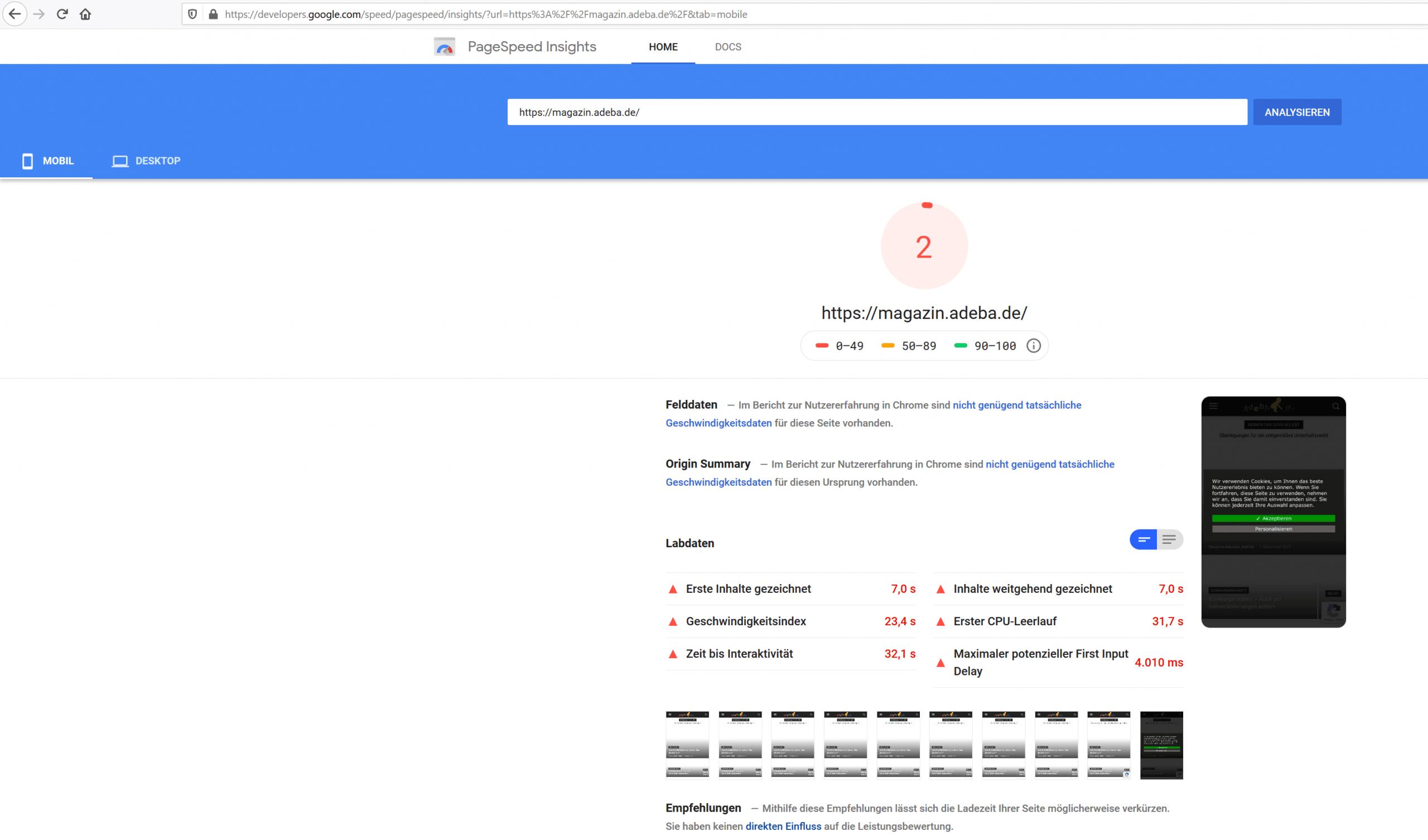
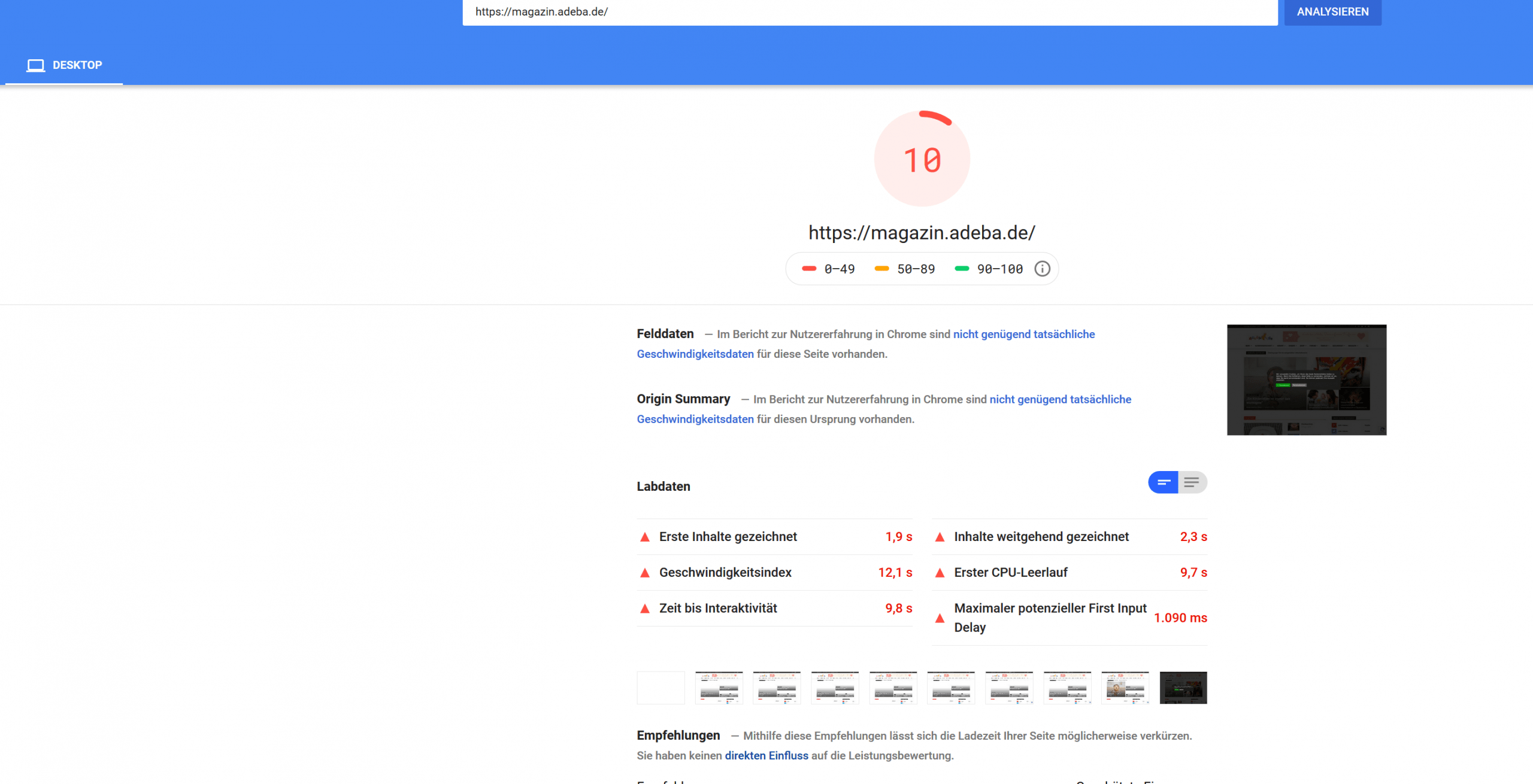
AdebaA new record on my website. After updating to the new design 10.2 and deinstalling Standad Pack I got a new negative speed record.
Sitespeed 2
https://developers.google.com/speed/pagespeed/insights/?url=https%3A%2F%2Fmagazin.adeba.de%2F&tab=mobile
https://magazin.adeba.de/wp-content/uploads/2019/12/2-scaled.png
Sitespeed 10
https://developers.google.com/speed/pagespeed/insights/?url=https%3A%2F%2Fmagazin.adeba.de%2F&tab=desktop
https://magazin.adeba.de/wp-content/uploads/2019/12/1adeba-scaled.png
Even an own server 🙁
So any help is welcome, because things are really getting interesting.
https://tagdiv.com/newspaper-10/
Blazing-Fast Websites
We’ve been working on the idea of making the Newspaper Theme light and fast for a long time. We’re now delighted to give you an excellent way to build a website that is optimized for fast loading speed out-of-the-box.
When you deactivate it, things are starting to get interesting, and your website tends to speed up by itself. ?
jamiesharpe Hi Amit – I’ve taken a lot of time and followed your instructions to optimize all the images on my website. On the homepage, I’m still getting low ratings from both Google PageSpeed (https://www.screencast.com/t/TmTeFaIpiJg) and GT Metrix (https://www.screencast.com/t/MrsO35TU). On those screenshots, it appears that both services are highlighting images that I’ve replaced with the Photoshop process that you suggested. What do I need to do to get rid of those old images so both Google and GT Metrix do not punish me for them?
I appreciate your help.Thank you.
 Sumit
SumitHello, Let me know to improve Google page speed for my website.
Website: oispice