- NewsmagRequirements for Newsmag
 Calin
Calin Hi,
Please try this tutorials for speed optimization, is possible that some of them to have can minifie that code and this problem will be solved.
– https://tagdiv.com/how-to-increase-page-loading-speed/
– https://forum.tagdiv.com/cache-plugin-install-and-configure/
– https://forum.tagdiv.com/how-to-make-the-site-faster/
– https://www.infophilic.com/get-almost-100-pagespeed-newspaper-theme/
– https://forum.tagdiv.com/topic/score-100100-pagespeed-with-newspaper-wordpress-theme/
– https://forum.tagdiv.com/topic/newspaper-theme-speedify-your-website/
– https://forum.tagdiv.com/topic/tutorial-chriss-custom-optimizations-for-functions-php-etc/
– https://forum.tagdiv.com/cloudflare-cdn/
– https://forum.tagdiv.com/topic/theme-causing-high-cpu-usage-2/
– https://forum.tagdiv.com/topic/sql-querys-high-cpu/
– https://forum.tagdiv.com/topic/newspaper-theme-slow-to-respond/
– https://premium.wpmudev.org/blog/optimizing-your-wordpress-database-a-complete-guide/
– https://underconstructionpage.com/optimize-wordpress-database/
– https://crunchify.com/better-optimize-wordpress-database-all-in-one-guide/
Hope this will help you!
Thank you!
 HayesC
Hi there,
I’ve recently updated my theme and pushed to live, and I deactivated the Standard Pack to try to make the site faster. However, the site seems to be loading very slow after the updates, especially on mobile.
I tried to test the site on Google’s PageSpeed Insights. For mobile, it’s returning “Lighthouse returned error: generic::internal: APP::1: Abnormal renderer termination, status = crashed exit_code = 1” even I’ve refreshed the site for multiple times.
May I know the reasons behind and how to fix it?
Thanks,
Hayes
 jamiesharpe
 Just FYI I used photoshop to optimize the image we discussed above, looks like the new size is 25kb and I used the progressive image per your suggestion. I removed the image on my homepage and replaced it with this new version. Please have a look and let me know if I did this correctly, and if I need to do anything else in the process? I re-ran the PageSpeed Insights and GT Metrix tests, they both still list this file as an issue.
jamiesharpe Thanks very much Amit. I’m using photoshop to optimize my images. One question – when I’ve got the optimized images and I’m ready to re-upload them, is the process to use TDcomposer and remove the images on the page then upload the optimized image? Or do I need to go into my file manager and delete the original image altogether?
Please let me know the process that will fix my poor scores on the Google PageSpeed Insights / GT Metrix tests. Thank you very much.
jamiesharpe Thank you very much for your help Amit. I have a couple follow up questions for you:
Can you walk me through the process of how you optimized that image? I’ve been trying to accomplish what you did, and I’d like to do it for a lot of images on my website but I’m having trouble with the workflow.
Second, I ran the Google PageSpeed Insights – https://developers.google.com/speed/pagespeed/insights/?url=https%3A%2F%2Fwww.pinkluggageabroad.com%2F&tab=mobile and GT Metrix https://gtmetrix.com/reports/www.pinkluggageabroad.com/Sr5AsDfx and the image that you optimized is still highlighted on both. How can we run the tests so that is not included?
I appreciate your help. Thank you.
jamiesharpeHello – I’ve been working to improve my Google PageSpeed / GT Metrix scores and I had a couple questions on their suggestions. Here are the two reports that have been run:
https://gtmetrix.com/reports/www.pinkluggageabroad.com/iutRcr0C
Both services have advised me to optimize my images by compressing them. I’ve done that and removed the original larger files from my file library, but these images are still showing up on both reports and not improving my score. Here’s an example of an image that I optimized, deleted the original file from my file manager, emptied the trash and is still showing up on both reports: https://www.pinkluggageabroad.com/wp-content/uploads/2019/10/list-of-quirky-bars-1.jpg
Could you let me know if I’m doing the right improvements, or if I need to be doing something else?
jamiesharpeHello – I’ve been working to improve my Google PageSpeed / GT Metrix scores and I had a couple questions on their suggestions. Here are the two reports that have been run:
https://gtmetrix.com/reports/www.pinkluggageabroad.com/iutRcr0C
1) Both services have advised me to optimize my images by compressing them. I’ve done that and removed the original larger files from my file library, but these images are still showing up on both reports and not improving my score. Here’s an example of an image that I optimized, deleted the original file from my file manager, emptied the trash and is still showing up on both reports: https://www.pinkluggageabroad.com/wp-content/uploads/2019/10/list-of-quirky-bars-1.jpg
2) Google PageSpeed suggests: “Consider lazy-loading offscreen and hidden images after all critical resources have finished loading to lower time to interactive”. I understand Newspaper has an option to lazy load all images, is there a way to lazy load just offscreen and hidden images?
3) Google PageSpeed for desktop suggests “Large GIFs are inefficient for delivering animated content. Consider using MPEG4/WebM videos for animations and PNG/WebP for static images instead of GIF to save network bytes”. This applies to these GIFs on my homepage https://www.screencast.com/t/n1vvrlINYN. I converted these to MPEG4 files but when I use TD composer to remove the GIF file and replace it with MPEG4, I cannot choose the MPEG4 file. Am I doing something wrong, or is there a workaround that you can suggest?
4) GT Metrix suggests “Leverage browser caching. Page load times can be significantly improved by asking visitors to save and reuse the files included in your website”. I’m currently using WP Super Cache, is there a setting that I can adjust to meet this suggestion?
5) GT Metrix suggests “2.2MiB of JavaScript is parsed during initial page load. Defer parsing JavaScript to reduce blocking of page rendering”. How would I do this?
6) GT Metrix suggests “The requests for the following URLs don’t fit in a single packet. Reducing the size of these requests could reduce latency” but when I click on those URLs, they bring me to a blank page – https://www.youtube.com/api/stats/playback?ns=yt&el=embedded&cpn=wOWKLXK0prCQLirl&docid=kO__C5pOyQo&ver=2&referrer=https%3A%2F%2Fwww.youtube.com%2Fembed%2FkO__C5pOyQo%3Fautoplay%3D1%26loop%3D1%26mute%3D1%26showinfo%3D0%26controls%3D0%26start%3D2%26playlist%3DkO__C5pOyQo%26amp%3Bt%3D25s%26&cmt=0.797&ei=k1fRXc2XFIHmkgaf7I-gCA&fmt=244&fs=0&rt=0.448&of=GC6OCn1lTVgpgJyrp2hYjw&euri=https%3A%2F%2Fwww.pinkluggageabroad.com%2F&lact=15508&cl=280776138&mos=1&vm=CAEQABgEKiBKVmpsYXZfam82S0FEVWM4VUZzMThaRHE5dFpoWUdQVg&volume=100&c=WEB_EMBEDDED_PLAYER&cver=20191113&cplayer=UNIPLAYER&cbr=Chrome&cbrver=75.0.3770.100&cos=X11&autonav=1&autoplay=1&delay=4&hl=en_US&cr=US&len=110.321&fexp=23744176%2C23748146%2C23768780%2C23804281%2C23837040%2C23837772%2C23837993%2C23839361%2C23839597%2C23842630%2C23842986%2C23844999%2C23846545%2C23847168%2C23848795%2C23848871%2C23851771%2C23856652%2C23856867%2C23857013%2C23857013%2C23857493%2C23857850%2C23857850%2C23857949%2C23858319%2C23859128%2C23859212%2C23859427%2C23859929%2C24630404%2C9449243&rtn=6&feature=playlist&afmt=250&size=768%3A1365&inview=0.76 has a request size of 2.6KiB
Request URL: 1.1KiB
Cookies: 54B
Referer Url: 128B
Other: 1.4KiB
Thank you for your help.
 ahmetekinler
The extension page says that the standard package is required. But my system now works without a standard package.(10.1) Is the standard package necessary for my site to really be at top speed?
Finally, where can I check that my site meets speed requirements? I don’t mean gtmetrix and google pagespeed. (Do all temples on the site match the speed)
Thanks,
 notizieoggi
 It is loading, but I want to “defer” the script about Google Ads, to load js after the loading of page. This is to improve pagespeed (I have warning about “third party code”, all by google)
So I tried to “defer” the scripts, but works only to desktop.
This is website: notizieoggi24.it
notizieoggiI have a problem with pagespeed, so I had to put “defer” to all scripts about google ads.
This worked for desktop, but not for mobile. In the panel all script about ads have “defer” and also Mobile ADS in the mobile panel.
is there something else that call js from google ads? (like pagead2.googlesyndication.com or something like that)
for example:
<script defer src=”https://pagead2.googlesyndication.com/pagead/js/adsbygoogle.js”></script>
I have same problem with google analytics (works only for desktop the “defer”)
in the mobile code I have this:

where can I edit that?
 infod9
Hi,
I just upadated Newspaper 9 theme to Newspaper X, beacuse like many other users, I was expectiong higher speed. But now I see that speed is not any better. I don’t know if I need to change any settings or I have other problems, that I don’t achive speed of your demo site (https://demo.tagdiv.com/newspaper_pro/) which is on Google PageSpeed Insights more than 90 on Mobile and Desktop. I allready have fallowed all you instructions to get more speed, this inclues installing WP Super Cache, changing setting of it and all other changes that you said I need to change for Newspaper 9. Please help.
 Siebren10
Hi there!
Google PageSpeed Insights indicates the following issues with removing unused CSS, related to the theme:
…css/td_legacy_main.css?ver=5a862b9…(www.streamwijzer.nl)
94 KB
92 KB
…Newspaper/style.css?ver=9.8(www.streamwijzer.nl)
26 KB
22 KB
…css/tdb_less_front.css?ver=489325f…(www.streamwijzer.nl)
13 KB
13 KB
How can this be done?
Warm regards,
Siebren
 Carlichy
I have tested my web in PageSpeed Insights and my score is terrible: 1 point in mobile and 29 on laptop. My URL is: https://www.tuvisitaguiada.com/prueba/
I have configured the WP Super Cache Plugin like in your manual, but it doesn´t work.
My worst problems are:
-Remove resources that block rendering –> I don´t know how to do it.
-Enable text compression –> also the same.
I have checked this CSS delayed:
-1.6300 ms the load: td-legacy-framework-front-style | https://www.tuvisitaguiada.com/prueba/wp-content/plugins/td-composer/legacy/Newspaper/assets/css/td_legacy_main.css
-630 ms: rs-plugin-settings | https://www.tuvisitaguiada.com/prueba/wp-content/plugins/revslider/public/assets/css/rs6.css
-750 ms: revmin | https://www.tuvisitaguiada.com/prueba/wp-content/plugins/revslider/public/assets/js/rs6.min.js
The first I don´t know what is it, and the other I suppose is the Revolution Slider Plugin, but is so bad to slow so the load. Can you help me?
Thanks.
 Omnitos
 I have already cleared the cache, still sometimes it works and sometimes it doesn’t and also the response time has got high, I didn’t install any additional plugins and I have a good configuration server, the problem is in the theme itself, please check the lighthouse score or pagespeed score for my site’s mobiles Version.
 meri
meri Hi Calin,
You can see there that everything is not alright: https://developers.google.com/speed/pagespeed/insights/?hl=fr&url=https%3A%2F%2Fwww.mondeoz.com%2F&tab=mobile
Even Google picks the AMP version instead of the mobile one.
My theme is set to “Mobile + AMP” and actually I haven’t changed it since ages.
So I don’t understand what’s going on…
Can you help?
 GiadaBenassi
 Hi,
Sorry but you can’t understand the problem. The scripts that are shown by Speed Booster, are different from those of Page Speed. I can’t find the scripts to be moved to the footer. From the screenshots, i showed you that in the list of scripts that generates speed boosters, there is not even one that matches those of blocking resources on PageSpeed. Do you understand? If not I try to write in Italian if there are any misunderstandings.
Thanks
Calin Hi,
The Speed Booster plugin do not tell the page speed, all that is doing this plugin is to load the scripts at the end of page, after the html is load not before.
If you want to check your page speed please check with:
https://developers.google.com/speed/pagespeed/insights/
https://gtmetrix.com/
Thank you!
 prag81
Hi,
I have installed the Newspaper theme and ran the GTMetrix, the pagespeed score was 90%. But when I have imported a demo (Travel), then the load time dropped drastically to 55% .
I have not added anything new to my site yet apart from the installing one demo. Can you please help.
 downplus44
Since I installed the Newspapper Theme (Romania News PRO), in my home page, the response time is more than 22 seconds, any idea how I can fix it?
tolucalabellacd.com
In PageSpeed Insights: “Lighthouse returned error: NO_FCP. An error occurred while registering the trail while loading the page.”
Calin Hi,
We understand that right in this moment our theme is quiet have, but we hope that in the coming update our theme will be more light.
What you can do is to check our guide for speed optimization, maybe you can find something that will help you -> https://tagdiv.com/how-to-increase-page-loading-speed/
There are many optimization guides provided by our users here in the forum, some made by us, you could check some of them too
– https://forum.tagdiv.com/cache-plugin-install-and-configure/
– https://forum.tagdiv.com/how-to-make-the-site-faster/
– https://www.infophilic.com/get-almost-100-pagespeed-newspaper-theme/
– https://forum.tagdiv.com/topic/score-100100-pagespeed-with-newspaper-wordpress-theme/
– https://forum.tagdiv.com/topic/newspaper-theme-speedify-your-website/
– https://forum.tagdiv.com/topic/tutorial-chriss-custom-optimizations-for-functions-php-etc/
– https://forum.tagdiv.com/cloudflare-cdn/
– https://forum.tagdiv.com/topic/theme-causing-high-cpu-usage-2/
– https://forum.tagdiv.com/topic/sql-querys-high-cpu/
– https://forum.tagdiv.com/topic/newspaper-theme-slow-to-respond/
– https://premium.wpmudev.org/blog/optimizing-your-wordpress-database-a-complete-guide/
– https://underconstructionpage.com/optimize-wordpress-database/
– https://crunchify.com/better-optimize-wordpress-database-all-in-one-guide/
Thank you for your understanding!
 Sibi Paul
Sir,
I am using Newspaper Theme for My Website https://www.fastunlocker.com
My Server is Litespeed Enterprise Hosted in AWS
CDN Enabled
Optimized Using Litespeed Cashe
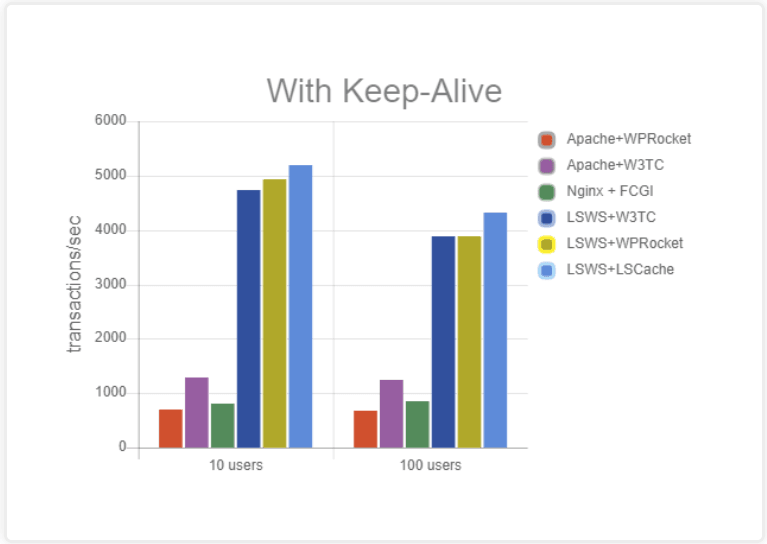
Refer this Page – https://blog.litespeedtech.com/2019/05/20/litespeed-cache-vs-wp-rocket/
Also, Check this Image – https://blog.litespeedtech.com/wp-content/uploads/2019/05/LSCWP-vs-WP-Rocket-a.png
Sir, I am almost happy with Everything in Newspaper Theme.
But,
Some Filesize is very huge in the Newspaper Theme.
When Compared to My Other Providers.
I have Subscription in Mythemeshop, GeneratePress… etc
When I Test Page speed after activating those themes,
Page size is around 60KB to 100KB
But, Newspaper Theme Page Size is 360+ KB
So, I would Like to Mention Two Test results
1 – https://gtmetrix.com/reports/www.fastunlocker.com/wa68Rx4a
2 – https://gtmetrix.com/reports/www.fastunlocker.com/PhPoslVb
The second one is the Newspaper Theme’s
I Really Appreciate its Facilities, When Compared to Other Themes… Newspaper is Fully Loaded.
I need a Small Help to Reduce the Size of Some Files.
site.com/wp-content/themes/Newspaper/images/icons/newspaper.woff?16
site.com/min/e7ce4.css
site.com/min/fe6e6.js
Kindly Help me on this…
The page is Optimized Great, But Size is High…
 doraemonwu
 Thank you! Nevertheless, I could not use gtMetrix to test the website for the first time, some people said that have to disable WP Super Cache when you use gtMetrix.
I tried this method. I find that my PageSpeed is B(85%) but YSlow is E(55%)
Maybe I enable the WP Super Cache can improve YSlow, but now this cannot.
I can visit my website in Hong Kong, could you mind test again?
doraemonwuI use Newspaper 9 recently, but I tested my website through Google Pagespeed, Its get 8 scores on mobile phone and 32 scores in computer. Could you give me some suggestion to improve the score of Google Pagespeed? Thank you!
this is my website
https://www.boyangu.com/
Should I provide what plugin I installed in the past time?
Calin Hi,
Please notice that the speed of your website depends on how well your site is optimized.
Notice that is not a simple task and if you do not have any experience in this regard you will do not bring good results for the theme. Also, notice that we have a speed optimization tutorial but this is addressed only to advanced users. So, if you follow the steps which are presented in this tutorial here -> https://tagdiv.com/how-to-increase-page-loading-speed/
There are many optimization guides provided by our users here in the forum, some made by us, you could check some of them
– https://forum.tagdiv.com/cache-plugin-install-and-configure/
– https://forum.tagdiv.com/how-to-make-the-site-faster/
– https://www.infophilic.com/get-almost-100-pagespeed-newspaper-theme/
– https://forum.tagdiv.com/topic/score-100100-pagespeed-with-newspaper-wordpress-theme/
– https://forum.tagdiv.com/topic/newspaper-theme-speedify-your-website/
– https://forum.tagdiv.com/topic/tutorial-chriss-custom-optimizations-for-functions-php-etc/
– https://forum.tagdiv.com/cloudflare-cdn/
– https://forum.tagdiv.com/topic/theme-causing-high-cpu-usage-2/
– https://forum.tagdiv.com/topic/sql-querys-high-cpu/
– https://forum.tagdiv.com/topic/newspaper-theme-slow-to-respond/
– https://premium.wpmudev.org/blog/optimizing-your-wordpress-database-a-complete-guide/
– https://underconstructionpage.com/optimize-wordpress-database/
– https://crunchify.com/better-optimize-wordpress-database-all-in-one-guide/
Thank you!
 Yahtzee_Wikilord
Ever since it was created my Cloud Template (Header Style 4) has been rendering less efficiently than the default Header Style 4. It takes a good while for the font to appear and the box will often expand before assuming its correct size. It is also highly sensitive to an optimization function called “also aggregate inline CSS”. The same function causes my Cloud Template – Big Flex Box 5 to experience font problems. Without “also aggregate inline CSS” I get poor scores on gtmetrix.com/ and developers.google.com/speed/pagespeed/insights, with it my header breaks.
My website is: https://www.medievilfaq.com/