
 Marius
 Hi,
To improve you pagespeed score, you need to test your site in Google pagespeed or gtmatrix and solve each issue reported.
You have a lot of js loaded, probably from different plugins http://screencast.com/t/qEcjjUDf5f each plugin will affect the score.
Please follow carefully all steps from here https://forum.tagdiv.com/how-to-make-the-site-faster/ and test your site after each modification.
Hope this help!
 grillingmachine
 Hey guys,
please have a look at the following huge different loading results:
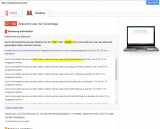
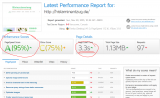
would i have any disadvantages (bad google ranking,…) because of the bad googlepage speed?
i have tried so many speed plugins, but the pagespeed on gmetrix AND google stays everytime at the same. What could be the reason for that?
website link: http://www.histaminentzug.de
-
This reply was modified 10 years by
grillingmachine.
-
This reply was modified 10 years by
 posonty
Hi guys.
As I can improve a little more time to load my web ?, I’ve noticed that with the latest update is a bit slower than before. I have installed the plug-ins for the dedicated server images and have good machine.
https://developers.google.com/speed/pagespeed/insights/?url=http%3A%2F%2Fpicrun.es%2F&tab=mobile
grillingmachine Now i could activate the speedbooster plugin with your guide,
but the pagespeed is still only at 58.
please have a look at my website, histaminentzug.de, something has to be wrong with it.
Before i updated it to v.6.5.1 , the speed was at 78…
thank you!
 Bintmusic
Hi,
how I have to change in code to specify follow image dimensions with last 6.6 version?
themes/Newspaper/images/icons/ico-video-large.png (Dimensions: 40 x 40) (5 uses)
uploads/2015/06/logo1.png (Dimensions: 140 x 48)
uploads/2015/10/logo2.png (Dimensions: 150 x 29)
uploads/2015/11/logo3.png (Dimensions: 272 x 52)
Moreover PageSpeed always tells me to compress this file that dramatically decreases the score
https://static.xx.fbcdn.net/rsrc.php/v2/yw/r/J5Fiy3B5kJ5.js
is it an error of page speed or i can change something to solve?
Thanks
grillingmachineHey guys,
after updating to version 6.5.1, the google pagespeed is now at 57/100.
Before it was at 78/100.
Doesn’t matter which plugin for speedoptimization i use, the speed stays at 57/100.
Of course i tried thetagdiv speed plugin, but this doesn’t work. In the System status of newspaper theme, it says it’s incompatible with every other plugins i have installed.
I already uninstalled wp super cache and the speed stays at 57/100.
Don’t know what to do?
 84KcZ
84KcZ Hi all,
We tried several browser (and cleared them). The server is not running pagespeed, atm, it is running zend opcache but I have just restarted PHP so that would clear out. Nothing the replacement thumbnails are not there. So I guess my question is where should I drop in a default thumbnail for anything that has no thumbnail
George
 simchris
 If using Chrome you also need to fully clear browser cache as well. If your server runs mod_pagespeed you need to turn off MPS then serve new image until cache for MPS clears.
 Andrei L.
 Hi
The cache plugin generates static pages which are stored in the memory and when a user makes a request the pages are delivered from the cache. By this the php execution and the database requests are skipped. But a cache plugin don’t move the css/js resources in footer, you will have to do this manually using the Speed Booster plugin.
I’ve checked your site with PageSpeed Insights and noticed that you have lots of css/js files: http://screencast.com/t/DLwgvpYWDL Mount of this files are not from the theme, so to move them in footer please follow our page speed guide: https://forum.tagdiv.com/how-to-make-the-site-faster/
Hope this help.
Thanks!
 Alin [tagDiv]
 Hi,
Please increase the php memory – https://codex.wordpress.org/Editing_wp-config.php#Increasing_memory_allocated_to_PHP
Regarding the pagespeed optimization please check this guide – https://forum.tagdiv.com/how-to-make-the-site-faster/
Thanks!
Andrei L. Hi
There are lots of factors that influence the site’s page-sped. I’ve checked your site with PageSpeed Insights tool and noticed that you have a slow server response time and lots of css/js resources which also slow the page load: http://screencast.com/t/zbHS570RMiK
To improve your server response time you can try to reduce the number of queries (fewer plugins, fewer blocks on page, reduce the elements which use ajax requests/pagination like mega menus/load more/infinite load), also consider using a cache plugin and to improve the loading speed look the mysql query cache: http://dev.mysql.com/doc/refman/5.1/en/query-cache.html We also use it on our demo.
Also you can use the speed booster to move the js and css at the bottom of the page, eliminate render-blocking, but not for all plugins. Check the System Status if the speed booster is active if you use other plugins than the tested ones. You can find some useful information regrading speed booster usage in this topic: https://forum.tagdiv.com/topic/speed-booster-questions/
Also you can read this guide, it may help – https://forum.tagdiv.com/how-to-make-the-site-faster/
Thanks!
Alin [tagDiv] Hi,
Please check the server requirements for newspaper theme – https://forum.tagdiv.com/requirements-for-newspaper/ and increase the php memory(wp-config) and the other values from php.ini file – http://codex.wordpress.org/Editing_wp-config.%3Cb%3Ephp%3C/b%3E#Increasing_memory_allocated_to_PHP
Also you can the pagespeed optimization guide – https://forum.tagdiv.com/how-to-make-the-site-faster/
Thanks!
 refly puasa
differences in version 2.3. 2.3.1 use the plugin wp-super-cache with referral url https://forum.tagdiv.com/cache-plugin-install-and-configure/
why is that while I am not setting the plugin to version 2.3.1 updates directly in dah results are different still Acceleration version 2.3
version 2.3 desktop version 91/100
82/100 2.3.1 version of the desktop version
disposable test https://developers.google.com/speed/pagespeed
please enlighten why is that
 Arafat
How to solve Prioritize visible content. See this: http://prntscr.com/91236j
check this:
1. https://developers.google.com/speed/pagespeed/insights/?url=https%3A%2F%2Fmydreamlives.com%2F&tab=mobile
2. https://mydreamlives.com/
Alin [tagDiv] Hi,
The Speed Booster is an optional plugin and it moves the css and js at the end of the page, this removes render blocking and improves the score on pagespeed, please check this guide – https://forum.tagdiv.com/how-to-make-the-site-faster/
Yes, it works with WP Super Cache plugin, as Speed Booster is not a cache pluging.
Thanks!
 wpdiv
wpdiv 1. No, have not change any CSS for line height issues,. I think you have resized your browser to check the line height issues. Please use mobile device to regenerate the issue or check this page mobile device screenshot http://i.imgur.com/zkj68gT.png
or run the page test
https://developers.google.com/speed/pagespeed/insights/?url=http%3A%2F%2Fwww.wpdiv.com%2F&tab=mobile
You might noticed the same issue regenerated in screenshot http://prntscr.com/8zav0a
(Note : The screenshot i have attached here http://i.imgur.com/zkj68gT.png grabbed through my smartphone.)
2. Ok, let me use the JPEG image for logo. Thanks to notify.
 MudassarSaeed
Hi, earlier i posted this https://forum.tagdiv.com/topic/newsmag-home-page-need-help/ because i needed some help to build my home page, now i have built it but the problem is that the “navbar”(Six Dots which you click and then category appears, hope it’s called navbar, if not then you know what i mean) for mobile is just below the logo and it can’t be tapped without tapping the logo which redirects to the homepage and it also looks very awkward , so how can i correct it so those 6 dots which you click and the menus appear in cellphones are separate from the logo, meaning there’s ample space between them. Here you can check the tapping error which i am talking about.
check this screen shot http://postimg.org/image/rp9yoqodj/ or the link below.
2. Another thing i noticed that after i had built my homepage and selecting it from settings > readings, i am no longer able to change the header style in newsmag. i mean it does change it but the website remains the same and no difference appears..
Thanks!
Alin [tagDiv] Hi,
Please check this guide to optimize images and pagespeed – https://forum.tagdiv.com/how-to-make-the-site-faster/
Thanks!
 Bogdan B.
 Hi,
If the problem is still there, it can be caused by the page speed. CSS loads in cascades by default so if the load speed is realy slow you will see every step of the cascading styles. You can try to improve the pagespeed by following this topic: https://forum.tagdiv.com/how-to-make-the-site-faster/
You can also check to see if a plugin does not slow down your website, or you can check your server configuration.
The best way to eliminate this effect is still to use the style.css and create a back-up of it so it will not be lost in an update.
I hope this helps.
Thank you!
Alin [tagDiv] Hi,
Glad that you made it! I have checked your page source and they are moved to the footer like you said. But the custom css is still there, you said you move it in the stylesheet file – http://screencast.com/t/ezFwsuFG32G
If you move the custom css in style.css please remove it also from Theme Panel > Custom Css. I’m not sure what you mean that it failing.. please provide more details.
Also you could try to save the css code in a text file and try pagespeed test without it and see if it works.
Thanks!
Bogdan B. Hello,
You can increase page speed by following our tutorial here: https://forum.tagdiv.com/how-to-make-the-site-faster/, or by following our users guides in this topic here: https://forum.tagdiv.com/topic/tutorial-pagespeed-2015/
Thank you!
simchris Hello all…
some of you may have noticed in old threads I had suggested using the venerable ADDTHIS plugin if you needed quick “bunch of sharing buttons” for your site without having to do anything custom or fancy; I can no longer recommended AddThis due to an injection of large amount of comment text in every page, which is designed to disable and over-ride “comment removal” systems like mod_pagespeed. So, this broadcasts to everyone you’re using AddThis. Granted it’s a free offering at its basic level, but still not cool.
So, instead we have started using this one, which works great with the theme automatically, putting the “top” sharing items at bottom of post for those who want share buttons without bandwidth/page load affecting “counters” … if you just want people to be able to share stuff… this one works very well, and super lightweight:
(loads in under 5 msec.)
Simple Share Buttons Light
https://wordpress.org/plugins/simple-share-buttons-light/
A ‘pro’ version adds additional bells, whistles,
Alin [tagDiv] Hi,
The setup is different from one server to another so you may have to look on your host instructions section to see how you can enable it on your site. Try to enable the Gzip compression from Cpanel or similar host administration panel.
Also Christopher’s tutorila about pagespeed optimization may help – https://forum.tagdiv.com/topic/tutorial-pagespeed-2015/
Thanks!
Alin [tagDiv] Hi,
I have already replied in this topic – https://forum.tagdiv.com/topic/optimize-newspaper-in-mobile/#post-71278
Please also check this guide for pagespeed optimization(gzip compression, remove render blocking..) – https://forum.tagdiv.com/how-to-make-the-site-faster/
Thanks!
Alin [tagDiv] Hi,
The speed booster plugin moves the css and js at the end of the page, this removes render blocking and improves the score on pagespeed, please check this guide – https://forum.tagdiv.com/how-to-make-the-site-faster/ But also to have a good score is recommend to use less plugins.
Please note that the speed booster was tested only with these plugins – http://screencast.com/t/hcjLnOqh4i2 and if you use other plugins it will be automatically disabled. A lot of people install the plugin without knowing what it does and after that they add many plugins and some of the them are not written fine, so the developer took this decision. If you want to always enable speed booster, delete this code from speed booster file: http://screencast.com/t/RZLIOPUNdqh
So please check your System Status to make sure that the Speed Booster is active – http://screencast.com/t/Gomyv89n7j0 and then try to follow the steps provided in the documentation to remove render blocking.
Thanks!

