
- NewspaperPosts Loop Element
- NewspaperFlex Block Builder and Flex Loop Builder
- NewspaperBookmark – Save For Later
- NewspaperModules Builder in Newspaper Theme
- NewspaperFilters and sorting for taxonomies
- NewspaperPage templates
- NewspaperSmart Sidebar
- NewspaperChild Theme Support
 simchris
 There have been a LARGE number of bugs with the Yoast SEO plugin released last week (1.5), and about three or four patches so far. Still buggy as hell with 1.5.2.3 (including option for Google News keywords not saving to dbase or showing in the SEO post panel). I rolled back my sites to the prior version (stable), 1.4.25 due to a lot of issues including a major memory spike on our server post 1.5 update. If you look at the changelog for 1.5 it’s pretty awful, and doesn’t bode well for their new development team, frankly.
SERIOUSLY …. (!)
— YOAST SEO 1.5 BUG FIXES (SO FAR) —
1.5.2.3
** Note: if you already upgraded to v1.5+, you will need to retrieve your Facebook Apps again and please also check your Google+ URL. We had some bugs with both being escaped too aggressively. Sorry about that. **
◾Bugfixes
◾Added missing settings menu pages to wp admin bar.
◾Replaced old AdWords keyword tool link.
◾Fix wp admin bar keyword density check link
◾Taxonomy sitemap will now also show if empty.
◾Prevent infinite loop triggered by sitemap_close(), fixes #600 as reported and fixed by pbogdan.
◾Fixed a link count Page Analysis bug.
◾Fixed a keyword density problem in the Page Analysis
◾Fixed OpenGraph/GooglePlus/Twitter tags not showing in a select few themes, issue #750 as reported by Jovian and wwdboer – props Jrf.
◾Fixed Facebook Apps not being saved/ “Failed to retrieve your apps from Facebook” as reported by kevinlisota in issue #812 – props Jrf.
◾Fixed duplicate feedback messages on WPSEO -> Social pages as reported by steverep in issue #743 – props Jrf.
◾Flush our force title rewrite buffer earlier in wp_footer so it can be used by other plugins in wp_footer. Props Gabriel Pérez Salazar.
◾Start the force rewrite buffer late (at 999) in template_redirect instead of get_header because of several themes not using get_header, issue #817 as reported by Jrf.
◾Fixed ‘Page %d of %d’ / %%page%% variable not being replaced when on pages, as reported by SGr33n in issue #801 – props Jrf.
◾Restore robots meta box per post to its former glory, it now shows even when blog is not set to public.
◾Fixed individual page robots settings not being respected when using a page as blog as reported by wintersolutions in issue #813 – props Jrf.
◾Fixed: Too aggressive html escaping of the breadcrumbs.
◾Fixed: Last breadcrumb wasn’t always determined correctly resulting in crumbs not being linked when they should have been.
◾Fixed: Breadcrumbs were sometimes missing separators and default texts since v1.5.0.
◾Fixed: 404 date based breadcrumb and title creation could cause corruption of the $post object.
◾Fixed: Filtering posts based on SEO score via the dropdown at the top of a post/page overview page no longer worked. Fixed. As reported by gmuehl in issue #838 – props Jrf.
◾Enhancements
◾Added filters for the change frequencies of different URLs added to the sitemap. Props to haroldkyle for the idea.
◾Added filter wpseo_sitemap_exclude_empty_terms to allow including empty terms in the XML sitemap.
◾Private posts now default to noindex (even though they technically probably couldn’t be indexed anyway).
◾Show a warning message underneath a post’s robots meta settings when site is set to noindex sitewide in WP core.
◾Updated licensing class to show a notice when requests to yoast.com are blocked because of WP_HTTP_BLOCK_EXTERNALS.
◾Other
◾Refactored the breadcrumb class – props Jrf.
1.5.2.2
◾Bugfixes
◾Fix for issue with Soliloquy image slider was not applied to minified js file.
◾Fixed some PHP ‘undefined index’ notices.
◾Fix banner images overlapping text in help tabs.
◾Fixed meta description tag not showing for taxonomy (category/tag/etc) pages as reported in issue #737 and #780 – props Jrf.
◾Prevent a fatal error if wp_remote_get() fails while testing whether the title needs to be force rewritten as reported by homeispv – props Jrf.
◾Enhancements
◾Added composer support – props codekipple and Rarst.
1.5.2.1
◾Bugfixes
◾Fix white screen/blog down issues caused by some (bloody stupid) webhosts actively disabling the filter extension – props Jrf.
◾Fix for some PHP notices, issue #747 as reported by benfreke – props Jrf.
◾Fixed: GooglePlus vanity urls were saved without the + as reported by ronimarin in issue #730 – props Jrf.
◾Fix WP Admin menu items no longer clickable when on WPSEO pages as reported in issue #733 and #738 – props Jrf.
◾Fix strict warning for W3TC, issue 721.
◾Fix RSS text strings on options page being double escaped, issue #731 as reported by namaserajesh – props Jrf.
◾Avoid potential confusion over Facebook OpenGraph front page usage, issue #570 – props Jrf.
◾Potentially fix issue 565 bbpress warning message. Thanks inetbiz for reporting and tobylewis for finding the likely cause.
◾Filter ‘wpseo_pre_analysis_post_content’ output is now only loaded in DOM object if not empty. – props mgmartel.
◾$post_content is now unset after loading in DOM object. – props mgmartel.
◾Fix Alexa ID string validation, as reported by kyasajin and Bubichka in issue 736 – props Jrf.
◾Fix issue with Soliloquy image query, as reported by osalcedo and mattisherwood in issue #733 – props Jrf.
◾Enhancements
◾Twitter metatag key is now filterable by ‘wpseo_twitter_metatag_key’.
◾Added a filter called “wpseo_replacements” in wpseo_replace_vars to allow customization of the replacements before they are applied – props martinernst.
◾Added useful links for page analysis – props bhubbard.
◾i18n Updates
◾Updated nl_NL, id_ID, it_IT, fr_FR and de_DE
◾Added ko
◾Updated .pot file.
1.5.2
◾Bugfix: ◾If mbstring extension isn’t loaded, fatal error was thrown.
 Radu
Radu Hi,
tags should have worked, I’ve tested the filter and it works as expected. It may be that you either have a lot of content or the database configuration is not good.
This is the function that renders our loops on the templates http://screencast.com/t/flqgW87f . The functions above that is used by the blocks.
Sorry for the delay,
Radu O.
 Marius
 Hi,
If you have version from 3.2 the post file now is loop-single.php http://screencast.com/t/tjnE0lwmiIIY
Add your code there without buffy.
Try this
<h4 class=”block-title”><span>Commenti:</span></h4>
<div class="fb-comments" data-href="<?php get_permalink(); ?>" data-colorscheme="light" data-numposts="5" data-mobile="false" data-width="700"></div>
Thanks!
 vorman
 My apologies the last set of codes was for Articles with a BG. Please see the following code that should reflect what you requested that I do. I am still having a problem on this page when I make your amendments.
<?php
/* Template Name: Homepage – with article list */
get_header();
td_global::$current_template = ‘page-homepage-loop’;
global $paged, $loop_module_id, $loop_sidebar_position, $post, $more; //$more is a hack to fix the read more loop
$td_page = (get_query_var(‘page’)) ? get_query_var(‘page’) : 1; //rewrite the global var
$td_paged = (get_query_var(‘paged’)) ? get_query_var(‘paged’) : 1; //rewrite the global var
//paged works on single pages, page – works on homepage
if ($td_paged > $td_page) {
$paged = $td_paged;
} else {
$paged = $td_page;
}
$list_custom_title_show = true; //show the article list title by default
$td_homepage_loop_filter = ”; //homepage loop filter metadata
/*
read the settings for the loop
—————————————————————————————- */
if (!empty($post->ID)) {
td_global::load_single_post($post);
//read the metadata for the post
$td_homepage_loop_filter = get_post_meta($post->ID, ‘td_homepage_loop_filter’, true); //it’s send to td_data_source
$td_homepage_loop = get_post_meta($post->ID, ‘td_homepage_loop’, true);
if (!empty($td_homepage_loop[‘td_layout’])) {
$loop_module_id = $td_homepage_loop[‘td_layout’];
}
if (!empty($td_homepage_loop[‘td_sidebar_position’])) {
$loop_sidebar_position = $td_homepage_loop[‘td_sidebar_position’];
}
if (!empty($td_homepage_loop[‘td_sidebar’])) {
td_global::$load_sidebar_from_template = $td_homepage_loop[‘td_sidebar’];
}
if (!empty($td_homepage_loop[‘list_custom_title’])) {
$td_list_custom_title = $td_homepage_loop[‘list_custom_title’];
} else {
$td_list_custom_title =__td(‘LATEST ARTICLES’);
}
if (!empty($td_homepage_loop[‘list_custom_title_show’])) {
$list_custom_title_show = false;
}
}
echo td_page_generator::wrap_no_row_start();
/*
the first part of the page (built with the page builder) – empty($paged) or $paged < 2 = first page
—————————————————————————————- */
/*
the main fake loop
—————————————————————————————- */
$more = 0; // fix read more
echo ‘<div class=”row-fluid”>’;
switch ($loop_sidebar_position) {
case ‘sidebar_left’:
?>
<div class=”span4 column_container” role=”complementary” itemscope=”itemscope” itemtype=”http://schema.org/WPSideBar”>
<?php get_sidebar(); ?>
</div>
<div class=”span8 column_container” role=”main” itemprop=”mainContentOfPage” itemscope=”itemscope” itemtype=”http://schema.org/Blog”>
<?php if ((empty($paged) or $paged < 2) and $list_custom_title_show === true) { ?>
<h4 class=”block-title”><span><?php echo $td_list_custom_title?></span></h4>
<?php }
query_posts(td_data_source::metabox_to_args($td_homepage_loop_filter, $paged));
get_template_part(‘loop’, ‘simple’);
echo td_page_generator::get_pagination();
?>
</div>
<?php
break;
case ‘no_sidebar’:
?>
<div class=”span12 column_container” role=”main” itemprop=”mainContentOfPage” itemscope=”itemscope” itemtype=”http://schema.org/Blog”>
<?php if ((empty($paged) or $paged < 2) and $list_custom_title_show === true) { ?>
<h4 class=”block-title”><span><?php echo $td_list_custom_title?></span></h4>
<?php }
query_posts(td_data_source::metabox_to_args($td_homepage_loop_filter, $paged));
get_template_part(‘loop’, ‘simple’);
echo td_page_generator::get_pagination();
?>
</div>
<?php
break;
//sidebar right
default:
?>
<div class=”span8 column_container” role=”main” itemprop=”mainContentOfPage” itemscope=”itemscope” itemtype=”http://schema.org/Blog”>
<?php if ((empty($paged) or $paged < 2) and $list_custom_title_show === true) { ?>
<h4 class=”block-title”><span><?php echo $td_list_custom_title?></span></h4>
<?php }
//
query_posts(td_data_source::metabox_to_args($td_homepage_loop_filter, $paged));
get_template_part(‘loop’, ‘simple’);
echo td_page_generator::get_pagination();
?>
</div>
<div class=”span4 column_container” role=”complementary” itemscope=”itemscope” itemtype=”http://schema.org/WPSideBar”>
<?php get_sidebar(); ?>
</div>
<?php
break;
}
wp_reset_query();
if(!empty($post->post_content)) { //show this only when we have content
if (empty($paged) or $paged < 2) { //show this only on the first page
?>
<div class="row-fluid">
<div class="span12 column_container" role="complementary" itemscope="itemscope" itemtype="http://schema.org/WPSideBar">
<?php
if (have_posts()) {
while ( have_posts() ) : the_post();
//read the page settings
the_content();
endwhile; //end loop
}
?>
</div>
</div>
<?php
}
}
echo ‘</div>’; //close the .row
echo td_page_generator::wrap_no_row_end();
get_footer();
?>
vorman Many thanks for the reply Marius. I did update the code and unfortunately it get a blank white page. Please see below. Also, I am using the Home Page – with Article List. I sincerely do appreciate your help here.
<?php
/* Template Name: Homepage – bg + with article list */
get_header();
td_global::$current_template = ‘page-homepage-loop’;
global $paged, $loop_module_id, $loop_sidebar_position, $post, $more;
$td_page = (get_query_var(‘page’)) ? get_query_var(‘page’) : 1; //rewrite the global var
$td_paged = (get_query_var(‘paged’)) ? get_query_var(‘paged’) : 1; //rewrite the global var
//paged works on single pages, page – works on homepage
if ($td_paged > $td_page) {
$paged = $td_paged;
} else {
$paged = $td_page;
}
$list_custom_title_show = true; //show the article list title by default
$td_homepage_loop_filter = ”; //homepage loop filter metadata
/*
read the settings for the loop
—————————————————————————————- */
if (!empty($post->ID)) {
td_global::load_single_post($post);
//read the metadata for the post
$td_homepage_loop_filter = get_post_meta($post->ID, ‘td_homepage_loop_filter’, true); //it’s send to td_data_source
$td_homepage_loop = get_post_meta($post->ID, ‘td_homepage_loop’, true);
if (!empty($td_homepage_loop[‘td_layout’])) {
$loop_module_id = $td_homepage_loop[‘td_layout’];
}
if (!empty($td_homepage_loop[‘td_sidebar_position’])) {
$loop_sidebar_position = $td_homepage_loop[‘td_sidebar_position’];
}
if (!empty($td_homepage_loop[‘td_sidebar’])) {
td_global::$load_sidebar_from_template = $td_homepage_loop[‘td_sidebar’];
}
if (!empty($td_homepage_loop[‘list_custom_title’])) {
$td_list_custom_title = $td_homepage_loop[‘list_custom_title’];
} else {
$td_list_custom_title =__td(‘LATEST ARTICLES’);
}
if (!empty($td_homepage_loop[‘list_custom_title_show’])) {
$list_custom_title_show = false;
}
//adds the filters for templates: ‘Homepage – with article list’ and ‘Homepage – bg + article list’
//include_once(‘includes/wp_booster/td_homepage_loop_filter.php’);
}
/*
big slide
—————————————————————————————- */
locate_template(‘parts/page-homepage-slider.php’, true);
echo td_page_generator::wrap_no_row_start();
/*
the content if we have one
—————————————————————————————-
02/06/2014 – Disabled this code ITPS Trevor
if(!empty($post->post_content)) { //show this only when we have content
if (empty($paged) or $paged < 2) { //show this only on the first page
?>
<div class=”row-fluid”>
<div class=”span12 column_container” role=”complementary” itemscope=”itemscope” itemtype=”http://schema.org/WPSideBar”>
<?php
if (have_posts()) {
while ( have_posts() ) : the_post();
//read the page settings
the_content();
endwhile; //end loop
}
?>
</div>
</div>
<?php
}
}
*/
/*
the main fake loop
—————————————————————————————- */
$more = 0; // fix read more
echo ‘<div class=”row-fluid”>’;
/*
//do the loop
$queryPost = Array(
‘posts_per_page’ => get_option(‘posts_per_page’),
‘paged’ => $paged
);
//hide featured categories
if ($td_featured_posts != ‘show_featured_posts’) {
$queryPost[‘cat’] = ‘-‘ .get_cat_ID(TD_FEATURED_CAT);
}
*/
switch ($loop_sidebar_position) {
case ‘sidebar_left’:
?>
<div class=”span4 column_container”>
<?php get_sidebar(); ?>
</div>
<div class=”span8 column_container”>
<?php if ((empty($paged) or $paged < 2) and $list_custom_title_show === true) { ?>
<h4 class=”block-title”><span><?php echo $td_list_custom_title?></span></h4>
<?php }
query_posts(td_data_source::metabox_to_args($td_homepage_loop_filter, $paged));
get_template_part(‘loop’, ‘simple’);
echo td_page_generator::get_pagination();
?>
</div>
<?php
break;
case ‘no_sidebar’:
?>
<div class=”span12 column_container”>
<?php if ((empty($paged) or $paged < 2) and $list_custom_title_show === true) { ?>
<h4 class=”block-title”><span><?php echo $td_list_custom_title?></span></h4>
<?php }
query_posts(td_data_source::metabox_to_args($td_homepage_loop_filter, $paged));
get_template_part(‘loop’, ‘simple’);
echo td_page_generator::get_pagination();
?>
</div>
<?php
break;
//sidebar right
default:
?>
<div class=”span8 column_container”>
<?php if ((empty($paged) or $paged < 2) and $list_custom_title_show === true) { ?>
<h4 class=”block-title”><span><?php echo $td_list_custom_title?></span></h4>
<?php }
query_posts(td_data_source::metabox_to_args($td_homepage_loop_filter, $paged));
get_template_part(‘loop’, ‘simple’);
echo td_page_generator::get_pagination();
?>
</div>
<div class=”span4 column_container”>
<?php get_sidebar(); ?>
</div>
<?php
break;
}
wp_reset_query();
if(!empty($post->post_content)) { //show this only when we have content
if (empty($paged) or $paged < 2) { //show this only on the first page
?>
<div class="row-fluid">
<div class="span12 column_container" role="complementary" itemscope="itemscope" itemtype="http://schema.org/WPSideBar">
<?php
if (have_posts()) {
while ( have_posts() ) : the_post();
//read the page settings
the_content();
endwhile; //end loop
}
?>
</div>
</div>
<?php
}
}
echo ‘</div>’; //close the .row
echo td_page_generator::wrap_no_row_end();
get_footer();
?>
 webmaster808
 Well, as far as I can tell you are using module 1, which is the default module for single posts.
If that is true then making the edits that I suggested in wp-content/themes/Newspaper/includes/modules/td_module_1.php would do exactly what you want. How are you editing these files?
One way we can check to see what module is being loaded is to echo the variable.
On line 94 of your single.php file change <?php to <?php echo $loop_module_id;
Then, just inside the container div on your post you should see a single digit and that is the module number that is being called.
 nsisongeffiong
 Hello Radu,
I don’t quite understand your question. I have already indicated where i’ll love to add the labels in the screencasts.
Just so there’s no confusion, i’ll take it from the top.
I’m Using advanced custom fields plugin to create custom fields for my document Category.
I’ve created three fields:
<li>Name of Author</li>
<li>Date of Publication</li>
<li>Name of Publisher</li>
Now ACF Normally posts only the values of the fields to the database and not the Field Names. In a normal post loop i could use echo to display a Field Name Text and then concatenate it with the field value so that my front end would look like this
Field Name: Field Value
due to the $buffy optimisation, i am unable to use echo so i’m looking for a workaround that would enable me add Field Name (Labels) automatically to each Field Value.
Concerning the issue of adding classes to the div, give me the CSS code which you believe will style the solution and i will add it to the CSS.
Like i stated in my last reply, this is a local development server. WordPress installed on XAMPP on my PC, so i can’t give you any link because the site is not live.
I’m looking forward to having this issue resolved and also it takes too long between replies so effectively this issue has taken us four days now. Please see how you can expedite a solution i’d appreciate it much.
Regards,
Effiong
Marius Hi,
Delete this code from here: http://screencast.com/t/Z3tGAAxvw
Scroll down in that file and add this code here: http://screencast.com/t/1PMe9ko4
wp_reset_query();

if(!empty($post->post_content)) { //show this only when we have content
    if (empty($paged) or $paged < 2) { //show this only on the first page

        ?>
        <div class="row-fluid">
            <div class="span12 column_container" role="complementary" itemscope="itemscope" itemtype="http://schema.org/WPSideBar">
                <?php
                if (have_posts()) {
                    while ( have_posts() ) : the_post();
                        //read the page settings
                        the_content();
                    endwhile; //end loop
                }
                ?>
            </div>
        </div>
    <?php

    }
}
This is for Homepage – with article list template
Thanks for the message!
 PMstal
 i think i figured it out.
for all who have the same issue and maybe @davistar -> so if you want to exclude X articles of the latest post:
go (via ftp) to /themes/newspaper/page-homepage-loop. there you have to edit line 130 to this:
query_posts(‘offset=4’);
in this case the first 4 articles would be excluded.
 rbenkaci
There is not even on the H1 Homepage, that is not Google friendly.
In which file is the loop that handles the home page. I just want to add a H1 but only on the home page, below the main navigation at the top of posts.
What file do I insert <h1> My title </ h1>
Attention h1 should be only on the homepage
Thank you
 servitium
 Thank you for the quick reply.
Unfortunately, this is not a complete solution, because pagination is not working properly.
Eg.
When I change the file page-homepage-loop.php.
If I 7 post and set the display of 6 post per page and I set offset = 5 page displays two posts and display the pagination.
Do you know how to improve the pagination pages?
 mertnuhoglu
 Hi,
You can find the files here:
http://dl.dropbox.com/u/103580364/temp/forum/page-homepage-loop.php
http://dl.dropbox.com/u/103580364/temp/forum/td_block_3.php
http://dl.dropbox.com/u/103580364/temp/forum/td_data_source.php
There you can see the exact locations to make the changes.
servitium mertnuhoglu thanks for the solution but…
[1]
inside “page-homepage-loop.php” no code:
$queryPost = Array(
    'posts_per_page' => get_option('posts_per_page'),
    'paged' => $paged
);
What code and where exactly to put this to work?
[2]
I’m using Template “Homepage – blank” and visual compser use ‘block 2’
and changed analogously:
1. I edit Newspaper/includes/app/shortcodes/td_block_2.php:
2. Where in the file ‘Newspaper/includes/content_builder/td_data_source.php’ insert the offset?
Such as?
        extract(shortcode_atts(
                array(
					'offset' => 0,
                    'category_ids' => '',
                    'tag_slug' => '',
...             ),
                $atts
3. Where exactly (line number) to put this
$args['offset'] = $offset;
Please help?
Marius Hello,
You can hide that categories using the category filter on blocks and homepage loop to, just add in the filter the category ID with -(minus)
Ex. If you want to exclude a category Apple that have catID 3, write in category filter -3 and that category will be excluded.
Exclude from article list: http://screencast.com/t/mQUsgOrj
Exclude from a block or slide: http://screencast.com/t/VeL3SGOP
Hope this help.
Thanks for the message!
Marius Hello,
In the top slide why you can show featured articles?(important posts) and from blocks above you can remove them to avoid duplicates using -ID of the category Features as a filter for blocks.
The WordPress have an offset post function but work only in loop. We know about this, we have in mind a homepage with unique content(no duplicate posts) for future updates.
Thanks for the message!
RaduHello all,
I will periodically write here a new thread where we can discuss what will be implemented in the next versions. In addition to the small fixes and improvements we have some very big updates that will come in the long run.
Please know that we are working full time and we dedicate all of our attention to this theme and to the support.
We are now working on this:
– fix the sticky posts – on the homepage loop since update 1.7 they are missing.
– the new adsense code
– text color for menu option
We are also investigating and we want to implement if it’s possible this:
– color themes on each category (the theme will change it’s entire color theme when you are on one category or on posts from one category)
– a system that will remove duplicate posts everywhere – in response to this thread
Research:
In the long run we are working on a new panel system. It’s still in the early stages of design but we finished the requirements and a basic framework to work on:
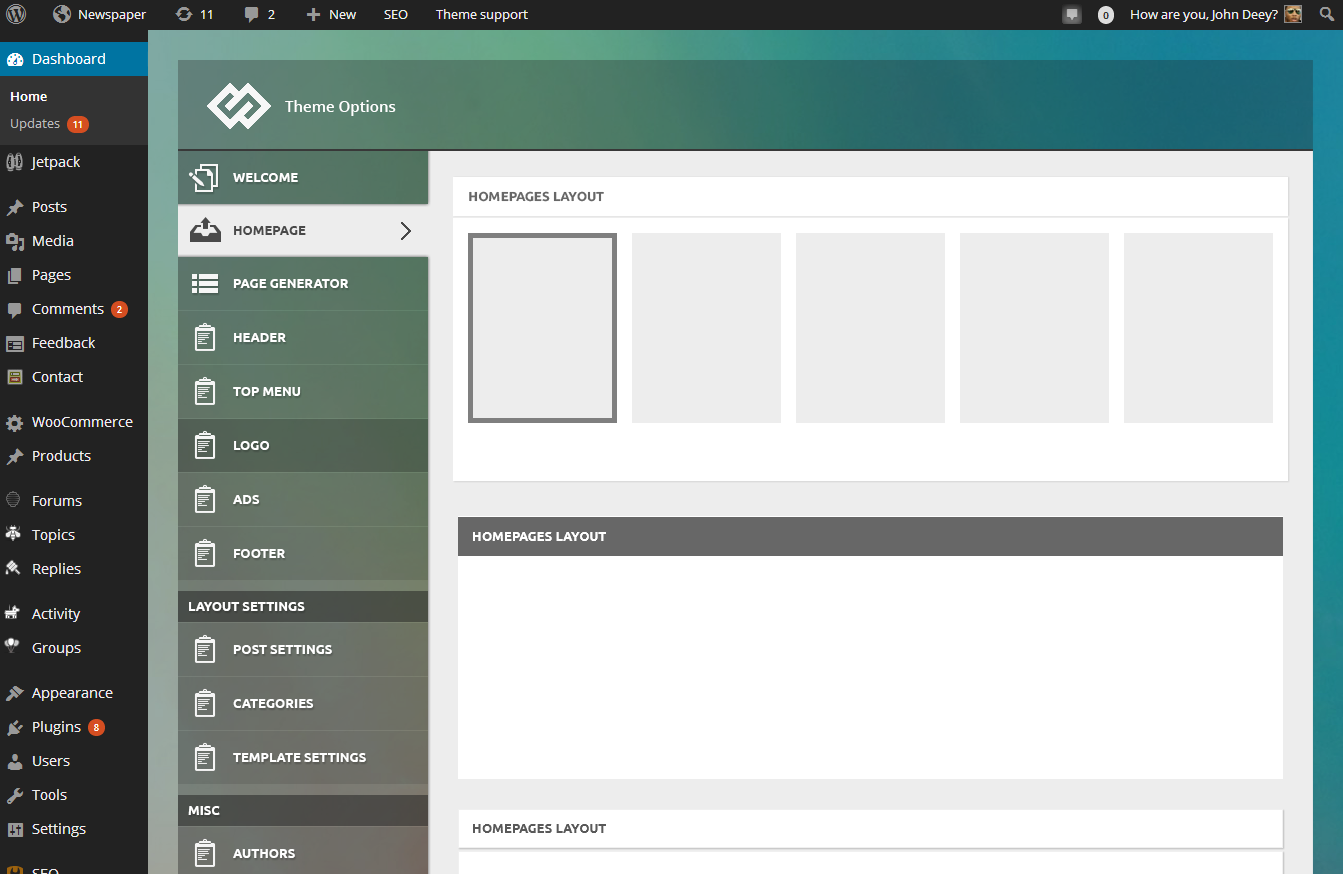
We will use this panel on all of our products from now on and it’s designed to work also with Newspaper. This panel will take us at least a month to be finish and it order to make it compatible with the Newspaper theme I think we have to redo the ads section of the theme and the category settings section but all the other settings should be easily be moved to the new one.
Besides this we also do some interesting stuff to push the limits of wordpress themes 🙂 stay tuned.
 offminded
Hello Radu & Marius,
First of all I would like to thank you for developing this great theme guys, great work!
I think there’s a bug with homepage loop filter and sidebar settings. When I enter a category ID(s) for Multiple categories filter, sidebar setting from dropdown is ignored and default sidebar is being called(If top category entry on the list has a sidebar assigned, then that on the homepage assigned category sidebar is being rendered).
http://imgur.com/UcVsr0I
http://imgur.com/LsrP8k0
The weird thing is if sidebar is on the left then it works correctly. So when I check page-homepage-loop.php:
If query_posts($queryPost); is called after <?php get_sidebar(); ?> we have this problem.
So can you think of a way to address this problem?
 johnmflores
 Alas, I spoke too soon. After I went in and customized the Newspaper theme (via wp-admin/customize.php) the problem has re-appeared.
I’ve gone back into the page-homepage-loop.php file and query_posts('offset=4'); is still there.
Is there any way that customizing the theme could have broken this fix?
Marius Hello,
You can offset posts from article list, edit the template you use ex. for Homepage – with article list edit page-homepage-loop.php file and add this query_posts('offset=5'); like here: http://screencast.com/t/4JhbpnY2 and from the article list the post will omit first 5 posts
Thanks
Marius Hello,
Great! I’m glad you solve it.
Thanks.
mertnuhoglu I found a solution. Here is it:
Edit Newspaper/includes/app/shortcodes/td_block_3.php:
$td_query = &$td_data_source->get_wp_query($atts); //by ref do the query
Add the following line before it:
        $atts['offset'] = 5;
        $td_query = &$td_data_source->get_wp_query($atts); //by ref  do the query
Edit Newspaper/includes/content_builder/td_data_source.php
        extract(shortcode_atts(
                array(
                    'category_ids' => '',
                    'tag_slug' => '',
...             ),
                $atts
Add the following element to the above array:
'offset' => 0,
And add the following line after $args created:
$args['offset'] = $offset;
-
This reply was modified 12 years by
mertnuhoglu.
mertnuhogluI want to start the posts loop with some offset so that the posts in the slider are not repeated in the article list.
I can do this for the Template “Homepage – with article list” using the following code:
Inside page-homepage-loop.php
$queryPost = Array(
    'posts_per_page' => get_option('posts_per_page'),
    'paged' => $paged
);
Add the following element to the array:
'offset' => 5,
But I cannot do this with Template “Homepage – blank”.
The template php file page-homepage-blank.php does not have query_posts() call. What should I do in order to offset the post listing?
 matthewvb
 Generic – I used it for a custom post type, but throw in what you’d like. Framework is all there.
<?php
/* Template Name: Media Tracker - Custom */

get_header();

  $paged = (get_query_var('paged')) ? get_query_var('paged') : 1;

	//define $args here.
	$wp_query = new WP_Query( $args );

?>

<div class="container td-page-wrap">
	<div class="row">
		<div class="span12">
                	<div class="td-grid-wrap">
                        	<div class="container-fluid">

<h1 itemprop="name" class="entry-title td-page-title">Page Title</h1>

<?php
if (have_posts()) { ?>
    <?php while ( $wp_query->have_posts() ) : $wp_query->the_post();?>

	<?php // output loop contents here ?>
    <?php endwhile; ?>

<?php echo td_page_generator::get_pagination(); ?>

<?php } else {
    echo td_page_generator::no_posts();
} ?>

			</div>
                    </div>
                </div>
            </div>
        </div>
<?php get_footer(); ?>I setup a custom post type and wanted to loop through it on a page while preserving the theme, sidebars, etc. Ideally I’d want to create something like a custom block using something like the visual page editor to control how my custom posts display on a page. However, that’s probably not realistic.
So, my questions would be:
1. Is there a “blank” page template with just the settings in the theme available? Something that I can use as a base for setting up my page?
2. Is there a template for creating blocks so users could take your existing blocks and tweak them to maybe fit a custom post type or something else?
Thanks!
