
No search results were found in Documentation!
 Calin
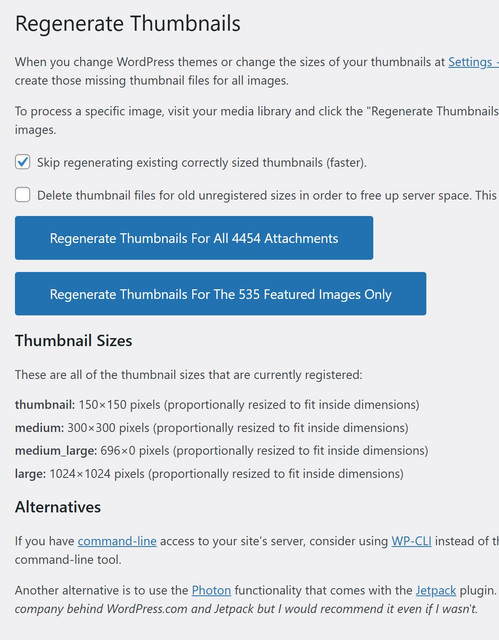
Calin In this case the Regenerate Thumbnails plugins can be used with this option – https://i.imgur.com/QNcOp4v.png
 Ans
Ans Normally we only want to regenerate thumbnail for MAIN image only (but not gallery/secondary image) for td widgets usage.
Force Regenerate Thumbnails seems regenerate for ALL images which cause uncessary inodes/usage in server. Please advise any plugin/options to regenerate thumbnail for MAIN image only, thank you.
Calin Hi,
Please use the plugin Force Regenerate Thumbnails – https://wordpress.org/plugins/force-regenerate-thumbnails/. This one will find and regenerate all the thumbs that are enabled – https://i.imgur.com/WeRRGzj.png
Thank you!
Ans Found an related issue: Disabling “tagDiv Standard Pack” plugin will remove all the td_xxxx thumbnail sizes in thumbnail regeneration plugin (can show it but cannot regenerate image), even though we can select thumbnail sizes in theme panel of td. (eg. 265×198 and 741×486 for mobile theme)
Note that I enable the plugin again and the regeneration return to normal.
Please check and advise, thank you.
AnsHi Support,
As title, Theme thumb sizes are not recognized in thumb regenerated plugin, and it also shows/generates the generic thumb sizes of WordPress as sreenshot.
Please help check and advise, thank you.
Screenshot: (tried Force Regenerate Thumbnails as well-same issue)
Guides followed:
https://forum.tagdiv.com/theme-thumbs/
Calin Hi,
This situation is not related to the theme and it’s related to the migration, so the first thing you should check are the images folders to be the same as on the place were it has been migrated. If the images are there, then use a regenerate thumbnail plugin, like this one https://wordpress.org/plugins/force-regenerate-thumbnails/
I hope this will help you!
Thank you!
 dorseteye
Hi Guys,
We’re migrating servers and we’ve just migrated everything to our staging/temp domain but main homepage images have been set to ‘blank’. Also article images have been set to blank. Strangely, the article title is also ‘Sample Page Title’ and we’re not quite sure why?
Live domain: https://dorseteye.com/
Staging/test site: https://dorseteye-u47296.vm.elestio.app/
Example article:
https://dorseteye-u47296.vm.elestio.app/dorset-man-among-victims-of-air-india-flight-ai171/
https://dorseteye.com/dorset-man-among-victims-of-air-india-flight-ai171/
Cleared cache and updated everything. Have disabled WP-Rocket.
I was going to use a regenerate thumbnails plugin but we have allot of images so I wanted to ask here first.
Thanks
Calin Hi,
Please use the theme panel settings to disable the thumbs (https://forum.tagdiv.com/theme-thumbs/) that you are not using and you can also use an extra plugin to remove all images that have been created and are not used – https://wordpress.org/plugins/force-regenerate-thumbnails/
Thank you!
 stavrosgian
We are using the WP Super Cache plugin on our website, configured according to the official recommendations published by tagDiv.
Recently, due to serious high CPU utilization issues, we investigated our performance bottlenecks and identified that many of the slow queries were originating from the td-composer plugin. The queries were triggered by heavy use of flex blocks across our homepage and category pages. These blocks often regenerate content on each page load, causing significant strain on server resources during traffic spikes.
Following a suggestion by @Simion from tagDiv support, we enabled Block Caching for all Flex Blocks. This adjustment had a noticeable and immediate impact on performance. For a high-traffic news website like ours, this improvement was essential — and we now strongly recommend enabling Block Cache for similar heavy-use cases.
https://postimg.cc/NLQHPdvT
https://postimg.cc/rRyR0wNg
Encouraged by these results, we applied the exact same cache settings to our Mobile Page layout using the mobile theme configuration from Newspaper. However, while the Desktop version properly refreshes and reflects new content over time, the Mobile version remains stale, failing to show newly published articles.
To force the new content to appear on mobile, we are currently manually deleting the entire cache from the admin dashboard — something that is clearly not a sustainable or acceptable solution in production.
We would like to ask:
– Why is the mobile version not refreshing like the desktop version under the same block cache settings?
– Is there a way to independently invalidate or refresh mobile cache when new posts are published?
– Could this be a bug or a limitation in how the td-composer handles caching for mobile themes?
Any help or guidance would be greatly appreciated — especially from other high-traffic sites using similar setups.
Thank you in advance!
 Anamaria
 Hello,
You don’t need to make changes in the child theme, you just need to set a placeholder from Theme Panel -> Blocks Settings -> https://i.imgur.com/mo0Cbu2.png
After you set the placeholder, you need to use this to regenerate the thumbs -> https://forum.tagdiv.com/thumbs-on-modules-and-blocks/
Thank you!
 emailwie
 How can I change default placeholder image of module, mega menu etc.
I had uploaded a my image from Theme panel > Template setting > Thumbs on block/module
Even I had regenerated by recommended plugin but it not works for me.
Check the image: https://snipboard.io/eGZPTl.jpg
emailwie Thanks it worked for me..
How can I change default placeholder image of module, mega menu etc.
I had uploaded a my image from Theme panel > Template setting > Thumbs on block/module
Even I had regenerated by recommended plugin but it not works for me.
Check the image: https://snipboard.io/eGZPTl.jpg
 iegexpo
Hi, I have a seemingly strange issue.
A few months ago, the client https://iegexpomagazine.com reported that on the home page he was seeing the featured images of the posts in low resolution (not sharp). After a series of checks, we found that in the theme settings Block 2 (the one relating to the posts on the home page) did NOT show the images in Retina version. The problem was quickly resolved at the time.
For a few days, the client has said that the site has started to present the same problem again, but obviously the configuration has never changed.
From Macs, PCs and iPhones EXTERNAL to the client’s network, we see the site correctly. The client, however, says that all the computers in their company have the same problem (actually, he sent us a screenshot and the issue occurs).
Attached is a comparative screenshot (on the left, what the client sees from the company network, on the right, me from a Mac on our network)… https://ibb.co/N6x76gbh
Technically, we have emptied the cache, regenerated the thumbnails and checked all the configurations again… are we doing something wrong?
Thank you!
Anamaria Hello,
To increase page speed, I recommend checking which thumbnails you are using on your blocks. You might want to avoid having all of them enabled and optimize and regenerate images. You can use the EWWW Image Optimizer for image optimization and the OMGF plugin for fonts. Also, you can use the WP Rocket plugin.
Also, I recommended using cloud templates for posts, categories, and so on Flex blocks instead of blocks 1 to 25 and disabling the tagdiv Standard pack plugin.
here are many optimization guides provided by our users here in the forum, some made by us; you could check some of them
– https://www.infophilic.com/get-almost-100-pagespeed-newspaper-theme/
– https://forum.tagdiv.com/cache-plugin-install-and-configure/
– https://forum.tagdiv.com/how-to-make-the-site-faster/
– https://forum.tagdiv.com/topic/high-number-of-ajax-request/
– https://forum.tagdiv.com/topic/score-100100-pagespeed-with-newspaper-wordpress-theme/
– https://www.andraware.com/wp-rocket-for-newspaper-theme/
– https://forum.tagdiv.com/topic/page-speed-guide-for-2023-beginners-and-advanced/
– https://forum.tagdiv.com/topic/newspaper-theme-speedify-your-website/
– https://forum.tagdiv.com/topic/tutorial-chriss-custom-optimizations-for-functions-php-etc/
– https://forum.tagdiv.com/cloudflare-cdn/
– https://forum.tagdiv.com/topic/theme-causing-high-cpu-usage-2/
– https://forum.tagdiv.com/topic/sql-querys-high-cpu/
– https://forum.tagdiv.com/topic/newspaper-theme-slow-to-respond/
– https://premium.wpmudev.org/blog/optimizing-your-wordpress-database-a-complete-guide/
– https://underconstructionpage.com/optimize-wordpress-database/
– https://crunchify.com/better-optimize-wordpress-database-all-in-one-guide/
Thank you!
 Greg
Greg Hello,
After extensive 6h testing, I was able to identify the root cause of the issue: The Critical CSS files in Autoptimize apparently generated faulty rules, which led to conflicts with the cache. After deleting the Critical CSS rules in Autoptimize Plugin, caching started working properly again on all pages.
I wanted to share this with you so that you can potentially help other users with a similar problem more quickly. If there is a way to ensure that Critical CSS rules regenerate automatically or to improve error detection in Autoptimize, that would certainly be beneficial.
If you have any questions or need further details, please feel free to reach out.
Thank you for your support!
Best regards,
Greg
Anamaria Hello,
To increase page speed, I recommend checking which thumbnails you are using on your blocks. You might want to avoid having all of them enabled and optimize and regenerate images. You can use the EWWW Image Optimizer for image optimization and the OMGF plugin for fonts. Also, you can use the WP Rocket plugin.
here are many optimization guides provided by our users here in the forum, some made by us; you could check some of them
– https://www.infophilic.com/get-almost-100-pagespeed-newspaper-theme/
– https://forum.tagdiv.com/cache-plugin-install-and-configure/
– https://forum.tagdiv.com/how-to-make-the-site-faster/
– https://forum.tagdiv.com/topic/high-number-of-ajax-request/
– https://forum.tagdiv.com/topic/score-100100-pagespeed-with-newspaper-wordpress-theme/
– https://www.andraware.com/wp-rocket-for-newspaper-theme/
– https://forum.tagdiv.com/topic/page-speed-guide-for-2023-beginners-and-advanced/
– https://forum.tagdiv.com/topic/newspaper-theme-speedify-your-website/
– https://forum.tagdiv.com/topic/tutorial-chriss-custom-optimizations-for-functions-php-etc/
– https://forum.tagdiv.com/cloudflare-cdn/
– https://forum.tagdiv.com/topic/theme-causing-high-cpu-usage-2/
– https://forum.tagdiv.com/topic/sql-querys-high-cpu/
– https://forum.tagdiv.com/topic/newspaper-theme-slow-to-respond/
– https://premium.wpmudev.org/blog/optimizing-your-wordpress-database-a-complete-guide/
– https://underconstructionpage.com/optimize-wordpress-database/
– https://crunchify.com/better-optimize-wordpress-database-all-in-one-guide/
Thank you!
Anamaria Hello,
Please disable the wp super cache because you need there a strong cache plugin, like WP ROCKET OR Litespeed cache.
As I said, please disable the AMP because it is deprecated and no longer used.
After you run to optimize the images, you need to use this to regenerate the thumbs -> https://forum.tagdiv.com/thumbs-on-modules-and-blocks/ and use this option for blocks
There are many optimization guides provided by our users here in the forum, some made by us; you can check some of them
– https://www.infophilic.com/get-almost-100-pagespeed-newspaper-theme/
– https://forum.tagdiv.com/cache-plugin-install-and-configure/
– https://forum.tagdiv.com/how-to-make-the-site-faster/
– https://forum.tagdiv.com/topic/high-number-of-ajax-request/
– https://forum.tagdiv.com/topic/score-100100-pagespeed-with-newspaper-wordpress-theme/
– https://www.andraware.com/wp-rocket-for-newspaper-theme/
– https://forum.tagdiv.com/topic/page-speed-guide-for-2023-beginners-and-advanced/
– https://forum.tagdiv.com/topic/newspaper-theme-speedify-your-website/
– https://forum.tagdiv.com/topic/tutorial-chriss-custom-optimizations-for-functions-php-etc/
– https://forum.tagdiv.com/cloudflare-cdn/
– https://forum.tagdiv.com/topic/theme-causing-high-cpu-usage-2/
– https://forum.tagdiv.com/topic/sql-querys-high-cpu/
– https://forum.tagdiv.com/topic/newspaper-theme-slow-to-respond/
– https://premium.wpmudev.org/blog/optimizing-your-wordpress-database-a-complete-guide/
– https://underconstructionpage.com/optimize-wordpress-database/
– https://crunchify.com/better-optimize-wordpress-database-all-in-one-guide/
Thank you!
Anamaria Hi,
Please regenerate it, because sometimes it may expire. Or it may have been limited due to inactivity, which is also a reason why this may happen – https://prnt.sc/257psyi you can check the youtube API here https://www.googleapis.com/youtube/v3/search?part=snippet&q=YouTube+Data+API&type=video&key=youryoutubeapihere
Thank you!
 mundoplus
 Yes, I set it up. It had been working until now. Do you think the 403 error message is because of that?
If so, I will try to regenerate the Youtube Api Key
Anamaria Hello,
Do you have set up a Youtube API in the theme panel -> https://forum.tagdiv.com/youtube-api-key/?Also, you can regenerate it and set the new API and check after.
Thank you!
Anamaria Hello,
From what I see, there are no webp images https://i.imgur.com/9SG8Sj7.jpeg, so please use this plugin https://wordpress.org/plugins/ewww-image-optimizer/
Please regenerate the thumbs https://forum.tagdiv.com/theme-thumbs/ and check after.
Thank you!
 Abdessamad Azil
Hi all,
I was trying to add a custom fonts, all fonts are working properly but one of them not working and I tried many time to change the file and regenerate WOFF files but still not working.
The font I’m talking about is TAN Angleton
Thanks
 gpeter
 I followed these steps, and it seems to be working now:
I deleted the previous Co-Authors Plus plugin.
I removed the ‘author’ taxonomy from the database.
I deactivated the Molongui plugin.
I went to Settings > Permalinks and regenerated the permalinks.
I reactivated the Molongui plugin.
These actions resolved the issue, and the author article count now appears to be correct.
Anamaria  teknotel
Sorry I am sure this is something basic but I cannot seem to work it out:
(fixed my image problem)
I can’t open these category settings, just loads forever.
Same for these thumb options.
I did try to install regenerate thumbnail, that didn’t do anything.
Let me know if you have any advice, thank you!



