
No search results were found in Documentation!
 Calin
Calin Please click on mobile preview – https://prnt.sc/66LPVRU9TuhZ then just select the logo element and check the settings for it.
How to Add a Logo in Newspaper
Calin Hi,
Thank you very much for taking the time to test this again after updating to 12.7.5 and for sharing a detailed explanation of what you’re seeing.
I’ve forwarded your information to our developers so they can review the focus/aria-hidden behaviour with the updated wrapper targeting.
Thanks again for your thorough feedback
Calin Since the issue does not occur when you are logged in, it is most likely connected to a cache plugin or one of its configurations.
Problems like this are often caused by JavaScript or CSS optimization settings, so I recommend reviewing those options carefully.
 macworks
Hello,
After a recent update, I’ve noticed inconsistent behavior when loading my primary blog page at:
https://www.macworks.com/blog/
At times, the page loads as expected, showing the correct homepage layout and content. However, intermittently, the same URL displays a different or incorrect version of the page.
This is occurring using the same browser and URL, without any changes on my end between page loads.
I’ve included two examples below:
• Example 1: Expected homepage appearance
• Example 2: Alternate/incorrect page rendering that sometimes appears
Could you please review this behavior and advise what might be causing the inconsistency? I’m trying to determine whether this is related to caching, theme behavior, or a recent update.
Thank you in advance for your help.
Calin Hi,
Yes, we have a dedicated custom work department that can assist you with these services. Please contact us at services@tagdiv.com and provide detailed information about the changes you would like to have after switching themes.
It would also be helpful to include temporary wp-admin access, so our colleagues can review your website and check whether there are any custom changes in the theme files that need to be carried over to Newspaper.
Our team will evaluate your request and get back to you with an estimated price and timeframe for the service.
Thank you!
 Test2CBD
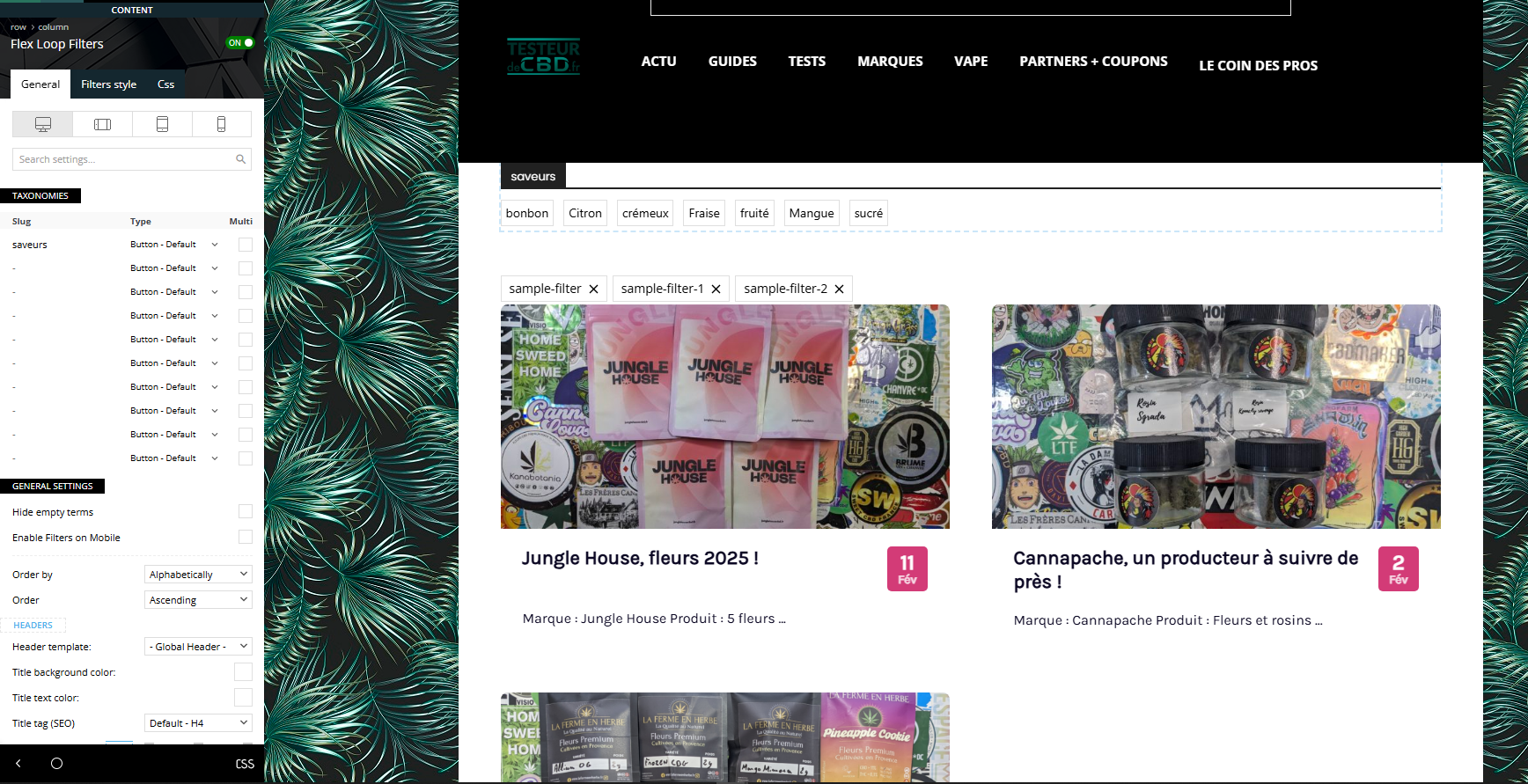
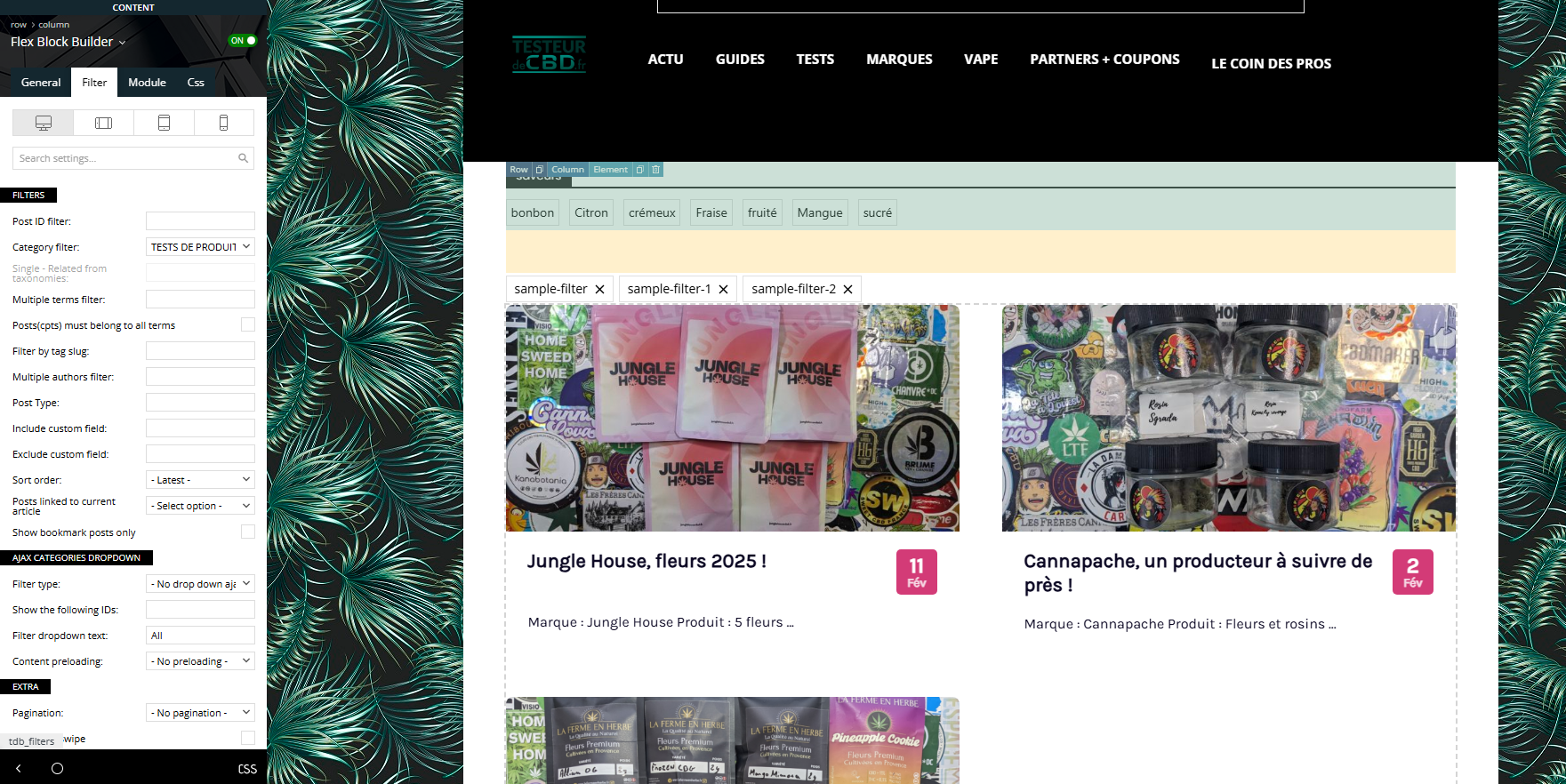
I tried all day to setup this option that look super intersting but I just don’t manage. we are reviewing CBD products and My goal is to create a menu that comes on the top of my post, with for example “flavor” (strawberry, lemon, …) so when the user click on one item, he can see (without reloading page) all the article marked as “strawberry”.
I created a custom taxonomy with Custom Post Type UI plugin.
I followed all the documentation, tried everything, but I dont manage to link the menu to the post.
https://testeurdecbd.fr/toutes-nos-critiques/
I would like to manage to get the menu like it is, but the menu filter article in “ajax” mode. No reloading.
And if possible, I would love to do this with multiple taxonomy on different place of the site.
Calin Hi,
Normally, that code is present only when the tagDiv Mobile theme is used (with amp or without it).
If you can provide a link, we can review it and determine whether this is a different situation.
Thank you!
 ShrishantIncraze88
I am currently using your theme on my website and I am facing website speed performance issues. My site is loading slower than expected, which is affecting user experience and overall performance scores. I have already tried basic optimization steps like image compression and plugin reduction, but the speed is still not satisfactory.
I request you to please review my website setup and guide me with the best theme settings, optimization options, and recommended configurations to improve loading speed. If there are any specific features, scripts, or modules that should be disabled or adjusted for better performance, please let me know.
Thank you for your support. I am looking forward to your guidance.
Calin Hi,
I just made some tests on my install and it seems to be ok.
If you’d like, we can review your situation and identify the issue with the template. For this, please contact us via email at contact@tagdiv.com and provide temporary wp-admin access and a link to check the situation.
Thank you!
 degelcreatives
 thank you sir i am fixed that topic now ineed to fix me load of portiat tablet when i want to edit with tagdiv composer look previews image
 ewc21
ewc21I am using TownTalk theme and added theme for mobile homepage, single, etc. In the preview it looks good, but when I try on my mobile device, it does not look the same and shows the generic Newspaper theme. I read about clearing caches and applying theme, but I must have missed a step or two.
I hope someone can help, with visuals is better. Apologies if there’s already a thread on this (please point me to it).
Thank you!
 hrhq2020
Hi,
The Forms/Modal Popups on my site are no longer displaying. The widgets and pages with forms (WPMUDev Forminator) do not display.
Forms display in the Admin Panel and can be previewed in the Admin login and when creating/editing the form.
When I use developer tools in the browser, inspect element shows me:
element.style {
display: none;
}
The homepage (https://hrheadquarters.ie) has an Advertise with Us button this should open the Advertising form page but does nothing it points to https://hrheadquarters.ie/# and not the target page:
Modal Popup: Unique Id is set
General
Source: Page
Content Load: Delayed
Page ID: set
Triggers
Enabled: set
Button Text: set
The page (https://hrheadquarters.ie/contact-us/) has an embedded form but it does not show.
Both pages work in Preview mode.
Theme: TagDiv 12.7.4
Environment: WordPress 6.8.3
PHP: 8.2.3
Thanks,
Mick
Calin Hi,
I just checked the notice I submitted for the developers. It currently shows the status “Ready to be Investigated”, which means it has not been investigated yet, but it will be reviewed soon by a developer who is finishing a project.
Thank you for your understanding!
Calin Hi,
It appears that right now the mentioned page is not available – https://prnt.sc/Yt9TjE7ISBoS
Now, if the “features” is an element set on the template, use tagDiv Composer to edit the template and go to that section, then use the right click on it and select the delete option.
If the review section looks like this – https://prnt.sc/0SquHh7D7UoX then edit it with tagDiv Composer, go to the review section, select the element and add any text to the notification text https://prnt.sc/UAkwg2d3akAl save the changes, afterthat the text can be removed and the problem should be resolved – https://prnt.sc/o65esmaskrIw
Calin Hi Nearview,
Thank you for providing the correct solution.
This is now on our list, and we hope our developers will review it and include a fix in an upcoming update, so there will no longer be a need to make changes to the theme plugin files.
 caasindia
 Follow-up on fatal td-composer error (developer review status)
Hi,
I’m following up regarding the td-composer fatal error we discussed earlier.
The issue is still occurring intermittently on the live site, and WordPress has again reported the same fatal error related to tdc_check_domain.php. This is affecting the admin area performance and site stability.
I understand that the case was forwarded to your developers. Could you please let me know if there is any update from their side or an estimated timeline for review?
Since this is a live production website with ongoing traffic and ads, even intermittent fatal errors are having a noticeable impact.
Thank you for checking, and I appreciate any update you can share.
Best regards,
Team Caas India News
 dmforum
HI,
In this page “https://aiopscommunity.com/tdcpt_app_listing/moogsoft/”, I would like to remove the “features” tab and also at the bottom of the page, just below the heading “review”, I see “N�j�brW���’��y����{2z” How to remove even this?
Calin Hi,
In most cases, this type of issue is caused by an extra plugin interfering with the theme. Please test the site using only the tagDiv plugins and check whether the recovery password option works.
If it works, reenable the other plugins one by one until you identify which one is causing the conflict. Once you find the interfering plugin, review its settings in many cases, the plugin can remain active and the issue can be resolved by disabling a specific option that causes the conflict.
 Mark Gilbert
 It seems that either you haven’t read what I said or have misunderstood it. Yes, this is a featured image, but placed within Single Post Content. There is no featured image element in the template.
If you actually look at the page, you will see this: https://jazzjournal.co.uk/2026/01/24/jj-01-66-owning-up/?
The mystery is that such a featured image appears perfectly well in previous articles using the SAME TEMPLATE, such as this:
https://jazzjournal.co.uk/2025/12/27/reviewed-sun-ra-and-his-myth-science-arkestra-anne-paceo/
So the question, again, is why have captions stopped appearing in new articles using the same template?
Thanks
MG
Calin Hi,
Could you please provide a bit more detail about the issue? Are you referring to the login option in the menu not working?
If so, in most cases this is related to cache or optimization settings. Please try the following steps to identify the cause:
Disable all cache and CSS/JS optimization plugins and test again.
This includes options that minify, combine, or defer CSS and JavaScript files.
If the login works with caching disabled, re-enable the cache plugin and carefully review the CSS and JS optimization settings, as these options are usually responsible for this type of issue.
Another possible cause is a plugin conflict. To test this:
Activate only the Newspaper plugins and check if the login works.
If it does, enable the remaining plugins one by one, testing after each activation, until you identify which plugin causes the login to stop working.
Mark GilbertHello – can you see why no caption is appearing under the Single Post Content image here – https://jazzjournal.co.uk/2026/01/24/jj-01-66-owning-up/?
The caption does appear on another article using exactly the same template – https://jazzjournal.co.uk/2025/12/27/reviewed-sun-ra-and-his-myth-science-arkestra-anne-paceo/
If I change the https://jazzjournal.co.uk/2026/01/24/jj-01-66-owning-up/ to a template with Featured Image, the caption appears ok.
Thanks
 RECORD EUROPA
Hello tagDiv Support,
We are experiencing an issue with the header search (magnifier icon) that may block page interaction, mainly on mobile, only when the Theme Panel module:
Template Settings → Accessibility (Keyboard + Skip link + Search dialog) is enabled.
When the magnifier is tapped, the search panel appears, but the page can become partially or fully unresponsive (e.g., cannot type into the search field, closing becomes unreliable, and the page may require a reload to recover). In DevTools we consistently see the following warning during the sequence:
“Blocked aria-hidden on an element because its descendant retained focus…”
This points to tdAccessibility.js applying aria-hidden=”true” (and/or inert) to an ancestor while a descendant still has focus (e.g., the search trigger button or the search input). This creates an invalid accessibility state and can leave the UI in an inconsistent “stuck” state.
We implemented a temporary mitigation snippet to prevent the stuck state site-wide, but we intentionally excluded one single post so you can reproduce the issue without the mitigation on a controlled page:
On that page, the behaviour is “as-is” with the Accessibility module enabled, to help you test and diagnose the tdAccessibility.js Search dialog flow.
Please review the tdAccessibility.js Search dialog logic to ensure that:
aria-hidden=”true” / inert is never applied to any element that contains the currently focused node;
the search dialog container cannot end up aria-hidden=”true” while it contains the focused input;
opening/closing restores a consistent state every time on mobile (focus + attributes).
Thank you.
Regards.
Calin Hi,
If you’d like, we can take a closer look at this. Please contact us via email and provide a temporary access link to the website. I’ll review it and let you know if there’s anything I can do to help.
https://www.wpbeginner.com/plugins/how-to-create-temporary-login-for-wordpress-no-passwords/
 UncleLion
 I think I’ve found the cause, but I don’t know how to solve it globally. Where reviews used to show half values, like 7.5, an error appears. But such values didn’t cause errors before.
caasindia Thank you for the update.
Since this is a live production website with active traffic and ads, changing PHP versions on the live environment is not safe at the moment.
I appreciate you notifying your developers to review the related code. Please let me know if they identify anything on their side or if there is a safe, non-invasive way to further verify this issue without impacting the live site.

