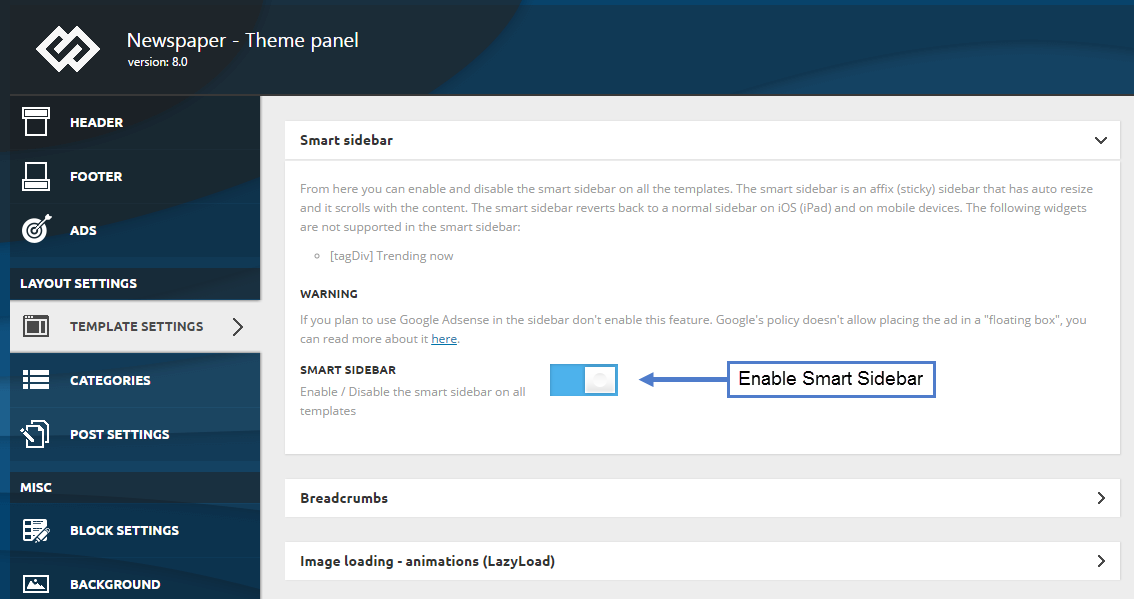
- NewspaperSmart Sidebar
 craftedbyculture
Hi, my name is anthony and i am contacting you to hopefully get some help regarding stick sidebars. For some reason no matter what I try my stick sidebar will not turn on on any page. I have already turned off all of the plugins, I have turned on smart sidebars in theme menu, I have installed and reinstalled the dome and theme and I have even tried different sidebars, however nothing will get them to work. Please help me with this issue as soon as possible because we are about to launch our site very shortly. Thanks!
 rnpacheco
Hi all,
Is it possible to use smart sidebar and at the same time prevent it to float in tablet resolution?
The floating is really messy in my case. See print below.
Any help will be appreciated.
Regards,
Rafael
 boez52
Hello guys,
Since a week, my posts sidebar arent work. I dont Know why ! In my theme panel, sidebar is enlable. Someone can help me?
Bonjour les amis,
J’ai un petit soucis avec mes articles. Les sidebar sur les côtés de l’article ne s’affiche plus ! Du coup, il ya un vide sur tout un côté de la page d’article et sa fait moche. Notons que smart sidebar est bien activé.
 mike_ashworth
hiya,
I’m new to this theme and having an issue with sidebar.
I’m wishing to introduce a standard sidebar (not smart sidebar) to my website.
Sidebar is enable on the template settings in the theme panel.
However, when i go to the widgets section in wordpress there is no sidebar to drop items into.
I can see that when i am using tagdiv composer there is a “widget sidebar” option however i cant see how to actually put that in the right hand column in the composer. It always seems to only want to go in a row.
what am i doing wrong, i am wishing to have a sidebar displaying on the website with various items within it such as the social counter, most popular categories etc etc
Thanks in advance for your help
 Simion C.
 Hi,
Adsense ads are not supposed to be placed in a floating container, that is what Google recommends in the matter.
The smart sidebar can only be enabled or disabled, parts from it cannot be sticky while the rest is fixed.
Also two sidebars cannot be used on a post page. There will be content and sidebar (left or right), or no sidebar at all.
Something like that could only be done through theme modifications. Or maybe a user has managed to find a different possible solution.
Thanks
 MrShawnTierney
It’s 2018, and by this point I’m hoping someone has this figured out!
First, we all know that Google AdSense ads cannot be placed in a “floating” box, so we can’t use the feature TagDiv calls the “Smart Sidebar” with those ads.
Second, we all know having a big empty space at the bottom of our sidebars is BAD since readers often look for something else to click on when they are done reading.
While I do have other non-adsense widgets to put on the bottom, I can’t find a way to make the stay at the bottom while the adsense widgets scroll with the page using TagDiv’s Newspaper Theme.
So how do/did you go about solving this?
– Is there any way to add Ads to the single post template that will appear not in the article itself but above the sidebar widget, and scroll with the page?
On the homepage builder you can add Ads, blocks, and a Widget Sidebar to the side of the layout, but after much searching and reading many documents I can’t see how this could be done on a single post or by editing the single post template.
– Is there any way to have two sidebars on a single post – a default on top and second a “smart” one on the bottom?
My searches turned on this turned up nothing 🙁
– Is there any way to stick or make smart just certain Widgets?
I tried Q2W3 Fixed Widget but the widgets disappear 🙁 No other free widgets seem to be available.
*** Note: I will buy the first user with a working solution a large cup of coffee (or favorite snack) in appreciation! (via PayPal Donation) ***
(I will also pass out grinch awards for suggestions not related to my question, or for snarky replies! 😉
Simion C. Hi,
Cloudflare rocket feature is known to cause issue with the theme, it is recommended to have it disabled if you use Cloudflare
– https://forum.tagdiv.com/cloudflare-cdn/
Disable it and check the results. By default the smart sidebar feature works in theme, something is causing it to fail in this case. Try deactivating plugins, child theme, disable rocket loader, check custom code used in theme panel or theme files.
Thanks
Simion C. Hi,
I see there are customization made to the post template, I would suggest to try for the moment to deactivate the child theme where you made these changes and check if the smart sidebar works properly.
However I see that you have Adsense ads in the sidebar. Note the warning in the matter
– https://www.screencast.com/t/uFmn1ZJntDZ
If you use Adsense ads in the sidebar then it is not recommended to use the smart sidebar feature according to Google policies
– https://www.screencast.com/t/aztyvtdGZCiU
– https://support.google.com/adsense/answer/48182?hl=en
Thanks
 angelgallegos
 Hi there,
I made a CSS customization on Template 2, but smart sidebar is not working if I try it on any post, for example, using Template 6 or 7 (which has no personal customization). Could it be a Cloudflare conflict because of javascript?
 Catalin
 Hello ulugg,
If you want to use the Sidebar on your homepage or any page you want, you should use the layout 2/3+1/3 and for 1/3 column you should add the Widgetised sidebar where you should add any element you want. Also, a smart option for the sidebar in homepage might be the Smart Sidebar which can be enabled from Theme panel. Also, use this configuration for it from here -> https://forum.tagdiv.com/newsmag-smart-sidebar/
Thanks for your understanding!
Simion C. Hi,
1. That sounds like the smart sidebar option. While scrolling down the page, as soon as the end of the sidebar is reached, it will remain fixed. That is what the smart sidebar does.
If this option is not enabled the sidebar content will be fixed, in the initial position. It will remain there regardless of scrolling down the page. In case there is a problem, please provide a link to the page in question so we can inspect it.
2. I don’t quite understand the square shape you are referring to, if you could provide a screenshot of it, or a link to the page where it is present, it would be helpful.
Maybe you are referring to the comment count box
– https://www.screencast.com/t/uebVoSiRgx
I could try to give you a solution if that is what you are referring to, specify how exactly you want it to be.
Thanks
Simion C. Hi,
The sidebar is stick from what I can see, that means the option is enabled in the theme panel. What that does is that when the end of the sidebar is reached while scrolling, it will always remain in view.
I don’t quote understand what you are asking however, the smart sidebar can be enabled/disabled only, for all the website. It should not be enabled if you plan to use Adsense in the sidebar content.
Thanks
angelgallegosHi there,
I have activated smart sidebar but it does not work at all: https://www.elquintobeatle.com/2018/01/18/roxy-music-new-order-guian-ill-be-your-girl-nuevo-album-the-decemberists/
Could you help me?
Thanks.
 abc.xyz
 New topic – My 2 last questions
1) When you are on post page, as you scroll down the sidebar becomes fixed and does not move up. And I am not talking about the smart sidebar.
2)In block 9 such as the sidebar or front page, before title is a little square. How can I substitute the square with another shape such as a “rectangle”?
-
This reply was modified 8 years by
abc.xyz.
Simion C. Hi,
If you use Adsense ads in the sidebar then it is not recommended to use the smart sidebar feature according to Google policies
– https://www.screencast.com/t/aztyvtdGZCiU
– https://support.google.com/adsense/answer/48182?hl=en
This could potentially be a Adsense violation, and you may suffer penalties. Disable the sticky sidebar or remove the ad.
The option in the theme panel can only be disabled or enabled, you cannot set it for only some sidebars and not for others. Only on pages you can specifically create sticky sidebars as you want using a custom row class, as mentioned in the guide.
Thanks
 srikant
 Hi Catalin,
Thanks for the reply, I am aware of this smart sidebar option.https://forum.tagdiv.com/wp-content/uploads/2017/05/smart_sidebar_1.png But What about this warning message? I am using Google Adsense on the sidebar.
And the second thing I don’t want the floating popup sticky sidebar. I am only looking for the option to stick the current sidebar.
Hope you understand my query.
Regards
srikant
-
This reply was modified 8 years by
srikant.
Catalin Hello srikant,
Notice that our theme has a functionality for Sticky Sidebar which is named Smart Sidebar. For more information about this element, please check here -> https://forum.tagdiv.com/smart-sidebar-2/
Thanks for the message!
Catalin Hello kokos,
Please make sure that you have correctly added the extra class td-ss-row according to our documentation here -> https://forum.tagdiv.com/search/smart+sidebar/
Thanks for the message!
Catalin Hello bogdan,
Make sure that your smart sidebar has been set up accordingly with the following topic from here -> https://forum.tagdiv.com/search/smart+sidebar/
Thanks for the message!
 bogdan
Smart sidebar not working on my website.
Consider this post for example:
http://www.culturavietii.ro/2018/01/15/sexul-si-problema-drepturilor-omului-de-stephen-baskerville-partea-iii/
I see no faults in my setup but obviously something is stil wrong. Can you please help fixing it?
Thanks a lot,
Catalin Hello margin707,
Yes, the smart sidebar functionality has been created in tagdiv_theme.js and minified js of the theme. You should edit that folder but please notice that it’s not a simple task and if you are not aware of the steps which are needed to take in this case, please consider hiring a freelancer/developer to help you because we cannot provide custom work at the moment, sorry!
Thanks for the message!
 margin707
 Just bumping this up, maybe a developer can see this and at least provide me the file which I should try editing to modify the smart sidebar. I am assuming the file is: tagdiv_theme.js can someone confirm or correct me?
margin707So I am having a really hard time modifying the smart sidebar to behave like I want it to. What I want is for the sidebar to stick the last element at the top, not cut off the 2nd to last element like it does on all the demos. It’s best to explain what I mean, here is a test page: http://165.227.104.80/5-exciting-monero-developments-to-look-forward-to-in-2018/
If you scroll down, you will notice there are 2 300×600 ads on the sidebar. Once you start scrolling down, it will anchor the bottom ad to the bottom of the sidebar instead of to the top. What I want it to look like is this: https://www.coindesk.com/ripple-eyes-retreat-after-record-price-highs/ As you can see when you scroll down the ad in the sidebar sticks to the very top and there isn’t an element being cut off.
I tried implementing Q2W3 Fixed Widget, Sticky Menu, Theia Sticky Sidebar, and many more methods to no avail. What annoys me is when I turn off the smart sidebar feature in the menu, none of these plug ins work.
I don’t understand why the theme was built in such a way that I am only able to use 1 type of smart sidebar implementation without having an easy way to modify it. Can anybody help me?
 beyondpositive
Hi all,
Let me prefix this by saying I’m not WP expert, just a charity worker.
I’m having trouble enabling the Smart Sidebar on my site (URL: http://www.beyondpositive.org). I followed the somewhat minimal tutorial, and enabled it site-wide. But that’s it. It’s not appearing anywhere, and the tutorial doesn’t really help much further on how to implement and/or troubleshoot it.
Can anyone help enlighten me why it’s not showing? Then how I’d customise the content?
Many thanks in advance.
Simion C. Hi,
Sidebars on pages can be set by splitting the row as you want and inserting content in the resulting sidebar column, like in this example
– https://www.screencast.com/t/4HSvGmfUx
Or use a widget sidebar element in the column
– https://www.screencast.com/t/fmLfKyJwoTE
Pages can be built in any way you want using the available options. If you want to split the row in 4 columns, one of them has to be the sidebar. You cannot set a sidebar differently
– https://forum.tagdiv.com/tagdiv-composer-tutorial/
Sidebars on pages can be sticky as well
– https://forum.tagdiv.com/smart-sidebar-2/
Thanks