
- NewspapertagDiv Composer – Website Manager
- NewspapertagDiv Opt-In Builder – Emails
- NewspaperModules Builder in Newspaper Theme
- NewspaperWooCommerce: Happy “Add to Favorites!”
- NewspaperCloudflare (CDN)
 brian7454
 Chris; I assumed newest posts would be read first, but watching other posts getting answered while mine got shuffled down to the second page without an answer persuades me otherwise. Sadly, there is no conflict, php7 is modern enough, i have a dozen wp sites on this server that run flawlessly and as this site is not yet what I call ‘ready’, it doesn’t even use caching.
One suggestion was made; that on the page that never finishes loading (any page opened with td-composer) that js was shown as not concatenated. It was said this ‘could’ cause issues. One assumes that if it ‘does’ cause issues it would already be known, but I have asked for advice from my hosts – luckily I have 4 vps accounts with them and they answer within the hour.
 Catalin
 Hello strawberrybase,
If you recently switched to HTTPS make sure you have done it properly.
http://www.wpbeginner.com/wp-tutorials/how-to-add-ssl-and-https-in-wordpress/
https://css-tricks.com/moving-to-https-on-wordpress/
https://yoast.com/dev-blog/move-website-https-ssl/
https://forum.tagdiv.com/topic/moving-to-ssl/
Also, make sure if you are using the latest version of the theme installed via FTP way. Check your plugin’s list and if you are using some untested plugins, try to disable all of them, clear all the caches and check the results. Before doing these steps, ensure that you have made a full backup to your database to avoid losing all of your data.
Thanks for your understanding!
 strawberrybase
Hi everyone, we are having some problems getting certain pages to load on our website. It used to be the entire site but now the home page loads, it’s just the other pages and posts that look like this (See screenshot).
We’re getting a lot of mixed content warnings (see screenshot), but despite having an SSL certificate and loading various plugins to replace all the http links with https AND running a couple of SQL enquiries on our C-panel database to replace the https, we’re still having this problem. Does anyone know what the problem is and how we would go about fixing it?
Many thanks


 drvarun5179
Hey Newspaper Family,
Just thought this might be useful to the ones starting a fresh new blog. I’m adding up plugins i’m currently using for my blog, feel free to add some to the list:
- Akismet Anti-Spam (to stop spam comments without adding them to your comment approval page)
- All In One WP Security (simple wp security for your website)
- Contact Form 7 (i have never used it, but yeah it might be handy)
- Envato Market (to keep your theme updated with Newspaper directly)
- External Links (super seo plugin, automatically prevents any external link from passing juice of your website to another for google ranking)
- GTmetrix for WordPress (checks page speed directly from plugin here)
- Heartbeat Control (ignore if you are not moderately good with tech. This one removes a lot of load from your cpanel of hosting)
- Inline Related Posts (adds beautiful in-line related posts automatically by extracting from tags and categories)
- Jetpack by WordPress.com (obvious)
- Mashshare Share Buttons (kinda good, especially has ability to add fake number of shares)
- OneSignal Push Notifications (a must get app! sends notification to mobile as well desktop users that you have published a post, just get this one)
- Regenerate Thumbnails (obvious)
- Remove Query Strings From Static Resources (speeding up website)
- SumoMe (for beginners, yeah this is super one, their tutorials explain everything)
- Table of Contents Plus (adds beautful TOC in your posts automatically using headings in a hierarchy)
- WP Smush (for image optimization)
- WP Super Cache (supports Cloudfare, one reason i preferred it over w3 total cache)
- WP-Optimize (cleans database and makes your hosting cleaner)
- Yoast SEO (obvious)
Apart from that, please do add free SSL certificate by Cloudfare, and setup free CDN by Cloudfare for your website. It boosts speed you will love to see.
Regards
Dr.Varun
drvarun5179 Hello @michele-jolie , have you tried using Mobile Plugin provided with the theme? Indeed your page is blank on mobile phones. Apart from that, i assume you are already using
Apart from that, some basics you should try for your website:
1. Try installing a demo from theme panel, in your case, you should try Cooking demo- https://demo.tagdiv.com/newspaper_recipes/ . Just have a look. You can find other demos here- https://demo.tagdiv.com/select_demo/select_demo_newspaper .
2. Go for Free CDN by Cloudfare, that will boost speed of your website a lot and is pretty good.
3. Add SSL Certificate to your website, it will show users that your website is safe and again, is pretty neat.
4. Explore post types in theme, they are pretty good and worth exploring.
5. Try reading how to set up homepage here- https://forum.tagdiv.com/homepage-how-to-build-and-set-it/ .
6. Basic plugins must get for WordPress- Akismet-anti spam, External Links, Jetpack, Regenerate thumbnails, WP Smush, Wp-Super Cache and Yoast ofcourse.
Good luck with blogging. You can check mine here- https://medicforyou.in . Feel free to ask for anything. 🙂
 simchris
 Well, the official AMP plugin from Automattic (the people who make WordPress) works very well, and there is a ‘glue’ plugin for use to connect that to Yoast SEO. I’ve been using the AMP plugin since it launched couple of years back, with zero hassles. Latest update supports pages, if needed; and has separate page or post templates which can easily be edited.
Note AMP only works if you have enough traffic to warrant it and if the pages all validate in Chrome with the AMP plugin activated. It’s NOT a full-on replacement for a responsive or mobile framework — it’s an “additional” element which only works on supported devices and if Google “blesses” the posts to add to CDN, and then will be shown in SERPS with AMP icon – and also in your Google Site Manager account (or whatever they are calling it this year).
So, worth doing – but it’s not a be-all, end-all solution for mobile at this time — simply an additional option. Frankly a normal responsive site with fast mobile speed, https, and http/2 is also as important.
( I don’t work here; just long time TagDiv user, webdev dinosaur, and WP user sicne v1)
 Simion C.
 Indeed I have not tried to load additional posts. It seems the images are not loaded since they are considered insecure content. If you recently switched to HTTPS make sure you have done it properly
http://www.wpbeginner.com/wp-tutorials/how-to-add-ssl-and-https-in-wordpress/
https://css-tricks.com/moving-to-https-on-wordpress/
https://yoast.com/dev-blog/move-website-https-ssl/
https://forum.tagdiv.com/topic/moving-to-ssl/
 GBHarlequin
Hi there,
I can’t seem to change the font on my site. I want to move away from having default typography throughout the whole site, especially with it being a popular media theme. When I select a new font in the drop down list and try to save the settings, it loads endlessly. Perhaps there is a missing step? Any advice would be much appreciated. 🙂
 rsenzon
Hello,I searched the documentation as well as google and was not able to find the answer so I apologize if this is a repeat questions.
I am trying to center the Category tag on modules/blocks and failing miserably. See attached what I am trying to accomplish. All else is working flawlessly!

 NoahFarr
 Thank you for the Reply Simon,
Everything is green in system status. I am also using shared hosting.
The only plugins I have turned on are Really Simple SSL, woocommerce, wp cache, yoast and Coming Soon Page & Maintenance Mode by SeedProd.
Perhaps I could try the visual composer instead? How would I go about activating it? It is installed but I do not see where I can activate it.
I have messaged your contact team for further support.
-
This reply was modified 8 years by
NoahFarr. Reason: mentioned visual composer
Simion C. Hi,
Maybe these guides and tutorials will help as well
– http://www.wpbeginner.com/wp-tutorials/how-to-add-ssl-and-https-in-wordpress/
– https://css-tricks.com/moving-to-https-on-wordpress/
– https://yoast.com/dev-blog/move-website-https-ssl/
– https://forum.tagdiv.com/topic/moving-to-ssl/
– https://managewp.com/blog/wordpress-ssl-settings-and-how-to-resolve-mixed-content-warnings
– https://designmodo.com/wordpress-https/
Thanks
Catalin Hello afz-product-vision,
Unfortunately, the theme does not have any such an option for this, sorry! If you will switch the site to https notice that the entire website should have to have SSL. Sorry, but I cannot recreate your issue. You should check the SSL configuration if done correctly.
Thanks for your understanding!
 blithe
 I am using cloudflare and cloudflare ssl. I don’t think it causes that. Tried disable all plugins, it doesnt work either.
I am using technology demo. Also tried go with non https, chrome incognito mode, they don’t work either. I can see icons that implemented in demo content but If I try to change icon from composer, it shows nothing.
-
This reply was modified 8 years by
blithe.
 Bogdan B.
 Hello,
You can have https and use the theme properly but you need the right configuration.
Please use these settings for cloudflare:
https://forum.tagdiv.com/cloudflare-cdn/
and use these guides for proper ssl integration:
http://www.wpbeginner.com/wp-tutorials/how-to-add-ssl-and-https-in-wordpress/
https://css-tricks.com/moving-to-https-on-wordpress/
https://yoast.com/dev-blog/move-website-https-ssl/
https://forum.tagdiv.com/topic/moving-to-ssl/
Thank you!
 Serpao
 New update.
I pressed f12 -> console to see if there were any errors. There were, 3 related to HTPS.
I went to cloudflare and disabled SSL, and everything is working. But if i put it on “Flexible”, it doesnt work. Neither works the website on full, of course.
I would like having the HTTPS, but i need to desactivate it for having the theme working. any ideas? thanks in advance
Simion C. Hi,
It seems the thumbnails images are considered insecure, the website is trying to load them over http
– https://www.screencast.com/t/5WVjwn41KhL6
Please see these guides for SSL implementation, maybe they would be helpful
– http://www.wpbeginner.com/wp-tutorials/how-to-add-ssl-and-https-in-wordpress/
– https://css-tricks.com/moving-to-https-on-wordpress/
– https://yoast.com/dev-blog/move-website-https-ssl/
– https://forum.tagdiv.com/topic/moving-to-ssl/
Thanks
 mrsshao
i have installed the latest version of newspaper theme. i am trying to install the theme , it required to install plugin tagDiv Composer , but i am getting following error please advice .
Download failed. cURL error 35: error:14077410:SSL routines:SSL23_GET_SERVER_HELLO:sslv3 alert handshake failure
 vinayakganiger
I just purchased a newspaper theme and I tried uploading it but it showed “please try again”. Then I tried uploading it via FTP but their some files failed to upload. I just need the solution for this as soon as possible.
This is the system status shown in Newspaper:
Theme config
Registration key i themenull.net Reset key
Theme name i Newspaper
Theme version i 8.5.1
Theme database version i 8.5.1
HTTP channel test wordpress
Installed demo i Tech News – demo ID: tech | install type: no_content
php.ini configuration
Server software i Apache/2.4.27 (Unix) OpenSSL/1.0.1e-fips
PHP Version i 5.6.30
post_max_size i 8M – You cannot upload images, themes and plugins that have a size bigger than this value. To see how you can change this please check our guide here.
max_execution_time 30 – the execution time should be bigger than 60 if you plan to use the demos. To see how you can change this please check our guide here.
max_input_vars 1000 – the max_input_vars should be bigger than 2000, otherwise, it can cause incomplete saves in the menu panel in WordPress. To see how you can change this please check our guide here.
SUHOSIN installed false
mbstring available
WordPress and plugins
WP Home URL i https://vinstechs.com
WP Site URL i https://vinstechs.com
WP version i 4.9.1
WP multisite enabled i No
WP Language i en_US
WP Memory Limit 256 MB/request
WP_DEBUG False
Caching plugin WP super cache – for best performance please check the plugin configuration guide here.
 elimiz
Hi
my websites uses SSL, i have errors with mixed content:
Mixed Content: The page at ‘https://trademasterteam.com/forex-trading/forex-harmonic-pattern-scanner-with-imarketslive-how-to-trade-forex-successfully/12614’ was loaded over HTTPS, but requested an insecure stylesheet ‘http://fonts.googleapis.com/css?family=Open+Sans:300,400,600,700,800|Gudea|Capriola|Alegreya+Sans+SC’. This request has been blocked; the content must be served over HTTPS.
How do i fix it?
 EquipaRefrigeracao
Hello,
I hope you’re doing good.
I’m with a great problem on my website: the images are not being displayed in the posts, and others things like submenu, search field not too. Sometimes they show up, sometimes they do not.
I think it could be a problem with CSS or JavaScript on the Newsmag theme, since I tried everything: I optimized the images, solved SSL problems, optimized the database, try it on other browsers, flushed browser cache, but so far nothing solved my problem.
This is a post example: https://www.equiparrefrigeracao.com.br/camara-fria-peixe/
Could you help me? See the image attached, please.
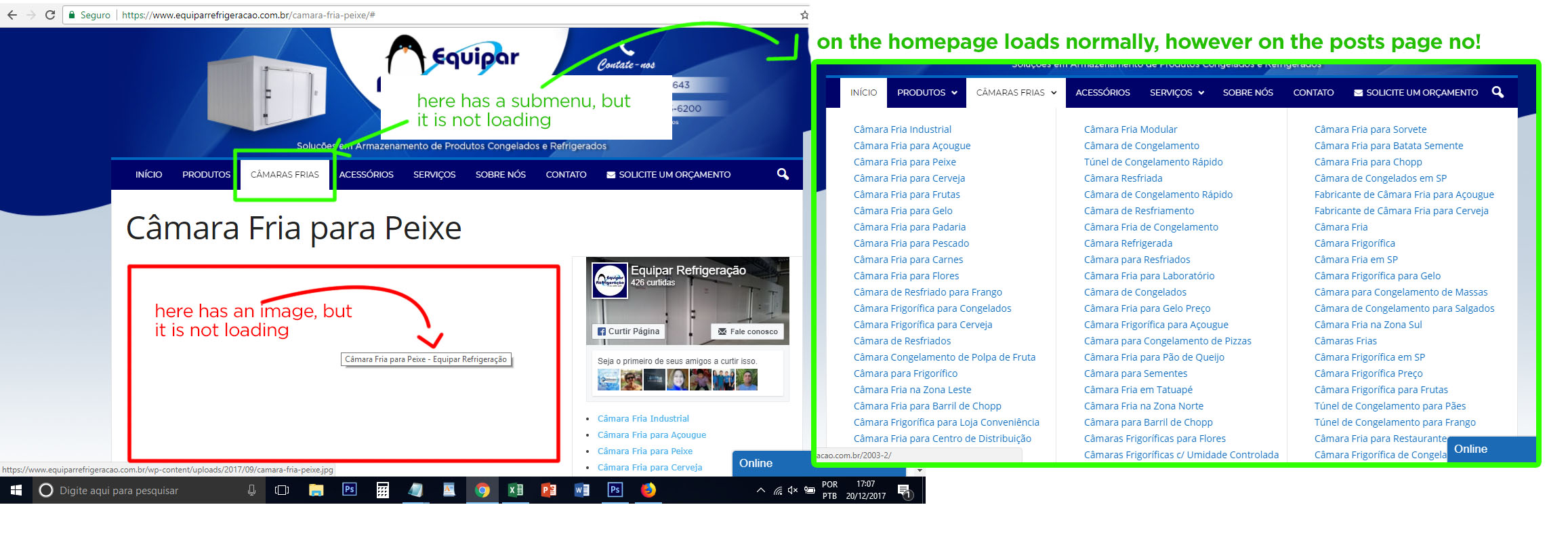
Thank you
 lazdim
 Sorry for the post. We figured out the problem. It was a SSL problem on the links of the pages. Problem solved!
 MrOrsh
I have a really odd problem after switching a site to ssl/https.
Everything works as it should and I have no mixed content warnings anywhere on the site.
However it seems that pages created using tagdiv-composer has an image-issue on iPhone (Safari browser).
On computer browsers images shows up as excpected. However on Safari (on iPhone) the top images only shows up the second I touch on either the menu- or search-icon. The images seems to load correctly but don´t get displayed untill something else is loaded as well.
See: https://www.baresolutions.se/ogonbryn-fransar/ for reference. The issue only occur (as far as I can tell) on iPhone in Safari browser.
 lcerura
 Okay, so those items sorted themselves out by completely clearing our my caches.
But, I’ve still got issues with making use of the ADs section in the Theme Panel. Keep getting the rotating wait thingy…as if it’s endlessly working.
 Amit
Amit Hello @depakranjan
If you are using SSL make sure you have added https version of your site to the Google Webmaster tool property. Also, check if you using www version.
Tip: Always add a slash (/) to the end of URL you submit to crawl.

Thank you for your understanding.
 arollettson
 I found the bug, (and it is a bug!)
I tackled the problem with renewed determination and got results. I’m looking more fondly on TD Composer this morning.
The bug occurred because I was testing a column text block to see if custom css could prevent the padding of a text block title but not the text below it.
While the text padding moves the text away from a border (good), the ‘me-too’ header padding leaves an unsightly white strip beside the colored background of the header (bad). I need to make it clear that Custom CSS was empty while creating (and re-creating endlessly) this bug.
So . . .
Home Page Layout:
• Full width row with banner image
• 2/3:1/3 row with ‘td-ss-row’ added class to make the 1/3 row sticky.
• inner row 1/2:1/2 .
• several blocks in each of the two columns, a mix of column text and raw html blocks
At the bottom of the left hand column (as it turns out bug will work at any place up or down the column) I put a default column text block. I changed the title to ‘Test Title Adjust” but I was happy with the default text (it was only a test, after all!)
-
so I did not change it
. I gave the block an all-around border and padded it left and right in order to create the unsightly header I was hoping to correct.
It saved fine the first time in TD Composer and displayed correctly in the page. However, TD composer did not append a [/vc_column_text] shortcode to close this block with its default text.
When I next open then save this page in TD Composer (without doing anything else), it is apparently confused by the [vc_column_text beginning. . . .] but no [/vc_column_text] shortcode to close the block.
Its response to the confusion is rather strange! At the head of the second column, it adds a second pair of quote marks like so: [vc_column_inner width=”1/2”] becomes [vc_column_inner width=””1/2””]. This breaks the layout, placing a full width second column under the ½ width first column. (repeat visits to TD Composer seem to sprinkle pairs of quotes in places down the second column, but I haven’t really explored that.)
Removing the extra quote marks around the column width restores the layout (only momentarily, if the padded default text box does not have new text added to trigger the adding of [/vc_column_text].)
Demand that users change the text? Otherwise don’t create the box? Alert box them if they don’t? Add the closing shortcode anyway?
So, continuing on, it seems, I’m still playing with the column text block title that I’m trying to ‘unpad’. I can get every title including standalone titles to ‘unpad’ by using custom css ‘.block-title{ margin-left: -4px}’ but that leaves all the standalone titles jutting left and looking unsightly. Any ideas on how I can identify only those titles within a text box?
Thanks for the offer of the refund, but I’m perfectly happy with Newspaper and TD Composer (much better than Visual Composer) for the photo magazine blog for which I bought the theme and for which it is licensed.
I’ve been taking a liberal interpretation of localhost usage to try the theme out for a client looking to port a much more text-based DNN website to WordPress (which will, if and when it sees the light of day, require a new purchase/license.) This is the project I’m not so sure about, but finding the bug has certainly improved my mood!
Regards,
Alan
