
 Anamaria
 Hello,
This is the article https://kinsta.com/knowledgebase/there-has-been-a-critical-error-on-your-website/
This is a very strange issue and can be caused by various factors. Please let me know if the guide link works and follow the steps. Also, please try to upload the plugin manually and check if the problem persists.
Thank you!
 skepti2024
Hi. I installed the theme on this new website: https://skeptinet.wpenginepowered.com/
1. I uploaded my logo with the exact sizes required (272×90 and 544×180), cannot get rid of the ‘Black version pro’ that appears next to it. Is this a watermark?
2. In the Theme panel, under Social/API’s, under ‘Social networks’, I put in the URL’s to my social networks (twitter, etc.). But the homepage just has FB,IG,X, and they direct to this website, not my social networks. Also, how can I add “Substack” to link to my substack page?
3. The featured post image goes to the top of the page with the logo and menu floating ontop. It looks strange since the logo and social network run off the edges. How can I specify that this featured post should be below the logo/menu (not underneath it)?
 acqua
acquaDear support,
Something very strange happened when I tried to add a JavaScript code to my website (under the header script code https://prnt.sc/Syh8AxQjc5P6 ) . The code was essential to make advertising banners appear on the site. Initially, the code was accepted, and I saved it. I could see the banners appearing correctly on the site. However, after a few minutes, when I loaded the admin panel again, I found that the code had disappeared.
My website: https://www.backdoorpodcast.com/
I am sharing the code below for your reference. Please advise.
 waleed9
 Hello simchris
I hate google
I don’t know, in this time people are allowed to say, “I hate.”
It seems that we are living in a slave-like time, with new ideologies now dominating our collective culture and controlling our thoughts.
The strange thing is that despite the presence of many technology companies and browsers, no one acts as a god like Google, It seems that the gods Google, make a lot of mistakes
Although I like the simple design style in amp
The idea was good and practical
However, Google failed to build the infrastructure for this project, and it did not seem serious or convincing, and this is what is strange about the matter.
-
This reply was modified 2 years by
waleed9.
 Bettina
 Hello @BLAY!
That’s strange because an update can’t delete your mobile pages from your backend.
Did you install a new demo on your website?
Thank you!
Bettina Hello @eman!
Everything looks ok in your screenshots. It’s strange and it should work.
Make a test and deactivate ALL plugins except tagDiv ones, also if you are using a cache plugin, deactivate it, clear all cache and try again.
If the problem is still there, then contact us via email at contact@tagdiv.com and provide the following:
– admin url and credentials
– a link to this topic in order to identify you
We will check the issue and let you know what can be done there.
Thank you!
Anamaria Hello,
@boutiquepcland Please make sure you have the latest version of the theme, and that you have cleaned the files of malware.
You could consider reinstalling the WordPress version, reinstalling the theme, and checking for this plugin wp-zexit.php. It might be wise to inspect via FTP if it doesn’t appear in the WordPress -> Plugins. Additionally, using Wordfence to scan the website and remove unknown users would be prudent.
@sparky263 Have you investigated and cleaned all the files to ensure there is no strange injected code?
Could you provide more details on what specific vulnerability you’re referring to?
Thank you!
 adhryx
 Hello, thanks for the response.
I have a problem, when the mega menu categories are displayed it takes up the entire page, it looks very strange. How can I make it so that the user can scroll and see all the subcategories. I attach a photo.
Ideally, only 10 or so would be seen on the screen and then you could see the rest by scrolling, as before.
Thank you
 perspektive
Hi, on my Website
perspektive-online.net
There is a strange Arrow on the top left side.
Do you know how i can erase it?
Already deactivated all plugins but the Tagdiv ones.
Thanks!
 ethosmedia.eu
Hi,
Please have a look at my megamenu main menu on https://v2.insuranceworld.gr. If you select one of the two options (on the black background), it displays the sub-categories, but it also displays one sub-category again under the main option.
What have I done wrong?
Thank you
George
Anamaria Hello,
This is very strange. I would like to take a look. Can you please contact us via email at contact@tagdiv.com and provide the wp-admin access? Include the link to the topic in the email.
Thank you!
Anamaria Hello,
This is very strange. Did you check using only tagdiv plugins?
Thank you!
Bettina Hello @Kaino!
Strange! If you want, we can take a look, see exactly the issue and let you know what you can do there. Please contact us via email at contact@tagdiv.com and provide the following:
– admin url and credentials
– a link to this topic in order to identify you
Thank you!
 Alminacorp2023
Hello, how please turn off the new top bar, I don’t understand its purpose and it appeared after the update.
Screenshot: https://imgur.com/a/2J1hF8m
On websites: https://trader-magazine.com , https://www.forex-mag.com , https://forex.sk , …
Thank you!
 peppecastelli
 But this is a cloud template, the strange thing is that I have installed this template on 3 other sites and I haven’t had any kind of problem after the update. http://www.infomessina.it is a site on which I installed this theme and this identical template. What may have happened?
Anamaria Hi,
You also need to check the files; if you have a strange file, kind of strange code in the files.
Thank you!
 vicky
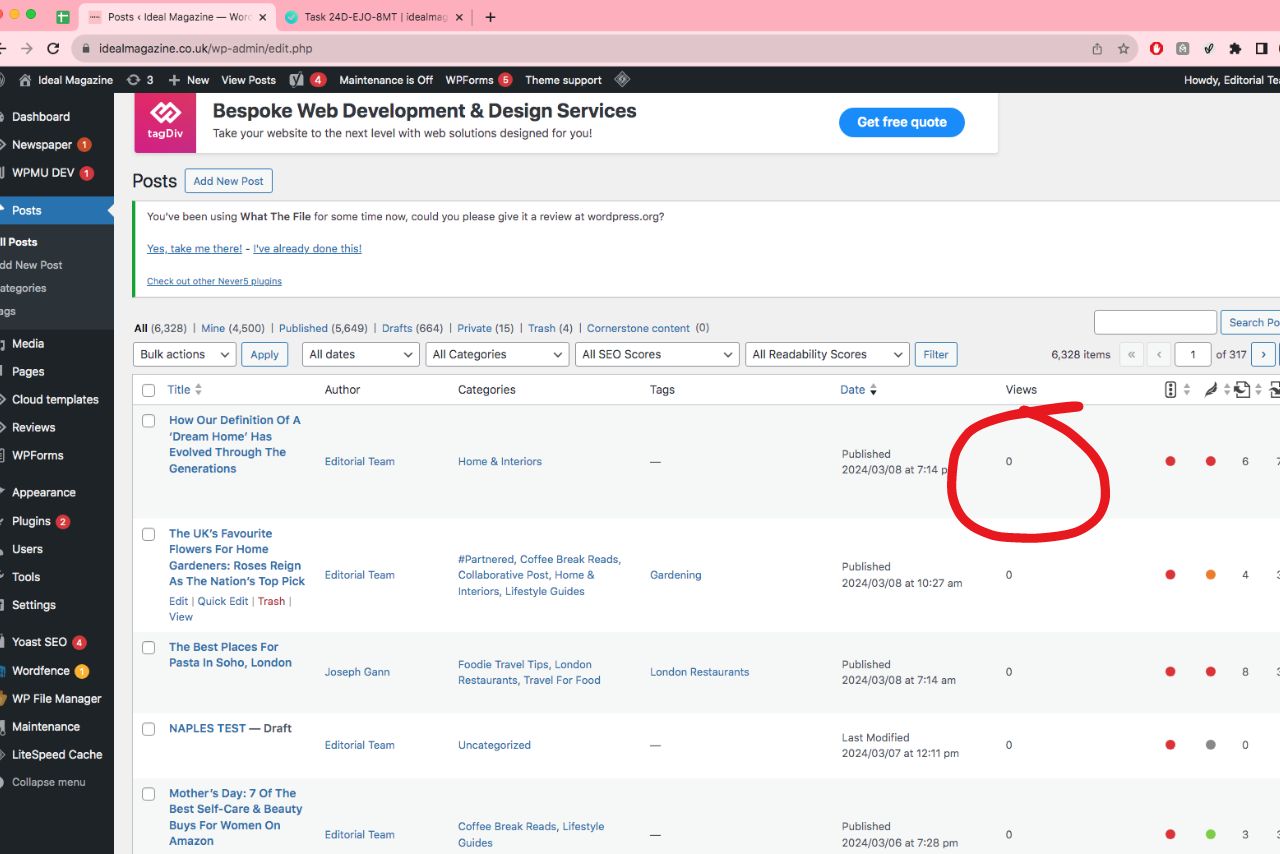
vickyHi everyone, I’ve noticed that my view counter isn’t increasing. It’s a little strange because I know that clients have been viewing the articles. How can I fix this?
 Mark Gilbert
Hello – any idea how to get rid of the black arrow that’s appearing on top left of all my pages (any browser) – https://jazzjournal.co.uk/
I don’t think I introduced any strange artefact…
Many thanks
Mark
Anamaria Hello,
This is very strange. Can you please let me know what cache plugin you use?
Thank you!
Anamaria Hello,
The theme has nothing to do with the htaccess file. I believe it’s just a coincidence. Please check if you have any other htaccess files or other strange files because then you might have malware.
Thank you!
 Schnorrer12
Hello, sorry for my bad English but I have a little problem since the update to 12.6.5 – I now have a strange symbol in the top left corner. I have this on all the pages where I did the update.

 HolgerL
 I tried this with another page, added a FlexBlock 1 and then indeed the ordering does work BUT despite the Option “Show modified date” ist activated or not always the modified date is shown and never just the published date that I need.
Another strange thing: “Enable time ago” and “Time ago add. text” works even when “Show modified date” isn’t activated.
Anamaria Hi,
Yes, this is strange. If you try to add other elements, then work?
We can take a look. Please get in touch with us via email at contact@tagdiv.com and provide the following wp-admin URL and credentials.
Thank you!
 gerruld
Hello, I’ve set up a new website, purchased a new Newspaper license, and wanted to use the prebuilt website to edit it. Unfortunately, in every selected template, various pages look strange, and their appearance is completely different from the demo on preview. The biggest issues are with the cart and checkout. I’ve tried different things, performed a clean WordPress installation, removed all additional plugins, even reset all files on the server. I also attempted to downgrade Newspaper, but nothing helps, and these pages still look this way. How can I fix this?
Bettina Hello @jeremyfactory!
Strange. Please contact us via email at contact@tagdiv.com and provide the following:
– admin url and credentials
– a link to this topic in order to identify you
We will take a look and try to help you asap.
Thank you!
