- NewsmagCustom Post Type Support
 sanny
sannyHi,
Very strange issue I got today when I was trying to update THEME OPTIONS from wp backend. Issue was when I save the changes the popup says Done (popup tick image comes) but when I refresh my website it’s not. Similarly as you may thinking it’s a caching issue I’d thought the same but I tried everything but it wasn’t and at last I checked it from database and found its not updated.
Can you explain what’s the issue.
 alexschneiderru
Hi,
I have a problem with Google Fonts using.
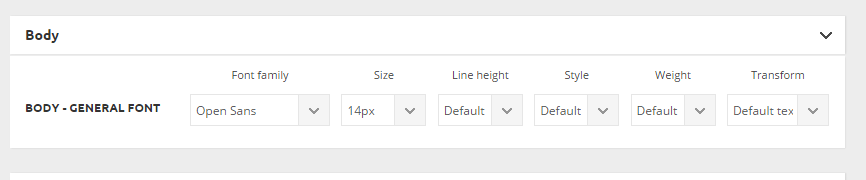
I chose this Google Font in the theme option panel http://c2n.me/3idRdU0.png but desired font (namely Open Sans) seems to not loading in the pages’ code.
This is my site (test installation) http://news.zzkk.ru/
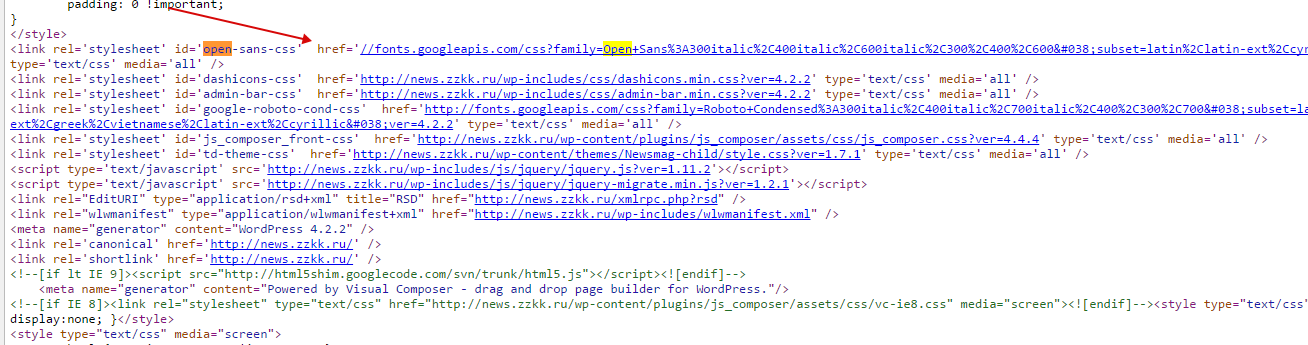
As one can see in the home page code there is no such font loading, only Roboto: http://c2n.me/3idSBUP.png (I was forced to manually load font through custom css http://c2n.me/3idSZS0.png
And there is another strange effect: this is page listing when admin is autorized on the site http://c2n.me/3idTkw1.png
This line appears in listing only when admin is autorized on the site!
Maybe I did something wrong?
Please help.
 Alin [tagDiv]
 Hi,
Please try to regenerate your thumbnails using this – https://forum.tagdiv.com/how-to-fix-strange-thumbnails/
If your featured images are smaller, you will need to use plugin like Thumbnail Upscale to enlarge thumbnails: https://wordpress.org/plugins/thumbnail-upscale/ like already Christopher suggested. For upscale use a combination of plugins Thumbnail Upscale + Force Regenerate.
Thanks!
 CtrlP Press
 Sorry, I should also add a couple of other problems I can’t figure out…
First is that the Pie Chart that is on the Page link above strangely displays “NaN” in its center for a brief moment before displaying the correct text. Does this for me on both Windows 7 and Android; don’t know about other browsers.
Also on Android mobile the text in the center of the Pie chart sits below center.
And finally, the main menu on Android does not display the correct font, but for some reason its sub menus do.
Sorry to be a pain, but I am learning lots from you guys!
Alin [tagDiv] Hi,
You can copy featured image code from post template 3 and paste it above the content div: http://screencast.com/t/syYCwVBD – http://screencast.com/t/m10ysJeygcSt and then regenerate thumbnails – https://forum.tagdiv.com/how-to-fix-strange-thumbnails/
Thanks!
Alin [tagDiv] Hi,
When you enable thumbs on blocks – http://screencast.com/t/ZyXAXo8EhCoY please make sure that you regenerate thumbnails using – https://forum.tagdiv.com/how-to-fix-strange-thumbnails/
Also if your featured images are smaller than thumb container on blocks/modules you will need to use plugin like Thumbnail Upscale to enlarge thumbnails: https://wordpress.org/plugins/thumbnail-upscale/ as WordPress doesn’t enlarge images. For upscale use a combination of plugins Thumbnail Upscale + Force Regenerate.
Thanks!
Alin [tagDiv] Hi,
On your blog you display articles using module 12 so if you want to change the thumbnail size here you can find it – http://screencast.com/t/a7aNQlc0U and then you have to regenerate you thumbnails using this – https://forum.tagdiv.com/how-to-fix-strange-thumbnails/
Please note that changing that size will also affect thumbs from: 'Default post template', 'Post style 2', 'Module 12, 13, 15', 'Smart list style 1, 2' like you can see also in the screenshot.
If you want to change only the module to display articles on your Blog you can set it from Template Settings – http://screencast.com/t/BhIVl93VPbd
Please provide more details about what you are trying to do, if this is not what you mean.
Thanks!
Alin [tagDiv] Hi,
Please make sure that you have enabled thumbs on modules and blocks – http://screencast.com/t/Q1nSeExPRx
Also if you want to change the size of thumbnail for some modules/blocks, you can do it from td_config.php – http://screencast.com/t/Cr7RA9dla and then regenerate your thumbnails – https://forum.tagdiv.com/how-to-fix-strange-thumbnails/
Thanks!
Alin [tagDiv] Hi,
Please make sure that cropping option is enabled from Theme Panel > Block Settings – http://screencast.com/t/i3nKippi and regenerate your thumbnails (if you make some changes there) using this guide – https://forum.tagdiv.com/how-to-fix-strange-thumbnails/
Thanks!
 happymedia
 thank you for your reply!
this is very strange i just uploaded the child-theme from them same main file i got from you.
anyway i just uploaded the /image from main theme to my child-theme.
thank you!
 robsabo10
 Thanks for the response, you guys are awesome and the theme is phenomenal. I had Newspaper, but NewsMag kills it.
I’m gonna pass on Uber or Mega (Plugin) and stick with the stock (Mega) menu provided. You guys have given me enough info where I’m okay.
1. It ONLY happens for me when using Google Chrome. With IE or Mozilla, it hovers fine. It DOES still give me issues in the demo.
–Lenovo Ultrabook
–Windows 7
***Doesn’t dropdown on Hover, needs a click to open everything on every level of menu. But first click only makes it popup really quickly and then disappear. It’s strange. Then clicks after that work fine.
***On other computers, the hover still works fine for IE and Mozilla, but I still have to click on Chrome…HOWEVER the “double click” issue is solved on other computers.
***So, the double click issue is just my computer (no worries there). But how can I make sure HOVER works on ALL BROWSERS?
2. Yes I will use the theme menu, if you point me in the right direction with CSS colors I can figure it out.
3. The Flyout menu meaning when it’s MOBILE, the menu that flies out to the LEFT of the screen. There is no logo option to place in there. Logo IS on the sticky (in the middle), which is good.
***The flyout menu that says “close” at the top. http://www.screencast.com/t/4gj2LfVZ
4. Thanks.
 securerr
Hello,
I’ve got this article:
http://securerr.com/google-bringing-encrypted-ad-services/
It looks okay on the home page: http://take.ms/Fl8WJ
However, the featured image doesn’t show up in the menu:
It even corrupts the menu: http://take.ms/2W9kl
As you see, the sub-categories are moved to the right while they should be aligned to be left, of course.
Please help me out.
Thanks.
 Simonline7
 Hi Chris, Thanks.
When I unzipped the plugins manually it indeed worked. Still strange that it took very long to install.
Could there be a setting blocking the install option?
 guybrush
 Hi!
Same problem for me.
Sometimes ad appear, sometimes not.
Always ok on desktop, but seems inconsistant on iPhone 6…I’m not using the built-in ad system, and the problem is the same as jeffymac11.
Pretty strange.
Otherwise, great theme!
-
This reply was modified 11 years by
guybrush.
 Riyathe
 thanks, ive just done some digging and found i have no topics therefore no topic-tag xml, which i guess is why google is getting a 404.
Strange… its the first time i have noticed topics in the wordpress menu lol, maybe i should be using them with categories and tags.
 mmeisner
 Thanks for the suggestion Chris, I will try that. The image paths are definitely correct.
I actually downloaded one of the .pngs and tried opening it with Photoshop but get an error message saying “the file format module cannot parse the file”, which is strange.
Perhaps the images are corrupted by my system/antivirus or something of the sort…if and when I figure it out, I’ll update with the solution.
mmeisner I tried that and it didn’t fix things.
It’s strange, because none of the theme icons found in wp-content/plugins/js_composer/assets/vc appear, nor do the font icons on the front end. The images are all in the directory, and the font files are as well.
securerrHello,
I’m trying to use the homepage template without latest posts + pagination, just a Visual Composer content.
So I’ve created a sidebar with it: http://take.ms/HqLwp
But strangely, it doesn’t work as smart sidebar: it doesn’t stick to the screen.
So why? Does smart sidebar works only if it’s a regular sidebar made of widgets, not with Visual Composer? But I just wanted to create my page from scratch using the blocks I need. And I like the layout of latest post I use: http://take.ms/dggDm
It’s way better than the default layout the template with latest posts and pagination produces.
Please help me here.
Thanks.
 pixeldynamo
 That’s the strange thing, with the default WordPress themes the comment counts from the Discourse plugin do show.
I can forward links to a sample site which demonstrates this.
Alin [tagDiv] Hi,
I have edited your post and removed wp-access as this is a public forum and you should not provide credentials here.
I have also checked your site and there is no margin there, the width of the images is smaller than it should be: http://screencast.com/t/xLIhwOEj2hG – http://screencast.com/t/hDEGSKSK So please regenerate your thumbnails using this guide: https://forum.tagdiv.com/how-to-fix-strange-thumbnails/ and see if this solve your issue.
Thanks!
Alin [tagDiv] Hi,
Please try to regenerate your thumbnail using this guide: https://forum.tagdiv.com/how-to-fix-strange-thumbnails/
Thanks!
 Natuurlijk Hosting
Hello,
I tried to do the latest update (via FTP) but something strange is happening with the header and the search button.
Old theme: http://www.nieuwetijdskind.com/theme1.jpg
New theme: http://www.nieuwetijdskind.com/theme2.jpg
Can you help? Thanks!
Sincerely, Niels
 SveinDahlberg
Hi,
I run my website at http://www.roadracing.no and publish each article on my facebook page too.
But now, after update I guess, Facebook does not import article images. Just text.
Is this a bug with the theme? What Can I do?
The strange thing is that Old articles created last week, imports images at facebook when I link. But not New articles.
 blogatrompa
 Hi
Strange, I installed the Social Counter 2.9 and I have the same problem with the activition of the plugin…
I have the WP 4.2.1
Any idea?
Thx
RD
 Bichareh
Hi,
since I don’t do anything with Visual Composer – how do I remove this plugin safely?
I deactivated it and it shows me this strange code: http://imageshack.com/a/img540/4325/fRkK8F.png
Thank you!