
No search results were found in Documentation!
 konstantina-aposp
Gi TagDiv support!
I’m facing a really strange problem here. The TagDiv plugins are deactivated every night by themselves. I have to activate them every morning to have my website look correct. I have read the topics that have the same issue with me but nothing helped.
I’m running WordPress 5.4.1 with Newspaper 10.3.3 and my domain is: https://fleetnews.gr/
Please help!
Thanks in advance,
Konstantina
 Calin
Calin HI,
This is a strange situation, if you want I can take a look, for this I will need a link to a post/page where the ads are se.
Thank you!
Calin Hi,
This is strange it should look like this ->https://i.imgur.com/jyvf1Jj.png
Please make sure that you do not have a plugin conflict, please deactivate ALL non theme plugins except tagDiv plugins, also if you are using child theme or cache plugin, deactivate them, clear all cache and try again.
If there is still a problem, you can send us an email at contact@tagdiv.com and provide admin login, as well as cPanel or FTP if possible. We will take a look. Include a link to this topic in the email.
Thank you!
 jsup
jsup Hi,
Same here – Just bought the theme (again). I have this running on another site (same IP) and when updating it does the same. I’ve been using newspaper and newsmag for years (with other licences). What am I missing – I have checked the link provided above, I’m meeting all requirements (everything is also green on the system page). Site works. It wanted to update “out of the box” when I downloaded the theme from Envato, which I thought was strange…? Currently showing running 10.3.3. I will attempt to manually update.
Also – I have used a homepage style from the tagDiv cloud (Romania News Pro) that seems to be broken in Edge (who uses Edge I suppose?) – it looks all broken..
-
This reply was modified 6 years by
jsup.
Calin Hi,
That is not an error, you do not have set a cloud template, you only try to edit a standard template that is not editable.
Yes, these files need to be set in child theme, if not will be lost when you’ll make the theme update. Also you’ll need t regenerate the images after you made the changes in theme files -> https://forum.tagdiv.com/thumbnails-fix-strange-looking-images-on-blocks/
Thank you!
Calin The theme need to create thumbs for each thumb enable in theme panel -> https://forum.tagdiv.com/theme-thumbs/ if the images that you are uploading in media library are to small the theme can not create these thumbs, therefore you need to use a plugin to regenerate the images to the size that your theme needs -> https://forum.tagdiv.com/thumbnails-fix-strange-looking-images-on-blocks/
If the problem persist please provide me a link to your website and some example.
Please enable only the thumbs dimension you use.
Hope this will help you!
Thank you!
 rnbjunk
Hello Guys
I’m still running your mobile theme on my site, activated and customized. We just update to new version.
I am using cloudflare CDN, if i activate this page rule setting to speed up the site, the mobile theme doesn’t charge, instead of it it loads the desktop site in mobile


 legenncafe
I have a slight problem. I have updated my site to the new patch. However, when I update the template I lost everything…my setting and etc, Strange but ok. What I did I had to do was start from scratch.
Also, I am unable to save my custom javascript to the template. For example, since I lost my setting I am re-entering my google ad scenes to the site. But when I do, the template does not save it. the site will go dark with the logo that it is saving. My first thought was maybe a plugin issue, but when I deactivated all the plugins and then try to save the custom javascript…I got the same results.
Any suggestions? Thank you
Calin Hi,
I just checked your website and now is look normal -> https://i.imgur.com/opAjhIy.jpg
Indeed if the menu is on 2 lines is possible to look strange, but you can stretch the menu -> https://i.imgur.com/zoU7uVS.png
Thank you!
 soliloquio
 Hi,
with the width setted in px it works on desktop but it seems strange on mobile.
If I set the width with auto or % it doesn’t work in any device.
Davide
 adlc
adlc Hey there, thanks for your answer, I did that, the menu still looks strange whe is on 2 lines. Can you please helpt me set it right?
 terveydenasialla
I moved the the the Newspaper + Cloud templates from dev to production and it wasn’t so fluent process.
It feels strange that this kind of basic action is not built in.
My question is that how can I backup / restore single Cloud template code ?
I used the wordpress import / export tool and this did the trick at some level, but it consists ALL templates.
How can i get the code of ONE template, backup & restore ?
When using the “classic editor” code editor to do this i get errors so it’s definetly not the correct way.
I can use database browser also, how can best way to find the single template’s code from database ?
Calin Hi,
Please try to regenerate the thumbs -> https://forum.tagdiv.com/thumbnails-fix-strange-looking-images-on-blocks/
Also the flex blocks can be adjusted to look the same as block 7 you can import it from cloud section -> https://i.imgur.com/TH3cnKo.jpg -> https://i.imgur.com/L63X4LU.png -> https://i.imgur.com/PmlPf1v.png -> https://i.imgur.com/6507S0l.png the block will be set at the bottom of the page/template and you can drag it from there where you want.
Thank you!
 JESUSINT
Hi, we have the Newsmag theme installed on several domains at different hostings. In one of our web pages something very strange happens, every day the plugins Tagdiv composer and Tagdiv social counter deactivate themselves.
We have very few plugins installed in the page and they are all reliable….yoast, tinymce, wordfence, with none of these installations we have problems in the other pages and hostings where we have installed Newsmag.
Can someone give us some idea of what could be happening so that only these two plugins are deactivated every day?
Thank you very much,
Greetings
rnbjunk The rest seems to be coming from an external plugin
I was trying to check source, but didn’t find that code on my end. Can you please send me some screenshots of the page you are looking at?
This is really strange, i’ve no plugin with that name.
Calin Hi,
This problem appears when you install the theme on a site that already has content. The theme comes with it’s own thumbnails to minimize the page size and increase the page loading speed. To fix the problem, you need to regenerate the thumbs -> https://forum.tagdiv.com/thumbnails-fix-strange-looking-images-on-blocks/
If the problem persists, make sure that you do not have a plugin conflict, please deactivate ALL plugins except tagDiv plugins, also if you are using child theme or cache plugin, deactivate them, clear all cache and try again.
The tagDiv Cloud Library plugin is only in Newspaper theme, Newsmag them do no have this plugin.
Thank you!
Calin Hi,
The theme need to create thumbs for each thumb enable in theme panel -> https://forum.tagdiv.com/theme-thumbs/ if the images that you are uploading in media library are to small the theme can not create these thumbs, therefore you need to use a plugin to regenerate the images to the size that your theme needs -> https://forum.tagdiv.com/thumbnails-fix-strange-looking-images-on-blocks/
If the problem persist please provide me a link to your website and some example.
Please enable only the thumbs dimension you use.
Hope this will help you!
Thank you!
 AnaBenLAURENT
 I have tried lots of others users “Envato”, “bbc”, etc. and all are with 0 followers on my account only for the instagram.
What is strange is if i put only a “@” I have the good number of my account… but the link is not working.
Is there a easy way to uninstall and re install the plugin ?
-
This reply was modified 6 years by
AnaBenLAURENT.
 Sarbjit Grewal
 Hello Calin,
Yes, for small screens Banner size looks okay, but if you open this blog theme into more than 1900 width like I am using 1920px X 1080px. In those screens Banner size not looks good.
I also visited:- https://forum.tagdiv.com/thumbnails-fix-strange-looking-images-on-blocks/, but, yes I installed this theme on Existing Blog, as their mentioned “This problem appears when you install the theme on a site that already has content. The theme comes with its own thumbnails to minimize the page size and increase the page loading speed.”
How can I solve this problem, so the user experience will increase. I also installed https://wordpress.org/plugins/regenerate-thumbnails/ plugin too for regenerate thumbnails. But still have same problem. Suggest me what to do?
Should I need to give you Login details to check the status ??
Waiting for your quick response.
 Henkdo
 I have removed all the headers of my pages and in the panel. After that I have activated them again. The headers of posts I cannot change and when Iam on a post and click to a page I see other fonts in the header and a strange hickup in the header.
Can you check my website and in my wp admin?
AnaBenLAURENTHello,
My Instagram account is connected into the theme panel.
I have tried to follow :
https://forum.tagdiv.com/tagdiv-social-counter-tutorial-2/
https://forum.tagdiv.com/tagdiv-social-counter-tutorial/
I have a strange problem on the social Counter, I try many Instagram Users :
1 : anaben.behind.the.lens –> not working i have 0 followers
2 : @anaben.behind.the.lens –> working but i have “right number + 1” followers
3 : /anaben.behind.the.lens –> working i have “right number” of followers
But when i try to click on the follow button it opens this page ;
1 : https://www.instagram.com/anaben.behind.the.lens/# –> Working
2 : https://www.instagram.com/@anaben.behind.the.lens# –> not working
3 : https://www.instagram.com//anaben.behind.the.lens# –> not working
I have tried to clear cache, etc.
Newspaper 10.3.2
TagDiv Social Counter Version 4.7
Server software Apache
PHP Version 7.3.17
WP version 5.4
Many thanks for your help.
Benoit
Calin Hi,
Is possible that the thumbs that were generate by the theme to not fit well, please try to regenerate the images -> https://forum.tagdiv.com/thumbnails-fix-strange-looking-images-on-blocks/
Hope this will help you!
Thank you!
 demcrumblies
Hi there, I have a strange problem with the Newspaper Theme. I bought it on April 26th and and it worked pretty quickly for the first two days.
However, when I try to edit any page using the default WordPress editor, it takes many minutes to load (sometimes over 5 minutes, and sometimes just a blank screen appears). However, if I click to edit the page using the Edit with TD Composer, it works right away. I still need to use the default editor sometimes to make other edits such as adding tags, dates, etc., but the theme loading speed makes it unusable now. Here is what I mean when I say when I click the edit link or the Edit with TD Composer: 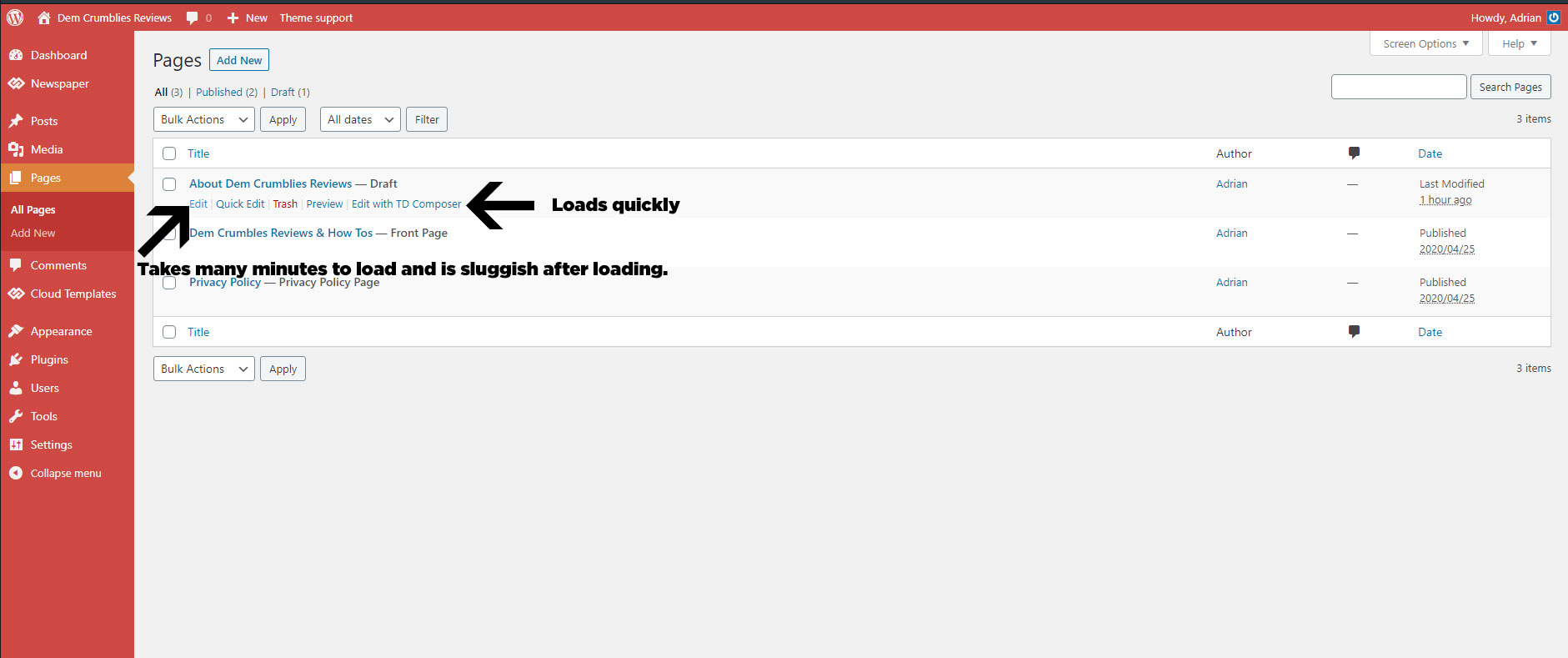
I have met all the server requirements or exceeded them, proof here: 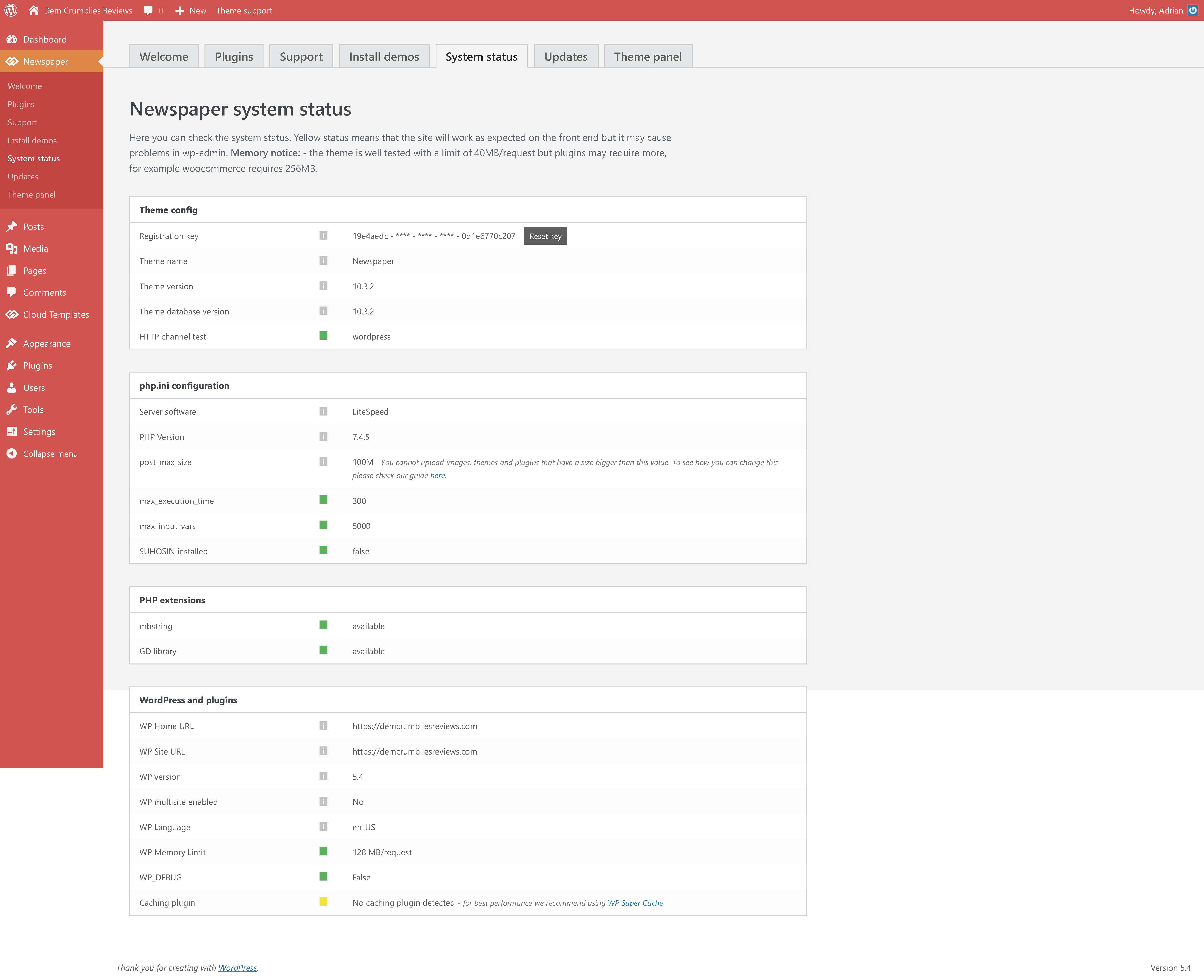
I had set my PHP version to 7.2 as recommended, but changed it to 7.4.5 today after everything loaded slowly, but it still did not help.
Viewing the website is not slow. Accessing the plugins screen, theme settings, tool settings, menu settings is fast. The ONLY issue is when I choose to click “Edit” using the default WordPress editor shown in the image above.
I have disabled all plugins, so that only the the tagDIV ones are active, but still no help. Proof here: 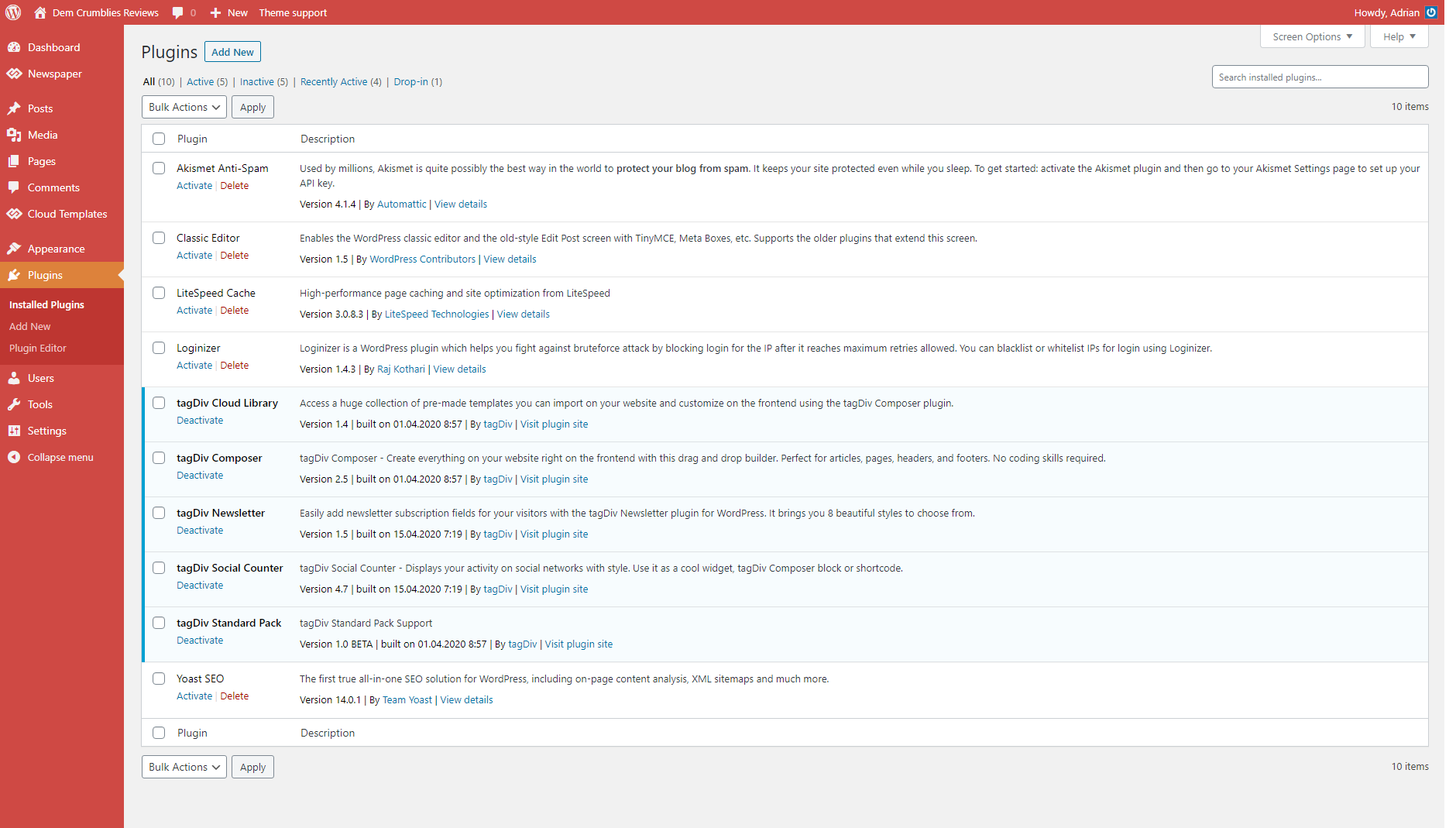
I have recorded a clip to show what I mean. (fast when using TD Composer and very very very slow and sluggish when clicking to edit using the default editor).
 Akaueb
Hello, we noticed there is a strange issue with AMP version of websites.
After debugging a few we found this path: plugins/td-composer/mobile/header-amp.php
The thing is that the search bar echoes this snippet of code:
<amp-img src=”{{post_thumb_url}}”
And then replaces the {{post_thumb_url}} at runtime. Unfortunately this confuses search engine crawlers that interpretes this as an URL so we found a lot of 404 like this:
https://www.mywebsite.com/path/to/article/{{post_thumb_url}}
https://www.mywebsite.com/path/to/article/{{post_cat_link}}
…
We did a fast research on google and found that other people have the same issue:
https://mbaretimes.com/search/%7B%7Bpost_cat_link%7D%7D/
So, this is unlikely because of two factors:
1) CPU overload with huge amount of 404 (3-4 for each blog post, that is dramatic for a newspaper)
2) Waste of crawling budget for search engine => less SEO friendly website.
Please, can you investigate this bug and provide to fix in next Theme releases?
Thank you,
Silvio (Akaueb Srls)
Calin Hi,
For me is displaying quite good -> https://i.imgur.com/iJYOH55.png please make sure that you have enable the thumbs for the size you are using in theme panel and you can use a regenerate plugin like the one from our documentation -> https://forum.tagdiv.com/thumbnails-fix-strange-looking-images-on-blocks/
Thank you!



