raebild
 Hi Catalin
Yes i know this is related to the browser, however i never had this problem with other themes, therefore i was wondering if anythings is related to newsmag4.
its really strange, i deleted the browser cache in Google chrome, even made a totally reset – still there is a problem as chrome shows and old “deleted image”
Does wordpress/newsmag4 keep any cached images anywhere?
I have no experience in this, but i saw there is some “cache” plugins – do you know if there is any plugin solving this issue ? if so, do you reccomend any combined with newsmag4?
 Catalin
 Hello YTGAW,
You need to use the Force Regenerate Thumbnails or Thumbnails Regenerate for all the images if you want to achieve best theme results. Please check here -> https://forum.tagdiv.com/thumbnails-fix-strange-looking-images-on-blocks/ for more references.
Thanks for the message!
 news.zapoved.ru
There is strange problem with both the push menus in mobile version of my website https://news.meatbranch.com
There is no content showing in these panels at all https://c2n.me/3SbYvN2.png
Please help me to find the bug.
Thanks on advance.
 Bintmusic
 Hi Simion,
Strangely I have not received any notice for theme 8.7.1 from Envato in email…
Thanks
BintmusicHi
i use 8.7 theme version with js composer for making page
if i load via ftp new version of td-social-counter plugin, I get the code below instead of the button
[td_block_social_counter custom_title="" style="style7 td-social-boxed" facebook="name" facebook_app_id="0000000000" facebook_security_key="00000000000" facebook_access_token="0000000" twitter="name" googleplus="+name" open_in_new_window="y"][td_block_ad_box spot_id="custom_ad_1"]
moreover in js composer backend editor, the code is strangely displayed as text.
the social block has disappeared…
Going back to the old version 4.2 of the plugin (contained in theme 8.6) everything works well.
How to solve?
Thanks
 Simion C.
 Hi,
Indeed it seems some of the thumbnails are not created properly. Please regenerate the thumbnails, this is a guide
– https://forum.tagdiv.com/thumbnails-fix-strange-looking-images-on-blocks/
Thanks
 geospatialmedia
Dear Sir,
Recently we encountered a strange problem that the same feature images are showing up in our several video section.
https://www.geospatialworld.net/videos/
Earlier it was ok. And we are totally blank how it might be happen.
Please help us to resolve the issue
Thanks
Regards
Anshu Garg
geospatialmediaDear Sir,
Recently we encountered a strange problem that the same feature images are showing up in our several video section.
https://www.geospatialworld.net/videos/
Earlier it was ok. And we are totally blank how it might be happen.
Please help us to resolve the issue
Thanks
Regards
Anshu Garg
 Elevas32
Hello, good in your day I wrote but I did not find anyone to help me. It turns out that since November in a Newspaper update I started seeing strange 404 errors of the type “mydomain / url / post-xxxx” where “xxxx” is the ID of that url in particular. I have to say that I have 5 websites and it happens to me in 4 where I have Nespaper theme. Apparently they are errors related to the schema coming from Google Plus but when I go to the source of Google Plus the article is correct, but the spiders give me an error “mydomain / url / post-xxxx” in Google Search console. To fix it I am re-directing it to the canonical url one by one with the plugin redirect 301 but it is very tedious. Is there a way to solve this?, Even if doing a reedirect on htcacess is a problem of the theme I’m sure. Thank you.
 thestnr
I uploaded via ftp. getting strange symbols when i try to activate
Catalin Hello,
I have inspected your website and it seems to be very strange that border. I do not know the source of it, sorry! I suggest you make a new clean install from scratch via FTP way with the latest version of the theme, clear all the caches, purge all CDN files if you are using the CDN system and check the results. By default, notice that orders do not appear, sorry! As a quick solution, you can try using the code below ->
.td-container-border:after{

background-color:initial;

}

.td-pb-row .td-pb-span4:nth-of-type(3):after{

background-color:initial;

}
Thanks for the message!
Simion C. Hi,
That may be a thumbnail issue, please try to regenerate the thumbnails
– https://forum.tagdiv.com/thumbnails-fix-strange-looking-images-on-blocks/
The theme uses a center-top cropping for the thumbnails used by all modules
– https://forum.tagdiv.com/featured-image/
The resulting thumbnails are also affected by image aspect ratio
– https://forum.tagdiv.com/thumbnails-vs-featured-image-size/
Thanks
Simion C. There is a problem there, please regenerate the thumbnails
– https://forum.tagdiv.com/thumbnails-fix-strange-looking-images-on-blocks/
This will recreate all the necessary thumbnails.
Catalin Hello rrathore21,
Please regenerate thumbnails after doing this, so the custom sizes will be created
– https://forum.tagdiv.com/thumbnails-fix-strange-looking-images-on-blocks/ Clear all the caches and check the results.
Thanks!
 benjaone1
 Hi C,
For some strange reason the code don’t have any effect, thanks.
Simion C. Hi,
The theme thumbnail sizes are defined in this file
– https://www.screencast.com/t/A3wBGyFtCR
You can add more if that is what you want
– https://forum.tagdiv.com/td_api_thumbadd/
Regenerate thumbnails after doing this, so the custom sizes will be created
– https://forum.tagdiv.com/thumbnails-fix-strange-looking-images-on-blocks/
Thanks
 Truealeth
 Hi Catlin,
I was wondering about such a thing. I had another theme installed before, and it must be from the previous installation. Now I understand the strange behavior. I’ve deactivated the plugin and it works. But I still get the subcategories repeated bellow the standard design.
Why is this happening?
https://www.dropbox.com/s/0ow6rqnxchm4j4b/Captura%20de%20pantalla%202018-02-12%2010.39.10.png?dl=0
Thank you
-
This reply was modified 8 years by
Truealeth.
Simion C. You could try the solutions from these topics if the icons are replaced with strange characters
– https://forum.tagdiv.com/topic/strange-chinese-symbols-replaced-icons-and-arrows/
– https://forum.tagdiv.com/topic/font-blocked-from-loading-by-cross-origin-resource-sharing-policy-no-access-co/
These worked for most users, it is an issue with the server configuration and the required font used for the icons cannot be loaded properly.
 slavamatador
Hello! the template creates strange pages like this:
https://life-for-me.com/voshititelnyj-zapechennyj-losos-s-avokado/24909982_836840283107448_7350544595809629215_n/
https://life-for-me.com/kak-izbavitsya-ot-morshhin/539x318_1_7557cdc86a9ea930281e4ebe1eb461d4-539x318_0xc0a839a2_17240435141468249195/
its bad – for seo? i need to stop this
 Tatiane Pires
Hello there! I need some help.
I already checked the page How to use custom post type and taxonomy, and downloaded the suggested plugin td-custom-post-type. It seems to me that this is a “plugin way” to add CPTs other than my “child theme way” to add them.
I’m working with a Newspaper’s child theme, the files cpt-events.php and cpt-photos.php are required from functions.php. Then I rebuild the permalinks from /wp-admin/options-permalink.php whenever I add or remove the require lines.
The issue is that, upon adding these CPTs, TagDiv Composer no longer loads after clicking the button that links to /wp-admin/post.php?post_id=SOME_ID&td_action=tdc
Both CPT files were generated from Generate WP and everything else (other than TagDiv Composer) works flawlessly.
To make things even stranger, after removing cpt-events.php and cpt-photos.php require lines from functions.php, and rebuilding permalinks, TagDiv Composer continues not loading. It will only work if I restore a database backup saved right before activating the CPTs.
I don’t have an URL so that you could login in wp-admin. I’ve been testing it on my local development environment.
I’d like to know if you could take a look in the linked php files. I’m not aware of any CPT setting in those files that could trigger this behavior (composer not loading), perhaps you can spot it.
Simion C. Hi,
The thumbnails are created from featured images, make sure the posts have featured images
– https://forum.tagdiv.com/featured-image-or-video/
Once set, the theme will create the proper thumbnails for the modules.
If there are thumbnail issues please regenerate the thumbnails, this is a guide
– https://forum.tagdiv.com/thumbnails-fix-strange-looking-images-on-blocks/
This will recreate all the thumbnails.
Thanks
Simion C. Hi,
You could try the solutions from these topics
– https://forum.tagdiv.com/topic/strange-chinese-symbols-replaced-icons-and-arrows/
– https://forum.tagdiv.com/topic/font-blocked-from-loading-by-cross-origin-resource-sharing-policy-no-access-co/
These worked for most users, it is an issue with the server configuration.
Thanks
Simion C. Hi,
From what I can see the font is not loading on your website, there is an error
– https://www.screencast.com/t/JdvpyDnQWal
So the text font defaults to browser font. In similar cases the solutions provided in these topics worked
– https://forum.tagdiv.com/topic/strange-chinese-symbols-replaced-icons-and-arrows/
– https://forum.tagdiv.com/topic/font-blocked-from-loading-by-cross-origin-resource-sharing-policy-no-access-co/
Also a thing to note is that fonts may look different based on device and operating system
– https://www.smashingmagazine.com/2012/04/a-closer-look-at-font-rendering/
– https://webmasters.stackexchange.com/questions/9972/how-can-i-make-fonts-render-the-same-way-across-different-web-browsers
Browsers have different methods of rendering fonts. You could try to find common fonts which will look similar on all browsers.
Thanks
Simion C. Hi,
I am having trouble accessing your website, I had to use VPN browser extension to be able to see it. You might have restrictions on the website.
From what I see there is a strange width and height set for the row containing the big grid, which are also causing a big empty space below the grid
– https://www.screencast.com/t/l63IM1RL
If you used custom code or set design on the row containing the grid or grid itself in the composer
– https://www.screencast.com/t/PSeExgx65OgS
Try to remove the custom code or modifications made in the mentioned locations, then check the grid again.
Thanks
 robsabo10
I don’t know where this issue popped up from, but I noticed it yesterday. We’ve added some code by way of speeding up the site while deleting many plugins. Already troubleshooted by disabling every plugin on the site and removing any code that was added.
On every TAG page, our images display the WORDPRESS CAPTION CODE for some strange reason. Never has this happened over two years prior to yesterday.
example of tag: elitesportsny.com/tag/greg-bird
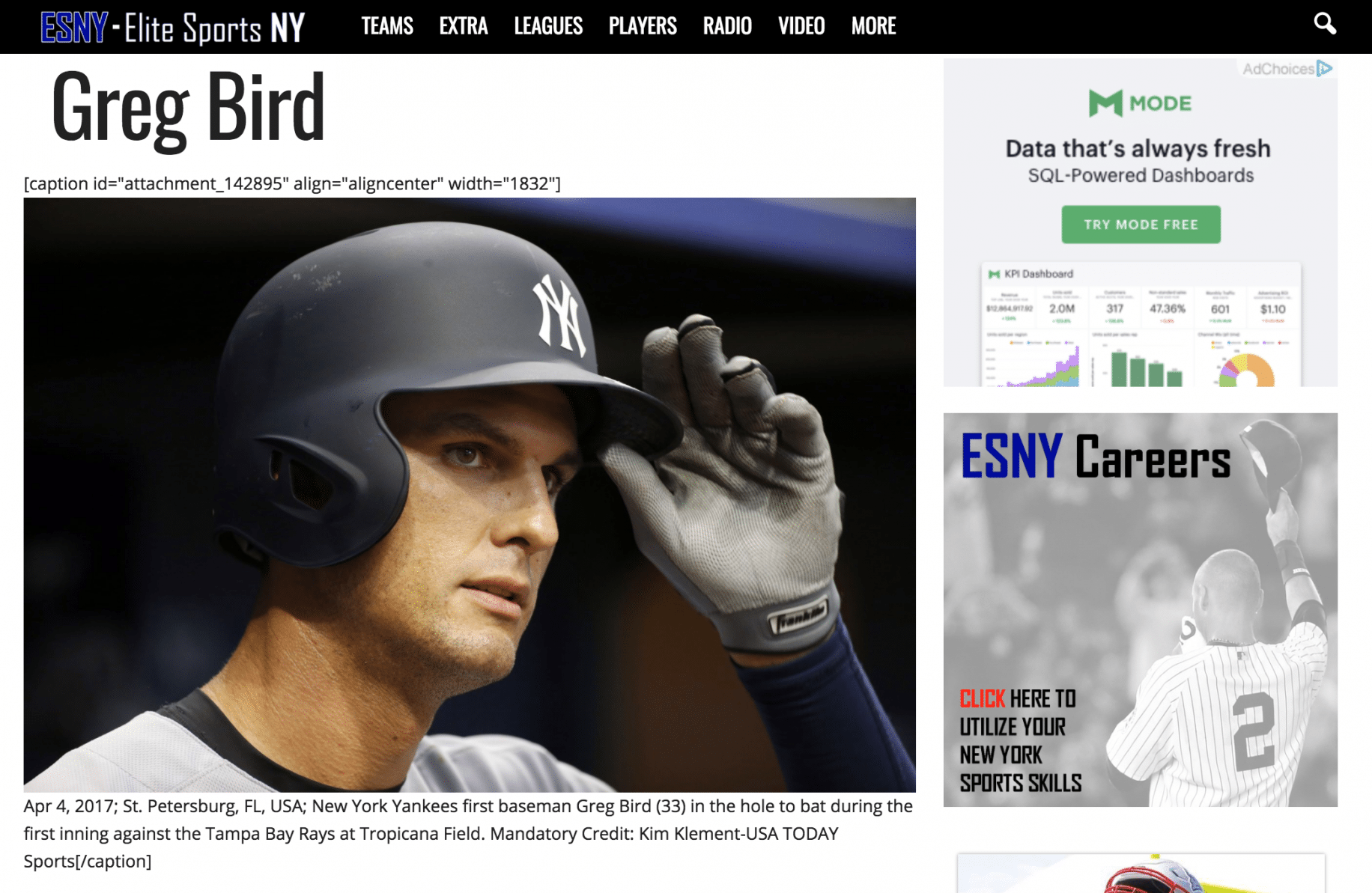
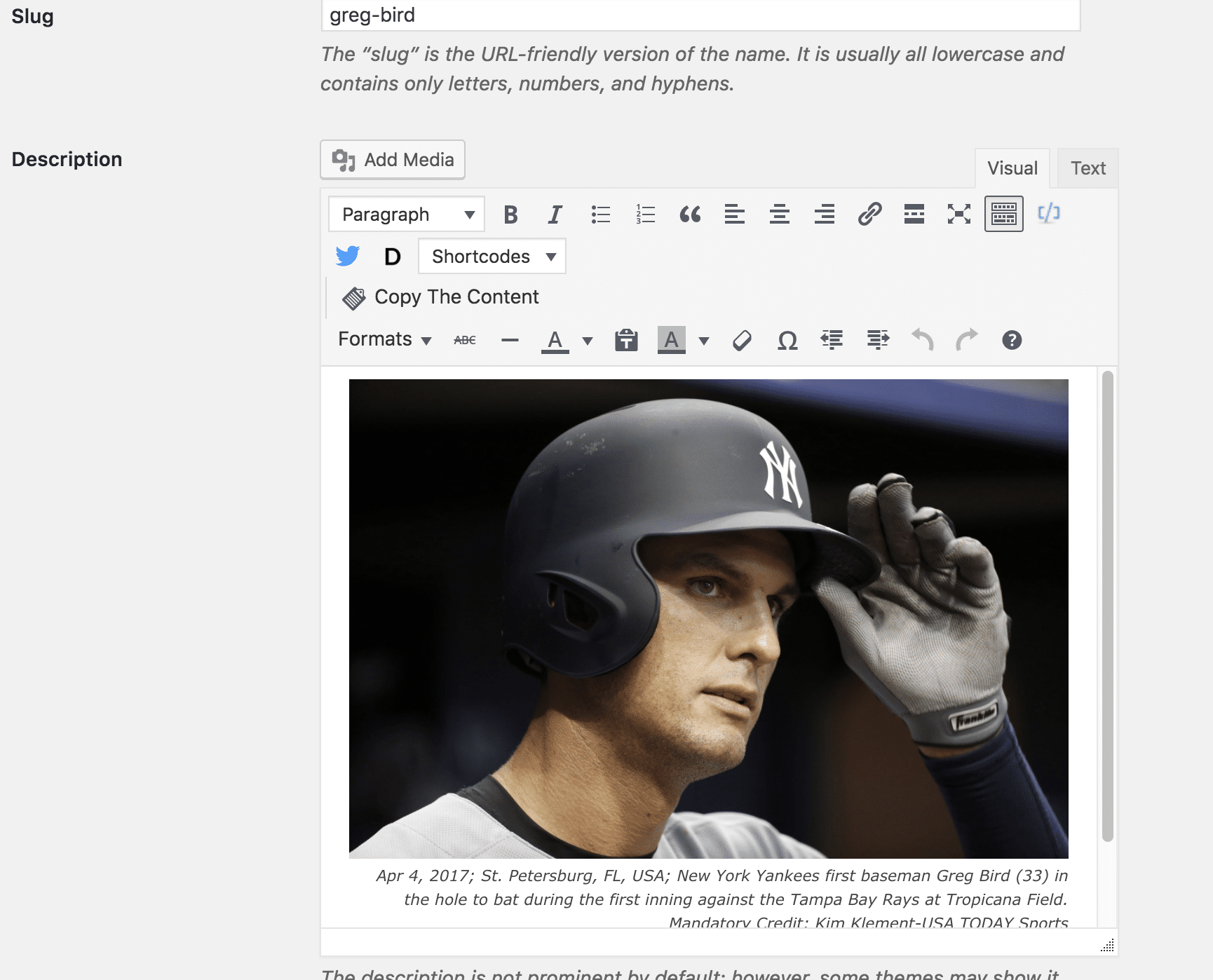
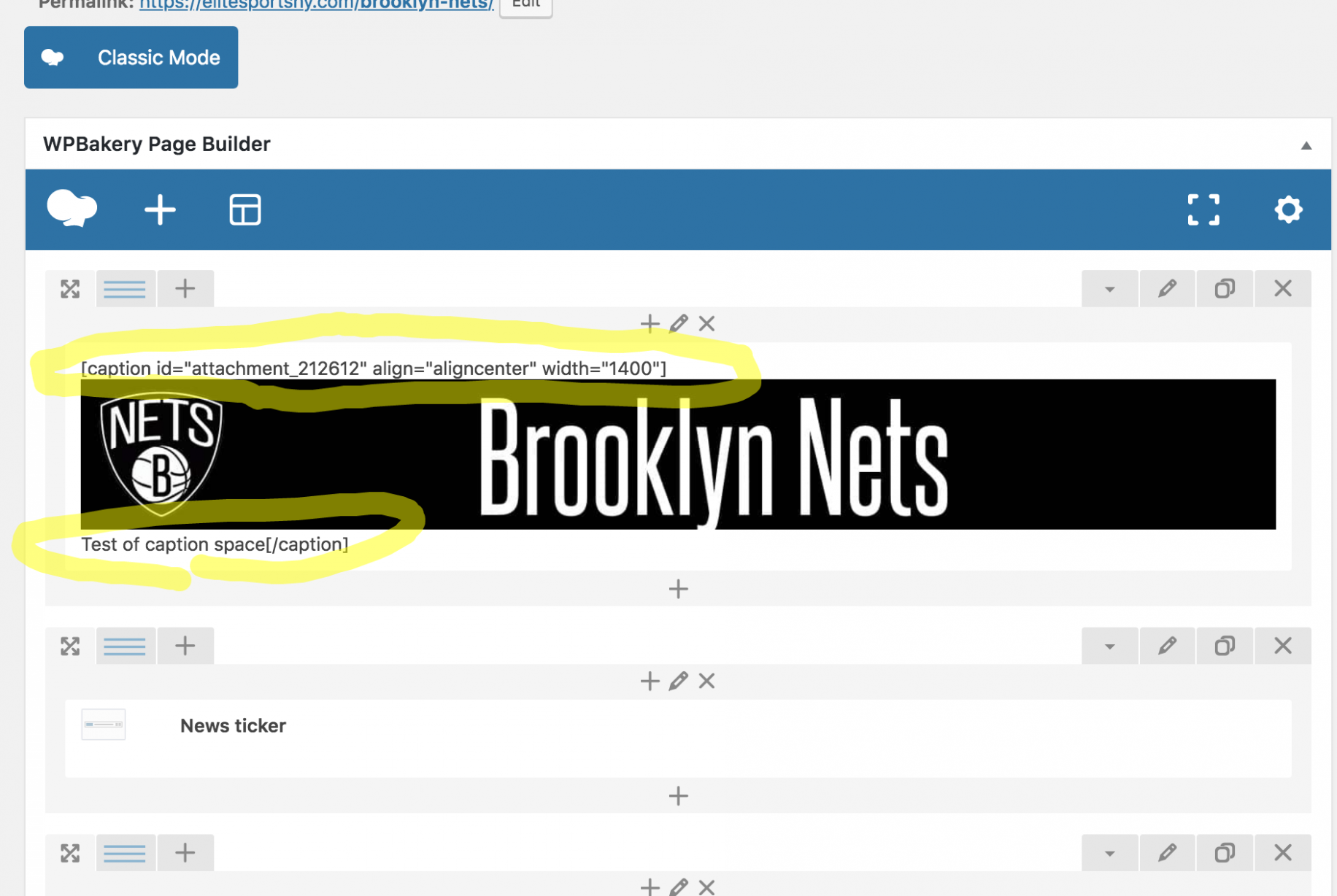
So the backend of the tag and post shows fine, yet the Tag shows up completely screwed up. The backend of the Page is messed up, yet shows up on the front end as perfectly fine. It feels like a Visual Composer issue, but I’ve always used the regular version coming with the theme. (Just updated it tonight out of desperation in looking to fix the issue.)
Definitely need help here. Thanks.