
 Pukacza
 Also I receive alert from WordPress
Since WordPress 5.2 there is a built-in feature that detects when a plugin or theme causes a fatal error on your site, and notifies you with this automated email.
In this case, WordPress caught an error with one of your plugins, tagDiv Composer.
Error Details
=============
An error of type E_ERROR was caused in line 2937 of the file /home/546626.cloudwaysapps.com/muxfghuehd/public_html/wp-content/plugins/td-composer/legacy/common/wp_booster/td_util.php. Error message: Out of memory (allocated 12582912) (tried to allocate 40960 bytes)
PukaczaHi,
I see lots of errors with theme in Apache error log:
 [Mon Apr 26 00:18:13.914739 2021] [proxy_fcgi:error] [pid 20394:tid 139993376810752] [client 144.76.60.198:54860] AH01071: Got error 'PHP message: PHP Warning: Undefined variable $prev_class in /home/546626.cloudwaysapps.com/muxfghuehd/public_html/w..............d-cloud-library/state/date/tdb_state_date.php on line 120PHP message: PHP Warning: Undefined variable $next_class in /home/546626.cloudwaysapps.com/muxfghuehd/public_html/wp-content/plugins/td-cloud-library/state/date/tdb_state_date.php on line 121'

[Mon Apr 26 00:18:37.844803 2021] [proxy_fcgi:error] [pid 20394:tid 139993334847232] [client 207.46.13.87:54888] AH01071: Got error 'PHP message: PHP Warning: Attempt to read property "slug" on null in /home/546626.cloudwaysapps.com/muxfghuehd/publi..............block.php on line 202PHP message: PHP Warning: Attempt to read property "ID" on null in /home/546626.cloudwaysapps.com/muxfghuehd/public_html/wp-content/plugins/td-composer/includes/tdc_composer_block.php on line 202PHP message: PHP Warning: Attemp

[Mon Apr 26 00:18:38.072243 2021] [proxy_fcgi:error] [pid 20394:tid 139993334847232] [client 207.46.13.87:54888] AH01071: Got error 's/tdc_composer_block.php on line 202PHP message: PHP Warning: Attempt to read property "ID" on null in /home/546626...............cy/common/wp_booster/td_block.php on line 1554PHP message: PHP Warning: Attempt to read property "ID" on null in /home/546626.cloudwaysapps.com/muxfghuehd/public_html/wp-content/plugins/td-composer/legacy/common/wp_booster/td_block.php on line 1554'

[Mon Apr 26 00:18:44.843007 2021] [proxy_fcgi:error] [pid 20394:tid 139993460737792] [client 40.77.167.107:54888] AH01071: Got error 'PHP message: PHP Warning: Attempt to read property "slug" on null in /home/546626.cloudwaysapps.com/muxfghuehd/publ.............._block.php on line 202PHP message: PHP Warning: Attempt to read property "ID" on null in /home/546626.cloudwaysapps.com/muxfghuehd/public_html/wp-content/plugins/td-composer/includes/tdc_composer_block.php on line 202PHP message: PHP Warning: Attem

[Mon Apr 26 00:18:45.068332 2021] [proxy_fcgi:error] [pid 20394:tid 139993460737792] [client 40.77.167.107:54888] AH01071: Got error 's/tdc_composer_block.php on line 202PHP message: PHP Warning: Attempt to read property "ID" on null in /home/546626..............cy/common/wp_booster/td_block.php on line 1554PHP message: PHP Warning: Attempt to read property "ID" on null in /home/546626.cloudwaysapps.com/muxfghuehd/public_html/wp-content/plugins/td-composer/legacy/common/wp_booster/td_block.php on line 1554'

[Mon Apr 26 00:18:47.924295 2021] [proxy_fcgi:error] [pid 20394:tid 139993410381568] [client 40.77.167.74:54888] AH01071: Got error 'PHP message: PHP Warning: Attempt to read property "slug" on null in /home/546626.cloudwaysapps.com/muxfghuehd/publi..............block.php on line 202PHP message: PHP Warning: Attempt to read property "ID" on null in /home/546626.cloudwaysapps.com/muxfghuehd/public_html/wp-content/plugins/td-composer/includes/tdc_composer_block.php on line 202PHP message: PHP Warning: Attemp

[Mon Apr 26 00:18:48.143685 2021] [proxy_fcgi:error] [pid 20394:tid 139993410381568] [client 40.77.167.74:54888] AH01071: Got error 's/tdc_composer_block.php on line 202PHP message: PHP Warning: Attempt to read property "ID" on null in /home/546626...............cy/common/wp_booster/td_block.php on line 1554PHP message: PHP Warning: Attempt to read property "ID" on null in /home/546626.cloudwaysapps.com/muxfghuehd/public_html/wp-content/plugins/td-composer/legacy/common/wp_booster/td_block.php on line 1554'
Could help me in investigation?
Thank you,
Michal
 Breinblik
 Your colleague already pointed me to this page: https://forum.tagdiv.com/custom-post-type-support/ and thank you but it doesn’t help me. Also i suspect the info on this page is outdated because i can’t find these files:
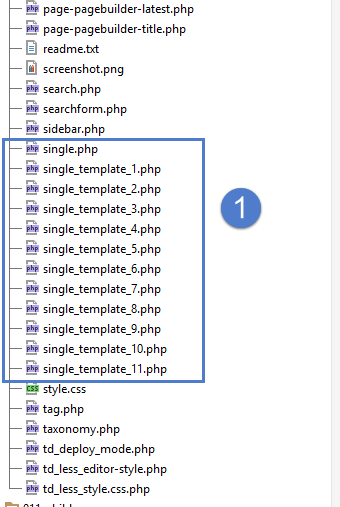
It looks like the root of the Newspaper theme but i don’t see these files in my theme folder, where are the located?
I would like to disable/uninstall WP Bakery pagebuilder but i first need to be sure that TagDiv Composer can offer me the same solutions.
-
This reply was modified 5 years by
Breinblik.
 Anamaria
 Hello,
I saw that you are using flex block 5, and to add that extra parameter you have to edit this file from this path => wp-content/plugins/td-composer/legacy/Newspaper/includes/modules/td_module_flex_5.php => https://www.screencast.com/t/g2Y4ODAemAt
Thank you!
Anamaria Hello,
Normally the option for infinite loading use this code ” ?tdb_action=tdb_ajax”, you don’t have to worry about those URLs and it should be set on those unfollow links, but if you want can disable the option the Auto Loading on the Sigle Post Template with tagDiv Composer -> Show site wide settings => https://www.screencast.com/t/A9nO0Vy1
Thank you!
 hanzosrl
We’re having lots of problems with Newspaper theme.
Particularly after wordpress updates. Actual version of wp brokes the tagdiv editor. It keeps loading without come to work. In console we have some error. Here only some of them:
Uncaught Error: Syntax error, unrecognized expression: undefined<div class=”tdc-sidebar-separator tdc-sidebar-text-separator”><span>Flex Block 5<
Uncaught TypeError: jQuery(…).live is not a function
<anonymous> http://valdarnopost.it/wp-admin/post.php?post_id=72989&td_action=tdc&tdbTemplateType=single&prev_url=//valdarnopost.it/wp-admin/edit.php?post_type=tdb_templates:4528
Now this problem is getting really frustrating cause this is only the last of a long series of bad behaviors. Another example? Global header can’t be updated or saved no more! Why is this happening?
Another issue? We can’t find widget similiar to a simple message form so we’ve installed contact form 7. So even in this case we have error results after cf7 was activated…
We have disabled all plugins, unistalled and after reinstalled them but with no clue.
In this situation it’s impossible to work. We need to restore theme and tagdiv-composer functionalities, as fast as possible. We really need your help. The situation is a totally mess now.
Anamaria Hello,
If you use a Single Post Template from Cloud Library, then you can find the section in this path => wp-content/plugins/td-cloud-library/shortcodes/single/tdb_single_content.php
if you have a standard template then you can find it in this path => wp-content/plugins/td-standard-pack/Newspaper/parts/single/loop-single-1.php the function for the post content on default style is set on this file wp-content/plugins/td-composer/legacy/common/wp_booster/td_module_single_base.php , the function is starting from the line 428 and the function is function get_content()
Hope this helps you!
Thank you!
 ckoulatsi
 Hello Bettina,
I add my code in Newspaper -> Theme panel -> Ads, as i said above.
I found that the .js is loading through this file: plugins/td-composer/legacy/Newspaper/includes/shortcodes/td_block_ad_box.php in line 910.
There the javascript code is genareted and served via php, why this is done? Can we disable it and just run the code i give in the theme panel?
Otherwise is there a way to override this file the right way, so that i wont have a problem with updates?
Kind Regards
Carlos
 Joda
JodaI have the Newspaper theme installed on the site http://www.fjclassitalia.it
On the website I installed the Newspaper 8.6 version, with the WP 5.4.2 version.
When WP automatically updates to later versions, I can no longer log in in pages using “EDIT WITH TD COMPOSER”.
In order to use the TD COMPOSER I have to restore the BackUp to a date prior to the WP update.
I tried to upgrade the theme to a later version but the site goes down and I get it the following error message:
<<An E_COMPILE_ERROR error was caused in line 33 of the file /home/customer/www/fjclassitalia.it/public_html/wp-content/plugins/td-multi-purpose/styles/tds_api.php. Error message: require_once (): Failed opening required ‘/home/customer/www/fjclassitalia.it/public_html/wp-content/themes/Newspaper/includes/wp_booster/td_api.php’ (include_path = ‘.: / Usr / local / php73 / pear ‘)>>
WordPress version 5.7.1
Current theme: Newspaper (version 10.3.1)
Current plugin: tagDiv Multi-Purpose (version 1.0)
PHP version 7.3.27
I contacted the Siteground host and this is the answer:
From what I see, there is no indication of any server problem logged in the error log. If restoring the backup worked for you, my personal advice would be to check the issue with the theme / plugin provider directly. Each theme / plugin has its own unique functions and features and I won’t be able to tell you what exactly is causing the problem. So it will be better to check the case further with plugin / theme support. As for hosting services, I can assure you that everything at the server level is running smoothly
Of course, if they require server-side changes, please contact us with exact instructions and we will be happy to assist you further.
Can you give me some help to solve the problem definitively?
Thank you Fabio
Anamaria Hello,
To translate the word “on” you need to change it in the theme files, following this path =>
wp-content/plugins/td-composer/includes/shortcodes/vc_wp_recentcomments.php
=> https://www.screencast.com/t/seGKAwbs5cYO
Hope this helps you!
Thank you!
 Bettina
 Hello!
When you create a page you have on the right side an option to select the template for that page and based on that type of template, you should edit the one of the files from td-composer/legacy/Newspaper: https://prnt.sc/1234p36
Hope that helps you!
Thank you!
 cheryldimof
 I’m having this same issue, now, on my 404 and search pages (unstyled content similar to what starship77777 showed in his picture). I’ve posted about this for other pages before, but it keeps happening various places on my two sites where I use Newspaper since the 10.4 update, and I keep playing whack-a-mole with it and it’s wasting time!
I’ve tried using a new 404 template. In the past I’ve tried uninstalling, then re-installing TD Composer and Cloud Library. In one case, it helped, in one it didn’t. I had to rebuild my events template, then that corrected the issue, but so far haven’t been able to fix this for 404 and search places on one blog.
Here’s a link:
https://www.caffeinejournal.com/sareareaer
 dobriyalji
Fatal error: Uncaught ArgumentCountError: Too few arguments to function {closure}(), 4 passed in /home/admin/web/11xi.in/public_html/home/wp-includes/class-wp-hook.php on line 287 and exactly 5 expected in /home/admin/web/11xi.in/public_html/home/wp-content/plugins/td-composer/css-analyze/css-analyze.php:507 Stack trace: #0 /home/admin/web/11xi.in/public_html/home/wp-includes/class-wp-hook.php(287): {closure}(NULL, 2, ‘tdb_template_ty…’, true) #1 /home/admin/web/11xi.in/public_html/home/wp-includes/plugin.php(212): WP_Hook->apply_filters(NULL, Array) #2 /home/admin/web/11xi.in/public_html/home/wp-includes/meta.php(676): apply_filters(‘get_post_metada…’, NULL, 2, ‘tdb_template_ty…’, true) #3 /home/admin/web/11xi.in/public_html/home/wp-content/plugins/td-composer/legacy/common/wp_booster/td_first_install.php(201): metadata_exists(‘post’, 2, ‘tdb_template_ty…’) #4 /home/admin/web/11xi.in/public_html/home/wp-includes/class-wp-hook.php(287): {closure}(”) #5 /home/admin/web/11xi.in/public_html/home/wp-includes/class-wp in /home/admin/web/11xi.in/public_html/home/wp-content/plugins/td-composer/css-analyze/css-analyze.php on line 507
There has been a critical error on this website. Please check your site admin email inbox for instructions.
Learn more about debugging in WordPress.
 xxxLesy
 I can confirm. Standard Pack does not effect this. Post Settings metabox is part of TD Composer (/td-composer/legacy/common/wp_booster/wp-admin/content-metaboxes). I never had SP active and had Post Settings metabox in posts. Now it’s just gone (not sure from which version). It’s gone in both classic and guttenberg editors.
Enabling Standard Pack does not activate Post Settings.
 fantalab
 For your information, currently we’re using the following scripts:
– plugins/td-composer/legacy/Newspaper/js/tagdiv_theme.min.js?ver=10.4
– plugins/js_composer/assets/js/dist/js_composer_front.min.js?ver=4.11.2
 gooma2
This error has consistently been showing up in my PHP error log. It’s actually the only error I’m getting. I’ve done everything advised in the forum (including deactivating all plugins to find an issue) but the error continues coming into the Error log.
I’ve had our LiquidWeb techs dig into this for 3 days now, and the only place this error is coming from is your TD Composer plugin. The tech also tried doing each step from reinstalling the theme from scratch and plugin check, but the issue is definitely in the plugin code.
Use of undefined constant TDC_PATH_LEGACY – assumed ‘TDC_PATH_LEGACY’ (this will throw an Error in a future version of PHP)
plugins/td-composer/td-composer.php on line 209
Below is the exact code it’s referring to.
$legacy_theme_file_path = TDC_PATH_LEGACY . '/' . $template_file;
I’ve literally done every single thing said to do (2 of us have now with LiquidWeb) which lets me know the problem is definitely on your end this time.
Thank you and please help with this.
 loslunes
Hi, I updated yesterday to the new version of the theme. Since then I have noticed some 404 errors (not to much) related with your plugins.
This one is the most common, its seems it comes from mobile chrome 90.0 visits (still appearing):
Url: /wp-content/plugins/td-cloud-library/assets/css/tdb_less_front.css?ver=a50385a2d79d6600973a7e697f735

Agent User: Mozilla/5.0 (Linux; Android 10; SM-A217M) AppleWebKit/537.36 (KHTML, like Gecko) Chrome/90.0.4430.66 Mobile Safari/537.36
More, this ones appears just after the update, not seen again:
/wp-content/plugins/td-composer/td-multi-purpose/style.css?ver=c784b8db3e66cd68082f3ff7aa2d70e6

/wp-content/plugins/td-composer/assets/fonts/font-awesome/font-awesome.css?ver=c784b8db3e66cd68082f3

/wp-content/plugins/td-standard-pack/Newspaper/assets/css/td_standard_pack_main.css?ver=6b62588d3347

/wp-content/plugins/td-cloud-library/assets/js/js_posts_autoload.min.js?ver=a50385a2d79d6600973a7e69

/wp-content/plugins/td-cloud-library/assets/js/js_files_for_front.min.js?ver=a50385a2d79d6600973a7e6
Any idea? The first one has appeared 13 times. Any problem, or nothing important. I vist my web site and it seems to work perfectly in mobile or desktop version but I prefer to ask you.
 beckib
 Sure – below are screenshots of the Mobile Page with TD Composer. In portrait mode, it looks how I want, but when I switch to landscape mode it’s all messed up. When previewing on Chrome – inspect with ipad on, it looks the same as the landscape mode below.
I also tried editing elements of the mobile page in the landscape mode via TD Composer, but it changes the portrait mode as well.
Mobile – Landscape Mode (Also displays on tablet)
I’d like to be able to use the main page (not mobile page) layout for landscape and ipad mode, or be able to revise the layout on the landscape mobile page.
-
This reply was modified 5 years by
beckib.
Anamaria Hello,
The only solution is to comment those lines of code into the theme files
wp-content/plugins/td-composer/legacy/Newspaper/parts/header/td-login-modal.php
wp-content/plugins/td-cloud-library/parts/tdb-login-modal.php
wp-content/plugins/td-composer/legacy/Newspaper/parts/register.php=> https://www.screencast.com/t/AImTOubf1T
Thank you!
 zhanboland
Fatal error: Uncaught ArgumentCountError: Too few arguments to function {closure}(), 4 passed in /home/u306h681/public_html/wp-includes/class-wp-hook.php on line 287 and exactly 5 expected in /home/u306h681/public_html/wp-content/plugins/td-composer/css-analyze/css-analyze.php:507 Stack trace: #0 /home/u306h681/public_html/wp-includes/class-wp-hook.php(287): {closure}(NULL, 1507, ‘tdc_google_font…’, true) #1 /home/u306h681/public_html/wp-includes/plugin.php(212): WP_Hook->apply_filters(NULL, Array) #2 /home/u306h681/public_html/wp-includes/meta.php(676): apply_filters(‘get_post_metada…’, NULL, 1507, ‘tdc_google_font…’, true) #3 /home/u306h681/public_html/wp-content/plugins/td-composer/legacy/common/wp_booster/td_wp_booster_functions.php(572): metadata_exists(‘post’, 1507, ‘tdc_google_font…’) #4 /home/u306h681/public_html/wp-includes/class-wp-hook.php(287): td_load_css_fonts(”) #5 /home/u306h681/public_html/wp-includes/class-wp-hook.php(311): WP_Hook->apply_filters(NULL, Array) #6 /home/u306h681/public_html/wp-inc in /home/u306h681/public_html/wp-content/plugins/td-composer/css-analyze/css-analyze.php on line 507
beckibHi – I created a mobile page for my homepage (not using mobile theme) and edited it with TD Composer. It looks great on mobile, but is also displaying on tablet where it looks horrible. Further, I can’t adjust the tablet layout when revising mobile page and selecting tablet (it also adjusts mobile). I’d rather use the original page’s tablet layout. Is there a way to fix this?
 secnat
Dear Tagdiv,
After updating to the latest theme version we get the following errors at the log section of our website:
PHP message: PHP Warning: require(/wp-content/plugins/td-composer/legacy/Newspaper): failed to open stream: No such file or directory in /wp-includes/comment-template.php on line 1554PHP message: PHP Fatal error: require(): Failed opening required ‘/wp-content/plugins/td-composer/legacy/Newspaper/’ (include_path=’.:/usr/share/php’) in /wp-includes/comment-template.php on line 1554″ while reading response header from upstream
Can you please help us debug?
Anamaria Hello,
To remove back to top, please follow those instruction:
If you have the tagDiv Standard Pack plugin active then you need to comment this line => https://www.screencast.com/t/NRBxqmUp4I from this path
wp-content/plugins/td-standard-pack/Newspaper/header.php
but if you have the tagDiv Composer plugin disabled then to comment the line go in
wp-content/plugins/td-composer/legacy/Newspaper/header.php
=> https://www.screencast.com/t/OWhnxwfS
Thank you!
 Richard
Stripe checkout stopped working after the last update of newspaper 10.4. The memberpress and stripe support team investigated the problem and said that “The tagDivComposer plugin is breaking the Stripe.js library. You will need to contact the developer to fix it as it’s breaking the global javascript code.” They put a temp fix that got Stripe checkout working again and you can see what they did at https://drive.google.com/file/d/1Sjq1UyiezdsfG0GDIKKEUdaH3WHWpITX/view?usp=sharing
However, this workaround has stopped a lot of TD Composer’s functionality (like right click, color selection etc.)
Could you provide the download link for the previous version of TD Composer please?
Thanks
Richard I have had the same problem since the last update of composer. The memberpress and stripe support team investigated the problem and said that “The tagDivComposer plugin is breaking the Stripe.js library. You will need to contact the developer to fix it as it’s breaking the global javascript code.”. They put a temp fix that got Stripe checkout working again and you can see what they did at https://drive.google.com/file/d/1Sjq1UyiezdsfG0GDIKKEUdaH3WHWpITX/view?usp=sharing
However, this fix stopped a lot of TD Composer’s functionality (like right click, color selection etc.) I have reported this information to Tagdiv two weeks ago as a bug report but haven’t heard anything back yet.
I’m really hoping that the next update fixes it.
