
 evanino
 Could it be that the below files were modified?
Modified files – 19 files
•functions.php
•includes\demos\retro\td_import.php
•includes\less_files\category-templates.less
•includes\less_files\header-search.less
•includes\less_files\header-style.less
•includes\less_files\main.less
•includes\less_files\post.less
•includes\plugins\td-composer.zip
•includes\plugins\td-multi-purpose.zip
•includes\plugins\td-social-counter.zip
•includes\td_config.php
•includes\td_css_generator.php
•includes\wp_booster\wp-admin\css\panel\controls.less
•includes\wp_booster\wp-admin\css\panel\theme-panel-general.less
•includes\wp_booster\wp-admin\css\wp-admin.css
•includes\wp_booster\wp-admin\css\wp-admin.less
•mobile\includes\less_files\post.less
•mobile\style.css
•style.css
or added files?
New files – 17 files
•includes\demos\ink\demo_style.css
•includes\demos\ink\demo_style.less
•includes\demos\ink\pages\about-us.txt
•includes\demos\ink\pages\contact.txt
•includes\demos\ink\pages\footer-template.txt
•includes\demos\ink\pages\homepage.txt
•includes\demos\ink\pages\themes.txt
•includes\demos\ink\screenshot.png
•includes\demos\ink\td_css_generator_demo.php
•includes\demos\ink\td_import.php
•includes\demos\ink\td_media_1.php
•includes\demos\ink\td_media_2.php
•includes\demos\ink\td_media_3.php
•includes\demos\ink\td_media_4.php
•includes\demos\ink\td_media_5.php
•includes\demos\ink\td_media_6.php
•includes\demos\ink\td_panel_settings.txt
 Catalin
 Hello samjames,
Most likely this plugin has not been correctly installed. Try to make a new clean install from scratch via FTP way because this is the surest theme method in this case. Also, for more information about our TD Composer, please check here -> https://forum.tagdiv.com/tagdiv-composer-tutorial/ Notice that plugin has been tested with the theme and should be installed as expected with our items. Please try again with more carefully.
Thanks for your understanding!
 scoophk
Installed Newspaper and the Demo with all settings. I usually begin by finding a homepage that I like and adjusting it.
When I use the plugin Duplicate Post and copy Homepage-loop to a new draft and rename it – I see the above error (Errors happened during tdcIframeData.init() -> bindViewsModelsWrappers()!) and the page that shows up is my ‘Under Construction’ page (as if I weren’t signed in to the Dashboard) instead of the Homepage-loop I do have tagDiv on the left side of it when I click to edit with that. This was your demo page – am I wrong to assume It was built with tagDiv Composer?
Yoast is not installed on this site – as it is just being built – or I would like to build it – neither is Super Cache.
Help….. Thank you!
 claudioper
Hello, does anyone know how to change the width of the panel without changing the css file? Is there any setting for it? The problem is that some fields are not seen at all. Thank u.
 AcarelTV
 [SOLVED] ok solved, after reading the documentary, that said that the theme will set the site to “blog” by default and I should create a dedicated homepage by hand.
Once getting used to the TD composer it’s pretty easy to click everything together. Great theme.
Catalin Hello Syams,
Unfortunately, the TD Composer has been designed to be used only for pages and not for post pages, sorry!
Thanks for your understanding!
 horuscyclicdaemon
 I probably face to the same problem: The wordpress dashboard and some part of the theme panel stay on loading or not loading, or looks like the menu (see my post https://forum.tagdiv.com/topic/problems-3/) or this one is also similar: https://forum.tagdiv.com/topic/plugin-issue/.
It helps a bit to get back to the wordpress dashboard if you block (via SFTP) plugin td-composer (for a while), but I do hope Support Team shall come with some quick and effective solution…
Martin
horuscyclicdaemonEven yesterday morning everything was OK.
Then yesterday evening everything went wrong.
Last plugin update has been done for regenerate-thumbnails.
The only possibility to screen my web page http://www.okultura.cz/WordPress/ was to disable td-composer plugin directory.
I have installed the latest version of Newpaper theme as well as plugins and upload them all in WordPress directories via SFTP.
It did not help at all.
Nothing works now.
Any idea?
Martin
 Mladen Gradev
Hello,
I think it’s great that you want to create your own page builder, especially if it is lighter and faster than Visual Composer. Here I want to share my opinion about tagDiv Composer and give you some feedback, if it is OK.
I think that you have a lot of work to do until you reach the level of Visual composer. I my opinion your backend editor is not so user friendly and here are few examples:
01. Native theme elements are visualized great, but others, like “Widget Sidebar”, are poorly visible. You can make the height of this element bigger, because now it is something like 20 px and it is difficult to grab & edit.
02. Rows, Columns and other main elements are hard to understand and edit. In VC is a lot better – bigger and clear editor elements and controls.
03. Text block element is not working for me, when I hit “edit content” text editor pops up with loading circle element, which never load. There is a hidden error in an iframe:
“Warning: require_once(/home/***/public_html/files/plugins/td-composer/includes/wpeditor.phpwp-load.php): failed to open stream: No such file or directory in /home/***/public_html/files/plugins/td-composer/includes/wpeditor.php on line 13”
“Fatal error: require_once(): Failed opening required ‘/home/***/public_html/files/plugins/td-composer/includes/wpeditor.phpwp-load.php’ (include_path=’.:/usr/local/php7.0/lib/php’) in /home/***/public_html/files/plugins/td-composer/includes/wpeditor.php on line 13”
04. Text written in Cyrillic is visualized as symbols and take a lot of space in WP content editor. Example of such text: JTNDaDIlM0UlRDAlOTQlRDAlQkUlRDAlQjElRDAlQjAlRDAlQjIlRDElOEYlRDAlQkQlRDAlQjUlMjAlRDAlQkQlRDAlQjAlMjAlRDAlQjglRDAlQkQlRDElODQlRDAlQkUlRDElODAlRDAlQkMlRDAlQjAlRDElODYlRDAlQjglRDElOEYlMjAlRDAlQjIlMjAlRDAlQTYlRDAlQjAlRDElODAlRDAlQjUlRDAlQjIlRDAlQkUuJUQwJTk4JUQwJUJEJUQxJTg0JUQwJUJFJTNDJTJGaDIlM0UlMEElM0NwJTNFJUQwJTlFJUQxJTgyJTIwJUQxJTgyJUQxJTgzJUQwJUJBJTIwJUQwJUJDJUQwJUJFJUQwJUI2JUQwJUI1JUQxJTgyJUQwJUI1JTIwJUQwJUI0JUQwJUIwJTIwJUQwJUI0JUQwJUJFJUQwJUIxJUQwJUIwJUQwJUIyJUQwJUI4JUQxJTgyJUQwJUI1JTIwJUQwJUI4JUQwJUJEJUQxJTg0JUQwJUJFJUQxJTgwJUQwJUJDJUQwJUIwJUQxJTg2JUQwJUI4JUQxJThGJTIwJUQwJUJBJUQxJThBJUQwJUJDJTIwJUQxJTgxJUQwJUIwJUQwJUI5JUQxJTgyJUQwJUIwJTIwJUQwJUE2JUQwJUIwJUQxJTgwJUQwJUI1JUQwJUIyJUQwJUJFLiVEMCU5OCVEMCVCRCVEMSU4NCVEMCVCRS4lMjAlRDAlOUElRDAlQkUlRDAlQjMlRDAlQjAlRDElODIlRDAlQkUlMjAlRDAlQkQlRDAlQjAlRDElODIlRDAlQjglRDElODElRDAlQkQlRDAlQjUlRDElODIlRDAlQjUlMjAlRDAlQkQlRDElOEYlRDAlQkElRDAlQkUlRDAlQjklMjAlRDAlQkUlRDElODIlMjAlRDAlQjElRDElODMlRDElODIlRDAlQkUlRDAlQkQlRDAlQjglRDElODIlRDAlQjUlMjAlRDAlQkYlRDAlQkUtJUQwJUI0JUQwJUJFJUQwJUJCJUQxJTgzJTJDJTIwJUQxJTg5JUQwJUI1JTIwJUQwJUIxJUQxJThBJUQwJUI0JUQwJUI1JUQxJTgyJUQwJUI1JTIwJUQwJUJGJUQxJTgwJUQwJUI1JUQwJUJGJUQxJTgwJUQwJUIwJUQxJTgyJUQwJUI1JUQwJUJEJTJGJUQwJUIwJTIwJUQwJUJBJUQxJThBJUQwJUJDJTIwJUQxJTg0JUQwJUJFJUQxJTgwJUQwJUJDJUQwJUIwJTIwJUQwJUI3JUQwJUIwJTIwJUQwJUJGJUQwJUJFJUQwJUJGJUQxJThBJUQwJUJCJUQwJUIyJUQwJUIwJUQwJUJEJUQwJUI1JTIwJUQwJUJEJUQwJUIwJTIwJUQwJUI4JUQwJUJEJUQxJTg0JUQwJUJFJUQxJTgwJUQwJUJDJUQwJUIwJUQxJTg2JUQwJUI4JUQxJThGLiUyMCVEMCU5RiVEMCVCRSVEMCVCRiVEMSU4QSVEMCVCQiVEMCVCRCVEMCVCNSVEMSU4MiVEMCVCNSUyMCVEMCVCRiVEMCVCRSVEMCVCQiVEMCVCNSVEMSU4MiVEMCVCMCVEMSU4MiVEMCVCMCUyMCVEMCVCOCUyMCVEMCVCOCVEMCVCNyVEMCVCRiVEMSU4MCVEMCVCMCVEMSU4MiVEMCVCNSVEMSU4MiVEMCVCNSUyMCVEMSU4NCVEMCVCRSVEMSU4MCVEMCVCQyVEMCVCMCVEMSU4MiVEMCVCMCUyQyUyMCVEMCVCRCVEMCVCOCVEMCVCNSUyMCVEMSU4OSVEMCVCNSUyMCVEMCVCRiVEMCVCRSVEMCVCQiVEMSU4MyVEMSU4NyVEMCVCOCVEMCVCQyUyMCVEMCVCMiVEMCVCMCVEMSU4OCVEMCVCNSVEMSU4MiVEMCVCRSUyMCVEMCVCNyVEMCVCMCVEMCVCRiVEMCVCOCVEMSU4MiVEMCVCMiVEMCVCMCVEMCVCRCVEMCVCNSUyMCVEMCVCOCUyMCVEMSU4OSVEMCVCNSUyMCVEMSU4MCVEMCVCNSVEMCVCMCVEMCVCMyVEMCVCOCVEMSU4MCVEMCVCMCVEMCVCQyVEMCVCNSUyMCVEMCVCMiUyMCVEMSU4MyVEMCVCRiVEMCVCRSVEMCVCQyVEMCVCNSVEMCVCRCVEMCVCMCVEMSU4MiVEMCVCOCVEMSU4RiUyMCVEMSU4MSVEMSU4MCVEMCVCRSVEMCVCQS4lM0MlMkZwJTNF
05. Why you don’t have 1/2 + 1/2 columns in build-in elements? It is confusing.
Other than that everything is working great with latest theme and plugins updates 🙂
p.s. I can not understand why this topic is not viewing correctly?!
 CologneMusic
 Hello i got a problem with the TD Composer. I only got this Message:
Errors happened during tdcIframeData.init() -> bindViewsModelsWrappers()!
What can i do?
 Syams
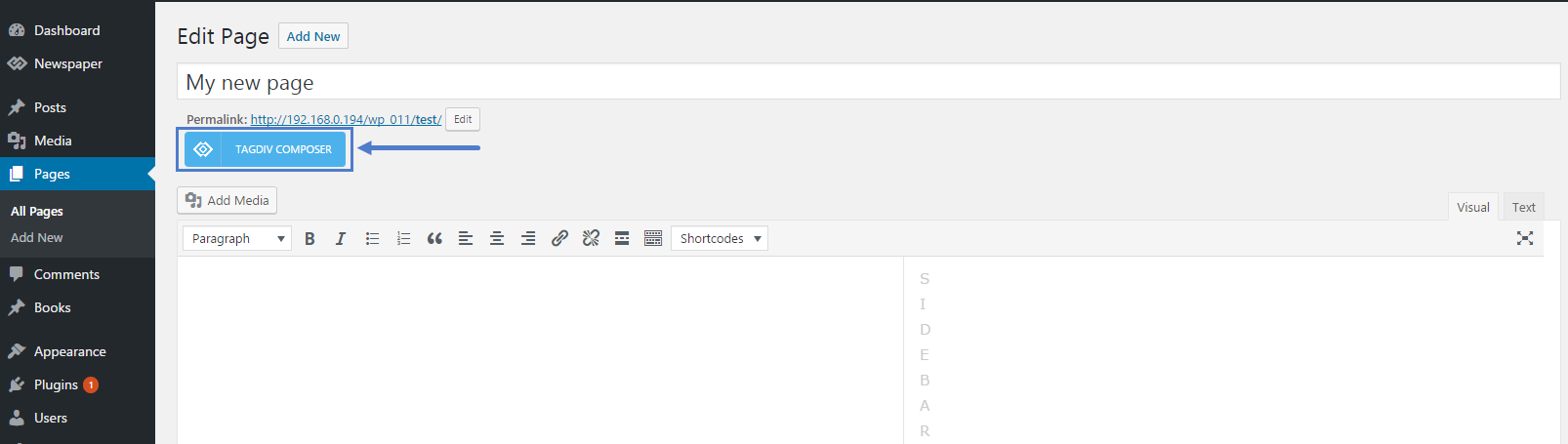
SyamsI want to use Tagdiv Composer on my post article, but I cant see this button. Please help me, how to use this lightweight plugin for post.
 Bogdan B.
 Hello,
With the new multi-purpose elements, you can achieve that. You can create a landing page using the blank page template and create a blog page with the news elements from the td composer. Please check this short video presentation:
It creates an about me page but you get the general idea. You can use woocommerce elements within the page to make it a shop page and style is with the new elements available.
Thanks.
Bogdan B. Hello,
It seems there is a css issue with the map iframe inside a raw html element.
Please use this code in the theme panel-> custom css box:
.tdc-theme-Newspaper .vc_raw_html iframe {
pointer-events: none;
}
Now you can access the raw html element in the composer.
Thank you!
Bogdan B. Hi,
Please try to disable all plugins except the td composer and clear cache. Then test again.
Thank you!
 Freddy Meynard
Hi guys, two quick questions:
1. I am trying to implement featured images for our categories, as a “fallback” option, in case the author does not include an image with their articles. We have been able to assign the fallback images using “Category Featured Images – Extended” plugin, and while it works on category pages, but your theme is not able to retrieve the featured images on pages that have been built using TD Composer’s BLOCKS when they have the < | > pagination feature ON, while ajax retrieves the article and the next set of posts, it will NOT pull the category image if article is on a second or third page.
Can you help me implement this feature while using your TD Composer Blocks?
2. How do i add the td-post-category tag to block 11 inside the featured image, like it is in block 3, as opposed to next to the content below the title…what file do i need to modify so i can use block 3 and still have the td-post-category inside the td-module-thumb?
 Simion C.
 Hi,
Maybe the plugin does not work on pages, only posts and categories. But that would mean it should not work on Visual composer pages as well.
Unfortunately we have not made any tests with such plugins and the tagDiv composer, I could not give you a solution or cause for this to happen. Normally the posts are meant to have a single author, that will be displayed.
The plugin you mention also seems to be somewhat outdated for the latest version of WordPress and theme.
Thanks
 Doug Thompson
Good theme with lots of options but I seem to have a problem when creating a homepage as a “page” instead of a blog listing. As a news site, we use bylines of many different writers who provide copy through syndications or wire services we subscribe to. The articles are posted via a “CHB” account and then we apply the correct bylines of writers using the “byline” plug-in. If we use the “blog” home page from recent posts, the “byline” names appear properly but when we create a new home page using TD Composer, the bylines are lost and the “CHB” line appears instead as the writer who created the article. This didn’t happen with the WP Bakery VC Composer but we are like the TD Composer and are using it to create our home page. The bylines appear find on the category archive page listings and the post template but not on the articles and excerpt used one the home page.
Example: Here is the latest homepage: https://www.capitolhillblue.com As you can see the lead article in the biggrid list at the top lists “CHB’ as the author because the article uses that ID and not the “byline” that is supposed to appear.
Second Example: https://www.capitolhillblue.com/node/69693 This is an article that appears from the link on the home page. The correct byline is listed in it.
Third Example: https://www.capitolhillblue.com/node/category/congress This is an archive page. The correct “bylines” appear in the BigGrid on the top of the page and also on most recent articles listed under it.
Is there a coding that can correct the listing on the home page?
 The Irish Place
I am trying to set custom (google) fonts in the theme panel. After changing the fonts and stylings some are saving and they are displayed on the front end. Others are reverted back to their previous setting after the save. This has happened multiple times.
I am running the latest verion of the theme and all plugins.
Also I notice some of the fonts/stylings are taken from the demo installation (default demo)… I have made a new homepage layout in TD-Composer.. and set style and layout options in the theme panel. Can I just uninstal this demo to remove its influence? Or will that cause I lot of issues if the stylesheet disapears?
What the best way to approach that?
The issue is when the page loads it loads the default font and colour accents. After 2 seconds the custom settings kick in and are displayed correctly…. but the initial load is still the ‘default’ settings. Should I uninstal that demo or should I look to edit the css somewhere. I suppose that would lead to quicker page speed if I did it that way??
Site: theirishplace.com
 mortgageman
 Hi,
This isn’t for untested plug ins? This is for the visual composer td image box?
 support.sd
 Hi,
Can we get the source code for td-composer? The zip that comes with the theme contains only minified JS files.
Regards,
 Rhys
Rhys HERE HERE… nycinsider… tagdiv composer has many great elements, but it sadly fails to deliver on some of the most simple of things which should really be a basic function to any page builder platform, such as adding text and being able to simply make some simple customization to that text.
I regret the day I moved away from VC to td composer.
RhysI have been trying to add the TD column text element to page, but cannot for the life of me figure out how this works, something that should be so straight forward.
Bogdan (tagdiv support) in a previous thread claims is works exactly the same as in Visual Composer… REALLY! I am not finding that at all. Adding text and the ability to customize that text, is so much easier and better in VC than with tagdiv composer… I am finding anyway!
Here is a short video which shows the difficulty I am having adding text to page > http://nimb.ws/uA9yGr
Some help and guidance with this would be much appreciated, as I am losing the will to live trying to get some simple text added.
Bogdan B. Hello,
Please choose the grid style from the tagdiv composer. Set it to grid style 4.
And then add this code in the theme panel-> custom css box: .td-grid-style-4 .td-big-grid-post .entry-title{
background-color: rgba(0,0,0,.7);
}
Thank you!
Catalin Hello monsur,
You should use the Youtube or Vimeo playlist elements from TD Composer, according to our documentation here -> https://forum.tagdiv.com/video-playlist-2/
Hope this helps!
Thanks.
 cancerawakens
Can you please tell me how to make the option for an Editor to get the “Edit with TD Composer” mode? Right when our editor is in Editor mode, she can edit a page with access to Visual and Text editor only. She does not see the “TD Compose” option. Can you let me know how to give access to users set to Editor role?
