
- TutorialsFrom WPBakery to tagDiv Composer
- TutorialsDefault Block Settings Guide
- TutorialsHow to Update the WPBakery Page Builder plugin
 EMSWT
EMSWTIt doesn’t load if the tagDivcomposer is installed and if installed it gives so many errors:
Site https://alhoush.co/
Please check and advise ASAP
wp_booster error:
td_api_base::mark_used_on_page : a component with the ID: single_template_10 is not set.
/chroot/home/a6c97607/17e9857119.nxcli.io/html/wp-content/plugins/td-composer/legacy/common/wp_booster/td_api.php
Display backtrace
wp_booster error:
td_api_base::get_key : a component with the ID: single_template_10 Key: file is not set.
/chroot/home/a6c97607/17e9857119.nxcli.io/html/wp-content/plugins/td-composer/legacy/common/wp_booster/td_api.php
Display backtrace
wp_booster error:
The path of the single_template_10 template not found. Did you disable a tagDiv plugin?
/chroot/home/a6c97607/17e9857119.nxcli.io/html/wp-content/plugins/td-composer/legacy/common/wp_booster/td_api.php
Display backtrace
wp_booster error:
td_api_base::get_key : a component with the ID: single_template_10 Key: bg_use_featured_image_as_background is not set.
/chroot/home/a6c97607/17e9857119.nxcli.io/html/wp-content/plugins/td-composer/legacy/common/wp_booster/td_api.php
 drvarun5179
 @anamaria . I fixed this issue.
Cause: Caching plugin rendering not updated content which conflicts with the tdcomposer.
Fix: Either clear cache or open an incongnito mode and login in admin panel. When opened, it reflects live updates without error.
 r4you
r4you Hello Anamaria!
We see on plugins files some restrictions to this section (“Post Settings”), the specific file that controls this functionality is “/wp-content/plugins/td-composer/legacy/common/wp_booster/wp-admin/content-metaboxes/td_templates_settings.php”, we changed line 75 where the code limits the permission level to see and edit this field in question if ( current_user_can('publish_post') ). We saw that wordpress users who are contributors do not have the permission specified in the code, we changed the code to if ( current_user_can('edit_posts') ), but this may have caused a certain instability in the database. Is there another alternative to be able to display the options other than the one I mentioned? https://drive.google.com/file/d/1v1ws-JwJ_rb2ILtnY2IjPlwHtV8sLjj4/view?usp=sharing -> print with an example of the functionality in question
drvarun5179 1. Go to cloud templates
2. Hover on Header template
3. Three dots will appear> Click edit with td composer
drvarun5179 You will have to edit the header from cloud templates using td composer.
drvarun5179 If you are using td composer, edit the header in cloud templates. From there, select the logo and switch to mobile template. You can replace the logo then.
P.S- Strictly do some work on your page speed, it takes forever to load. Start with cache and cloudfare first.
 WordDom
 Ok, seems to be here : td-composer/mobile/includes/shortcodes/td_block_related_posts_mob.php
drvarun5179Hi,
I recently observed that 46.7% page requests are made by Fonts alone (274KB). I am me mentioning the top three below:
1. td-composer/assets/fonts/td-multipurpose/td-multipurpose.ttf
Size- 74.2KB
2. td-composer/assets/fonts/fonts-awesome/fontawesome-webfojt.woff2
Size- 75.2KB
3. Newspaper/images/icons/newspaper.woff
Size- 32.1KB
I am using WP Rocket. I can preload google fonts but I am unsure how preloading the above 3 will help (or not).
Is there any way I can remove dependencies on them?
 nowheresrl
Hi,
yesterday we did update to latest Newspaper release 12.2 and now mega menu isn’t loading sub-categories anymore.
Loading icon keeps spinning.
You can check it at https://www.uominietrasporti.it/ moving mouse over “prodotto–>allestimenti” for example.
We tried to disable all plugins on a staging site but issue still persist.
Firefox debug console shows this but I’m not sure if it’s related:
Uncaught SyntaxError: JSON.parse: unexpected character at line 1 column 1 of the JSON data
jQuery 2
tdAjaxBlockProcessResponse https://www.uominietrasporti.it/wp-content/plugins/td-composer/legacy/Newspaper/js/tagdiv_theme.min.js?ver=12.2:282
tdAjaxDoBlockRequest https://www.uominietrasporti.it/wp-content/plugins/td-composer/legacy/Newspaper/js/tagdiv_theme.min.js?ver=12.2:279
c https://www.uominietrasporti.it/wp-content/plugins/td-composer/legacy/Newspaper/js/tagdiv_theme.min.js?ver=12.2:271
a https://www.uominietrasporti.it/wp-content/plugins/td-composer/legacy/Newspaper/js/tagdiv_theme.min.js?ver=12.2:277
In addition mega menu is correctly working when you’re logged in as administrator (other user role doesn’t work as well)
Any clue of possible reason?
Best regards,
Andrea
 parkaka
Dear Support,
when I updated to the Newspaper 12.2 , I found my website was infected with virus where the website was completed dead and my hosting company told me it was sourced from one of your auto installed plugin – td composer. Please see the below for details.
202.64.71.194 – – [10/Jan/2023:09:23:56 +0800] “POST /wp-admin/themes.php?page=td_plugins HTTP/2.0” 200 36962 “https://www.parkbin.hk/wp-admin/update.php?action=update-selected-themes&themes=Newspaper&_wpnonce=0e8fa17365” “Mozilla/5.0 (Windows NT 10.0; Win64; x64) AppleWebKit/537.36 (KHTML, like Gecko) Chrome/106.0.0.0 Safari/537.36″
https://share.getcloudapp.com/2Nu6mOLw
May I have any suggestion that I can avoid the virus again if i wanted to update the Newspaper 12.2?
Best regards,
Joe
 W3B
W3B I have the same problem. The problem is that server renames css-analyze.php and then you get an error: require_once(): Failed opening /td-composer/css-analyze/css-analyze.php
 georgets
 E_COMPILE_ERROR line 167
public_html/wp-content/plugins/td-composer/td-composer.php.
require_once(): Failed opening required ‘css-analyze/css-analyze.php’ (include_path=’.:/opt/cpanel/ea-php74/root/usr/share/pear’)
I try with clean installation.
I try to delete cache, install , unistall plugin and much more thinks.
I can not find a solution.
 Max
MaxHi,
I installed the theme manually via FTP, I disabled the various cache plugins, I cleared the cache, I changed the browser, I tried in anonymous mode, I cleared the cache again, I manually uploaded the plugin … nothing, always error critical of the tagDiv composer plugin, how can I fix it?
E_COMPILE_ERROR è stato causato nella linea 167 del file /home/bnewdimw/public_html/wp-content/plugins/td-composer/td-composer.php. Messaggio di errore: require_once(): Failed opening required ‘css-analyze/css-analyze.php’ (include_path=’.:/opt/alt/php74/usr/share/pear’)
Thank You
Max
 Anamaria
 Hello,
If you use Wp Rocket, you can try to exclude the following files
/jquery-?[0-9.](.*)(.min|.slim|.slim.min)?.js
/jquery-migrate(.min)?.js
/wp-content/plugins/td-composer/legacy/Newspaper/js/tagdiv_theme.min.js
tdBlocksArray
Thank you!
 mediagod
 Hello Everyone,
I was experiencing the same issue and found a solution after monitoring the browser’s console and making changes to my webserver’s configuration.
The following error appeared whenever I went to edit a page with the tagDiv Composer:
Error at zones: 6(models) : 0(dom). The model does not match the content Current state has involved an issue. You could try an UNDO operation (CTRL+Z / CTRL+SHIFT+Z)
I decided to look at the browser’s console while the tagDiv composer page was loaded to see if I could find out what was causing the problem. I saw the following error in the console:
The loading of “https://www.mywebsite.com/tdb_templates/404-template-week-pro/?td_action=tdc_edit&post_id=89&tdbTemplateType=404” in a frame is denied by “X-Frame-Options“ directive set to “DENY“.
Apparently the tagdiv editor uses an xframe and my webserver (Nginx) was configured to deny all xframes. After visiting https://developer.mozilla.org/en-US/docs/Web/HTTP/Headers/X-Frame-Options and following the instructions I was able to get the editor working.
The specific configuration line in NGINX’s server configuration that was causing the problem was:
add_header X-Frame-Options “DENY”;
I deleted this line and replaced it with:
add_header X-Frame-Options SAMEORIGIN always;
After doing this I restarted NGINX and the tagdiv editor proceeded to work as normal.
-
This reply was modified 3 years by
mediagod.
drvarun5179 Try Editing the page template in td composer. There, change the logo image.
I am suffering the same issue since update. Even after updating the logo and settings like additional js and css codes (like for adsense and google analytics), the changes are automatically reverted back.
Yet to figure out the cause but follow the step I suggested.
drvarun5179Hi, I released my Page speed guide for the Newspaper theme back in 2017. This is the 2023 version for the same.
My Website: https://medicforyou.in
Current Stats:
1. Pagespeed Mobile
2. Pagespeed Desktop
3. GTMetrix
4. Pingdom
Resources used:
Plugins
1. Ad Inserter
2. Akismet
3. Contact Form 7
4. Converter for Media
5. Formidable Forms
6. Formidable Forms Pro (Paid)
7. Inline Related Posts
8. Jetpack
9. LuckyWP Table of Contents
10. RankMath (free version)
11. Regenerate Thumbnails
12. tagDIV Cloud Library
13. tagDIV Composer
14. tagDIV Mobile Theme
15. tagDIV Social Counter
16. Wordfence Security
17. WP Rocket
18. wpDiscuz
CDN– Only Cloudfare Free with tweaks and rules
Hosting– GoDaddy (sucks but will switch later)
Plugin Based Tweaks Worth Mentioning
1. Ad Inserter
Newspaper mobile does not provide extended in-article ads. This is why I switched to Ad-inserter to apply rules to mobile and desktop versions. Works like a charm.
4. Converter for Media
Free webP conversion recommended by Google. Lightweight and also converts your previously uploaded files to webP as well.
6. Formidable Forms Pro- Paid
I bought this to have a quiz and calculator. To be honest, I spent more than 30 hours but still could not learn the conditional tags and essential formatting. Regardless, this is broken on the mobile theme plugin and has a drastic speed impact on the page. Definitely not recommended.
8. Jetpack
I am still to figure out what is the role of Jetpack in SEO and speed. Anyways, I have kept it to not destroy my existing SEO.
11. Regenerate thumbnails
I would recommend regenerating all thumbnails at a time when your visitors are not active on the website. It has some memory usage and should be done in a free environment.
MOST IMPORTANT
I browsed through forums to find that TD Standard Pack is not an essential plugin if you know how to develop your theme properly using TD Composer.
I was already using pre-installed templates. So, I simply deactivated the plugin to check if any pages were broken. Since there were none, I deleted the plugin.
It has huge speed impact and I definitely recommend creating your own templates rather than relying on the easy way out. Additionally, I would recommend you start with a pre-built website, and start editing the following Cloud Templates:
14. tagDIV Mobile Theme
If you have to choose performance over quality, I’d recommend quickly installing this plugin. It is tempting to give your users a wonderful experience, but at what cost? Reduced speed only drops your visitors from search engines. Most of us are bloggers, meaning we rely on Google and Bing for our visitors (in long term). I’d recommend using it without caring for those beautiful blocks or glittering images.
16. Wordfence Security
If you are on a shared hosting like me and using Wordfence, I would suggest you enable performance tweaks.
17. WP Rocket
I used AutoOptimize and various other plugins to speedily my website. I did achieve results, but the “remove unused CSS” is beyond my scope. It requires hours of finding the CSS and deleting them. Even if you understand what I am saying, you are still bound to make mistakes.
I switched to WP Rocket a few months back. It cost me 59 USD for a year. What did I get? Here are tweaks that I was not able to achieve previously (the rest all can be achieved with free plugins):
18. WpDiscuz
The CSS files are annoying and I believe minifying CSS and loading
wpDiscuz> Settings> General Settings> Enable Use WordPress native AJAX functions and Minify JS and CSS Files to Optimize Page Loading Speed.
If you have not installed it yet, I highly recommend you don’t get lured by it. Stick to traditional Comments from WordPress itself. They won’t cost you any speed damage.
Cloudfare Optimizations
I would not go much into detail about this. But I will summarize what I have done:
1. Optimization Tab- Tick marked all options except AMP URL and Rocket Loader (only if you are using WP Rocket because it will break your search button and menu on mobile with a Newspaper theme).
2. Caching- Tickmarked all except Always Online and Development mode.
3. Rules- I have set two rules which make Cloudfare cache all contents on my website except my admin panel. You can set them using the following image, make sure you replace your website name with www or without www (and no HTTP or HTTPS) and in THE ORDER THEY ARE (ByPass at 1st, Cache everything at 2nd).
Image:
4. Scrape Shield- Tick marked all of the available features (3 in total).
Currently, my concerns revolve around the following:
I hope this guide helps you all. Please leave any feedback or queries. Best of luck fellas.
Anamaria Hello,
I recommend you to use a Single Post Template from tagdiv Cloud Library, and you can design it with tagdiv Composer.
To display the related articles or more from author, you can use Flex Block and filter it https://www.screencast.com/t/SEmxo13Fo2X -> https://i.imgur.com/YIg3nPP.png
if you want to keep those templates the only way to remove the “more from author” tab is to use a custom CSS like this one:
.single .td-related-right{

 display: none;

 }
Set the code in Theme Panel ->Custom code -> Custom CSS
I hope this helps you!
Thank you!
 phubner
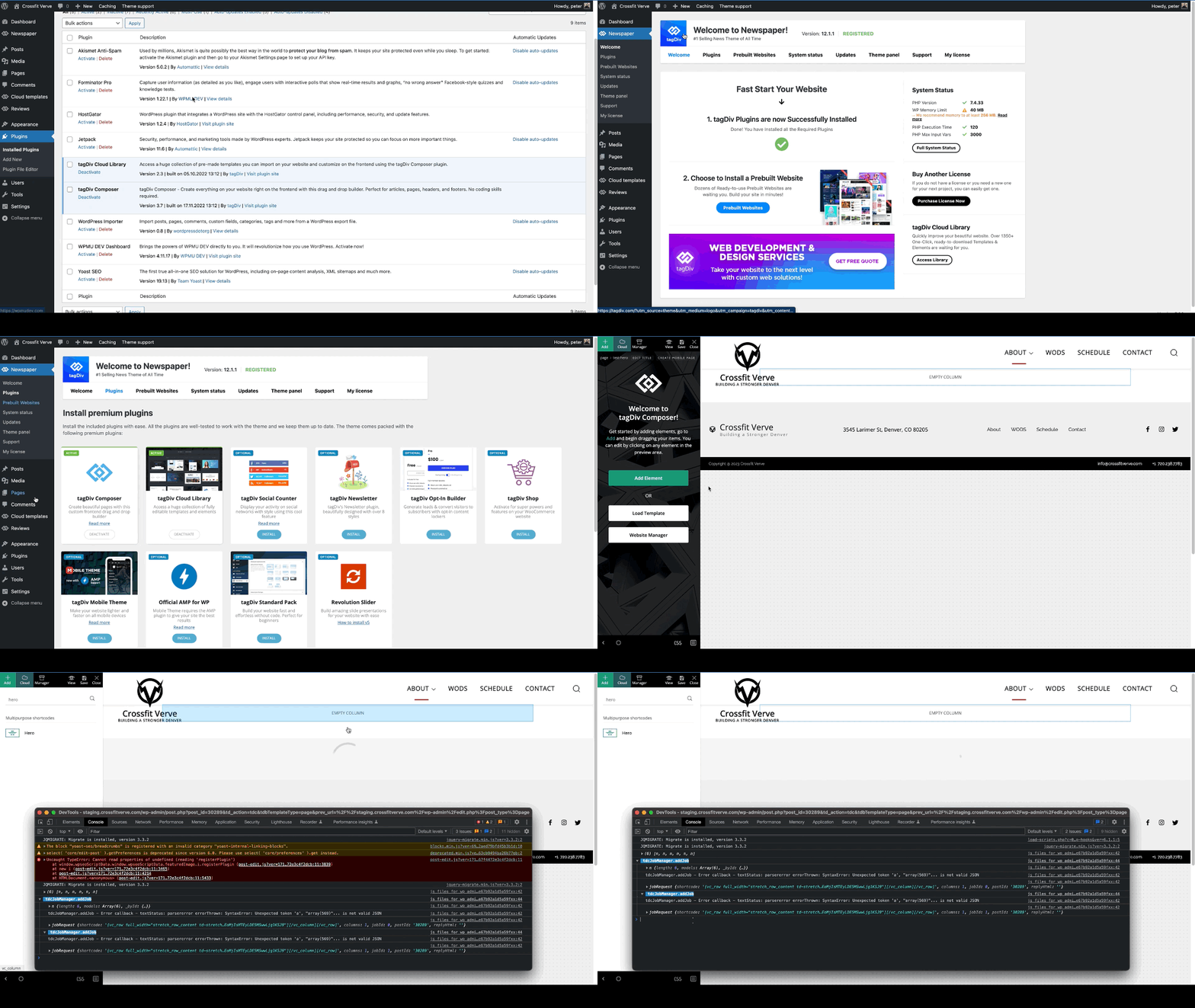
When trying to add a hero modules to pages I am getting the following error. This is happening on multiple sites of mine.
I created a simple test page that was blank and just tried to add the hero module. The page just has the spinner and never completes adding the hero module. In the console this is logged
tdcJobManager.addJob - Error callback - textStatus: parsererror errorThrown: SyntaxError: Unexpected token 'a', "array(569)"... is not valid JSON
jobRequest ...
shortcode
:
"[vc_row full_width=\"stretch_row_content td-stretch-content\"][vc_column][tdm_block_hero title_text=\"SGVybw==\" title_tag=\"h3\" title_size=\"tdm-title-bg\" description=\"V2VsY29tZSB0byB0aGUgZnV0dXJlIG9mIGJ1aWxkaW5nIHdpdGggV29yZFByZXNzLiBUaGUgZWxlZ2FudCBkZXNjcmlwdGlvbiBjb3VsZCBiZSB0aGUgc3VwcG9ydCBmb3IgeW91ciBjYWxsIHRvIGFjdGlvbiBvciBqdXN0IGFuIGF0dGVudGlvbi1jYXRjaGluZyBhbmNob3IuIFdoYXRldmVyIHlvdXIgcGxhbiBpcywgb3VyIHRoZW1lIG1ha2VzIGl0IHNpbXBsZSB0byBjb21iaW5lLCByZWFycmFuZ2UgYW5kIGN1c3RvbWl6ZSBlbGVtZW50cyBhcyB5b3UgZGVzaXJlLg
I did verify that I could add other modules, Author box, Flex grid, Client list, Image info box … etc.
site : staging.crossfitverve.com
Newspaper Version : 12.1.1
plugins : tagDiv Composer, tagDiv Cloud Library, YOAST SEO, Forminator Pro, Jetpack, WPMU DEV Dashboard
 modniportal
Hi I have the same problems like others. When I try to edit home page with TagDiv composer the message appears
“We’ve got some errors at loading API files. It could happen because of a disabled TagDiv plugin!”
wp_booster error:
Internal error: The system tried to use an att that does not exists! class_name: tds_button1 Att name: “button_tdicon” as “1-button_tdicon”
/home/namaportal/public_html/wp-content/plugins/td-composer/legacy/common/wp_booster/td_style.php
I tried everything upgrade/downgarade theme, deactivate all other plugins, delete tagdiv plugins, install tagdiv plugins again, page revisions …
All other pages working well, only home page not.
Kind regards, Grega
 vangeorgo
Hello,
I have Social counter installed on my homepage through TagDiv composer and also Social icons in the header with Cloud Library using TD composer. On my homepage Social counter/Social icons are using very weird font on Safari (looks kinda Japanese) and on Chrome there are only squares.
This problem occurs only on my homepage and I cannot find any setting that could possibly cause this. Can you please help me?
Also, how can I change the label in my sidebar that says “Followers” etc.? Thanks
URL with wrong font: https://svetapple.sk (check upper right corner and sidebar)
URL with correct font: https://svetapple.sk/featured/titanova-konstrukcia-nove-tlacidla-aj-vacsia-ram-toto-vsetko-prinesie-iphone-15-pro/
 observatorulprahovean
Hi there,
We are having an issue that is continuously raising the warning below since 15.11.2022 until now.
It is related to TD Composer WP Booster and specialy to the td_wp_booster_functions.php
Can you help us with it? We are using Newspaper Theme 12.1.1 and PHP Version 8.0.25.
Today, we got a lot of Cloudflare 522 error on WordPress admin actions and found out this.
[15-Nov-2022 22:33:30 UTC] PHP Warning: Attempt to read property “ID” on null in /home/____/public_html/wp-content/plugins/td-composer/legacy/common/wp_booster/td_wp_booster_functions.php on line 2046
————————-
[04-Jan-2023 14:56:16 UTC] PHP Warning: Attempt to read property “ID” on null in /home/____/public_html/wp-content/plugins/td-composer/legacy/common/wp_booster/td_wp_booster_functions.php on line 2046
Thanks!
 Razvan
Hello, in the theme panel there is an article top ad, but it doesn’t work. Only the article top ad in the td composer works. Moreover, I want to add the article inline ad in the middle of the content. How can I do both?
 Mutazq
ِ
I am getting this error, I tried the suggested solutions in the forum but it did not work.
The PHP version is 7.4 and I am running last updated theme,
I tried also to disable the plugin and other plugins that may effect the theme bu again the theme is not loading and I can not access the dashboard.
the Error I get isL
Error E_COMPILE_ERROR line 47 in file /home2/rawashen/almeena.co/wp-content/plugins/td-composer/legacy/common/wp_booster/td_wp_booster_functions.php.
ِerror message : require_once(): Failed opening required ‘/home2/rawashen/almeena.co/wp-content/plugins/td-composer/legacy/common/wp_booster/td_block.php’ (include_path=’.:/opt/cpanel/ea-php74/root/usr/share/pear’)

