- TutorialsFrom WPBakery to tagDiv Composer
- TutorialsDefault Block Settings Guide
- TutorialsHow to Update the WPBakery Page Builder plugin
 Stanford Nix
 I dont know how to find the folder. Just saying it is wp-content/plugins/td-composer/legacy/Newspaper/parts/header doesn’t tell me where I can find the folders. I tried inputting that after my domain and it didn’t go anywhere. I don’t know how to find the ‘sign in/join’ to edit.
 Calin
Calin Hi Stanford Nix,
The folder is header and the path to it is wp-content/plugins/td-composer/legacy/Newspaper/parts/header there is a file td-login-modal.php where is the code for sign in / join.
The code for menu is this one wp-content/plugins/td-composer/legacy/Newspaper/parts/login.php – logged.php
Now if you are using the mobile theme plugin the files are on this path -> wp-content/plugins/td-composer/mobile/parts
Thank you!
 betterwp
Hello,
My client’s website has more than 12K posts. I had slow queries, which made the post load after 2 or 3 seconds, maybe more.
I am using Redis on a stage website and it is the same. Also, I am using RDS by AWs and the same.
It is a very serious problem as the website has around 8K users per day.
Please guide me.
Kindly, check
 mode8.jp
Hi Team,
Will you please provide some advise on the issue below.
On my staging site, just started to build a website, I noticed that it shows some errors on the log.
— — —
[12-Jan-2022 14:50:01 UTC] PHP Warning: Undefined array key “SCRIPT_NAME” in /home/xxx/public_html/xxx/wp-includes/load.php on line 79
[12-Jan-2022 14:50:01 UTC] PHP Warning: Undefined array key “SCRIPT_FILENAME” in /home/xxx/public_html/xxx/wp-content/plugins/td-composer/includes/tdc_main.php on line 161
[12-Jan-2022 14:50:01 UTC] PHP Warning: Undefined array key “SCRIPT_FILENAME” in /home/xxx/public_html/xxx/wp-content/plugins/td-composer/includes/tdc_main.php on line 259
— — —
I have reinstalled td-composer or reinstall all WP and start from zero, these lines will come up on the error log.
It is not a big issue, but it will be a lot in the future.
is this because I have not set up the theme right?
Please let me know what I can do.
 dimitrisv
 I am preloading the fonts already. I tried preloading also the css e.g.
echo "<link href='https://femmefatale.ecode.gr/wp-content/plugins/td-standard-pack/Newspaper/assets/css/td_standard_pack_main.css?ver=79f8a1d02f05c15c98a62e68cd419e0b' rel='preload' as='style'  crossorigin>";

echo "<link href='https://femmefatale.ecode.gr/wp-content/plugins/td-composer/legacy/Newspaper/assets/css/td_legacy_main.css?ver=381db5cebf26144e1b1ab5f0477be694' rel='preload' as='style'  crossorigin>";

echo "<link href='https://femmefatale.ecode.gr/wp-content/plugins/td-standard-pack/Newspaper/assets/css/td_standard_pack_main.css?ver=79f8a1d02f05c15c98a62e68cd419e0b' rel='preload' as='style'  crossorigin>";

echo "<link href='https://femmefatale.ecode.gr/wp-content/themes/Newspaper/style.css?ver=11.4' rel='preload' as='style'  crossorigin>";
but still no improvement.
Calin Hi,
The text can be translated using the theme panel > translations -> https://forum.tagdiv.com/loading-translations/
Or in case that you want to edit it, then it can be done only in the theme files and those can be find in this folder wp-content/plugins/td-composer/legacy/Newspaper/parts/header
Thank you!
 Revive the Netherlands
This page gives a wp booster error.
https://www.revive.nl/influencer-joris-perez-komt-tot-bekering-zie-me-stralen/
wp_booster error:
td_api_base::mark_used_on_page : a component with the ID: single_template_8 is not set.
/home/customer/www/revive.nl/public_html/wp-content/plugins/td-composer/legacy/common/wp_booster/td_api.php
 Manha Com
 Hi Calin, thank you very much for your help and your answer.
I have solved it. I have one more question. Is there a known way to prevent when there is some td composer update from losing the configuration I made and having to re-overwrite the td_fonts.php manually?
Thanks.
Calin Hi Manha Com,
I’m sorry, my intention was not to insult you!
What I mean was that the theme is use only the fonts that are listed here -> wp-content/plugins/td-composer/legacy/common/wp_booster/td_fonts.php and is making a reqest from them on google api fonts.googleapis.com
The fonts are not automatically injected in the theme, those need to be added manually. So, at the time when the fonts were added, there were 948 major fonts and the Public Sans I do not think was one of them and was added only latter. What can be done is to add the font in the theme file so that will make a request for it -> https://i.imgur.com/W6o4B7s.png (the path for the file wp-content/plugins/td-composer/legacy/common/wp_booster/td_fonts.php).
I made also a request to add the rest of the google fonts in the theme list, but, this can take some time.
Thank you for your understanding and sorry for the inconvenience!
Calin Hi Jose, this can be done quite easy if you choose to use a single post template from cloud -> https://i.imgur.com/OukmYdU.png
If you want to use a standard template (edit the single that you use -> wp-content/plugins/td-standard-pack/Newspaper/parts/single/single_template_1.php -> https://i.imgur.com/TKZ9klS.png and set it in -> wp-content/plugins/td-standard-pack/Newspaper/parts/single/loop-single-1.php -> https://i.imgur.com/iwEDpFF.png, if is the default template the files are wp-content/plugins/td-standard-pack/Newspaper/loop-single.php and wp-content/plugins/td-standard-pack/Newspaper/single.php), the you must edit it (edit the file and set it in a child theme).
If you are using the mobile theme plugin, then the same change need to be done in this file wp-content/plugins/td-composer/mobile/single.php unfortunately, this can not be set in a child theme.
I hope this will help you!
 anseilen
 Hi,
When I changed to PHP 8, the site displayed fine, but I got the following error message.
Turning on tagDiv Composer causes an error in PHP 8.
ーーーーーーーーーーーーーー
Fatal error: Uncaught TypeError: ftp_fget(): Argument #1 ($ftp) must be of type resource, null given in /home/kusanagi/ichigo-an/DocumentRoot/wp-admin/includes/class-wp-filesystem-ftpext.php:146 Stack trace: #0 /home/kusanagi/ichigo-an/DocumentRoot/wp-admin/includes/class-wp-filesystem-ftpext.php(146): ftp_fget(NULL, Resource id #380, ‘/home/kusanagi/…’, 2) #1 /home/kusanagi/ichigo-an/DocumentRoot/wp-content/themes/Newspaper/includes/wp-booster/wp-admin/plugins/class-tagdiv-theme-plugins-setup.php(351): WP_Filesystem_FTPext->get_contents(‘/home/kusanagi/…’) #2 /home/kusanagi/ichigo-an/DocumentRoot/wp-content/themes/Newspaper/includes/wp-booster/wp-admin/plugins/class-tgm-plugin-activation.php(1977): tagdiv_theme_plugins_setup->theme_plugin_has_update(‘td-composer’) #3 /home/kusanagi/ichigo-an/DocumentRoot/wp-content/themes/Newspaper/includes/wp-booster/wp-admin/plugins/class-tgm-plugin-activation.php(1836): TGM_Plugin_Activation->does_plugin_have_update(‘td-composer’) #4 /home/kusanagi/ichigo-an/DocumentRoot/wp-content/themes/Newspaper/includes/wp-booster/wp-admin/plugins/class-tgm-plugin-activation.php(422): TGM_Plugin_Activation->is_tgmpa_complete() #5 /home/kusanagi/ichigo-an/DocumentRoot/wp-includes/class-wp-hook.php(303): TGM_Plugin_Activation->init(”) #6 /home/kusanagi/ichigo-an/DocumentRoot/wp-includes/class-wp-hook.php(327): WP_Hook->apply_filters(NULL, Array) #7 /home/kusanagi/ichigo-an/DocumentRoot/wp-includes/plugin.php(470): WP_Hook->do_action(Array) #8 /home/kusanagi/ichigo-an/DocumentRoot/wp-settings.php(578): do_action(‘init’) #9 /home/kusanagi/ichigo-an/DocumentRoot/wp-config.php(93): require_once(‘/home/kusanagi/…’) #10 /home/kusanagi/ichigo-an/DocumentRoot/wp-load.php(50): require_once(‘/home/kusanagi/…’) #11 /home/kusanagi/ichigo-an/DocumentRoot/wp-admin/admin.php(34): require_once(‘/home/kusanagi/…’) #12 /home/kusanagi/ichigo-an/DocumentRoot/wp-admin/index.php(10): require_once(‘/home/kusanagi/…’) #13 {main} thrown in /home/kusanagi/ichigo-an/DocumentRoot/wp-admin/includes/class-wp-filesystem-ftpext.php on line 146
ーーーーーー
Is this a problem with the plugin?
I have a WordPress site that uses a different theme and it works fine with PHP 8.
 WalnutHillDesign
Something happened today while editing pages. There are not a handful of pages where the header disappeared and cannot be edited with the tagdiv composer. Trying to Edit with tagdiv composer just opens the TDC but it never fully loads. It just spins forever.
Strangely some pages on the site do work, so it’s like there are a bunch of corrupt pages.
Everything is up to date on the latest version.
 limitlessv
Anyone working with WP_Rocket and Newspaper theme and want to share the configurations?
We have challenges with performance:
https://parentsontheyard.com/
We Excluded JavaScript Files
/jquery-?[0-9.](.*)(.min|.slim|.slim.min)?.js

js-(before|after)

(?:/wp-content/|/wp-includes/)(.*)

/wp-content/themes/Newspaper/(.*).js

/wp-content/plugins/td-cloud-library/(.*).js

/wp-content/plugins/td-composer/(.*).js

/wp-content/plugins/td-mobile-plugin/(.*).js

/wp-content/plugins/td-newsletter/(.*).js

/wp-content/plugins/td-social-counter/(.*).js

/wp-content/plugins/td-standard-pack/(.*).js

/wp-content/plugins/td-subscription/(.*).js

/wp-content/plugins/td-woo/(.*).js
We Excluded CSS Files
/wp-content/themes/Newspaper/(.*).css

/wp-content/plugins/td-cloud-library/(.*).css

/wp-content/plugins/td-composer/(.*).css

/wp-content/plugins/td-mobile-plugin/(.*).css

/wp-content/plugins/td-newsletter/(.*).css

/wp-content/plugins/td-social-counter/(.*).css

/wp-content/plugins/td-standard-pack/(.*).css

/wp-content/plugins/td-subscription/(.*).css

/wp-content/plugins/td-woo/(.*).css
but still, performance on mobile is very low.
and in some devices its not show the menu correctly
any advise
 mkarlov
 Also error log shows
Failed to load resource: the server responded with a status of 500 ()
https://trogirskiportal.hr/wp-content/plugins/td-composer/legacy/Newspaper/includes/demos/fast/demo_style.css?ver=11.4
Calin Hi,
So, this is a php code that need to be set in a special place, then I do not think that will work setting it with tagDiv Composer, for the moment there are no elements to support php code, some of theme support html, css and a some JavaScript.
Now, if will be to set the code in the theme header.php file, I think that will be triger this file wp-content/plugins/td-composer/legacy/Newspaper/header.php (our theme has 3 header.php files, but if the tagDiv Standard Pack is not installed and you use a cloud header, the above one will be use). Just copy the file from there in child theme (Newspaper-child/header.php) and set the code in that file, it should work properly.
I hope this will help!
Thank you!
Calin Hi joit,
Unfortunately, the amp is not entirely translated, but I just made some changes and if you replace the code from this file wp-content/plugins/td-composer/mobile/header-amp.php with the code from here the problems should be solved.
Let me know the results.
Thank you!
 33ParkMedia
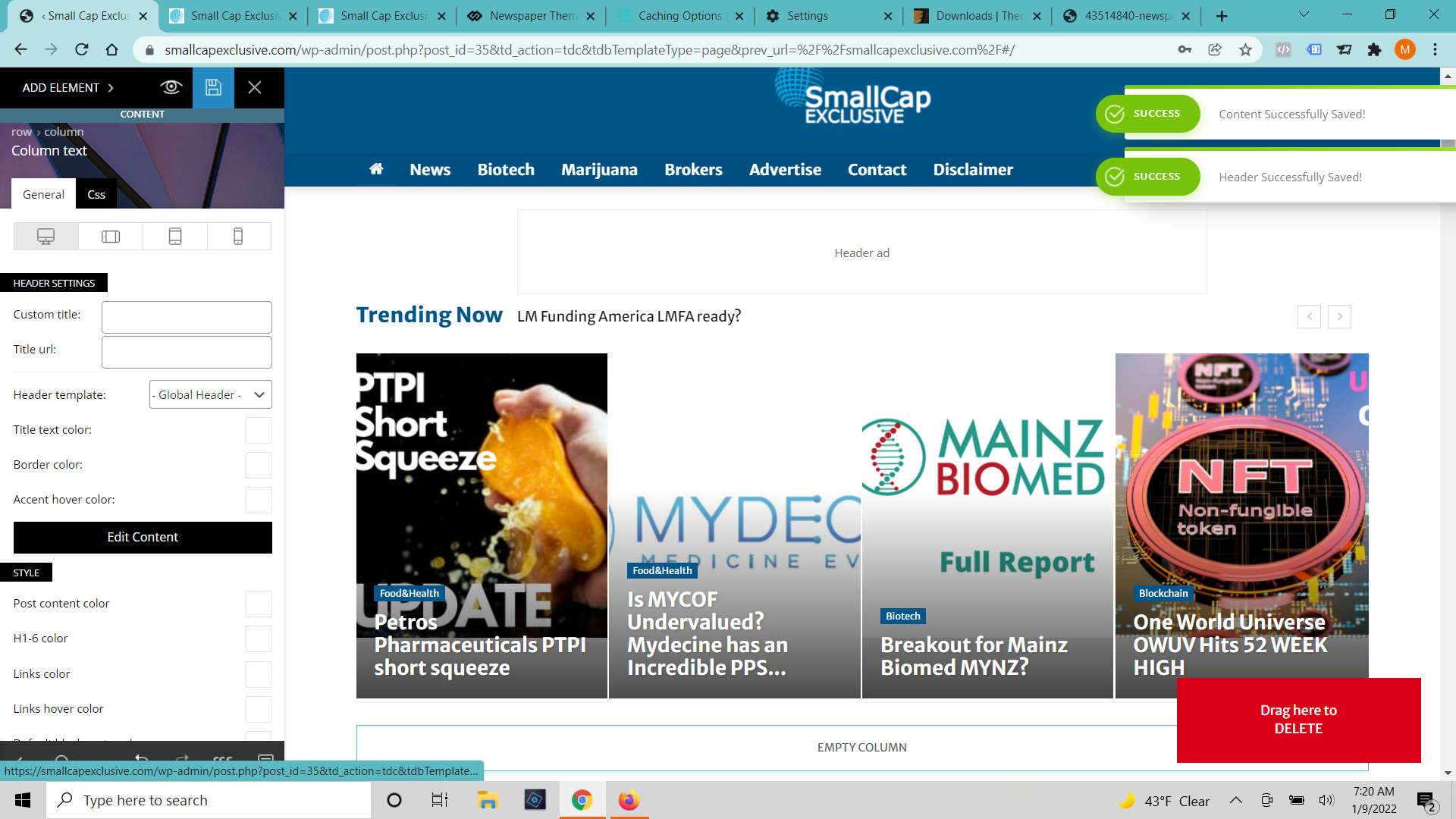
https://smallcapexclusive.com/
A few days ago our homepage started showing up out of sorts (built with tag div composer). I have edited it and got it looking correctly again (6 or 7 times). When I press save it says that the changes were successfully made but none of the changes show up. I’ve cleared cache on the browser and server. I’ve tried incognito windows and different browsers. I’ve waited 12 hours. (https://smallcapexclusive.com/wp-content/uploads/2022/01/Tag-Div-Saved-Changes.png)
When I click on the page to edit with TD Composer again It shows the old version of the page and gives an error message that the model doesn’t match the content and to press the undo button. (https://smallcapexclusive.com/wp-content/uploads/2022/01/Tag-Div-Saved-Changes.png) When I press the undo button it fixes the margins a bit but not any of the content and it still won’t save.
 Anamaria
 Hello,
Please check this topic https://forum.tagdiv.com/topic/how-to-show-hidden-row-in-td-composer/
Thank you!
 Tim Moore
tag Div Composer and tagDiv Social Counter Outdated / Inactive and the Envato tech I paid to installed said its not updating and author need to send updates.
Calin Hi,
That can be done with some changes in the theme files, for this you’ll need to revers the array use for categories, the file that need to be edited is wp-content/plugins/td-composer/legacy/common/wp_booster/td_category_template.php on line 85 set -> https://i.imgur.com/561Q9RA.png
array_reverse($categories_objects, true) like this -> https://i.imgur.com/SOGuZ3t.png
I hope this will help you!
 cwbnlive
Hi,
3 days ago we have updated to the latest release from Newspaper theme and from that day onwards we can’t access the TD composer editor. The error is “ERR_HTTP2_PROTOCOL_ERROR” Please provide with a solution as soon as possible.
Thanks
Mayantha.
+94710642467
Calin Hi,
1. The flex blocks will display the comment count, but this can be disable individually using the tagDiv Composer -> https://i.imgur.com/tBn23QC.png -> https://i.imgur.com/c6MpnlW.png
2. Yes, that is the path -> https://i.imgur.com/FPSDV1y.png -> https://i.imgur.com/6hSTPc8.png
3. We did not tested the Co Authors Plus plugin with cloud templates, so I do not know if this code will work. But if you use the default post template -> https://i.imgur.com/BHbk31Q.png then the code should apply on the files from -> wp-content/plugins/td-composer/legacy/Newspaper/loop-single.php
4. The single post templates allow you to edit the post layout/template using tagDiv Composer, now this was not possible with a standard templates. The posts will be made using the WordPress editor (classic or Gutenberg editor).
I hope this will help you!
Thank you!
 tnec_in
After the theme is updated to the latest version 11.4, the tagDiv Composer Plugin stops working, all you see on the site are codes and codes.
The plugin cannot be updated, nor activated.
I tried by deleting it from the file manager in Cpanel and then replacing it with one of my old backups, the problem still persists.
I had no option but to revert back to the previous version 11.3.2 of the theme.
This is really a bad experience when your own plugin doesn’t work after the theme update. Please clean up the bug and give a new update where such problems don’t rise.
 cavalrydesign
Hi. I’m using the Newspaper theme along with the plugin Web 2.0 Directory plugin Version 2.9.3. The plugin works fine with the Theme until I click on a ‘Tag’ in the directory. When I do that I get the following errors:
Notice: Trying to get property ‘ID’ of non-object in /home/xxxxxxxx/public_html/wp-content/plugins/td-composer/legacy/common/wp_booster/td_wp_booster_functions.php on line 993
Notice: Trying to get property ‘ID’ of non-object in /home/xxxxxxxx/public_html/wp-content/plugins/td-composer/legacy/common/wp_booster/td_page_generator.php on line 703
Notice: Trying to get property ‘ID’ of non-object in /home/xxxxxxxx/public_html/wp-content/plugins/td-composer/legacy/common/wp_booster/td_page_generator.php on line 719
Notice: Trying to get property ‘ID’ of non-object in /home/xxxxxxxx/public_html/wp-content/plugins/td-cloud-library/shortcodes/header/tdb_header_logo.php on line 857
Notice: Trying to get property ‘ID’ of non-object in /home/xxxxxxxx/public_html/wp-content/themes/Newspaper/includes/tagdiv-page-generator.php on line 272
Notice: Trying to get property ‘ID’ of non-object in /home/xxxxxxxx/public_html/wp-content/themes/Newspaper/includes/tagdiv-page-generator.php on line 288
If I change the Theme to Twenty Twenty-One it works fine.
Do you know what might be causing the issue, and how I might be able to fix it?
Thanks
 whoknows
Hi,
when I want to open a page with the TagDiv Composer it is loading and does not stop anymore. I already deactivated and deinstalled plus installed and activated the tagein composer plugin without change. Here is the output from safaris js console:
[Log] JQMIGRATE: Migrate is installed, version 3.3.2 (load-scripts.php, line 5)
[Error] URIError: URI error
decodeURIComponent (js_files_for_wrapper.min.js:14:109)
b64DecodeUnicode (js_files_for_wrapper.min.js:14:109)
(anonyme Funktion) (js_files_for_wrapper.min.js:42:142)
Globaler Code (js_files_for_wrapper.min.js:43:97)
[Warning] The block “wpzoom-blocks/social-icons” is registered with an invalid category “wpzoom-blocks”. (blocks.min.js, line 2)
[Info] You are running Vue in development mode. (js_files_vue_modals.min.js, line 207)
Make sure to turn on production mode when deploying for production.
See more tips at https://vuejs.org/guide/deployment.html
[Warning] jQuery.Deferred exception: null is not an object (evaluating ‘document.getElementById(“tdc-live-iframe”).contentDocument’) (2) (load-scripts.php, line 2)
init — js_files_for_wrapper.min.js:22:326
(anonyme Funktion) — post.php:807
c — load-scripts.php:2:28333
fireWith — load-scripts.php:2:29074
e — load-scripts.php:2:30311
(anonyme Funktion) — load-scripts.php:2:30342
undefined