
- TutorialsFrom WPBakery to tagDiv Composer
- TutorialsDefault Block Settings Guide
- TutorialsHow to Update the WPBakery Page Builder plugin
 michaelcates
Recently updated WordPress and Newspaper theme and the wpeditor is not loading. Just getting a spinning circle. I’ve contacted Bluehost and they were unable to address the issue.
 Anamaria
 Hello,
The mobile theme use the thumbs 265X198 and 741X486 => https://i.imgur.com/8jepsGB.png
you can find the thumbs in this path td-composer/mobile/includes/td_config_mob.php and you can change them => https://i.imgur.com/fQsEtA1.png
Thank you!
 princebilly
Hi there
I purchased Newspaper and also extended support now. I removed the old (not automatically upgradeable Newspaper 9) and exchanged the theme with Newspaper 11. Frontend works fine when i build the website using TagDiv Composer blocks again. But the posts do not work anymore due to an wp booster error (see [1]).
Please support. I love your theme, but this upwards not-compatibility is really hard to follow. Thank you.
Best j
wp_booster error: td_api_base::mark_used_on_page : a component with the ID: single_template_1 is not set.
/mnt/rawdata/www/cubicles/flock-0755/showreel.mdh.fhstp.ac.at/wp-content/plugins/td-composer/legacy/common/wp_booster/td_api.php
[1] https://showreel.mdh.fhstp.ac.at/5911/breathx-stressfree-radiotherapy/
 Bettina
 Hello!
For this you have 3 options to modify the single template files:
1. If you use cloud library single template, then you will have to modify a specific element like post author, post content etc and you will find these files here wp-content/plugins/td-cloud-library/shortcodes/single
2. If you use post template default like this: https://i.imgur.com/HFH2kFE.png , then these templates are consists of single.php and loop-single.php and you will find them here: wp-content/plugins/td-composer/legacy/Newspaper/loop-single.php
3. If you have standard pack plugin, then you will find the files mentioned at point 2 here wp-content/plugins/td-composer/legacy/Newspaper/loop-single.php
Hope that helps you!
Thank you!
 patrixx73
I, I just installed newspaper last Saturday and today i create the first mobile page. This is the error I am facing on the mobile ios device. Please help me solve it.
Kindest Regards
Patrick
wp_booster error:
td_res_context->get_att(gap) Internal error: The atts are not set yet(AKA: the render template method was called without atts)
/var/www/vhosts/ecodisofia.net/httpdocs/wp-content/plugins/td-composer/legacy/common/wp_booster/td_css_res_compiler.php
Array
(
[0] => Array
(
[file] => /var/www/vhosts/ecodisofia.net/httpdocs/wp-content/plugins/td-composer/legacy/common/wp_booster/td_css_res_compiler.php
[line] => 385
[function] => error
[class] => td_util
[type] => ::
[args] => Array
(
[0] => /var/www/vhosts/ecodisofia.net/httpdocs/wp-content/plugins/td-composer/legacy/common/wp_booster/td_css_res_compiler.php
[1] => td_res_context->get_att(gap) Internal error: The atts are not set yet(AKA: the render template method was called without atts)
)
)
[1] => Array
(
[file] => /var/www/vhosts/ecodisofia.net/httpdocs/wp-content/plugins/td-composer/legacy/common/wp_booster/td_css_res_compiler.php
[line] => 362
[function] => get_att
[class] => td_res_context
[object] => td_res_context Object
(
[settings:td_res_context:private] => Array
(
[all] => Array
(
[gap] => 10px
[row_auto_height] => 1
[row_fixed] =>
[stretch_off] =>
[row_anim_off] =>
[svg_z_index] =>
[flex_display] => block
[flex_width] =>
)
)
[current_media:td_res_context:private] => portrait
[atts:td_res_context:private] => Array
(
)
[index_style] =>
[responsive_atts:td_res_context:private] => Array
(
[0] => gap
)
[fonts_to_load:td_res_context:private] => Array
(
)
)
[type] => ->
[args] => Array
(
[0] => gap
[1] =>
[2] =>
)
)
[2] => Array
(
[file] => /var/www/vhosts/ecodisofia.net/httpdocs/wp-content/plugins/td-composer/includes/shortcodes/vc_row.php
[line] => 365
[function] => get_shortcode_att
[class] => td_res_context
[object] => td_res_context Object
 Calin
Calin Hi,
Unfortunately, our theme do not have an option or a plugin that can include a captcha in the login popup, usually the code for captcha need to be added manually in the theme files. The file path is -> wp-content/plugins/td-composer/legacy/Newsmag/parts/header/td-login-modal.php
Thank you for your understanding and sorry for the inconvenience!
 halim
halimI upgraded to the new version today. In older versions, I was able to use PHP pages that I created myself. I was able to see and add PHP pages that I added in td_composer as templates. But now I can’t run those files. How to run custom PHP files?
 Heinky0
I keep getting this error after I updated your theme:
Fatal error: Out of memory (allocated 31457280) (tried to allocate 40960 bytes) in /home/afrinuus/public_html/wp-content/plugins/td-composer/legacy/common/wp_booster/td_util.php on line 2883
There has been a critical error on this website. Please check your site admin email inbox for instructions.
Please assist
 itgrcapitallink
 Hello Bettina,
Sorry for my misunderstanding. What I mean is that I am editing the file
/xxxx.com/public_html/wp-content/plugins/td-composer/legacy/Newspaper/parts/header/td-login-modal.php
but the modal login window doesn’t change with the changes that i have.
the
$users_can_register_link = '' . __td('Create an account', TD_THEME_NAME) . '';
and I change it to
$users_can_register_link = '' . __td('Register', TD_THEME_NAME) . '';
But no changes happened on (Signin / Login – top right) of https://capitallinkshipping.com/
Am I editing the right file???
Thank you.
Calin Hi praveenkumarad, if you have Newsmag v5.1 then the files must be there, the single.php file is on wp-content/plugins/td-composer/legacy/Newsmag and it is use for the default post template -> https://i.imgur.com/iCzWJ52.png for the rest of templates the files will be here wp-content/plugins/td-composer/legacy/Newsmag/parts/single -> https://i.imgur.com/KBtvwhJ.png
Thank you!
 mivzaklive
Error information
===================
An E_COMPILE_ERROR error occurred in line 2743 in /var/www/vhosts/****/****/wp-content/plugins/td-composer/legacy/common/wp_booster/td_wp_booster_functions.php. Error message: require_once (): Failed opening required ‘td_js.php’ (include_path = ‘.: / Opt / plesk / php / 7.4 / share / pear’)
 Tom C
Tom C Hello Bettina,
Thank you. Just please share this thread with the devs so they can see the specific issues for my use case.
Basically,
1. Apple Pay button didn’t show up on my checkout page (in Safari on desktop) due to td-woo-front css.
2. Check boxes were missing on my checkout page (for all Apple devices), also related to css in td-woo-front file.
3. Log in prompt for saved passwords on iOS devices/safari continued to pop up even after being logged in. I changed the mobile-menu.php in the legacy Newspaper folder of the td-composer plugin.
Thank you and have a great day.
 stular9
Hi,
I have a problem with ads implemented via theme panel and TagDiv Composer. I want an ad in a sidebar and on my homepage. It used to work just fine when I had ads from AdSense and Ezoic, but now I’m on some other (local) network and the ads are not showing.
I put their code in the code that is provided by Newspaper (THIS ONE: <div class=”td-all-devices”>
<!– Your NON AdSense code here – this ad will show on all devices –>
</div>), but the ads are still not showing.
What is the problem? Is that a theme problem or an ad network problem?
For the record, ads in the post placed via AdInserter plugin work just fine.
Thanks!
itgrcapitallinkI would like to change the url and the text of “CREATE AN ACCOUNT” when someone will click on that button.
On the previous versions I was going to /xxxx.com/public_html/wp-content/plugins/td-composer/legacy/Newspaper/parts/header
and I changing the
$users_can_register_link = '' . __td('Create an account', TD_THEME_NAME) . '';"
Now, In the version 11.3.1 I cannot see the changes that I make.
Do you know why?
Calin Hi praveenkumarad, the files for the single posts templates are on this path -> wp-content/plugins/td-composer/legacy/Newsmag/parts/single if is the default php file, then will be on this path wp-content/plugins/td-composer/legacy/Newsmag
I hope this will help you!
 menneskedyr
 Thank you for the quick response, but that’s not quite it. Yes, TD Composer has a lot of queries and we live with it, but this was caused by a single (double, actually) repeating query from TD Standard Pack apparently fetching the site logo, using what seems to be a highly inefficient function:
attachment_url_to_postid()
And it was doing it twice, once for the desktop and once for the mobile logo, on every single page load. This caused mysqld to spike to 200% and above.
I see now that I have posted the wrong screenshot above, sorry. Here’s the correct one:
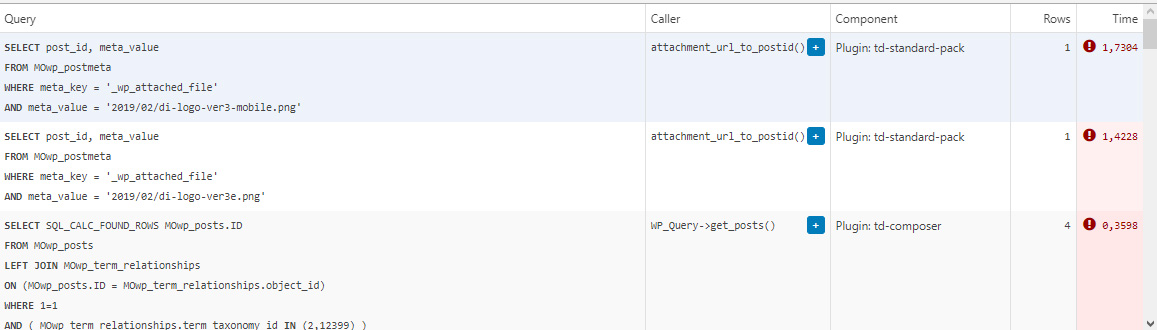
This morning I managed to patch up the problem, it’s a crude solution but may help someone. In header template I found that it was loading the logos from
plugins/td-standard-pack/Newspaper/parts/header/header-menu-h1.php
(yours may be different of course)
There I simply removed the PHP block fetching the logos and hardcoded the HTML for the logos in. As soon as I did that, the SQL spike went away. So I’d say it’s a bug, or inefficient code at least.
To be clear, we’re running the latest versions of WP, PHP, MySQL, the theme & plugins, all on a solid VPS. Yes there is quite a bit of SQL load, we’re working to optimize it with new blocks and Cloud Templates, but this was something else. Could be related to the latest Standard Pack update, don’t know, team didn’t report it before.
-
This reply was modified 4 years by
menneskedyr.
 Rahul chauhan
While try to open any post on home page it shows:
wp_booster error:
td_api_base::mark_used_on_page : a component with the ID: single_template_2 is not set.
/home1/hindivib/public_html/wp-content/plugins/td-composer/legacy/common/wp_booster/td_api.php
Display backtrace
wp_booster error:
td_api_base::get_key : a component with the ID: single_template_2 Key: file is not set.
/home1/hindivib/public_html/wp-content/plugins/td-composer/legacy/common/wp_booster/td_api.php
Display backtrace
wp_booster error:
The path of the single_template_2 template not found. Did you disable a tagDiv plugin?
/home1/hindivib/public_html/wp-content/plugins/td-composer/legacy/common/wp_booster/td_api.php
Display backtrace
wp_booster error:
td_api_base::get_key : a component with the ID: single_template_2 Key: bg_use_featured_image_as_background is not set.
/home1/hindivib/public_html/wp-content/plugins/td-composer/legacy/common/wp_booster/td_api.php
Display backtrace
Bettina Hello!
This issue has been discussed already here: https://forum.tagdiv.com/topic/td-composer-creates-27-slow-db-queries-on-every-page-load/
I recommend you to have the latest version of the PHP, WordPress, theme and plugins(11.3.1).
Thank you!
 srpskiposlovniimenik
Theme is broke again from no reason, homepage and category is ok and mobile too but article page showing me error with td composer a try to reinstall but still is error here 
 Bway83
My mobile site isn’t showing up properly. I keep getting an error Warning: Invalid argument supplied for foreach() in /home/cfkqq1oxic00/public_html/wp-content/plugins/td-composer/includes/tdc_mapper.php on line 42
Please help. website : http://www.waytoparentmagazine.com
Anamaria Hi,
If you’re seeing only NAVER please make this adjustment in the tagDiv Composer plugin -> wp-content/plugins/td-composer/legacy/common/wp_booster/td_first_install.php
=> https://www.screencast.com/t/yO3iU8E5JhH
Then hit a save in the theme panel and then revert the code back to the original, this will make the social icons appear properly again -> https://forum.tagdiv.com/design-post-pages-using-default-templates/.
If you don’t have success you can send us an email at contact@tagdiv.com and provide
– wp-admin URL and credentials
– cPanel URL and credentials
We will fix the problem. Include a link to this topic in the email.
Let me know the results!
Thank you!
 Philwat
Hi,
My website theme was on 11.2 version, after update it with 11.3.1, many errors appeared.
Rollback with old version stable for my site not change anything.
In panel theme i cannot see header style, top bar…
Result: no logo, no footer, all settings are lost
In post settings, i see only one default post template, so the result is, where are disappears my features, result:
https://www.australien-backpackersguide.com/australien-blog/
Other result: https://www.australien-backpackersguide.com/unglaubliche-koala-geschichten/
wp_booster error:
td_api_base::mark_used_on_page : a component with the ID: single_template_3 is not set.
/var/www/clients/client1/web3/web/wp-content/plugins/td-composer/legacy/common/wp_booster/td_api.php
with a button display backtrace
I have two others website with same theme, same features etc and i make an update on one of it and there are no problems.
Please i need support, investigate, i can create credentials, how do you proceed in this case ?
Regards.
Tom C the directory is something like: td-composer/legacy/Newspaper/parts/menu-mobile.php
 rahulroushan
 I am facing the same issue and I’ve no luck. Emails to contact@tagdiv.com are pending too. Could you let me know which plugins you enabled network wide? Currently everything is working fine for me on desktop, but I get this error on mobile devices with mobile plugin on (pasting it here to ask if you were getting similar error):
Critical error:
require_once(/var/www/html/site/public_html/wp-content/themes/themes/Newspaper/tagdiv-deploy-mode.php): Failed to open stream: No such file or directory in on line 11 /var/www/html/site/public_html/wp-content/plugins/td-composer/mobile/functions.php
Fatal error
: Uncaught Error: Failed opening required ‘/var/www/html/site/public_html/wp-content/themes/themes/Newspaper/tagdiv-deploy-mode.php’ (include_path=’.:/usr/share/php’) in /var/www/html/site/public_html/wp-content/plugins/td-composer/mobile/functions.php:11
Stack trace:
#0 /var/www/html/site/public_html/wp-settings.php(546): include()
#1 /var/www/html/site/public_html/wp-config.php(110): require_once(‘/var/www/html/s…’)
#2 /var/www/html/site/public_html/wp-load.php(50): require_once(‘/var/www/html/s…’)
#3 /var/www/html/site/public_html/wp-blog-header.php(13): require_once(‘/var/www/html/s…’)
#4 /var/www/html/site/public_html/index.php(6): require(‘/var/www/html/s…’)
#5 {main}
thrown in /var/www/html/site/public_html/wp-content/plugins/td-composer/mobile/functions.php on line 11
 mattemkadia
 Here are the three warnings which are being logged with trying to edit a page (load the composer).
Notice: jQuery.fn.load() is deprecated
Theme: Newspaper
Location: /wp-content/themes/newspaper/js/tagdiv_theme.min.js
Notice: jQuery.fn.load() is deprecated
Plugin: tagDiv Composer
Location: /wp-content/plugins/td-composer/assets/js/js_files_for_wp_admin.min.js
Notice: jQuery.fn.load() is deprecated
Plugin: tagDiv Composer
Location: /wp-content/plugins/td-composer/assets/js/js_files_for_wrapper.min.js



