
No search results were found in Documentation!
 ukume
ukumeHello,
I’m using Newspaper Theme and I’ve created a custom taxonomy called “Especial” to group special content (like Halloween or Christmas).
I’d like to assign an image to each taxonomy (for example, a representative image for “Halloween”, “Christmas”, etc.) and display it in the taxonomy block (e.g. tdb_category_list or similar).
I’m using Toolset to manage the custom taxonomies, but Newspaper doesn’t seem to recognize any image field by default.
My questions are:
Does Newspaper have a built-in field or recommended method to assign an image to a taxonomy term?
If not, what’s the best way to register and display it (via custom field, ACF, or Toolset)?
Which field slug or meta key should I use so the theme recognizes it automatically in the block?
 Anamaria
 Hello,
If the toolset types is a plugin, then this plugin is not tested with the theme.
Thank you!
 hdtit
hdtitHello,
I try to use Newspaper theme with Toolset types. Is this already testet / possible?
I found in my test environment that in new posts the post image seems to be displayed by default?
I want to get rid of this. In my production environment the post image is not shown by default.
 ChildhoodBiz
Hi,
on my website the search does not find posts from my custom post types. I use Toolset to create the CPTs and Relevannsi for the search. The CPT is activated for search in the settings. So, I think I have to configure the search result page differently. Any hints? Would be great!
E.g.: https://www.happybaby.de/search/Heinsberg/
Kinr regards, Martin
 Bettina
 Hello!
Please note that Toolset plugin is not tested with our theme.
It’s possible to be a plugin conflict there, but you can make a test on a test page.
Thank you for understanding!
ChildhoodBizHi,
Superbug question: is Toolset compatible to the new custom post type functionality?
 tomjose
 I have created Slider Advertisement custom post using Toolset Plugin. Please help me to show the number of visitors on the page and Slider Advertisement in the admin side. Currently post view count is display in admin side and also i nedd view count display in pages and Slider Advertisement.
Anamaria Hello,
It seems that this error is the cause that the fonts are no longer in that place => https://i.imgur.com/Xz0FDqL.png also, the error toolset comes from a plugin that are you using, most probably this is a conflict with your cache plugin, here is a topic with a similar case like your https://toolset.com/forums/topic/uncaught-referenceerror-toolsetcommones-is-not-defined/
Thank you!
 kevinsikora
 I’m having issues with maps plugins in this theme. I tried Toolset and GeoMyWP. With both plugins, the maps load, but if you try to zoom in or out, the map doesn’t update. It just goes “blank.” It looks like there is an issue with Newspaper’s JavaScript. I haven’t tried to track it down yet with the latest version of it.
ChildhoodBiz Hi, thanks for this fix. Looking at the css code I assume that the post date will not displayed anymore on ALL posts, right? But in my case I just need it for the custom post types, not the wordpress regular posts.
The more, I assume that it does not need to be a special Toolset fix. I just use it to create CPTs as any other tool can do so or as it can get done by some manual plugin code.
I would suggest that in the theme panel’s CPT section there should be a selector to decide on CPT by CPT if I want to display the date or not. If this can get integrated in Newspaper – great!
 mrpuyal
i create custom types and custom fields via acf and toolset plugins. the elements not showing td composer or not support newspaper themes.
newspaper theme is made for the news. not for movie are movie review schema types. google currently prefers schema websites. But could not create custom types or custom fields with tagdiv.Does not support 3rd party plugins such as acf or toolset.
tagdiv developers have been offering all the special features too late.This is very unfortunate.
tagdiv has created unique plugins for everything. tagdiv has created unique plugins for everything except schema and custom types or fields. I am a movie reviewer. I could not give Google the correct schema data.
We have to wait for the tagdiv update for everything. We could not use the 3rd part page builder or schema app properly.
 Calin
Calin Hi kalimbatabs,
Unfortunately for the moment there is no system and function in our theme to count the custom post types made by authors, for the moment only the post are counted. This can be done only with custom work, if you want you can try these suggestions from these articles:
-> https://toolset.com/forums/topic/get-number-of-custom-post-type-per-author/
-> https://wordpress.stackexchange.com/questions/278533/custom-post-type-author-not-associating-user-post-count-is-0-api-doesnt-ret
Thank you!
 Frydenborg
I have imported newspaper header, it is 1400px width but I can figure out to change it to 1200.
But I create pages, but with TC composer and with WordPress blocks (for my toolset output) and they do not have the same width as the Newspaper header. Is there a way I can set page width so they automatically have the same width as the header?
 behappy
 Hi again Calin,
What about security? Even after upgrading to Newspaper X (following your steps), WP says we are still using WP Bakery 5.2.1 while the latest and updated version is 6.1.
Our main objective while upgrading is to improve security and solve that issues using theme’s latest version available.
May we rest thinking our site is safe and all plugins are up-to-date with Newspaper X?
Thanks.
—–
WP Bakery
Installed version: 5.2.1
Latest available version: 6.1
13.12.2019 – ver 6.1.0
– Added: Catalan, Ukrainian, Hungarian translations
– Update: WordPress 5.3 Compatibility
– Update: FontAwesome update to 5.10.2
– Update: loop attribute not found rows and order by relevance
– Update: PrettyPhoto https support
– Fix: RTL controls on backend
– Fix: RTL column reverse
– Fix: Disabled post revisions desing options
– Fix: Save row/section as template
– Fix: HoverBox improvements
– Remove: IE9 support
17.07.2019 – ver 6.0.5
– Fix: LESS vendor folder available
– Fix: All Media in Text Block works properly
15.07.2019 – ver 6.0.4
– Fix: Element API works properly for 3rd party elements
– Fix: Post grid filter displayed properly
– Fix: Custom CSS editor does not remove “\”
– Fix: Directory name typo for Instagram filter files corrected
– Fix: Templates import API does work correctly
– Fix: Row design options settings for elements in templates works properly
– Fix: WooCommerce cart element works properly
– Fix: Option “Save as a template” for a row is available
– Fix: Elements edit form displayed correctly
– Fix: Warning message for PHP function htmlspecialchars
– Fix: Custom post types taxonomies work in Post Grid element
– Fix: Revolution Slider output content properly
31.05.2019 – ver 6.0.3
– Update: Init action priority is changed from 9 to 11
– Update: Allow return in shortcode templates
– Update: Coding standards improvements
– Fix: Param Group clone
– Fix: Checkbox value display in edit form
– Fix: Loop attribute tax_query render
– Fix: Attach image typo
– Fix: Removed notice when shortcode template file missing
– Fix: Map meta cap warning on custom post types
17.05.2019 – ver 6.0.2
– Fix: Container elements controls in Backend Editor
15.05.2019 – ver 6.0.1
– Fix: Tour element class error
15.05.2019 – ver 6.0
– Update: Compliance with coding standards
– Update: jQuery Waypoints update to the latest version
– Update: Fallback for previews added
– Fix: Pageable container autoplay
– Fix: Hover box does not flip on iOS devices
– Fix: Responsive media queries work properly
– Fix: WooCommerce products pages in preview mode
– Fix: Data source for Post Grid works with correct taxonomies
– Fix: Design options for elements work in preview mode
– Fix: The Editor got broken after adding many images
– Fix: The posts source got broken in Post Grid after importing data
13.02.2019 – ver 5.7
– Update: Compatibility with PHP 7.3
– Fix: WooCommerce corrected editable role
– Fix: Page preview styles independent from view page
27.11.2018 – ver 5.6
– Update: Compatibility with WordPress 5.0
11.10.2018 – ver 5.5.5
– Fix: SSL issues for fonts
– Fix: Gutenberg improvements
08.09.2018 – ver 5.5.4
– Fix: Link selector works properly in Backend editor
07.09.2018 – ver 5.5.3
– Added: RTL control toggle added for columns
– Fix: Accordion control styles display properly in Role Manager settings
– Fix: Plugin update notice works properly
– Fix: RTL works properly with full screen rows
– Fix: Single Image elements are counted into Yoast SEO sitemap
– Fix: Post grid id applied properly to reduce number of records in wp_postmeta
– Fix: Exception works properly in Post Grid
– Fix: SSL timeout on activation
– Fix: Link selector works properly in Frontend and Backend editors
– Fix: Simplified controls in Design Options save border color
– Fix: Empty space in class name removed for inner column
– Fix: Post grid display proper number of posts specified
27.06.2018 – ver 5.5.2
– Fix: “WPBMap Uncaught Exception” for modifyParam API method
22.06.2018 – ver 5.5.1
– Fix: “WPBMap Uncaught Exception” for dropParam and addParam API methods
15.06.2018 – ver 5.5
– Added: Undo/Redo operations available for the editor actions
– Added: Gutenberg compatibility elements to insert Gutenberg blocks in the WPBakery layout
– Added: 5 columns grid layout for rows
– Added: RTL support for the full width rows
– Added: Settings to enable/disable Gutenberg plugin
– API Added: vc_shortcode_prepare_atts to update prepared shortcode attributes
– API Added: vc_map_get_attributes to add new, modify all compiled attributes
– API Added: vc_basic_grid_filter_query_filters to modify custom query in posts grid.
– API Added: vc_is_valid_post_type_be to disable/enable Backend Editor for several post type
– API Added: vc_show_button_fe to show Edit With WPB in Frontend Editor
– API Update: vc_shortcode_output added shortcode tag in attributes
– Update: Order by “include” added to WooCommerce
– Update: WooCommerce elements default order/orderby synchronized
– Update: Isotope/Masonry library version update
– Update: Performance improvements for the Frontend Editor loading
– Update: Performance improvements for the Editor Save
– Update: Performance improvements for the Posts Grid loading
– Update: WPML compatibility for posts/front pages
– Update: RevSlider compatibility improvements
– Update: Ninja Forms compatibility improvements
– Update: ChartJS library update
– Update: vc_wpautop, vc_wpnop versions updated
– Fix: PHP 7.2 compatibility improvements
– Fix: Post Slider custom links work properly
– Fix: Extra p tags in grid removed
– Fix: Blog page design options work properly
– Fix: WPML single image translation available
– Fix: HoverBox element on iOS and Firefox improvements
– Fix: Builder.parse in frontend
– Fix: Custom OnClick action in buttons for Posts Grids
– Fix: Shortcode attributes update by reference inside filter vc_shortcode_output
08.03.2018 – ver 5.4.7
– Fix: Custom shortcode mapping
07.03.2018 – ver 5.4.6
– Update: Compatibility with PHP 7.2 added
– Update: Compatibility filters for WP Toolset added
– Update: French translation updated
– Update: Persian translation updated
24.11.2017 – ver 5.4.5
– Fix: Firefox tinymce and vc_link issue
– Fix: WooCommerce vendor categories list
16.11.2017 – ver 5.4.4
– Fix: TinyMCE Saves linebreaks
15.11.2017 – ver 5.4.3
– Added: Shortcode support in raw_html
– Added: More filters for vc_btn shortcode
– Update: Shortcode automapper admin content escaping
– Fix: Improve WordPress 4.9 tinyMCE support
– Compatibility: with WordPress 4.9
– Compatibility: with WP Tool Set plugin
13.10.2017 – ver 5.4.2
– Fix: Updater URL typo
12.10.2017 – ver 5.4.1
– Fix: Plugin zip size
12.10.2017 – ver 5.4
– Update: WPBakery Page Builder logo update
– Update: Navigation bar color schema in Backend and Grid Builder
– Update: TweetMe text update with WPBakery data
– Update: FontAwesome library update
– Update: PO/MO files with new strings
– Fix: Param saving dependant on checkbox
– Fix: Extra javascript loading with Yoast SEO activated
– Fix: Double shortcode parsing in WPB field
– Fix: Checkbox param value repeat inside param group
– Fix: Fixed encodeUriComponent
– Fix: Device icons for column responsiveness
– Fix: WPML vendor
– Fix: ZigZag separator display on Firefox
– Fix: Element presets category merge
15.09.2017 – ver 5.3
– Update: WordPress native color interface
– Update: New interface icons
– Update: New SVG element icons
– Update: FontAwesome library is updated
– Update: With new color scheme comes new name WPBakery Page Builder
03.08.2017 – ver 5.2.1
Update: Function add_shortcode_param returned
Update: Function get_row_css_class returned
Update: Function wpb_map returned
Fix: std fixed for attribute types nested in a param group
Fix: vc_js error on frontend editor
Fix: Font dropdown in TinyMCE for WordPress 4.8.1
ChildhoodBiz Dear Vlad,
thanks for hinting at “check the plugins” (a standard…). I found out that “Toolset Blocks” does cause this issue. I also will call the support of Toolset to question if they know why the plugin breaks the “nextpage”-functionality…
 alimbolar
If I use Toolset for creating Custom Posts, would I be able to use your post templates?
Would I have to create new designs myself? If yes, what exactly would I need to do for new designs for custom posts?
Please advise.
Regards,
Alim
Calin Hi,
Unfortunately, Toolset, has not been tested with our theme and therefore, we cannot say for sure if it will work or not as expected with the theme, sorry! Also, we cannot provide support for untested tools/plugins.
Our theme use the get_content() and this can be found in each loop-single-n.pxp -> https://i.imgur.com/adgZSWk.png -> https://i.imgur.com/CrQG17K.png
Thank you!
FrydenborgIn order to get Toolset work with Newspaper, I need to setup a child theme where the content is output by the_content() function. The reason is Newspaper theme uses non-standard methods to output post content in its PHP templates (i.e. it does not output the content using the WordPress the_content() function).
I have looked the child theme guide and the files you mention https://forum.tagdiv.com/the-child-theme-support-tutorial/ but I cannot in the single.php file (or any of the other new single-timplates 1-10) figure out which parts to erase and where to insert the_content function. Can you point me to the right direction?
 Duvelix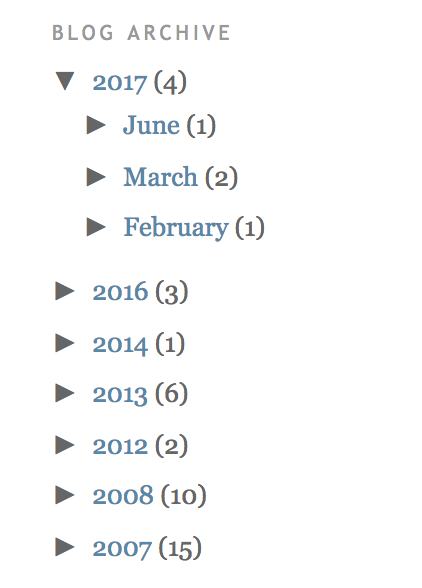
Hello, I want to make a archive list (like upper image) in my sidebar.
But I can’t find option about it. How can I make it?
Calin Hi,
Unfortunately, the Toolset plugin has not been tested with our theme and therefore, we cannot say for sure if it will work or not as expected with the theme, sorry! Also, we cannot provide support for untested plugins.
This is our list with tested plugins with our theme -> https://www.screencast.com/t/cmPkh9jba4sZ
Thank you for your understanding!
 priyankpandey42
I’m using Newspaper theme with Toolset plugin. I use Toolset to create and display layputs in custom post types.
When I switch to default theme 2019 – I can see the layout I created is applied successfully and works as expected. But when I change it to newspaper no content is showing in frontend.
I contacted the support staff of the plugin and they said:
“This looks like your theme is not compatible with Toolset Layouts, you need to either switch to the recommended themes that are already compatible with Layouts:
=> https://toolset.com/documentation/recommended-themes/
Or
You need to make your theme Layouts compatible by adjusting your theme template source code:
=> https://toolset.com/documentation/user-guides/develop-layouts-based-themes/”
They said “You need to use the following function for Layouts render: the_ddlayout();”
Please help to make the theme compatible with the plugin.
 BrunoJacinto
Hello,
I’ve got a site using some heavy custom page via toolset. For that I use a child theme, and to get the body rendered I use on that child theme a single php for each custom type to get that working.
Since the last the render of the mobile stoped working, but the normal version still is rendered. Any ideas? An example.
 donday
 Hi –
That does not work. I’m trying to insert a shortcode from Toolset. The code works great in the existing widget, but when added via the method above it does not display
Any known issues with interaction between Toolset and your new cloud templates?
For reference, this is the tag I’m using [wpv-view name=”post-page-tease”]
 admindoxa
Hello All,
I am creating a membership site with toolset Acces.. i would like to know, how i can hide menus that i made for registered member
i tried a plugin named “Nav Menu Roles” (https://id.wordpress.org/plugins/nav-menu-roles/), but your theme seems override it
Hope you have solution
Thanks
 Bogdan B.
 Hello,
Sorry but we have not tested any toolset with our theme so we cannot offer any insight into what may be wrong. Maybe some of our users can help if they have experience with the “Toolset” plugin
Thank you!



