- NewsmagHow to update a plugin
- NewspaperHow to update a plugin
- NewsmagHow to update the theme
- NewsmagHow to update the WPBakery plugin
- NewspaperHow to update the WPBakery Page Builder plugin
- NewspaperHow to Update the Newspaper Theme
- Apitd_api_top_bar_template::update_key
- Apitd_api_top_bar_template::update
- Apitd_api_single_template::update_key
- Apitd_api_single_template::update
- Apitd_api_footer_template::update_key
- Apitd_api_footer_template::update
- Apitd_api_smart_list::update_key
- Apitd_api_smart_list::update
- Apitd_api_thumb::update_key
- Apitd_api_thumb::update
- Apitd_api_category_top_posts_style::update_key
- Apitd_api_category_top_posts_style::update
- Apitd_api_category_template::update_key
- Apitd_api_category_template::update
 Vibrancy Marketing
Dear Tagdiv Support,
Thank you for receiving this query. I am writing with regards to the functionality of the Ajax View Counter.
From my understanding, when each user loads a particular post on the website, the ajax view counter updates this figure, and it becomes a post meta data? This data is then relayed to any module that has “7 days trending sorting” selected.
What I’d like to know is which specific files are associated with this view counter and 7 days trending sorting function, and how does it work? I am not asking for a customisation services but rather I’d like to know more about how it works.
Our company is developing a mobile reader application that would require this functionality.
Thank you for your time!
WWH
 luxechicago
 Hi Catalin-
Thank you for your response. We can see that there is a height restriction of 200 pixels. However, we did not add a height restriction. We have specified a full size image, as is our standard process for all pages. We noticed the height restriction was automatically added to the underlying code. We noticed this after the most recent update of Newspaper. It appears to be a dynamic change. Is there something we can do to change it back globally. Do you think it’s related to your most recent update?
BTW…when we check the images on pages they are designated as “full”.
Lynna
 Amit
Amit Guide updated: http://bit.ly/2rqWFvM
 Simion C.
 Hi,
The only sticky ad bar plugin that I found has not been updated for 2 years. A lot has changed in WordPress since then, and it may not work properly.
If you could provide more details about what exactly you are trying to do, I will try to give you a solution.
The theme ad capabilities can be seen in the documentation
– https://forum.tagdiv.com/header-ads-adsense/
If you want different and more options regarding ads, you can try the Adrotate plugin. Some users seem to use this plugin with good results.
Thanks
Simion C. Hi,
You could use the Image box element
https://demo.tagdiv.com/newspaper/image-box/
At the moment there is no similar gallery element created specifically for this purpose. More elements will be added to the tagDiv composer in future updates.
Or you could try and search for a gallery plugin, maybe you can find one that you can use in the meantime and works properly with the theme.
Thanks
 Erythros
Since the last update, there’s a new column in the admin dashboard for posts showing total view counts. Is it possible to hide this, for everyone, by default ? Example: https://i.stack.imgur.com/BLXVW.png
 barelliluca
Hi TagDiv,
I’ve been trying to activate your theme v8 but when I click on (both) activate buttons it does nothing.
EDIT: now the activate theme page has changed. It’s no more a plain html one but has got a nice facelift. Trying to paste the code again.
UPDATE: it seems that clearing caches many times did solve this issue. Maybe the JS file did not get updated and this was the issue. Sorry for the alarm but I will keep this post in case others might need this easy fix.
Best,
– Luca
 Bogdan B.
 Hello,
This will have to be updated by us in the coming update. For the moment you can leave it as it is, but we will most likely release an update for the social counter plugin to move over to the new api version.
Thank you!
Bogdan B. Hi,
Sorry but a link from 2014 will most likely not work anymore. The solution is invalid as there were numerous updates since then and there is a high change the code is very different. Please check the year of the topic beforehand and if it;s older than 1 year, the solution provided could possibly not work anymore.
The theme name is found here: https://www.screencast.com/t/scqmdS7H9K and you have to rename the folder of the theme.
Thank you!
Bogdan B. Hello,
As @Satwik mentions, you do not have to buy anything. You already have full access to the plugin. There is no activation code we can provide on the bundled version. These versions do not get automatic updates from the plugin author. This is mentioned here:
https://wpbakery.atlassian.net/wiki/pages/viewpage.action?pageId=524337
This is a limitation created by the plugin author, not by us.
Thank you!
Bogdan B
Simion C. Hi,
The latest version of the theme is Newspaper 8
– https://themeforest.net/item/newspaper/5489609
The new front-end page editor, the tagDiv composer is included in the theme package, as of version 8.
Here is a guide to help you with the theme update process
– https://forum.tagdiv.com/how-to-update-the-theme-2/
Also update all the bundled plugins, provided in the theme.
More information about the tagDiv composer here
– https://forum.tagdiv.com/tagdiv-composer-tutorial/
– https://forum.tagdiv.com/visual-composer-tagdiv-composer-transition/
Thanks
 Catalin
 Hello rgomez,
Please keep in mind that we provide theme support but we cannot make your website from scratch. Always, for each theme update, you should make a full backup to your database. For more information about our support policy, please check our documentation here -> https://forum.tagdiv.com/support-policy-2/ We recommend to do the theme update via FTP way according to our documentation here -> https://forum.tagdiv.com/install-via-ftp/ because this is the surest method in this regard.
Thanks for your understanding!
Catalin Hello pdamon,
Notice that you can automatically update your theme using the Envato Market plugin, according to our documentation here -> https://forum.tagdiv.com/how-to-update-the-theme-2/ but we do not recommend to do this. Our recommended way for theme installing is via FTP way because this is the surest method in this regard and in that way you will avoid eventual problems which might appear.
Thanks for your understanding!
Bogdan B. Hello
If you plan on using the tagdiv composer, then yes unfortunately. Visual composer was never intended to be used on poses together with our theme. You cna still use visual composer if you want to , but please note that we will no longer add any new features to it. We will still provide updates but the new features we will add in future updates will be for the tagdiv composer exclusively.
Thank you!
 generics
We have been informed by Facebook that we (via the Newspaper theme/Social Counter plugin) access Facebook via the Graph v2.3 API, which will reach the end of its lifetime in July, and that we should move on to Graph API v2.4. Is there something we can do or is an update of the Theme/Plugin required?
 Sarfaraz
 Thanks Simon for replying.
I will wait till you update the theme with RTL support.
I have shown the theme to the client and he says it was okay as far as posts are concerned but in future we may land in trouble.
So I am desperately waiting for you guys to come up with RTL support.
I love this theme soo much. I will wait.
Thanks and regards
Catalin Hello David Henry,
If you want to make some changes to your header style you should use the child theme because you will not lose this customization on the next update. For more information about child theme support, please check here -> https://forum.tagdiv.com/the-child-theme-support-tutorial/
Thanks for your message!
Simion C. Hi,
There is no option to change the breaking point for the mobile menu to display.This is deeply implemented in the theme, and it would not be easy to do it. If there would be an easy solution, I happily would give it to you.
If you have many menu items that is how they will be displayed in these conditions. There simply is no space to show them all on a single line is smaller monitors.
Maybe a feature that will allow modifications as to when the mobile menu will be displayed, will be added in future updates.
I cannot seem to be able too access your website at the moment
– https://www.screencast.com/t/P4w8BeiNYw
We can try to find a way to display the menu items differently. But this may not work if you decide to add more in the future.
Thanks
 paulberrow
 Lucian, could you please update this link with screenshot?
 Satwik
 You don’t have to activate the Visual Composer plugin, it’s already activated. Ignore the activation message. It will appear for everyone.
How to update Visual Composer plugin
https://forum.tagdiv.com/how-to-update-visual-composer-plugin/
 diablue
 Hi Bogdan, thank you for your assistance. I’ll be looking forward to any updates on the matter.
 trcanada
Hi, i am using your theme for our website.
However, when i make page, i do not see tagDiv composer button..
it only got classic mode button.
Also, i tried to search tagDiv plugin from wordpress dashboard plugin page, couldnt find it.
Can you let me know how to use tagDiv?
I think we have Newspaper 7, it says theme version 7.8
if there is an updates, how can we do it? i’ve updated everything on my dashboard.
Thanks.
 rea-secret
 Yes, I’ve tested default theme and same error is showing. You’re right it looks like wordpress error. We should wait an update. Maybe they’ll fix. Thanks for your replies…
 laptinek
 Hi,
problem solved: updated the theme via FTP
Thanks for your help!
 Style31
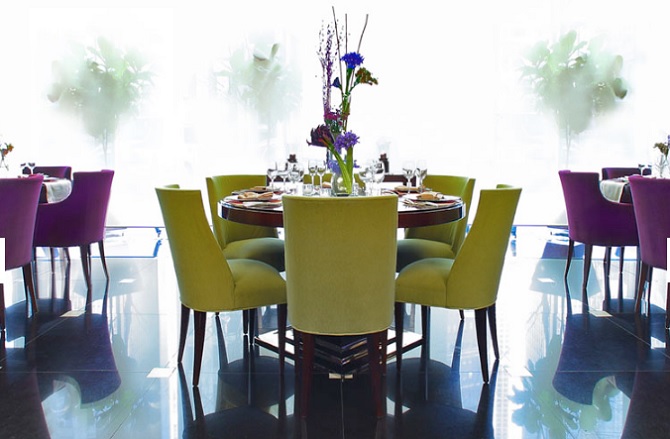
The recent update of Newspaper changed EVERY ONE OF OUR IMAGES on our “Pages” to have a image height restriction = 200 pixels (which is way too short…i.e. we don’t want a height limitation….or at least not one this short)
Since all our images are sized similar to “Posts”, this is creating a problem across our entire website, i.e. all the “Page” images are too short (https://StyleChicago.com)
Can you help us figure out how to change this (to get rid of pixel height limitation)
Page Example #1:
PAGE:
https://stylechicago.com/cafe-des-architectes-sofitel-chicago/ (source image is taller similar to our “Posts”)
UNDERLYING IMAGE URL:
https://s3.amazonaws.com/luxechicago/wp-content/uploads/2016/11/23114858/CafeDesArchitectes_DiningRoom_670x439.jpg
Page Example #2:
PAGE: https://stylechicago.com/city-winery-chicago/
UNDERLYING IMAGE: https://s3.amazonaws.com/luxechicago/wp-content/uploads/2017/06/05135653/CityWineryChicago_Exterior_750x454.jpg
Both of the images are between 400 and 500 pixels tall….but Newspaper / Worpress appears to be restricting the “Page” image height to 200 pixels.
Thanks so much!
Jonathan & Lynna Smith
StyleChicago.com
admin@stylechicago.com
312.461.9500 (Lynna)
312.461.9400 (Jonathan)