- Apitd_api_top_bar_template::update_key
- Apitd_api_top_bar_template::update
- Apitd_api_single_template::update_key
- Apitd_api_single_template::update
- Apitd_api_footer_template::update_key
- Apitd_api_footer_template::update
- Apitd_api_smart_list::update_key
- Apitd_api_smart_list::update
- Apitd_api_thumb::update_key
- Apitd_api_thumb::update
- Apitd_api_category_top_posts_style::update_key
- Apitd_api_category_top_posts_style::update
- Apitd_api_category_template::update_key
- Apitd_api_category_template::update
- Apitd_api_module::update_key
- Apitd_api_module::update
- Apitd_api_block::update_key
- Apitd_api_block::update
- Apitd_api_header_style::update_key
- Apitd_api_header_style::update
 Spotter2004
 Thanks for your answer
Is there any possibility that this can be added in a future update, that people can choose how many levels of breadcrumb will be shown on their site???
 Bogdan B.
 Well the code got changed so your customization is no longer correct. This is the problem with altering the theme files. Updating a theme means replacing the code. Code gets updated and modifications were made on the old code.
If you want to have a different menu on mobile phones, you can simply use the mobile theme plugin now and you will already have a custom menu for mobile phones.
Thank you!
 Catalin
 Hello troypener,
First of all, please ensure that you have respected our list of requirements for our product, like this -> https://forum.tagdiv.com/requirements-for-newspaper/ Also, try to update the theme to the latest version of it and also, all the required plugins which come bundled with the theme, clear all your caches and test it again. Basically, the latest Fatal error is happening due to the old version of Visual Composer. Try to update it and check the results.
Please try to clear this and re-install the latest version of the theme via FTP because this is the surest method in this regard. For more information about this, consult here -> https://forum.tagdiv.com/install-via-ftp/
Hope this helps and let us know how it goes!
Thanks for your understanding!
 simchris
 What plugin are you trying to install/update ?
 zzboba
Hello,
I upgraded to 7.5 and now the big grid (I’m using big grid 5) has a background covering the full width.
(I’m using the boxed version for my page)
In the HTML it seems to be here, the width and padding are set dynamic (in this case width = 1781px, padding left/right = 332.5):
<div class=”vc_row wpb_row td-pb-row import_video_slider_bg” data-vc-full-width=”true” data-vc-full-width-init=”true” style=”position: relative; left: -332.5px; box-sizing: border-box; width: 1781px; padding-left: 332.5px; padding-right: 332.5px;”>
Any possibility that the big grid’s size is fixed and background will not stretch beyond the website’s bounds?
Thanks,
Jan
 Vegan Flavour
 Hi Catalin,
Thank you for the update! The solution for #3 works well.
For #2 though, I am not using the category page templates. I created a blank new page and inserted a text block (for the category name) and block #5 for the posts. Whether I add the banner to these pages or a post, it doesn’t full stretch.
 meceware
Hi,
First of all, great theme.
Secondly, I would like to suggest my humble opinion and questions in these matters:
1. You guys should definitely consider adding a swipe image effect on lightbox galleries. Arrows are so old these days. Even mobile lightbox is still using arrows.(such as https://github.com/dimsemenov/PhotoSwipe)
Is there a way to adapt such effect using theme hooks or API?
2. Please add sidebar menu on desktops as well, for an option.
2. Please add more developer controls (hooks). For example it would be great if you could add an action right under td-outer-wrap in header.php. Interestingly, you added after header action but no before header action.
Another example here is, I want to add an icon right next to search bar, and I can’t because there is no hook there. I think developer controls are important in a theme.
Which comes to my question.
I want to add content right before header, without modifying the actual theme code. I don’t want to copy and change header.php, because every time theme updates I would need to check the header code if it’s changed.
How can I add a content before header?
Thank you,
Catalin Hello all,
The latest fully compatible version of Visual Composer come bundled with the latest version of the theme. Please consult here -> https://forum.tagdiv.com/how-to-update-visual-composer-plugin/
Thanks for the message!
Bogdan B. Hello,
In order to modify the theme thumbs you will have to use the theme api system and you will require coding skills to do it: https://forum.tagdiv.com/td_api_thumbupdate/
Thank you!
 MESOTU
Hi team,
I’m trying to update Newspaper 7.3 to 7.5. I deleted the Newspaper 7.3 folder from my cPanel in my hosting account due to an error with the WP interface.
I was, however, able to upload 7.5 using the WP theme uploader, but when it uploaded, it broke my theme. I wasn’t even able to access my WP dashboard. Just a white screen.
I was fortunately able to quickly reinstall my backup Newspaper 7.3 to keep my site running and also get my WP dashboard back.
Questions:
Any ideas about why this might be happening? Or other suggestions? Perhaps I should upload the theme directly to my hosting account? Would that be any different?
Open to suggestions. Thanks guys.
Cheers
Bogdan B. Please update your version of visual composer by following this guide: https://forum.tagdiv.com/how-to-update-visual-composer-plugin/ and remove any custom js you may have on your site. Remove any at all customization.
I;m not sure why you get the get_header error on the twentysixteen theme path though.
Where are you getting these errors? please provide the test you are running
Thank you!
Catalin Hello votranhtuhi,
Now, you should use the Visual Composer 4.12.1 because the 5 version of Visual Composer has not been tested yet. We will consider doing that in our future updates. Until this, you should use the 4.12.1 version. Clear all your caches and check the results. Notice that the Widgetised sidebar is fully tested with the theme and until now we do not have any bad reports in this regard.
Thanks for the message!
Catalin Hello crika1,
Unfortunately, our theme does not have any such an option that allows you a way to sort your posts by the last update. The theme only has latest articles created and not latest articles edited (update), sorry! If you want to develop this regard, you should do some additional customizations through the code in order to achieve best results. Notice that you should have some coding skills to do that, otherwise, if you are not aware of the steps which are needed to take in this regard, please consider hiring a freelancer/developer to help you because we cannot provide custom work at the moment, sorry! Another alternative for you would be to find some plugins which have this functionality and test them with the theme.
Hope this helps!
Thanks for the message!
 Daniele
 Thanks a lot for your help … once updated the plugin the theme now is working. I didnt know exactly which one was, because there were 4 updates to do, but it works immediately after that.
Daniel
Bogdan B. Hello,
If you read the very first part of the guide you mention you will see that the plugin does not require activation: http://screencast.com/t/RI1LwoYEKi
You update the plugin using the guide by disabling and deleting your current plugin and installing the one that is bundled with our theme. You will still see the activation message and the update message as the latest version of the plugin is not yet provided in the theme files. We will include it in the next theme update.
Thank you!
Bogdan B. Hi,
Well you did not mention if you updated the mobile theme plugin. The plugin will not update automatically. You have to disable and delete the plugin files from the plugins section of wordpress and then install it again from the main theme package you downloaded from envato (if you want to use the mobile theme plugins that is)
Thank you!
 nateb2127
 Hey Bogdan,
Any updates?
 cpndgn
Hi,
is there any other easy way to use child theme other than copying files in phppanel?
As I don’t have much experience in that I’m a little afraid to make changes there.
What settings change after the updates if I don’t use child theme?
Does it effect the whole site including contents?
Thanks a lot.
 usman
usman I guess updated visual composer plugin is not available yet.
 indiandtv
Hi Team,
Here is my website http://www.indiandtv.com
Please can you tell me how to update visual composer plugin, I did not find update option
Thanks in advance
 kobzeci
 I have the same issue but urls end with facebook.com and twitter.com
Updated the permalinks but still have a growing number of 404.
 christian
WP SUPERCACHE acts differently on mobile theme vs. desktop theme.
After one post update the mobile theme loads the page from cache in 1.4 seconds,
on desktop theme will rebuild the entire cache and load in ~8 seconds.
It’s a simulated large site with 15000 posts.
I know, it’s about WP SUPERCACHE but i’d be pleased if Newspaper theme can act like mobile theme, loading only new data without rebuilding entire page cache.
P.S. Can I please contact your team on another channel (mail, phone,…) for this and other collaboration problems?
I’m a WP developer from Romania and I have some ongoing projects.
Thank you in advance,
Cristian T.M.
 coskel
 UPDATE: I figured it out because I saw a post about installing the theme.
The fix:
In your plugins, the mobile theme installs as a PLUGIN, called tagDiv Mobile Theme.
Disable that plugin, and your site will become responsive and correctly display shortcodes, etc.
 crika1
 hi,
yes i know how to change to a different string but what i want is the latest article to be sorted by last update.
so for example if i have written an article 2 years ago, and i update the article with a few little extra information, that article will still not be shown under latest articles.
how can i change the sorting to include articles on last update?
kobzeciHi,
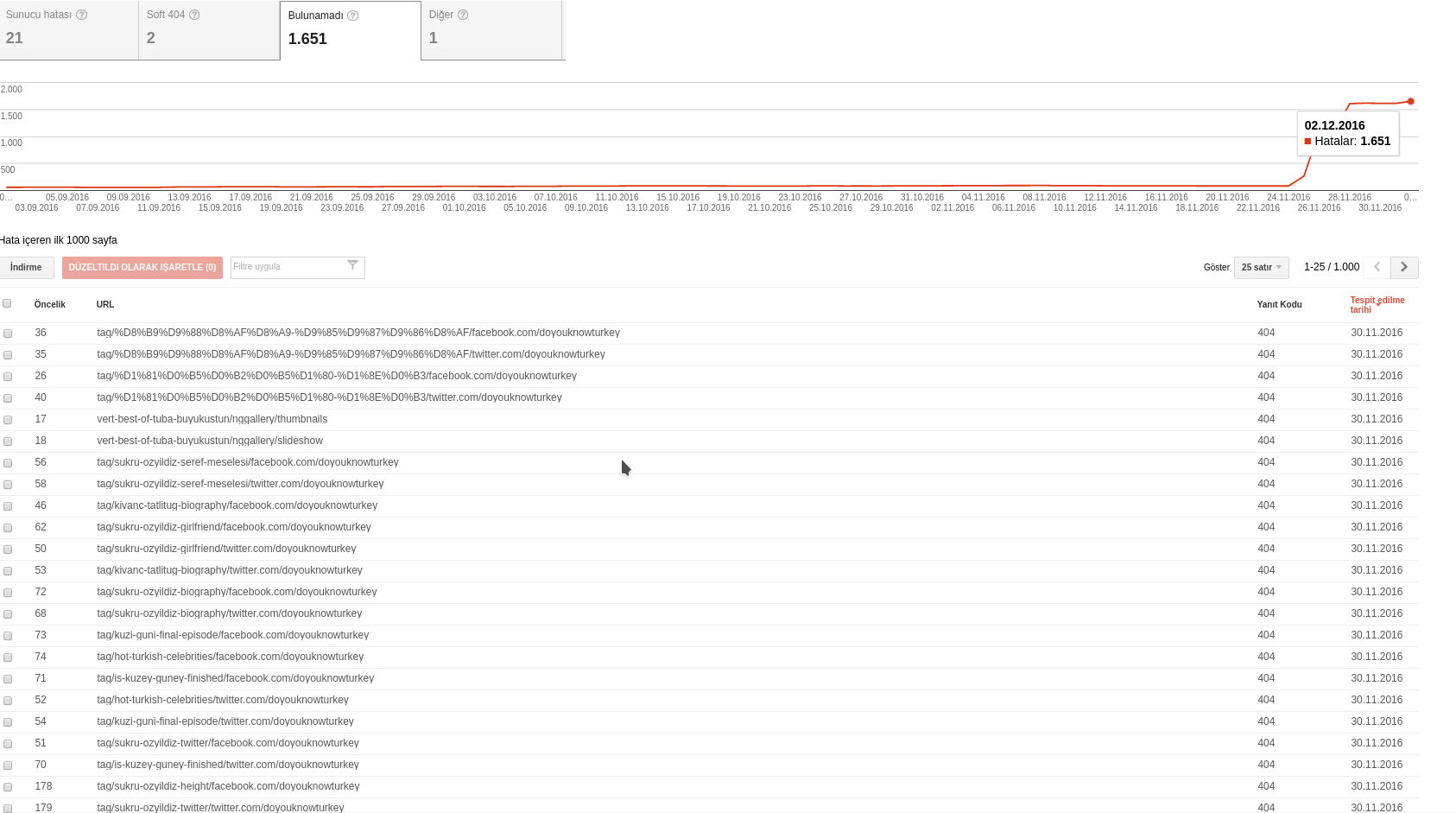
Last week i’ve installed Newsmag but i have lots of 404 error with some strance /facebook.com/sitename or twitter/sitename urls.
For example, the 404 given url is:
72
tag/sukru-ozyildiz-biography/facebook.com/doyouknowturkey which google search console says it has a 404 error upon crawling. I have not such urls in my site… The detail section says the following two pages linked to the url:
http://www.doyouknowturkey.com/tag/sukru-ozyildiz-biography
http://www.doyouknowturkey.com/tag/sukru-ozyildiz-biography/
no such urls in source code….
I’ve update the permalinks but i’m not sure it will restore the broken url&social structure. I had optimized the db after installation probably 25.11.2016