- NewsmagHow to update a plugin
- NewsmagHow to update the theme
- NewsmagHow to update the WPBakery plugin
- NewsmagCategory templates
- NewsmagWhat’s included in Newsmag theme package
- NewsmagAjax view count
- NewsmagSmart Lists
- NewsmagFeatured images
- NewsmagFeatured image or video
- NewsmagModal window
- NewsmagtagDiv slider gallery
- NewsmagVideo playlist
 Bogdan B.
 Hi,
Unfortunately we have no eta on this fix., Sorry. We added it to our list and we will fix it as soon as we can. Currently we are working on the next update and we will try to fix as many issues as we can. Hopefully we will be able to fix this as well.
Thank you for your understanding.
 richardgaspa
 Thanks for the information. I will wait for the next update of the theme. Now, at least I know how it works. Thanks.
 ben.hinc
Hello,
I’m trying to get our RSS feed to play nice with Google Play Newsstand which was just update for iOS, Android and released for the web.
In order to get Google to recognize an article’s “hero” image (their term), every featured image needs to have the class “type:primaryImage.”

Is there a tweak that can be made to the theme that will add this class to every featured image?
Thank you.
 simchris
 It came out Nov. 9, which was a really long time ago.
They will update the new version when tested as compatible, relatively bug free, and when they next update the theme. So make sure you have the email checkbox set in your ThemeForest account for when theme is updated.
The ‘free’ bundled version is only updated when theme is updated, not before.
(( I don’t work here. ))
simchris In my layouts, I make the home page sidebar a widget sidebar; then I use the normal appearance > widgets to put stuff in that sidebar on home page.
No need to get new version of Visual Composer just because there is an update.
Just ignore the update notice.
I have actually moved to the TD COmposer beta, as it’s simpler, more lightweight and doesn’t get pokey updates every 10 weeks.
simchris sticky post means the post that is ‘stuck’ at top of the forum every time you look at it
https://forum.tagdiv.com/topic/how-to-update-visual-composer/
REF:
Emil G
#34790
Jan 19, 2015 at 8:57 am
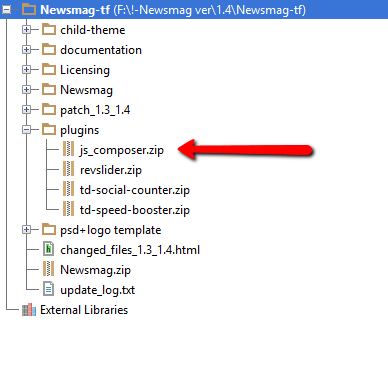
The Visual Composer plugin that comes with the theme is licensed to the theme, the license specifies that only we can provide the updates and you don’t have to buy it or register it. We provide updates on a regular basis, after we test the plugin for theme compatibility the plugin is included in the latest theme update, inside the Plugins folder:
https://forum.tagdiv.com/wp-content/uploads/2015/01/visualc_newsmag.png
Here is the guide on how to update the plugin – https://forum.tagdiv.com/how-to-update-visual-composer-plugin-wpbakery/
Conclusion – We’re testing the plugin latest version, if everything is ok we will include it in the next update and only then you can update the plugin by downloading the theme latest version and following the procedure presented in the plugin update guide.
Emil G.
 newsguru
My website does not this display new update instead it display old update after updating it with new and fresh content
 clasione
Hello,
I’ve been having trouble with Visual Composer, which is probably no surprise to anyone, it looks like it may require an update. I was able to find come coding fixes online which have improved the problems I am having…. But I am still not getting 100% fully functional and I figured I would register here and see if anyone can help me with a work-around, which may also help others.
I originally found some fixes online here:
https://wordpress.org/support/topic/visual-composer-is-not-working/
I spent sometime last evening and was able to improve the editor from this link.
But it is still not perfect. I think my ideal workaround would be finding someone who can actually share with me the shortcodes for the Newspaper style being used here as Magazine: http://demo.tagdiv.com/newspaper_magazine/
If someone has the shortcodes for this style and could share the entire block of code with me (the code that would appear in the BACKEND EDITOR I think I can get this done the old fashion way…
 Catalin
 Hello Mosamlife,
In a future update, it is possible but we cannot say for sure if it will get done in the next update because we have a big list of fixes, improvements, and suggestions to implement. It’s hard to filter them and select which one gets implemented now and which one gets postponed. The developers decide if it gets done or not, though. Until we can do it, you can use a plugin.
Thanks for your understanding!
 m0re
m0reHi,
I have a custom home page on morenews.pk, and in the right sidebar, I am unable to place widgets. From Visual Composer when I try to select the popular post widget, I can’t see it. However, there are few other native WordPress widgets, but any other widget that is created through a plugin does not come there. What is the way to bring any widget over there?
What are you releasing the new version of Newsmag since the Visual Composer plugin keeps showing the latest update?
Catalin Hello SamiRiding,
It seems to have a problem with your frontend. Please ensure that you are using the latest version of the theme which is Newspaper 7.5 and also, the latest version of required plugins which come bundled with the theme packet and rule out any conflicting plugins. Make sure that you have updated the Visual Composer to the higher tested version with the theme ->4.12.1. Notice that the theme is fully compatible with the VC and until now we do not have any bad reports in this regard! If the problem is still there, please try making a new fresh install from scratch via FTP because this is the surest method in this regard. For more information about this, please consult here -> https://forum.tagdiv.com/install-via-ftp/
Hope this helps and let us know how it goes!
Thanks for the message!
Catalin Hello sobepolitics,
Unfortunately, the latest version of Visual Composer (version 5) is not yet tested with our theme and you can’t use it with our theme, at the moment, sorry! Notice that this plugin should have to be adjusted and verified before being released. Our developers work hard in this regard and we will release that version in our near future updates. Until we will launch the future updates with this version of Visual Composer you should use the VC 4.12.1 version.
Thanks for your understanding!
Bogdan B. Hello,
You are right and VC is getting lots of updates recently and that is the reason why the latest version is not yet available for use with our theme. We cannot keep up with the updates live. We have to download the update, test it with our theme and make the proper adjustments. And yes, the plugin will not work out of the box, it needs adjustments to work properly with our theme elements. You will have to wait until we provide the update for the plugin along with the theme update. Please read this guide: https://forum.tagdiv.com/how-to-update-visual-composer-plugin/
Thank you
Bogdan B. Hello,
Please read this guide: https://forum.tagdiv.com/how-to-update-visual-composer-plugin/
You do NOT have to buy visual composer. It is already included in the theme package. Please ignore the nagging activation or update messages.
Thank you!
 gauravkohli
Hi Team,
Visual composer is getting updated very often from last 3-4 months. Could you please tell me the easiest process to update the plugin. What I was doing is downloading the newspaper theme from theme forest, deleting the plugin from site and then installing plugin which i have downloaded. But, some times still the latest version is not available there and still its asking to update the plugin. So, please help me to update the plugin whenever there is an update.
Thanks
 sobepolitics
 Thanks for responding. With that, I followed your direction on how to upload the new Visual Composer. It is still reading Version 4.12.1,and I’m still getting the update message for the 5.0 version. Where do I get the new Version
 nsndesigner
 I am looking to get this question answered too but this link is not working anymore: http://screencast.com/t/U3Gx6wsdN
Is there an updated link I can visit?
simchris See the sticky post at top of the forum.
The included version is bundled version and has no update/paid license.
The plugin is updated when the theme is updated only, as it’s bundled with the theme, not separate license.
Simply ignore the nag screen asking you to pay or activate the full version. As already noted!
 timventura
We’d like to have ratings on our site, and visible to google through the schema, Since the theme doesn’t support this, we added “rating widget”, but it appears that this is creating a SECOND article schema on our pages.
Here’s a good page example:
https://timandjulieharris.com/2016/11/11/the-6-point-plan-to-connecting-with-your-database-daily.html
Any way to disable one of these to get our ratings to work in Google? Or, are you guys going to release an update with built-in ratings? God, I’d LOVE that. Or a plugin? We’d buy a plugin for that as well.
 finanspara
 To receive automatic updates license activation is required. Please visit Settings to activate your Visual Composer. Got Visual Composer in theme?
plugin not updating
 francisco33
 In fact when i am trying to use VC from a page that I am building and do clic in the image , appears the web to buy the update, some months ago I could worked with vc and build pages, homepages , others
 FRANCISCO ANGELO GARCIA
I do not know what happened, but my site was down. I updated the Newspaper theme by FTP and now only one blank page appears asking for ‘password’
I need urgent help.
 Edward francisco33
I already have updated my theme newspaper V7 and Visual composer 4.7, but when i want to use the visual composer Takes me to the website to pay for an update for 34 dollars
https://vc.wpbakery.com/?utm_campaign=VCplugin&utm_source=vc_user&utm_medium=backend_editor
Could you guide me?¡
thanks in advance
Francisco
Catalin Hello stax,
Please try to update your theme to the latest version of it which is Newspaper 7.5. Also, please make sure if you are using the latest version of required plugins which should be -> Visual Composer 4.12.1 and Social Counter 4.1. Do the theme update via FTP because this is the surest method in this regard, clear all your caches and check the results.
If your problem is still there, please send us an email at contact@tagdiv.com with your log-in information (wp-admin) so we can further inspect it closer your setup page. Also, provide there the link of this topic so we can easily identify you.
Thanks for your understanding!