
- NewsmagHow to update a plugin
- NewspaperHow to update a plugin
- NewsmagHow to update the theme
- NewsmagHow to update the WPBakery plugin
- NewspaperHow to update the WPBakery Page Builder plugin
- NewspaperHow to Update the Newspaper Theme
- Apitd_api_top_bar_template::update_key
- Apitd_api_top_bar_template::update
- Apitd_api_single_template::update_key
- Apitd_api_single_template::update
- Apitd_api_footer_template::update_key
- Apitd_api_footer_template::update
- Apitd_api_smart_list::update_key
- Apitd_api_smart_list::update
- Apitd_api_thumb::update_key
- Apitd_api_thumb::update
- Apitd_api_category_top_posts_style::update_key
- Apitd_api_category_top_posts_style::update
- Apitd_api_category_template::update_key
- Apitd_api_category_template::update
 Bogdan B.
 Hello,
It seems the error is related to smooth scroll. In the version you are using (6.4), this function had a bug and would not work anymore. However it did not affect pagination. What you can do, is update the theme to the latest version (6.5.1) and also update visual composer: https://forum.tagdiv.com/how-to-update-the-theme-2/ – https://forum.tagdiv.com/how-to-update-visual-composer-plugin/
Let us know if the error is still there after the update.
Thank you!
Bogdan B. Hello John,
It actually depends on the version of the theme you are updating from. If you update from version 4 to 6, then all customization will be lost. If you altered the theme files, then even if you already had version 6 and update to 6.5.1 they will still be replaced in the new version if you did not use a child theme. The ‘update script’ you mentioned is only for updating from version 4 of the theme so I assume you have this version if you mentioned the scrpit. In this case, unfortunately all your customization will not work anymore.
Newspaper 6 is a whole new theme so an update from 4 to 6 may cause the same issues as switching to another theme (but we did try to maintain compatibility where ever possible).
Always make a full backup of your current installation – https://codex.wordpress.org/WordPress_Backups and then do a clean update, meaning that we recommend that you delete the old version of the theme before uploading the new one – https://forum.tagdiv.com/how-to-update-the-theme-2/ update also the plugins that come with the theme files from the /plugins folder. In the “how to update” guide is specified that you will have to run the script that will import from database your settings.
The shortcodes have been changed so old ones will not work anymore. Please note that old files customization or custom css will not work with the new version and you will have to adjust or re-add them.
Bottom line is that newspaper 6 is a whole new theme built from scratch.
The child theme is recommended for custom modifications but if the files you alter are going to be changed in a future update, you will have to check which file was modified by checking the changelog for each update and then adjust the file in your child theme if needed.
Hope this helps!
Thank you!
Bogdan B. Hello,
Thank you for this solution. I am sure it will help a lot of people here on the forum with the mobile version of their website. It is a good alternative to showing the top menu on the mobile version. We hope in a future update we will be able to adjust our mobile version and implement a few options for it as well.
Thank you!
Bogdan B. Hello,
Please make sure you install the plugin version that is bundled with the theme. If you did not also update the visual composer plugin, please follow this guide:https://forum.tagdiv.com/how-to-update-visual-composer-plugin/
If the problem is still there after the update, you can try the back end without other plugins. Please disable all of them except visual composer.
Let us know how it goes!
Thank you!
 ruslangr
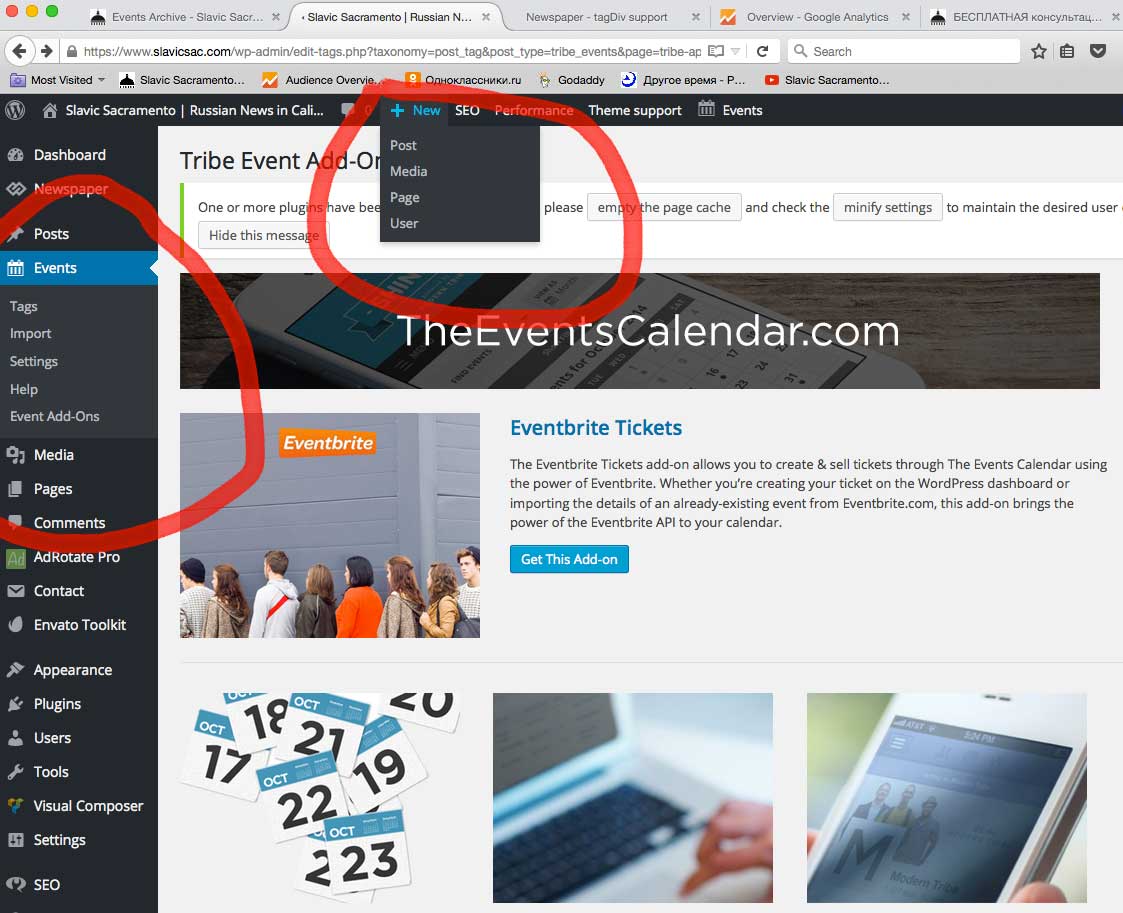
Usually from my admin menu I can add events, but after update Some Events functions incl. Add new event disappeared! Also It doesnt show list of old events! Can you plz help?
Thanks!
 JohnBull
Hello,
I need create a child theme for future updates in theme or i must using the “update script”?
I do not run the risk of losing my customizations?
Sorry for bad english
 GWhite23
I am having problems with my site after updating to the latest version of the newspaper theme. (I updated from version 3 to 6 yesterday)
I think the problems are related to the visual composer plugin not working correctly.
I want to use one of the pre-defined homepage templates for my homepage but I cannot access the templates as the backend editor of visual composer does not work or show up.
I spoke to my ‘WordPress guy’ and after taking a look he reckons that it seems like a theme bug and it was best to contact the theme dev.
What should I do? Thanks in advance.
 Torge
Torge Hi Lucian,
I just upgraded to Newsletter v6 and I couldn’t find the right place to tweak the code so that the shortcodes are working in the category description again. Could you maybe update your solution so that it works in v6? That would really be much appreciated.
Edit: I just answered my own question. Found the right place to change in includes/wp_booster/td_category_template.php. There change line 175 to
return '<div class="td-category-description"><p>' . do_shortcode($this->current_category_obj->description) . '</p></div>';
Thanks & best,
Torge
-
This reply was modified 10 years by
Torge.
 Andrei L.
 Hi
You can use tabs from Visual Composer to achieve a similar layout: http://screencast.com/t/qQBPT8gdlHX Note that in the current version of Visual Composer the shortcode for tabs has been changed and they are different from those on our demo. We will fix this in the next theme’s updates but meanwhile you can use this custom css in theme panel > custom css: http://pastebin.com/ttmX0r1U – http://screencast.com/t/odvibm25F67g
Thanks!
Bogdan B. Hello,
I have checked your website and saw that you did not update your version of visual composer. Please update it by using this guide: https://forum.tagdiv.com/how-to-update-visual-composer-plugin/
The CTA 2 button is a deprecated element and if you start using it, in a future update it will not work anymore. We recommend using the new CTA button that comes with the new version.
Please use that one and let us know afterwards if the problem is still there.
Thank you!
Bogdan B. Hi,
There is an option to hide the author in the theme panel, but this does it for the whole site, nut just specific posts. Maybe in a future update we will be able to implement such an option.
Thank you!
 Alina S
Hello, community!
We’re always so delighted to discover our themes behind amazing, beautiful websites. All this awesome work of yours needs to be acknowledged, so we’re creating a gallery on http://www.tagdiv.com to showcase the best websites built using our news WordPress themes.
Here are some details about this selection:
Who
This call for entries aims you, our customers who build gorgeous websites using the Newspaper and Newsmag themes.
When
You can submit your website starting November 2, 2015.
How
You can showcase your website very simple! Come to tagDiv’s Facebook profile, find the ‘Showcase your website!’ post in our timeline, fill the 4 questions form and click SUBMIT! That’s it!
The best websites will be promoted in the tagDiv’s showcase and in our social network campaigns.
We’ll love to see all your amazing websites and hear (actually, read :)) about your website’s story!
UPDATE – December 4, 2015:
We are absolutely delighted to present to you the new websites in our showcase! We have to say: your feedback was above our expectations and the selection task was a real struggle because all the websites you have submitted are amazing! Check out the most beautiful websites built using the Newspaper and Newsmag themes for Wordpress!
UPDATE – January 26, 2016:
We are thrilled to present to you the new websites in our showcase! Your positive feedback is such a wonderful surprise to us and the selection task was a real struggle because all the websites you have submitted are amazing! Check out the most beautiful websites built using the Newspaper theme for Wordpress!
UPDATE – March 23, 2016:
We are absolutely delighted to present to you the new websites in our showcase! We have to say: the selection task was a real struggle because all the websites you have submitted are amazing! Check out the most beautiful websites built using the Newspaper and Newsmag theme for Wordpress! Showcase your website: Discover beauty and inspiration
UPDATE – August 24, 2016:
We are thrilled to reveal the latest handpicked websites created using Newsmag and Newspaper themes. In this fourth selection, we have decided to promote 20 new websites into the Showcase collections. Check out the most beautiful websites built using the Newspaper and Newsmag themes for Wordpress! Showcase your website: Discover the power of enthusiasm
UPDATE – July 31, 2017:
Are you ready to see some of the most creative websites built on Newspaper theme? Great! We are happy to present you some inspiring visions on Newspaper usage, submitted on the “Showcase your website” action. Showcase your website: Discover the power of creativity!
Congratulation to all of you!
 Catalin
 Hi rehman,
Thank you for your message. I noted this suggestion and we have it on our list for the future updates.
Thanks.
 Alin [tagDiv]
 Hi,
We use the same markup on pages like we use for posts as you can see – http://screencast.com/t/WxydPvPz – http://screencast.com/t/QSXSfKzGlSA9 and it is not an easy task to control what google will display. I have also checked this on our demo and it is the same – http://screencast.com/t/RNX8JEC4
I will add this on our list for further investigations and if we can change something regarding this, we will implement it in a future update.
Thanks!
 panorev
 Hi, has this been updated or been moved around in the theme? I’ve changed my code as below by commenting out the original a href line and adding my own, but it hasn’t worked.., the link is still pointing to #comments
From line 178 in td-module.php

 Bogdan B.
 Hello Arafat,
The easiest way to achieve this is by using a plugin. Something like: https://wordpress.org/plugins/last-updated/screenshots/
We have not tested these plugins. Some of them might not work with our theme. Try a few of them out and see how they work.
The alternative involves coding:
Use this line:
<?php echo the_modified_date('l, F j, Y', '<div class="the-modified-date">LAST MODIFIED: ','</div>'); ?>
And add it to the loop-single file corresponding to your post template: http://screencast.com/t/35I4CepLEU and replace the get_date code with the one above: http://screencast.com/t/THPFMM9E
Result: http://screencast.com/t/hRATUXtT
You can read more about it here: http://wpcrux.com/wordpress-last-modified-date/
Thank you!
-
This reply was modified 10 years by Bogdan B..
Bogdan B. Hello Stefan,
At the time we created our theme and used version 4.6.2 of visual composer, nobody knew the security issues with that version. Unfortunately the new version of visual composer creates problems with version 4 of our theme. We will try to implement an option for it in the near future but we cannot promise anything. In these cases we usually recommend a theme update. Unfortunately as newspaper 6 is a whole different theme it will create a few problems along the way, but we tried to maintain compatibility as much as we could. If you decide to update, please follow this guide to update your theme: https://forum.tagdiv.com/how-to-update-the-theme-2/ – https://forum.tagdiv.com/how-to-update-visual-composer-plugin/
Sorry for the inconvenience
Thank you!
 meathead
Hi,
I can’t work out how to get the .summary .entry-summary column to go below the featured product image on the product page on small screens only?
It continues to be 2 narrow columns as it is on large screens.
I am sure it used be responsive before updates?
Any ideas how to make this happen?
Also, my Up-Sells always show in 2 columns instead of 3 as the related products do?
Any ideas how to fix this?
Cheers
Dawn
 Arafat
Hello, I want to add post last updated time. See this: http://prntscr.com/8wemf8
How to do this?
 Stefan
Its a pity that you sell themes that is not safe. Virtual Composer is not safe in 4.6.2. Version 6 is a whole new theme that dont fit in with my layout 🙁 It just crashes when I try to update. My host has to rewind to backup 🙁 What shall I do?
 SALZBURG12
We moved to a new server and had version 2.1 of NewsMag installed.
Today we upgraded our site http://www.salzburg12.at and all the plugins. Clear the cache – everything looks fine.
But when I try to edit a page with the Visual Composer fron the Themeforest ZIP (seems not to be the latest version) I can’t edit anything. Visual Composer loads, but when I click on an element nothing happens. I even can add new Blocks or whatever.
Please help!
 aleister
 Thank you, the problem was AuthorSure Plugin version 2.3 written by Russell Jamieson. It hasn’t been updated in a year and Google doesn’t care about authorship anymore so we are removing it.
Best Regards,
Andrei L. Hi
1. @NM-user the theme blocks have fixed sizes and adding a new margin will create layout problem. Evan some default elements from VC have this margin and the best way is to add the margin manually for those which don’t have it set by default. So the margin will apply only for the specific element and won’t create layout issues. You can find the design options following this link: http://screencast.com/t/1LxD5ZQl
2. To make the titles of tabs bold try this css in theme apnel > custom css: http://screencast.com/t/Cbw363rC9P
-this is for the current tabs
.vc_tta-title-text{

font-weight: bold;;

}
this css is for deprecated tabs:
.wpb_tabs li a{

font-weight: bold;

}
3. We will release an update which will include the latest version of VC soon. At the moment we test the current plugin’s version with the theme so we make sure that works fine.
4. If you use some elements like Tabs, you will have to re-add them to your page as the VC developers have changed the classes, the design for them – http://screencast.com/t/3r1YoBw7
Thanks!
Alin [tagDiv] Hi,
We have implemented the like button from a fb plugin – https://developers.facebook.com/docs/plugins/like-button and it should work properly, to have the same number of likes also on facebook. That like button uses the link of the current post and it increments like for it so it should show the total likes you have for that post. The counter is handled by facebook, so please wait a while maybe there is a Facebook error and it takes some time to update like’s number.
Thanks!
Alin [tagDiv] Hi,
I see that you use child theme and some css added there affects also the IOS Slider – http://screencast.com/t/HXczL3LkjSQ3
Also please note that the old customization for version 4 of the theme will have to be adjusted or they will not work anymore in Newspaper 6. Please update also the child theme as we have changed the system, please check documentation – https://forum.tagdiv.com/the-child-theme-support-tutorial/
So my suggestion is to update your theme to the latest version 6.5.1, update the plugins provided with the theme(especially Visual Composer) and update your child theme to the version provided with the theme, you can find it in the /code folder from files that you download from themeforest – https://forum.tagdiv.com/whats-included/
Then check if you still have this issue.
Thanks!
