marko
marko use wp 4.1 , I deleting a record of type ” Article ” that remains visible on the home pages.
I have to get into the administration edit and press update the “page” defaut of the home page and the item disappears .
how to solve this problem ?
 Lucian
 Hi,
I have also tested your site and found that the div container for related articles is added just no posts are loaded: http://screencast.com/t/wwbxWdYc
This means that after your posts go trough the query filers there aren’t any posts left to display and no post is loaded or the code is broken.
Either way I suggest you download and update your theme to the latest version which is 4.6.1 then check again. To update your theme please make sure that you make a backup of your current theme installation then use the FTP method from this guide: https://forum.tagdiv.com/how-to-update-the-theme/ and also update the VC plugin within the /plugins folder following this guide: https://forum.tagdiv.com/update-the-visual-composer-plugin-wpbakery/
Please let me know if you still have this issue afterwards.
Thanks
Lucian Hi,
I will add your suggestion to our request list and we will consider it for future updates. The text widget comes from WordPress and you will need a hook to customize it or you could try to do it via css, either way this is not an easy task so I suggest you get some to helps you with it.
Thanks for your suggestion!
 Alin [tagDiv]
 Hi,
Unfortunately the theme doesn’t have an option for this, Newsmag is designed to work on desktop, tablet, and phone.
Yes it’s possible, but if you need it you can get someone to help you with this and alter style.css and some javascript as you like, it’s not an easy task and you would need custom work for that which we cannot provide at this time as we work on updates/development and support.
Thanks!
Lucian Hi,
We will release an update with the new version of VC as soon as they will fix issues that apparently they have with the current version: http://screencast.com/t/MhULCZhfr
You can see their forum for more info: http://codecanyon.net/item/visual-composer-page-builder-for-wordpress/242431/comments?page=332
Thanks
Lucian Hi,
As Chris stated you need to update your VC plugin from the /plugins folder that was provided with the theme files and use this guide to install/update it: https://forum.tagdiv.com/how-to-update-visual-composer-plugin-wpbakery/
Please also note the following:
-
The theme includes a license for this plugin so you don’t have to buy it.
You don’t have to activate the plugin license, it’s already activated.
You can’t update the plugin directly from the it’s producer.
You don’t have to worry about the plugin update warnings.
We provide updates on a regular basis, after we test the plugin for theme compatibility we include it in the latest theme update, inside the ../plugins folder
Also please note that we will release an update with the new version of VC as soon as they will fix issues that apparently they have with the current version: http://screencast.com/t/MhULCZhfr
You can see their forum for more info: http://codecanyon.net/item/visual-composer-page-builder-for-wordpress/242431/comments?page=332
Thanks
Lucian Hi,
Unfortunately the theme doesn’t have an option for this and you would need additional customization for it. If you need it you can get some to help you with this and alter the slider css as you like, it’s not an easy task and you would need custom work for that which we cannot provide at this time as we work on updates/development and support. I suggest you to get someone to help you with this if you need it and don’t know to do it.
Thanks for the message!
Lucian Hi,
Glad you have managed to figure this out! I have also added this on our todo list so we will take a look at it and test it and try to implement it in future updates.
Thanks for the message!
Lucian Hi,
@Teejoow Please let me know if you refer to theme’s activation or VC plugin activation provide more details about this. If you refer to theme’s activation key then you can use your purchase code for each project without receiving an error for the VC plugin though you need to update following this guide: https://forum.tagdiv.com/how-to-update-visual-composer-plugin-wpbakery/ as we include the VC plugin within each theme update if there is an available update for it so you don’t need to buy it or you don’t need any license key: https://forum.tagdiv.com/topic/how-to-update-visual-composer-2/
Thanks
Lucian Hi,
I believe you refer to the Visual Composer issues which appears with older versions of VC when updating WordPress to 4.1
I have noticed while checking your site that you use the latest theme version (1.4) and the 4.3.4 version of VC which can cause this.
This issue appears because of the Visual Composer plugin when updating to WordPress 4.1. We have included the fixed version of the plugin(4.3.5) within the latest theme version so please make sure you update the Visual Composer plugin from the /plugins folder using this guide: https://forum.tagdiv.com/how-to-update-visual-composer-plugin-wpbakery/
Please let me know how it goes!
Thanks
Lucian Hi,
1. We will consider this, I have added this on our requests list and if more people will ask for it we will do it.
2. We also have this on our requests lists and we will consider it.
3. We will add this in next update, already have it on out todo list.
4. You can add this manually for all links just add the “_blank” target attribute for all anchor tags that you want to open in a new window, for author box social icons add it like this and replace the td_a_target variable: http://screencast.com/t/BjqbrZkE7CCE
5. I will add your request on our request list and consider it for future updates if more people request this. If you need this I suggest you use a plugin for it.
6. You can use this solution for this: https://forum.tagdiv.com/topic/related-posts-within-a-post/
7. You can remove the Pinterest share button from here: http://screencast.com/t/xaD8W4o2dwvU
Please provide more details about the smart list ascending/descending issue as I have tested this and haven’t found any issues.
Thanks
 jk
jk hi this file td_module_blog.php is ino included in newest update..
 Marius
 Hi, Chris
I have inspected your case and seems there is another bug. Not work for your case because you use ” in review description. To fix that add this code like here: http://screencast.com/t/zB2ClvxC8JF
We will fix this in the next update.
Many thanks again and sorry for all the issues.
 Emil G
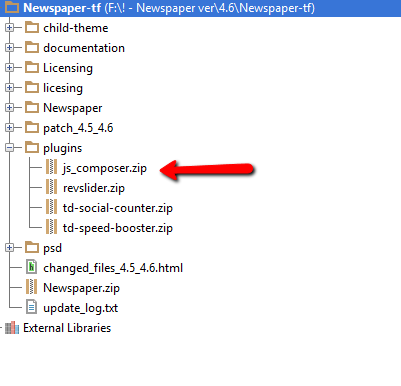
The Visual Composer plugin that comes with the theme is licensed to the theme, the license specifies that only we can provide the updates and you don’t have to buy it or register it. We provide updates on a regular basis, after we test the plugin for theme compatibility the plugin is included in the latest theme update, inside the Plugins folder:
https://forum.tagdiv.com/wp-content/uploads/2015/01/visualc_newspaper.png
Here is the guide on how to update the plugin – https://forum.tagdiv.com/update-the-visual-composer-plugin-wpbakery/
Conclusion – We’re testing the plugin latest version, if everything is ok we will include it in the next update and only then you can update the plugin by downloading the theme latest version and following the procedure presented in the plugin update guide.
Emil G.
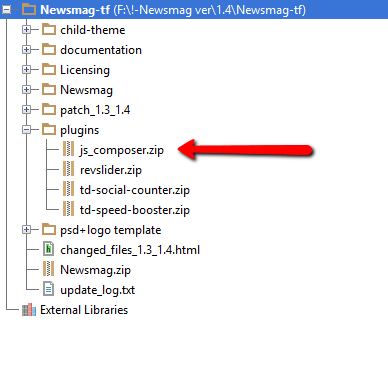
Emil GThe Visual Composer plugin that comes with the theme is licensed to the theme, the license specifies that only we can provide the updates and you don’t have to buy it or register it. We provide updates on a regular basis, after we test the plugin for theme compatibility the plugin is included in the latest theme update, inside the Plugins folder:
https://forum.tagdiv.com/wp-content/uploads/2015/01/visualc_newsmag.png
Here is the guide on how to update the plugin – https://forum.tagdiv.com/how-to-update-visual-composer-plugin-wpbakery/
Conclusion – We’re testing the plugin latest version, if everything is ok we will include it in the next update and only then you can update the plugin by downloading the theme latest version and following the procedure presented in the plugin update guide.
Emil G.
Alin [tagDiv] Hi,
I have checked your site and found some javascript errors in console: http://screencast.com/t/1lJFBw4JMnFy
I have also tested using the latest theme version(4.6.1) and haven’t found any issues with this.
Please make sure that you download the latest theme version and update your theme using this guide and the FTP method: https://forum.tagdiv.com/how-to-update-theme/ After you update the theme please try without any plugins active(leaving just the Visual Composer plugins active), then empty cache and also purge files if you use any CDN host services and check again.
Let me know if you still have issues with this.
Thanks!
jk yep, new update of WPBakery Visual Composer is available…19.1 2015
 mboydnv
 The panel is off. It still appears. So i took your suggestion and removed it in the code. That worked perfectly. Please be so kind as to remove this in next update.
Thank you so much!
-
This reply was modified 11 years by
mboydnv.
 Kvr28
Kvr28 I understand what you mean, but my OCD is going off the charts every time I see the update plugin notification
 simchris
 Try using Chrome; since IE on Windows sucks with Ajax stuff. If using Mac, make sure Safari is updated to current version.
It does work; being used by tens of thousands of websites.
Try using with just Visual Composer running v 4.3.5 and WP 4.1, and no other plugins.
 wpdiv
wpdivAfter i have updated a post today in http://www.wpdiv.com, i have a problem with meagamenu thumbnail which corresponds to the post published today.
http://oi58.tinypic.com/2mgta8k.jpg
When i analyze the issue via firebug, which refers the broken image URL as…
But the corresponding image is there in server and accessible via URL here…
Both the URL’s are same, but there is peculiar issue in megamenu of my website http://www.wpdiv.com
My head is spinning…
Will you please help me to overcome this issue? Where did i made mistake?
simchris Yup:
from the theme docs:
How to Update Visual Composer plugin (WPBakery)
•The theme includes a license for this plugin so you don’t have to buy it.
•You don’t have to activate the plugin license, it’s already activated.
•You can’t update the plugin directly from the it’s producer.
•You don’t have to worry about the plugin update warnings.
simchris from the theme docs:
How to Update Visual Composer plugin (WPBakery)
•The theme includes a license for this plugin so you don’t have to buy it.
•You don’t have to activate the plugin license, it’s already activated.
•You can’t update the plugin directly from the it’s producer.
•You don’t have to worry about the plugin update warnings.
 André
AndréHello
Show me this today
” To receive automatic updates license activation is required. Please visit Settings to activate your Visual Composer.”
And now?
simchris from the theme docs:
How to Update Visual Composer plugin (WPBakery)
•The theme includes a license for this plugin so you don’t have to buy it.
•You don’t have to activate the plugin license, it’s already activated.
•You can’t update the plugin directly from the it’s producer.
•You don’t have to worry about the plugin update warnings.