
- NewsmagHow to update a plugin
- NewspaperHow to update a plugin
- NewsmagHow to update the theme
- NewsmagHow to update the WPBakery plugin
- NewspaperHow to update the WPBakery Page Builder plugin
- NewspaperHow to Update the Newspaper Theme
- Apitd_api_top_bar_template::update_key
- Apitd_api_top_bar_template::update
- Apitd_api_single_template::update_key
- Apitd_api_single_template::update
- Apitd_api_footer_template::update_key
- Apitd_api_footer_template::update
- Apitd_api_smart_list::update_key
- Apitd_api_smart_list::update
- Apitd_api_thumb::update_key
- Apitd_api_thumb::update
- Apitd_api_category_top_posts_style::update_key
- Apitd_api_category_top_posts_style::update
- Apitd_api_category_template::update_key
- Apitd_api_category_template::update
 whiteeagle
Hello:
I have to update WP Bakery Plugin. The plugin came bundled with Newspaper Theme, however on the latest update for Newspaper, WP Bakery Plugin is not there. How do I get the update for free? Are you not using WP Bakery plugin with Newspaper anymore, and if not what am I supposed to do? Am I supposed to purchase this from WP Bakery page?
I am having major issues with TagDiv not connecting the links with images to pages and need to fix this right away. Is the WP Bakery plugin causing this because it’s not updated with the latest Newspaper theme? I updated Newspaper theme yesterday and all the plugins, except for this one.
Please help,
Maureen
 averimedia
I’ve updated everything on the website, turned off all plugins except the theme and the tagdiv and I’m getting this error:
Notice: Function _load_textdomain_just_in_time was called incorrectly. Translation loading for the Newsmag domain was triggered too early. This is usually an indicator for some code in the plugin or theme running too early. Translations should be loaded at the init action or later. Please see Debugging in WordPress for more information. (This message was added in version 6.7.0.) in /home/byline/public_html/wp-includes/functions.php on line 6131
Warning: Cannot modify header information – headers already sent by (output started at /home/byline/public_html/wp-includes/functions.php:6131) in /home/byline/public_html/wp-includes/functions.php on line 7182
Warning: Cannot modify header information – headers already sent by (output started at /home/byline/public_html/wp-includes/functions.php:6131) in /home/byline/public_html/wp-admin/admin-header.php on line 14
 emmalabbe
 Hi Calin,
I have the same issue but it seems that the reason is different from what you suggested. When I try to edit the content of a column text currently used on one of my pages (and working fine), the WP editor is just blank (whereas the text exists).
I had noticed this issue a few months ago (maybe after the last Newspaper update but I’m not sure), and since then I cannot use the column text element when I create a new page. Do you think that it could be related to the “classic editor” plugin that I use ?
Thank you.
 Calin
Calin Hello,
This issue is not related to the theme update. We have a few other clients experiencing the same problem, and in their cases it was related to an SEO plugin. Please check the SEO plugin you are using and make sure it is updated to the latest version.
For users with the Yoast SEO plugin who have the gallery problem, please go to Yoast Settings > Site basics and make sure that the option for “Force rewrite titles” is disabled – https://i.imgur.com/XdEl9cv.png. This should resolve the problem.
Thank you!
 tecchAU
I’ve used Tiled Gallery from Jetpack a lot over the years on my WordPress site that runs the Newspaper theme.
A recent update has broken the JS to lay this out correctly and now the images display one after another.
Switching to another theme confirms this works fine.
Would love to see a theme update to resolve this ASAP.
 discernin
Hi,
Is there a way to make the magazine’s date widget update automatically instead of only when I log in to the website? For example, the date should change at midnight each day to stay up-to-date. Imagine I don’t log in to WordPress for three days; in that case, the date will show the date from three days ago, not the current one.
Currently, the date only updates when I log in to WordPress.
I’ve looked in the widget settings, but there aren’t any additional settings except for CSS.
Calin Hi,
To use the responsive version, just make sure that you do not have the tagDiv Mobile theme plugin (or/amp amp plugin). After this is checked and confirmed, this plugin is not used, or in case it is, it is disabled and deleted. Please check if you have made any mobile pages https://tagdiv.com/newspaper-10-3-7-update-brings-customizable-and-fast-mobile-pages/ if you have mobile pages make sure those are not assigned on pages and cloud templates (for templates, is simple, you can see it in cloud templates if there are any mobile templates – https://i.imgur.com/mgvfs0y.png )
After that, just learn all the ache, the responsive version will be used.
The newspaper theme has three available solutions for the mobile version:
1. Responsive Desktop Version – The default responsive layout that adjusts to mobile screens using tagDiv Composer – https://i.imgur.com/apZQZ0o.png
2. Mobile Page/Template – A custom mobile layout that can be created using the tagDiv Composer.
3. tagDiv Mobile Theme Plugin – A separate mobile theme that provides a dedicated mobile experience but is limited in edits and changes.
Calin Hi,
If you see on your website shortcodes this means that one of the theme plugins is not installed, go to Newspaper > plugins and make sure that tagDiv Composer and tagDiv Cloud Library are installed (all theme plugins that have before the update), in some cases is need the tagDiv Opt-in Builder.
Thank you!
Calin Hello,
First we need to see if you are using the responsive version of the theme, the mobile page template or the mobile theme plugin. If you are using the tagDiv Mobile theme plugin the mobile layout will be simple, if is a mobile page template, then this is edited using tagDiv Composer but is a separate page/template.
Now in case that it is the responsive version for each option from the element that can be set separate on responsive eversion you’ll see a left bar when you are on any view port except the desktop version https://i.imgur.com/kSwuXzD.png
Thank you!
 ComicsBeat
Following up on my earlier question, I fixed the page with the mobile theme but it refuses to update. I would like to enable the default newspaper Mobile Theme while I figure out why the page isn’t working. But how do I do that? The plugin is activated.
 rwl1234
I updated to the latest version of newspaper theme and after i lost my header. Opening the website using Chrome browser the header is just html text. If I open on Firefox there is not html but also no header.
How can i get the header/menu back?
 athenac
I updated my site to WordPress 6.9, which caused a critical error. I manually downgraded WordPress to the previous version, but the critical error is still occurring. I can no longer access the WordPress admin dashboard. I also received an automated email from WordPress indicating that the issue may be related to the tagDiv Composer plugin.
Current plugin: tagDiv Composer (version 5.4.2 | built on 22.10.2025 10:59)
Calin Hi,
There was no new version for the plugin because we received the confirmation that the problem is resolved in the tagDiv Cloud Library version 3.9.2, and the message continues to pop up because of the way the version is displayed for our theme plugin, the answer was that it should be only Version 3.9.3 and our plugin displays Version 3.9.3| built on 22.10.2025 10:59
But now that we’ve mentioned it, our developers are already working on an update to the theme, but it will most likely be released in January.
I appreciate your understanding!
Calin Hi,
If you have a mobile page then you can duplicate it without problems, go to pages and look if that page is a mobile page, if it is then just duplicate it – https://i.imgur.com/UR4479w.png
Thank you!
 PostmasterPU
 Hi,
More than 30 days have passed since the tagDiv Cloud Library plugin was flagged by Wordfence and similar scanners as vulnerable and the warning is still present in the latest database of threats update.
Maybe it could be a good idea to release a new version of the plugin?
Thank you,
 Archerix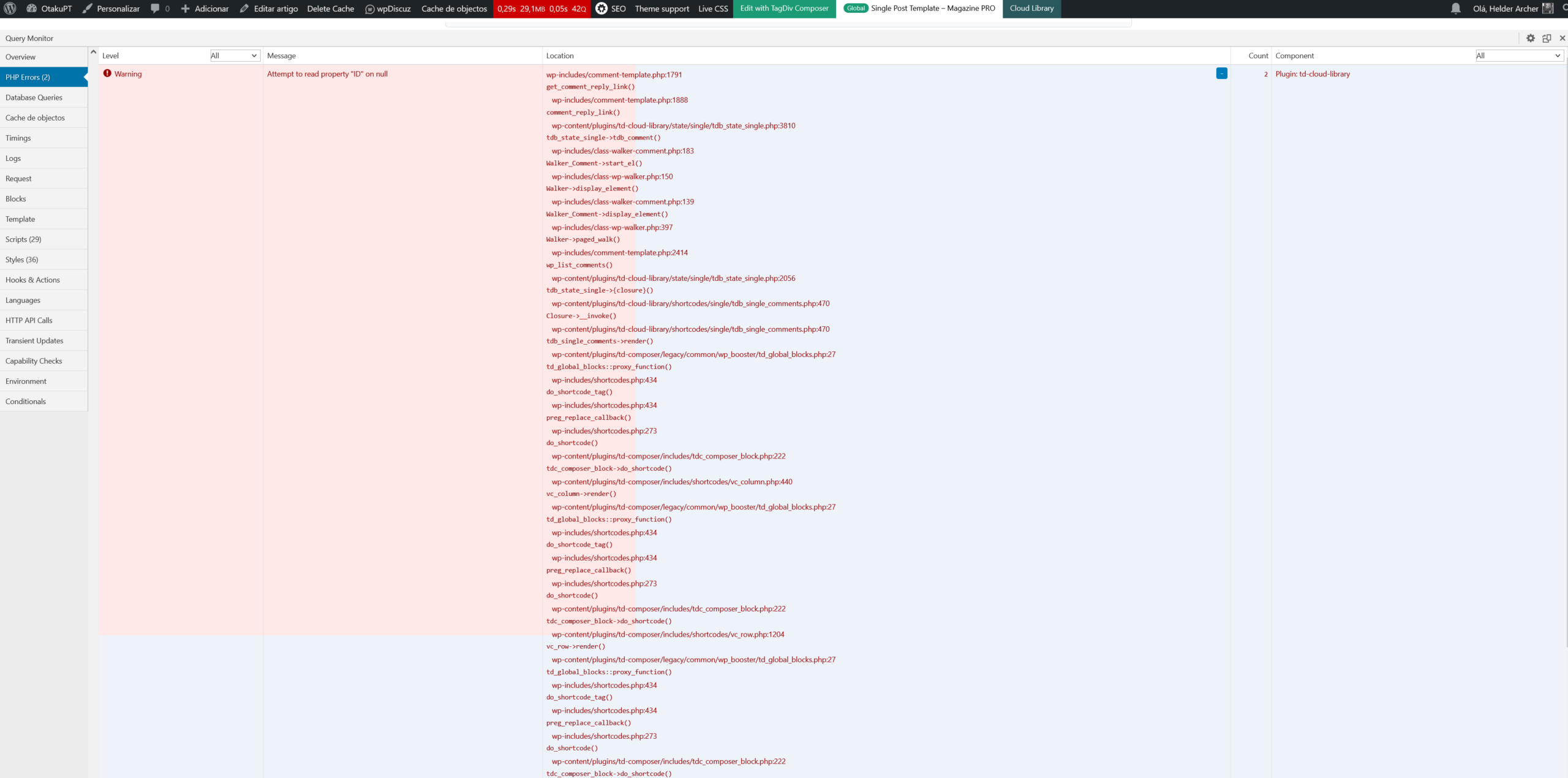

 vikasnangia
We have a blog for 1 of our brands. Newspaper theme.
Over the years we’ve spent a lot of time tweaking it to meet our requirement.
Now we need to replicate it, exactly as it across other blogs we own.
1. We installed the tagdiv plugins.
2. Activated the license.
3. Found the same Newspaper Pro templates on the other site and marked them as Global.
4. Theme Panel – Exported from the main site, and imported in the other sites.
However to my disappointment, the site does not look anything like the first site, which we’d like to clone.
It seems all the modifications we made in the cloud templates of the first site, are associated to that site only on your servers.
We want to use the same global theme across all our sites. They need to look exactly the same.
Ideally, if we make a change to the cloud template of 1 site, it should automatically update on all sites.
Please advise how we can achieve this.
 PoliticaMagazine
 it is updated to the latest version Newsapper v 12.7.3;The problem persists.
https://www.politicamagazine.it/2025/11/18/lamerica-che-si-guarda-allo-specchio-crisi-democratica/
https://www.politicamagazine.it/wp-content/uploads/2025/12/4a.png
https://www.politicamagazine.it/wp-content/uploads/2025/12/3a.png
https://www.politicamagazine.it/wp-content/uploads/2025/12/2a.png
https://www.politicamagazine.it/wp-content/uploads/2025/12/1a.png
 oointah
After updating to WordPress 6.9, I’m seeing this PHP warning in my error logs on all single post pages:
PHP Warning: Attempt to read property “ID” on null in /wp-includes/comment-template.php on line 1791
Environment:
WordPress 6.9
Newspaper theme (latest version)
PHP 8.4
To reproduce:
Any page load on a single post triggers the warning. Visible in nginx/PHP error logs only—doesn’t affect front-end display.
Also seeing the error triggered on direct requests to:
/tdb_templates/single-post-template-urban-observer/
Notes:
Error did not occur on WordPress 6.8
No theme or plugin changes made before/after update
Happens with legitimate traffic (Googlebot, Bingbot, real visitors)
Calin Hi,
Item 3: I’ll review this and let you know what I’m able to do as soon as I have an update.
Item 4: It’s not possible to display both options at the same time. The option shown will depend on the item’s status:
– If the item is out of stock, “Read More” will be displayed.
– If the item is available, the “Add to Cart” button will appear. (This behavior applies only to WooCommerce Blocks.)
Regarding the shadow effect, you can check how CSS shadows work by following this guide:
https://www.w3schools.com/css/css3_shadows_box.asp
Thank you!
 Daniel Romero
Hi.
I’m having a peculiar problem with the Slider Revolution bundled in Newsmag: the preview is not working on the slider editor. When I try to create a slider it just won’t show up in the preview window, I just get a blank (grey, in this case) window. However, the shortcode is generated and it works fine when I place it in a post or a page. So I’m working blind, cause I have to keep coming and going between the editor and a page in my site to visualize the work in progress, which off course is far from ideal.
I have already discarded conflicts with other plugins and found no relevant issues in the browser console. The PHP version, the WP memory limit, the PHP execution time and the PHP Max Input Vars comply with the theme requirements.
WordPress version 6.9
Newsmag version 5.4.3.4 (license bought a couple of weeks ago).
Tech prebuilt website
Slider Revolution version 6.7.38
I see SR is now on version 6.7.40, which means two updates have been released in the last two months. I wonder if this bug has been addressed in any of them.
My site is http://torundabit.com, but you find there any slider created with Revolution, given that I cannot adjust the one I’m trying to create.
Anyway, I would apreciate any help to resolve this issue.
 elcanal
Hello,
Since the latest WordPress update (I’m now on 6.7.x), every “Advanced WordPress Backgrounds” block on my Newspaper 12.7.3 site has stopped working properly:
– Background images no longer centered
– Background color + overlay disappeared
– Border-radius completely removed
The problem is visible both in tagDiv Composer pages and in the normal Gutenberg editor.
Everything worked perfectly before the WordPress update.
Is this a known compatibility issue?
Could you please provide a quick CSS fix or include a patch in the next Newspaper update?
Thank you!
Best regards,
 nuvoledibellezza
Good morning,
I need your help with the category settings in Newspaper.
I want to create ONE specific category with a completely different content logic from all the others.
I was able to customize the layout following your tutorial:
https://forum.tagdiv.com/default-category-settings/#:~:text=To%20change%20the%20category%20template,apply%20the%20global%20category%20settings
.
Here is the category where I want to display ONLY the most recently updated posts:
https://www.nuvoledibellezza.com/articoli-aggiornati/
The problem is this:
When I try to filter or sort the posts for this category (for example using Flex Box 1 or trying to show only the latest updated posts), the change is applied globally to ALL categories, even though I want this behavior ONLY for this specific one.
What I need is:
A category that has its own independent filtering logic,
Specifically: to show posts ordered by last modified date,
Without affecting the rest of the categories.
Is there a way to apply a custom post filter or custom sorting only to a single category page, without inheriting or overriding the global settings?
Thank you very much for your support!
 Kazek
Kazek Thank you for the update!
Kind regards
Kaz
(Ps. Sorry for misspelling your name, did’t notice while writing the change made by autocorrect)
-
This reply was modified 10 months by
Kazek.
Calin Hi,
To use the responsive version, just make sure that you do not have the tagDiv Mobile theme plugin (or/amp amp plugin). After this is checked and confirmed, this plugin is not used, or in case it is, it is disabled and deleted. Please check if you have made any mobile pages https://tagdiv.com/newspaper-10-3-7-update-brings-customizable-and-fast-mobile-pages/ if you have mobile pages make sure those are not assigned on pages and cloud templates (for templates, is simple, you can see it in cloud templates if there are any mobile templates – https://i.imgur.com/mgvfs0y.png )
After that, just learn all the ache, the responsive version will be used.
The newspaper theme has three available solutions for the mobile version:
1. Responsive Desktop Version – The default responsive layout that adjusts to mobile screens using tagDiv Composer – https://i.imgur.com/apZQZ0o.png
2. Mobile Page/Template – A custom mobile layout that can be created using the tagDiv Composer.
3. tagDiv Mobile Theme Plugin – A separate mobile theme that provides a dedicated mobile experience but is limited in edits and changes.



