
 blessingiyama
Since I updated my theme and switched to lifestyle prebuilt site, when I’m logged into my website, I can see my latest posts, but when I log out, it shows me older posts.
 Bettina
 Hello!
When you install Mobile Theme plugin, your pages will be overwritten by the plugin.
We have 3 options of mobile versions that you can use:
1. Responsive version: A responsive version of your website is looking similar like on desktop, edit the page with TagDiv Composer, click on the mobile viewport: https://www.screencast.com/t/XDQJedlggSB ; there you can see your mobile version and you can edit the elements there or adjust them to look better.
2. Mobile pages: https://tagdiv.com/newspaper-10-3-7-update-brings-customizable-and-fast-mobile-pages/
3. Mobile theme plugin: The Mobile Theme is a performance optimized theme included in the Newspaper main theme and it loads only for mobile devices. It comes with its own templates/design for page, post, category, etc so your current templates from the desktop theme will get converted to the mobile theme layout. For more details, please take a look here: https://forum.tagdiv.com/the-mobile-theme/ and https://forum.tagdiv.com/mobile-theme-introduction/
A full explanation you can find here: https://www.youtube.com/watch?v=SpGkOnJeNZY
You can choose to use which one is more affordable and useful for you.
Note: If you want to use version 1 or 2, then you need to deactivate the Mobile theme plugin and see the results.
Thank you!
 Ibalex
Hi there!
After updating my Theme to the current version, I observed that the layout, in live mode, changes on mobile and even on desktop sometimes. Since I did not edit any PHP scripts or touched the backend of the theme, I did not expect anything to affect the layout at least. Whereas the layout is as expected to be as the original demo in production or edit mode (see  ), it is not the same in live mode (see a screenshot of layout on desktop
  and a screenshot of the same layout on mobile device
  ).
).
2. Another weird issue on mobile device: The correct layout both on desktop/device is as seen here  . However, when you click any of the footer menu links e.g., About Us, the link does not display the page, instead, it displays this
  . I am not sure why the footer menu is displayed again instead of the requested page. This issue does not affect the website on desktop view. For the record, I did not create nor assigned any mobile page as I do not find it necessary.
3. In trying to resolve the issues above, especially issue 2, I explored the Mobile Theme Panel which I guess came with the new theme version. Under Footer, I see
Foote
r and
Sub-Footer
. I am confused with these two because I only have one Footer named td-demo-footer-menu. I expected this footer to be the main Footer instead, it appears under Sub-Footer. Because it is the only footer I have, I enabled the
SHOW SUB-FOOTER
button. Currently, the
SHOW FOOTER
button for the main FOOTER is not enabled, and I think it may be an issue as well. Because I am confused, I have left it as it is hope you will assist with clarification and the way out to resolve the whole issue. I believe the issues I have explained in 1 and 2 stem from here. I hope my query is clear. Thanks for your kind assistance.
 Calin
Calin Hi Bezukhof,
There is no way that the automatic update to be displayed for you, because this option was added only in 10.3.1 and it can be used from versions like 10.3.2 -> https://i.imgur.com/T2kO8Cw.png and you are using Newspaper v9.8, did you get it?
-> https://forum.tagdiv.com/how-to-update-the-theme-2/
What you need to do is to update the theme manually using FTP, cPanel or file manager (method B from our guide).
2. The problem with logo, it is that that you set an url to the image element that have set-> https://i.imgur.com/rH9Qdky.png please check the logo url and remove it -> https://i.imgur.com/A7Ov4AB.png
Also, you have anchor ads that are overlapping the sticky header -> https://support.google.com/adsense/answer/7478225?hl=en
Thank you!
Calin Hi,
Only the changes in the files will be lost. If the css and google code is set in the theme panel, then will be no problem when the theme will be updated.
Thank you!
 ialv
ialv Hello!
This is where I add, delete and update my menu (image 1). I don’t have a block editor.
How can I add the ‘Mobile Menu’ block to the desktop version from that menu?
Or how could I do it, as I understand that a block editor is needed for menu, but yet I edit my menu from Appearance > Menu (no block editor).
Thank you.
Image 1: https://ibb.co/802Hbvb
 fox100
 i was concerned that without a childthem when there is an update the code which we added like google tag manager or any css would be deleted..
 Bezukhof
 1. There’s no option to update the theme within WP. What is the recommended way to update it? Still confused why I don’t have an option to just update it from within WP.
2. Another logo issue:
 mita
mita Hi Bettina,
Thanks for clearing that out.
I have another question…
We are displaying Covid Stats on our site but because we use regional stats, unfortunately we can’t make use of the API you have developed :(. Those stats are manually updated every day and we have to do it in 4 different templates (Homepage desktop, Homepage Mobile, Covid page Dektop and Covid Page Mobile)
Can you help us find a way to edit those numbers in a general section and see them applied everywhere? We would like to keep the layout, that’s the tricky part…
https://snipboard.io/6qLnzR.jpg
Thanks,
Marta
Bettina Hello!
Unfortunately, we do not have any guide at the moment.
Also, we have a RTL demo which can help you to achieve what you need. More demos will appear in the next updates.
Thank you for understanding!
Bettina Hello!
Which kind of slide do you use? Try to disable the lazy load: https://www.screencast.com/t/O5pfqQdb, delete the cache and see the results.
For the page speed, I can recommend you some solutions in order to increase the score.
Our developers are working a lot to improve the page speed in every update.
Also, to increase the page speed you can check these similar topics for more solutions:
– https://www.xtechkr.com/optimize-newspaper-theme/
– https://www.infophilic.com/get-almost-100-pagespeed-newspaper-theme/
– https://forum.tagdiv.com/topic/score-100100-pagespeed-with-newspaper-wordpress-theme/
– https://developers.google.com/speed/docs/insights/v5/about
– https://www.youtube.com/watch?v=tnkVapqhIHc
Please note that page speed is not covered by the support team: https://forum.tagdiv.com/newspaper-theme-support/
Thank you for your feedback!
Calin Hi,
Most of the time when this is happening something it is interfering with the theme settings.
Can you please check to see if you get some errors in console when you click on the update theme button?
Also, can you please make a test using only tagDiv plugin and see if the theme gets updated?
Thank you!
Bettina Hello!
Then you can use the CSS Analyzer, which is our automatic tool, very useful for the unused CSS. This tool is detecting the unused CSS and delete it.
Documentation here: https://tagdiv.com/whats-new-in-the-newspaper-theme-10-4-update/
Tutorial here: https://www.youtube.com/watch?v=tnkVapqhIHc
Hope that helps you!
Thank you!
 Archerix
 Update, i was able to disable the header ad with “Disable on Phone”, implementing the “Header template – Default Pro”, if i chose “No template” the bugs is there
 Kfm90
Kfm90Hi, after last update the Slide Gallery have a great problem.
The gallery have black windows on photo: this is the link https://bit.ly/3F8GPgO
I also have another problem that I haven’t talked about previously. Unfortunately this theme is really slow compared to the other themes, it takes several seconds and despite loading the server is semi-dedicated.
With other themes the site loads much faster.
 truthmedia
 Hi vawn,
I faced a similar issue as well. I was trying to upgrade our website from Newspaper 9.7.2 to 11.4.3, and WPBakery Page Builder from 5.5.2 to (latest version used in Newspaper 11.4.3).
The following steps worked for me (using latest version of WordPress 5.9.3):
- Activate WordPress default theme (Twenty Twenty Two)
- Deactivate then delete Newspaper 9.7.2
- Deactivate then delete WP Bakery Page Builder 5.5.2
- Install then activate WP Bakery Page Builder in Newspaper 11.4.3 (from Newspaper folder > code > other_plugins > js_composer.zip)
- Install then activate Newspaper 11.4.3 (using Newspaper.zip)
- Install/Update theme plugins, especially Standard Pack plugin
Hope this helps!
Cheers 🙂
 MMonthego
I’ve worked with Newspaper 9 before and have now updated to 11 on a new page: http://www.mmonthego.com. Therefore, it’s new for me to use tagDiv.
I’ve followed you tutorial regarding building a header and can see you get options to customize settings via The Website Manager. But when I try to use The Website Manager I don’t get any header options to customize the template. It only allows me to customize font, color and settings. I dosen’t look like the tutorial screen dumps:
https://forum.tagdiv.com/header-manager/
What to do? Thank you
 Jeanbatman
Hi, I did an update and remarked that the Author date, comments number and views used to be inlined, now the view counter skips a line on both my desktop and mobile version. Several inline problem I spotted on this pic.
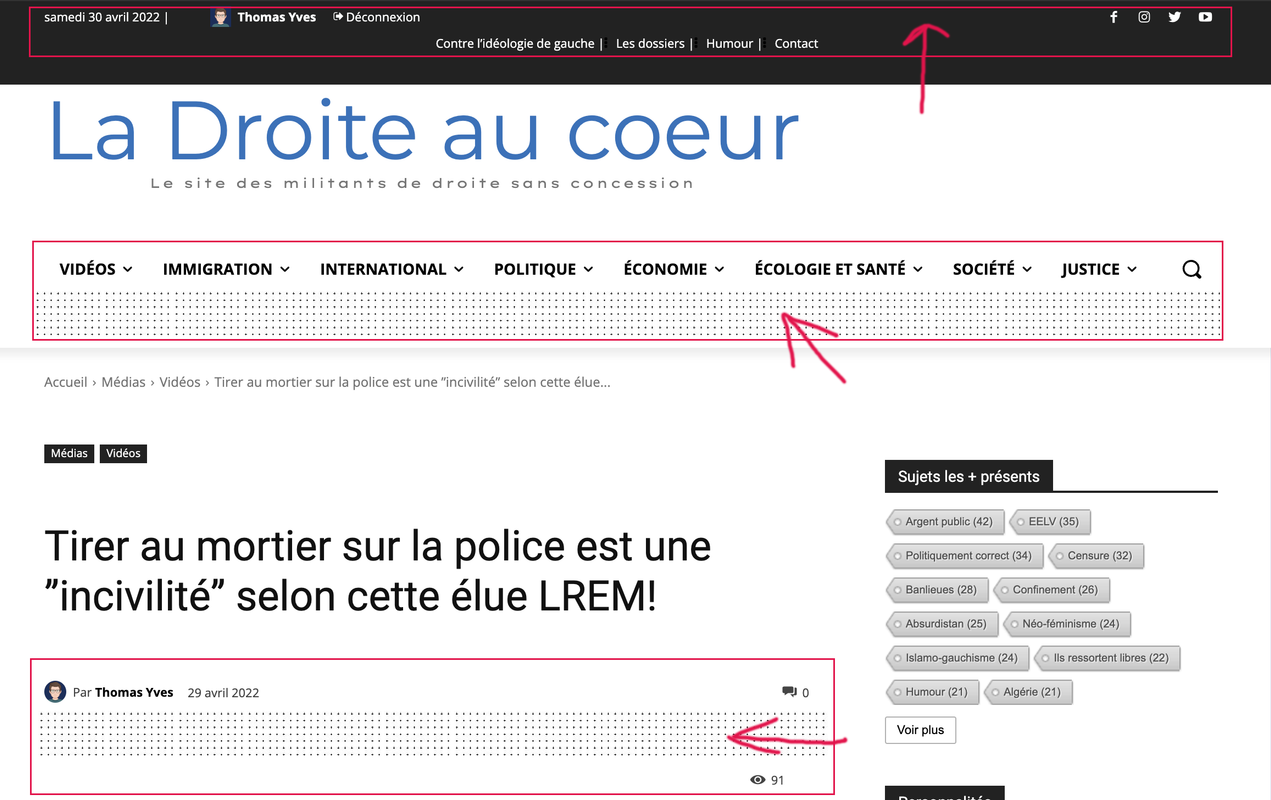
 SamKurosaki
I want to change the default logo to mine. but it is not working my logo size is 3200×1000.
Kindly help me with that.
 lexicopd
An update is available for my Newspaper theme. However, nothing shows when I click on the update tab
 fwoedit
Hi there!
I just updated to 11.4.3, and the visual editor is broken; you only see raw code. Plus the site logo disappeared.
So I rolled it back to Version: 11.4.1, but it’s still broken!
Help!! :'(
 sam.sofx
 Hi,
I need some updates on this
 GP_Media
Hi,
I need the WPBakery updated plugin zip file because I can not update it from WordPress admin area. It says You have to buy a personal license key but I received the WPBackery zip file in my new theme folder.
Please provide me with the latest updated plugin zip file of WPBackey Page builder.
 myvirtualplanet
URL https://www.cimbusinessevents.com.au/
tagDiv Composer plugin is causing issues with AIOSEO in latest update 11.4.3. I had to revert back to previous Newspaper Theme to resolve issue. There is a conflict with Vue. Can this be fixed so I can install latest Newspaper Theme?
 teknolojisk
 Hi,
I have the same problem, and it is theme-specific, not site-specific. I have tried many methods, but couldn’t find a proper solution. Even with the latest update, the problem still exists.



