
 Vlad S
 Hello !
You don’t have to buy the theme to upgrade. Upgrades are lifetime free. You can freely upgrade using our guides: https://forum.tagdiv.com/how-to-update-the-theme-2/
Also we offer support as much as we can to all the versions.
My recommendation is to upgrade to latest version and enjoy all the new features. Don’t forget to update and activate all the required plugins too.
Thank you !
 Bettina
 Hello!
Our team is continuously working on this and we will update and optimize our demos also as soon as possible.
Thank you for your understanding!
 Anamaria
 Hi,
Using our theme you can choose from 3 mobile versions
-> mobile responsive => https://www.screencast.com/t/oJ2ShOp47
-> mobile theme plugin => https://forum.tagdiv.com/the-mobile-theme/
-> mobile page => https://tagdiv.com/newspaper-10-3-7-update-brings-customizable-and-fast-mobile-pages/
This is a video about Responsive Newspaper Theme, AMP & Mobile Theme, Mobile Pages & Templates -> https://www.youtube.com/watch?v=SpGkOnJeNZY
So, the mobile responsive is what you see then that you select the viewport on phone => https://www.screencast.com/t/matV17hH, so some settings may apply for each viewport(where is the border blue), and others are not(where the border is black).
The mobile page has the mobile templates from Cloud Library => https://www.screencast.com/t/YCcZ8rL8
The mobile theme comes with its own templates for page, post, category, 404 etc so your current templates from the desktop theme will get converted to the mobile theme layout, the page content is made without builders in mobile editor => https://www.screencast.com/t/xbgZG8kH also, the options that are provided to edit the mobile theme version are limited (this keeps the things simple).
Mobile responsive version of the theme and the mobile page editor can be edit with tagDiv Composer, the mobile theme plugin not.
For example, you can have the mobile theme plugin activate and use the mobile page/mobile responsive version for the homepage/pages, but for the categories page/404 page you can’t use the mobile page/mobile responsive version if you have the mobile theme plugin activate.
Thank you!
Anamaria Hello,
Usually, the problem is from a cache plugin, because you are using the mobile theme plugin => https://www.screencast.com/t/mpbsqaVtX2kL, the mobile layout will have a different design and most of the cache plugins do not recognize this and provide the mobile version for desktop (or vice versa). We recommend using WP Super Cache plugin with the settings from our guide -> https://forum.tagdiv.com/cache-plugin-install-and-configure/
If you created the mobile pages with tagDiv Composer, then when you install the Mobile Theme plugin, your pages will be overwritten by the plugin (the mobile theme comes with its own templates for page, post, category, etc so your current templates from the desktop theme will get converted to the mobile theme layout, the page content is made without builders in mobile editor => https://www.screencast.com/t/xbgZG8kH also, the options that are provided to edit the mobile theme version are limited (this keeps the things simple)).
Better deactivate the plugin and see the results.
Also, if you create a mobile page, please check if is set correctly => https://tagdiv.com/newspaper-10-3-7-update-brings-customizable-and-fast-mobile-pages/
You can check this video about the Newspaper theme version on mobile and how to edit them -> https://www.youtube.com/watch?v=SpGkOnJeNZY.
Hope this helps you!
Thank you!
 thelastpoet
 Hey Anamaria,
Can you make a recommendation to add it to future updates…
I don’t think disabling mobile themes is an option for us.
Do you think not having it on mobile but desktop makes an impact?
Please add this to your future updates.
thelastpoet Thanks,
When do you think the new update will be released?
 katsar0v
 An update on this issue would be really helpful, thank you! I have tried adding the code here:
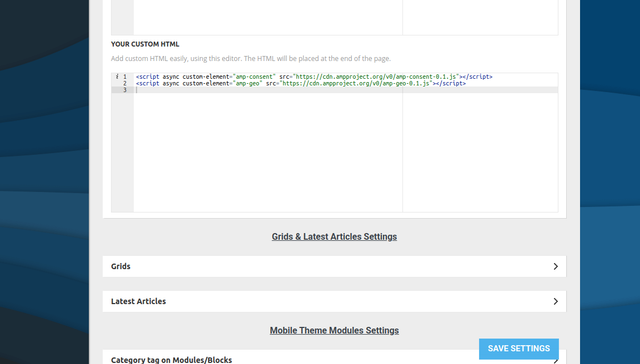
But it does not seem to show. I also tried adding it here (wp-content/plugins/td-composer/mobile/header-amp.php):
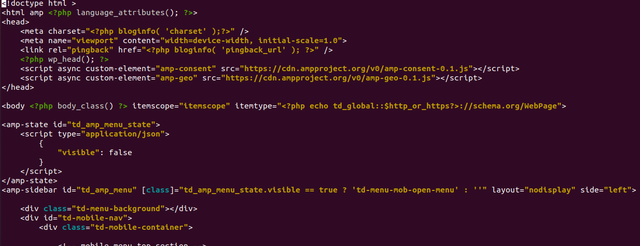
But it also does not work unfortunately. Any help would be appreciated!
 stanisci
Helo! I would like to know how I can customize the theme pages. The default layout … I want to update and change a few things. How do I do?
Anamaria Hello,
Please make sure that the update procedure is done correctly: https://forum.tagdiv.com/how-to-update-the-theme-2
Also, after the update, if you have shortcodes on pages, please please make sure all the tagDiv plugins are enabled => https://www.screencast.com/t/sUy4KEsyeGE
Also, if you encounter problems, please tell us and we will help you solve them.
You can find more tutorials on our channel on youtube =>https://www.youtube.com/user/tagdiv which can help you to redesign.
Thank you!
Anamaria Hi,
Please update the WordPress to 5.7.1 and check to see if the problem is still persisting.
Hope this will fix the problem that you have!
Let me know the results!
Thank you!
Bettina Hello!
If you want to use a mobile page, then you need to assign it to your homepage. For more information about this mobile version please take a look in this article: https://tagdiv.com/newspaper-10-3-7-update-brings-customizable-and-fast-mobile-pages/
A full explanation you can find here: https://www.youtube.com/watch?v=SpGkOnJeNZY
Thank you!
Anamaria Hello,
Seems you have installed the Mobile theme plugin. If you created the mobile pages with tagDiv Composer, then when you install the Mobile Theme plugin, your pages will be overwritten by the plugin (the mobile theme comes with its own templates for page, post, category, etc so your current templates from the desktop theme will get converted to the mobile theme layout, the page content is made without builders in mobile editor => https://www.screencast.com/t/xbgZG8kH also, the options that are provided to edit the mobile theme version are limited (this keeps the things simple)).
Better deactivate the plugin and see the results.
Also, if you create a mobile page, please check if is set correctly => https://tagdiv.com/newspaper-10-3-7-update-brings-customizable-and-fast-mobile-pages/
You can check this video about the Newspaper theme version on mobile and how to edit them -> https://www.youtube.com/watch?v=SpGkOnJeNZY.
Hope this helps you!
Thank you!
 develery
We updated the theme to the latest version, now the site is down.
This is the error in the server error.log
PHP Fatal error: Uncaught ArgumentCountError: Too few arguments to function {closure}(), 4 passed in /srv/xxx.com/wordpress/wp-includes/class-wp-hook.php on line 287 and exactly 5 expected in /srv/xxx.com/wordpress/wp-content/plugins/td-composer/css-analyze/css-analyze.php:507\nStack tra
ce:\n#0 /srv/xxx.com/wordpress/wp-includes/class-wp-hook.php(287): {closure}(NULL, 38, ‘tdc_google_font…’, true)\n#1 /srv/xxx.com/wordpress/wp-includes/plugin.php(206): WP_
Hook->apply_filters(NULL, Array)\n#2 /srv/xxx.com/wordpress/wp-includes/meta.php(676): apply_filters(‘get_post_metada…’, NULL, 38, ‘tdc_google_font…’, true)\n#3 /srv/dev/kriptoakademia.
com/wordpress/wp-content/plugins/td-composer/legacy/common/wp_booster/td_wp_booster_functions.php(572): metadata_exists(‘post’, 38, ‘tdc_google_font…’)\n#4 /srv/xxx.com/wordpress/wp-inclu
des/class-wp-hook.php(287): td_load_css_fonts(”)\n#5 /srv/xxx.com/wordpress/wp-includes/class-wp-hook. in /srv/xxx.com/wordpress/wp-content/plugins/td-composer/css-analyze/c
ss-analyze.php on line 507
Thank you for your help.
Bettina Hello!
This issue is on the list and will be resolved in the future updates.
Thank you for your understanding!
 garethvaughan
 Thanks for the reply. I’ve just updated to Newspaper theme 10.4 and the ‘Column text’ is not available in the TagDiv composer. I tried all the other object types but they still output the same raw shortcode and do not convert it?
Bettina Hello!
Check this topic where we discussed about this issue: https://forum.tagdiv.com/topic/wp_booster-error-on-single-more-from-author-box-in-td-composer-after-update/
Thank you!
 boogieboa
 I completely agree with you, especially when the new update affects a premium plugin. It may well be time to switch themes. There’s always some new issue with the Newspaper theme, and them thinking they’re too big to bother.
 boka003
 Hi,
I have updated, but the video still don’t show up 🙁
Now, it looks like this: https://prnt.sc/11omzq8
Regards
 Calin
Calin Hi,
Please update the WordPress to 5.7.1 and check to see if the problem is still persisting.
Hope this will fix the problem that you have!
Let me know the results!
boka003 Hello,
Any updates for this?
Is it possible to contact wordpress support somehow?
This is very big bug, not sure how someone did not report it to wordpress team.
Regards
 sleeptips
 Hi thanks for your help, yes that fixed my main problem.
I am also having issues with my favicon not updating. I originally inserted a logo and updated it and still keeps showing the old logo even though it is updated and I have removed the image from my media library. Any suggestions? Note, it shows ok for a couple of pages, but nor for most which is odd.
 Nikolay.kareev
Hi,
I have a WPML plugin on my site
In the second language, in categories without posts, I have a critical error. In categories in which there are posts – everything is ok
Also I have a test site that has a duplicate site that I made via updraft. And the test site has no error in categories without posts
Newspaper and all TagDiv plugins have been updated to the latest versions. Newspaper version is 14.0. WordPress also updated to latest version – 5.7.1, reinstalled WordPress several times
I also disabled all plugins except TagDiv and WPML – the error still remains
If you select No Template in the Category Global Settings in the Theme Panel – everything is ok, there is no error and No posts to display is written
Help, please, I cannot understand what the problem is
Error:
Fatal error: Uncaught Error: Call to a member function the_post() on null in /var/www/***/wp-includes/query.php:975 Stack trace: #0 /var/www/***/wp-content/plugins/td-cloud-library/wp_templates/tdb_view_category.php(17): the_post() #1 /var/www/***/wp-includes/template-loader.php(106): include('/var/www/***...') #2 /var/www/***/wp-blog-header.php(19): require_once('/var/www/***...') #3 /var/www/***/index.php(17): require('/var/www/***...') #4 {main} thrown in /var/www/***/wp-includes/query.php on line 975
 BLAY
BLAYHello,
Since the last update, the article post name appears when the mouse cursor is hover the featured image . How I can disable that ?
 bigmat18
 Hello Madam, I have the same problem. Since I updated the last version 10.4 of the template Newspaper my website is blank…
I succeeded in resolving the problem by downgrading the theme.
Any solution?
Thanks and regards
 SnakeEater
 Just want to write an update on this: something super weird!
The edit I did actually worked, but only if I put the Subtitle element before the raw containing the post content, or after it. Just not in the same row.
No clue why, but this fixed it for me.
