
- Apitd_api_top_bar_template::update_key
- Apitd_api_top_bar_template::update
- Apitd_api_single_template::update_key
- Apitd_api_single_template::update
- Apitd_api_footer_template::update_key
- Apitd_api_footer_template::update
- Apitd_api_smart_list::update_key
- Apitd_api_smart_list::update
- Apitd_api_thumb::update_key
- Apitd_api_thumb::update
- Apitd_api_category_top_posts_style::update_key
- Apitd_api_category_top_posts_style::update
- Apitd_api_category_template::update_key
- Apitd_api_category_template::update
- Apitd_api_module::update_key
- Apitd_api_module::update
- Apitd_api_block::update_key
- Apitd_api_block::update
- Apitd_api_header_style::update_key
- Apitd_api_header_style::update
 Calin
Calin Hi,
unfortunately for the moment this can be done only if you hide the content per devices, but this is not a good practice because the page content will be very large.
There will be soon a theme update that will bring some improvements for mobile devices, I think that the mobile version should be more flexible after this theme update.
Thank you for your understanding!
Calin Hi,
You can try this custom css to make the thumbs from blocks not clickable ->
.td-module-thumb a {

pointer-events: none;

}
This code need to make set in theme panel> custom code> custom css.
Unfortunately if you want to remove the links, then it can be done only from theme files, but this need to be made in to many places and most of theme will be lost after a theme update.
Thank you!
 Topy
Topy Hi, when will you release an update to fix this issue? We need to finish our website and publish as soon as possible.
 gumball44
 The issue is not only with the weather widget, the issue is here too with date widget.. I now have a header without weather widget but date doesn’t update… Still have this cache issue.
Calin Hi,
I just checked your website and not is working correctly -> https://i.imgur.com/a8724gm.png -> https://i.imgur.com/GFuhw1F.png -> https://i.imgur.com/qTvRFl3.png
I remember that you had some problems with cloud templates, now I do not remember exactly if it was from some element from cloud header or not, but now as I sow you are using a cloud header and this is working correctly, also for safari just make sure that the browser and website cache is clear and it should display the same header.
Also, soon will be a new update and hope this will work better for you.
Thank you!
Calin Hi nitrofox,
We are sorry for the problems you had!
Yes, our theme has an option for auto update, but this need to be launched manually, you need to click on it in order to update the theme, the theme it’s self will not update, only if you have some settings on WordPress/host that are checking for update and you have enable there the auto update option. -> https://i.imgur.com/Zc2Z1h6.png
Thank you for your understanding!
 vbrashier
 So I figured out the solution. Some of your suggestions worked. I turned off the mobile theme. I couldn’t use the plug-in suggested because it’s incompatible with WordPress.com. Instead, I turned off some features in the AMP plug-in. The pages might load slightly slower but all the content is there. It would be great if the next mobile theme would allow us to keep our desktop theme intact, or at least give us that option! Newspaper 9 didn’t seem to have this problem and worked perfectly for the most part. Thanks for a great theme. I hope to not experience any more errors until next year’s update. <Gulp>
 chabotjeff
 OK I found in Theme Panel > Template Settings.
But why turn off and why didn’t the update to the theme keep old settings?
-
This reply was modified 6 years by
chabotjeff.
 Anonymous
 Hi Team,
what is the update here? I can see it is still not fixed this is harming the SEO please let me know the ETA
chabotjeffPreviously, I set the default template for all pages using the Newspaper theme (except Home which is a tagDiv custom layout).
After recently updating the theme I found many custom templates in use. That means I have to find and update many templates whenever I make a change to sidebar widgets, menus, etc.
Can you please explain how many “templates” there are in the Newspaper theme? Meaning, how many different templates exist (by default): Single Post, Category, Page, Archive, etc.
Thank you.
 tkanel
When I update PHP to 7.4 from 5.4 I get the following error:
Your PHP installation appears to be missing the MySQL extension which is required by WordPress.
Which extension is he takling about?
Regards
 cojmc
cojmc Hi Calin,
Any progress? My client is asking for an update.
Thanks,
John
Calin Hi Diana,
Please try not to reply multiple times in the topic if possible, this will only delay our response. Replying multiple times will refresh the topic date and move it to the back of the line, we answer from oldest to newest. Also please note the allocated support hours mentioned in the top banner.
Please make sure that all the settings are like in our requirements, please follow the guide carefully
– https://forum.tagdiv.com/newsmag-requirements-for-newsmag/
and please increase all requirements that are lower, and follow all steps.
Also make sure that allow_url_fopen = On;
-> https://chemicloud.com/kb/article/how-to-enable-or-disable-allow_url_fopen-in-cpanel/
-> https://www.a2hosting.com/kb/developer-corner/php/using-php.ini-directives/php-allow-url-fopen-directive
When the right click menu is not working most of the time is a plugin conflict, please try only with theme plugins enable and see the results.
Now the Newspaper theme was divided into these plugins, therefore when tagDiv Standard pack is enable you have access to standard templates (these templates that can be edited only from theme panel), now if you are not using non of theme, then you can disable that plugin, now all demos are using cloud template from tagDiv Cloud Library these can be edited from frontend using tagDiv Composer.
Hope this will help you!
Let me know the results!
 sloope
 After some investigation with my friend:
I activated the plugin “tagDiv Standard Pack” which was deactivated from the theme itself and had to be updated in a very weird way. Then I chose “No template” for my header. I think this last step is the MAIN PROBLEM:
Now it seems to work. I had troubles with custom headers in may, as you can read in my last post.
Now see the screenshot: https://prnt.sc/umg7vj
Left the website with safari which still shows the old header.
Right the “no template” header.
I want my header to look nice like in the left browser. But it seems that everytime I make a custom header, my whole website crashes….
 Pierre Graff
Hello, since updaten looks like a lot of problems. after resolving editing text in td composer with disabling cache plugin (not the best for me), now it is image inline block showing errors
Invalid data Current state has involved an issue. You could try an UNDO operation (CTRL+Z / CTRL+SHIFT+Z). So what to do and do we have to expect other bugs????
Calin Hi,
So if I understand correctly you added a custom code or some plugins to change the default comments with Facebook comment, if is so, you need to know that your requirement is not covered by theme support -> https://forum.tagdiv.com/support-policy-2/ -> https://i.imgur.com/OEr2bZW.png
Now I can take a look to this situation if you provide a link but I do not promise that I can provide an working answer.
Also make sure that the Facebook Comments was not updated and the Moderation Tool removed or to be some plugins conflicts.
Thank you for your understanding!
 nitrofox
 Hi,
I’m very upset.
After being unresponsive for weeks, I decided to insist that I had an answer that the problem was solved for me to check the site.
To my astonishment I noticed that I lost several site settings, namely widgets, etc., ie your support made the auto update and not manual, which is where there is this problem and I only do manual updates in order to avoid loss of settings and other problems.
So, I hope that this does not happen again and you solve the problem that has already been flagged by several people, I restored the site through backup.
Thanks
-
This reply was modified 6 years by
nitrofox.
 swaz
swaz Hi,
The error still occurs when all plugins are deactivated. I have only noticed it when trying to change or add png images via TD composer for the image ad’s.
The site does not error, just doesn’t do anything or add the new file. Started noticing it after the last update. Actually thought it might be a bug.
cojmc Just to update here, everything was emailed yesterday.
 Diana
DianaHi, Guys!
I have upgraded recently to Newspaper X and I now have the new version of the Tagdiv Composer.
Prior to starting this topic, I have performed the following: deactivated most plugins,
I have the following problems (I’ll list them in order of priority that needs to be resolved):
Urgent: Can’t change any row background picture to any new or existing row. However, I can change it to pictures that came with the objects (supplied by you in templates). They work, but my existing pictures DO NOT WORK AT ALL. So, the replacement function works, but with your pictures only, so I don’t think there is a plugin (previously uploaded) at fault.
Good to Have: TagDIv right-click doesn’t work. I need the Copy Style feature that you have in the right-click menu.
I need your help to have this figured out fast since my client is expecting updates and I can’t perform them due to this little absurdity for which I wasted many hours. I also have to mention that I have multiple licenses with you and I am a little disappointed by this mess with Standard Pack and all that. Fortunately, I don’t need to change too much after the update, without the standard pack.
Cheers,
Diana
 digitalokmag
On our staging site I had a minor issue with a form. When I was trying to make sure It was not a conflict I deactivated plugins and changed the theme to a basic theme. When I switched everything back the model image is now not working on the posts. But if I add a new gallery it works. I have turned model image off and on trying to get ti to work. I need a solution I have to many post to do this manually. I have a lot of work in site updates and need to push it to live. This is my only hold. It works on the featured images fine Just the galleries.
 maltardesigns
 Hi calin
as per your sugessio i copy all file from plugin header to child theme header. top menu sign in/ join is working but when i click on sign in then popup is coming fron td-login-modal.php but it’s only come from plugin file. i try change content in child theme but it’s reading from plugin file.
Please update me4
Regard
Alpesh
 Roularta
Hi support!
I want to use the tagDiv Mobile Theme plugin, but I’m not able to because I run into the following error:
This version of the tagDiv Mobile Theme plugin is not supported by the current activated theme!
Please make sure you’ve updated the theme properly! Follow this guide.
See screenshot: 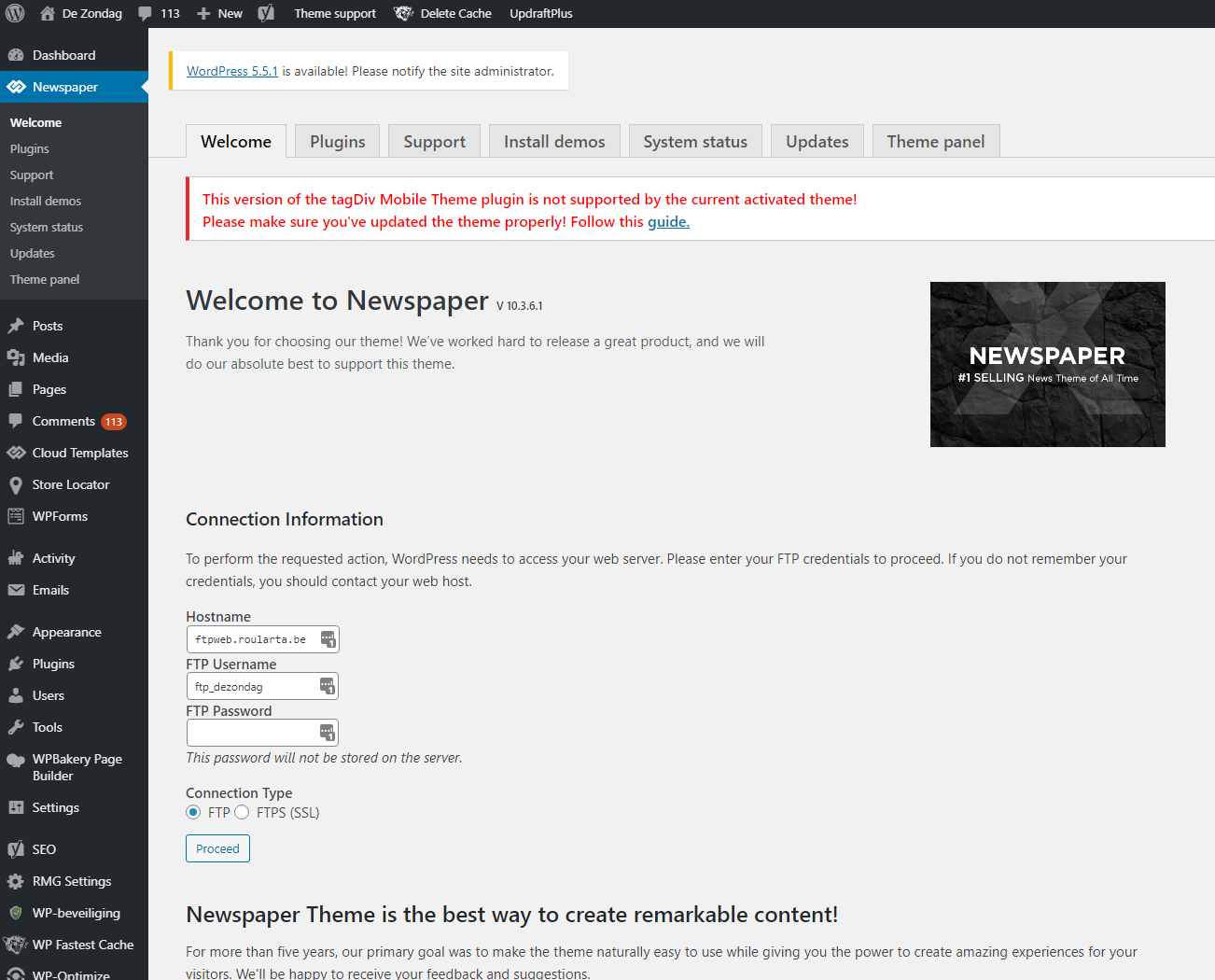
I’ve done what the error says and updated the Newspaper theme and it’s plugins to the latest versions.
See screenshot: 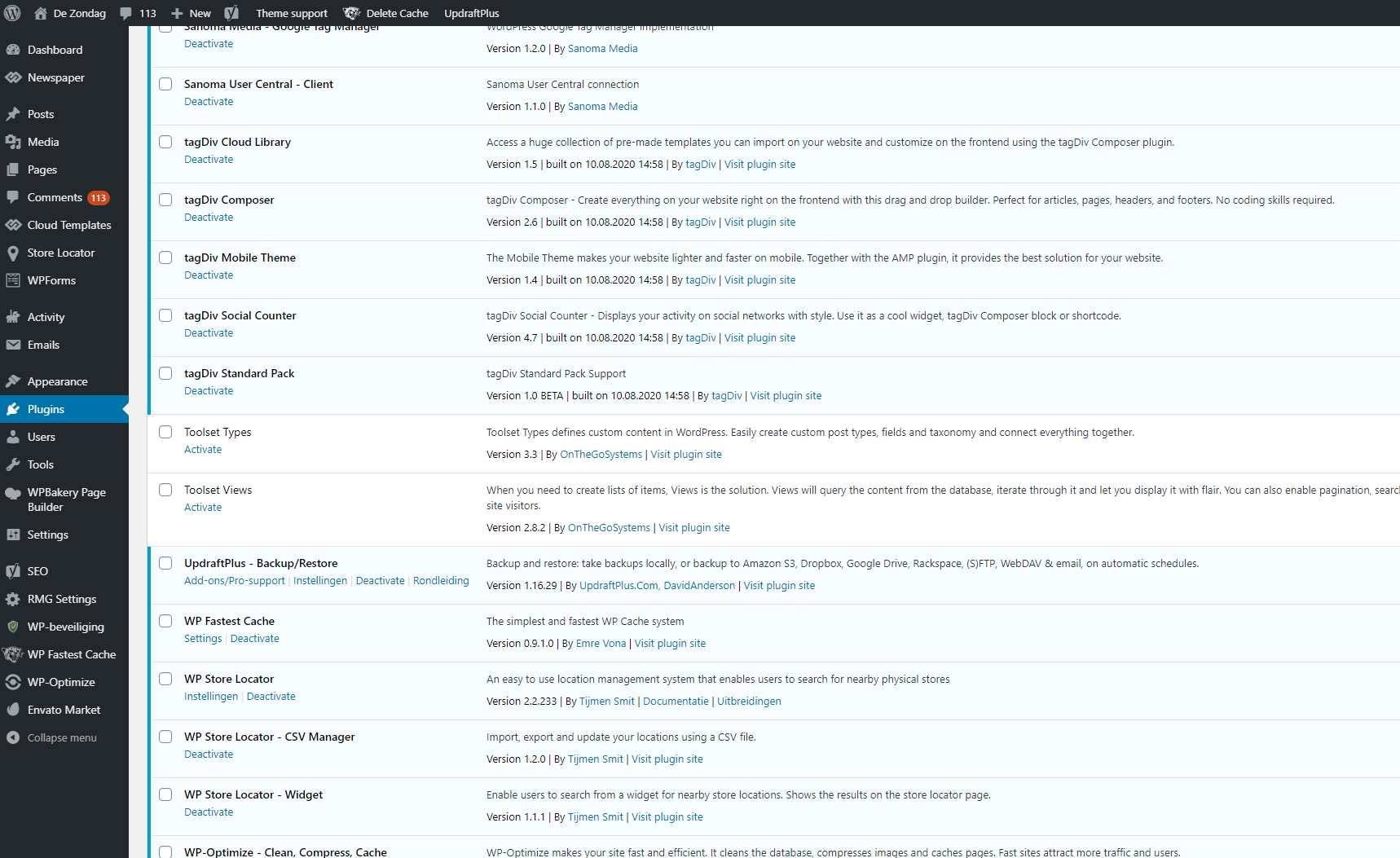
Do you have a clue what’s going on here?
Kind regards,
Sam from Roularta
 vorakorn
Hello TagDiv team,
I was using the Art Magazine as a base template for my blog(http://vork.co/) with the vertical text on the home page but after I updated it to the 10.6 it seems like it doesn’t work anymore. There is still “td-vertical-text” in the Extra Class box but maybe I have to do something about the CSS with the theme panel? Please advice!
Thank you for your support!
Warm regards,
Vorakorn
Calin Hi, sorry was my mistake, I do not know why I was thinking to popular 7 days when you clearly say random post from last 2 mounts, sorry!
The changes need to be made in the same file paths but on other lines code -> wp-content/plugins/td-composer/legacy/Newspaper/includes/td_config.php -> https://i.imgur.com/GZDtI4N.png -> https://i.imgur.com/VGijQWW.png and in wp-content/plugins/td-composer/legacy/common/wp_booster/td_data_source.php -> https://i.imgur.com/fUfMtK2.png
Unfortunately for the moment those settings need to be made after theme update because this file d_data_source.php do not work from child theme, sorry for the inconvenience!
Hope this will help you!
Let me know the results!



